 Recover photos, messages, WhatsApp, and more — no backup
needed.


 100% Security Verified | No Subscription Required | No Malware


 :

 ChatGPT
 Perplexity
 Gemini
 Claude
 Grok
A missing WhatsApp discussion can interrupt a study session just when you need the assignment instructions, a shared PDF or a project video on your Galaxy Tab S9. Without a usable backup, the important first distinction is where that information was stored: the tablet's app, an associated phone or simply the session you were viewing.
Dr.Fone - Data Recovery (Android) offers a focused way to look for available deleted WhatsApp records on a supported data source and save useful selections to a Windows PC. Once the source and configuration are confirmed, you can review conversation text and attachments instead of treating a missing tablet view as proof that every copy has disappeared. This guide separates those checks from the five-step recovery workflow.
In this article
Before you start
Identify the installed app and its relationship to the phone
Record whether you use an installed WhatsApp Android app or a browser session on the Tab S9, and whether your tablet session is linked to a phone. An installed app may itself be linked; installation alone does not establish an independent or supported recovery source. Ask Dr.Fone support to confirm whether the tablet's actual app configuration and locally available data can be scanned. Pairing is not evidence that the tablet contains the phone's full deleted history.
Confirm the Tab S9 model and software separately
In Settings > About tablet and Software information, record the model, Android version, build and kernel. The supplied Root reference names SM-X710 and kernel 5.15.189 but leaves Android and build unspecified. Public Advanced Recovery guidance covers Android 9-13; this reference does not establish all Tab S9 variants, newer software, or phone-equivalent WhatsApp behavior. Provide the full tablet and app details when confirming eligibility.
Prepare the confirmed source for a Windows scan
Use a Windows PC, USB data cable and private output folder. Keep the existing app and account configuration intact; do not clear app storage, unlink or reinstall as a recovery experiment, or reset the device. Do not follow unverified Root, unlock or flashing instructions. If the required source is an Android phone, confirm that phone's own eligibility rather than borrowing the tablet's reference. Results are saved to the PC, not synchronized back into WhatsApp.
Locate the missing WhatsApp conversation before scanning the Tab S9
A discussion is absent from the tablet, but you have not established whether the underlying messages were deleted.
Step 1 Check the actual tablet session
Identify the app or browser you were using and the account or linked-device configuration. Search for the project group, sender or a memorable phrase in the available WhatsApp view. In the app, check Archived as well. If you find the discussion, read the retained content rather than treating it as deleted.
Step 2 Check a linked phone for a retained copy
If a phone is linked to the tablet, inspect WhatsApp on that phone for the same exchange. A missing tablet conversation does not establish that the phone's copy is gone. If the phone still has the information, use that existing copy for your immediate task.
Step 3 Choose the source whose deleted data needs recovery
For data that was actually deleted, establish whether you need the tablet's local app records or the phone's records. Use the supported-device recovery route only after that source's configuration has been confirmed. A scan of one device is not a remote scan of the other.
- Archived and phone-copy checks locate existing data; they are not recovery of deleted tablet records.
- A browser view is not evidence of a supported native-app scan. This guide does not promise browser-session recovery or retrieval of a linked phone's full history through the tablet.
- The Advanced Recovery route below does not require an existing backup, but it does require an eligible source device and app configuration.
Which WhatsApp source should a Tab S9 user check?
| Your setup or finding | Next useful action | Recovery boundary |
|---|---|---|
| WhatsApp is installed on the tablet | Confirm its account/linking configuration and tablet-local scan eligibility | An installed app alone does not establish support or complete local history. |
| The tablet is linked to a phone | Check the phone for the missing exchange and identify which device's data is needed | Connecting the tablet does not scan deleted data stored only on the phone. |
| You use WhatsApp in a browser | Identify the actual device holding the records before choosing a supported scan | The Android app-data procedure does not establish recovery from a browser session. |
| The project group is in Archived | Read the retained conversation in the app | No deleted-message recovery is needed for those existing records. |
| An eligible source scan finds messages or attachments | Preview and save the useful selection to your Windows PC | The saved copy is not written back to the phone or tablet's WhatsApp. |
Common problems and fixes
The Tab S9 connects, but the expected WhatsApp recovery option is unavailable
Have Dr.Fone support check the actual SM-X710 or other model, Android version, build and installed WhatsApp configuration. Successful USB detection is not confirmation that the tablet's linked-app data can be scanned. Do not change the app setup or firmware merely to expose the option.
The missing discussion is still readable on the phone
Use the retained phone copy to obtain the information you need. That is not deleted-tablet recovery, and a device scan is not a synchronization repair. If you need records deleted from the phone as well, assess that phone as a separate recovery source.
A scan of the confirmed source finds a PDF or video but not the full project chat
Inspect the conversation and attachment results separately. Save the useful file if available, then review the message preview for relevant text. Do not infer the original chat's completeness or its availability on another linked device from one recovered attachment.
How to use Dr.Fone - Data Recovery (Android)
Dr.Fone - Data Recovery (Android) helps you look for the WhatsApp instructions and shared files needed to get back to your task. Its Windows-only Advanced Recovery mode scans a confirmed supported source device, organizes available conversations and attachments for review, and saves your chosen items to a PC without relying on an existing backup. For a Galaxy Tab S9 setup, use the tablet only if its actual installed-app configuration is confirmed eligible; when the records belong to a linked Android phone, that phone needs its own support check and direct connection.
- A WhatsApp-focused scan helps you look for the project exchange rather than unrelated tablet or phone files.
- Available conversation and attachment previews let you identify useful text, photos, videos and shared documents.
- Selective PC saving keeps the records you need for reference without requiring a full-history restoration.
 Scan Android phones and tablets directly.
- Preview and recover only what you want.
- Supports WhatsApp, photos, videos, contacts, and more.
- Works with 6000+ Android devices.

Follow the official Advanced Recovery workflow
Step 1 Connect the confirmed source through Advanced Recovery
After source and configuration eligibility are confirmed, launch Dr.Fone on Windows and open Toolbox > Data Recovery. Choose Android > Recover Android Data, select Advanced Recovery and click Start Scan. Connect that supported source device by USB when prompted and follow the detection instructions: the eligible Tab S9 for confirmed tablet-local data, or the separately eligible Android phone for its own data.

Step 2 Select the source device's WhatsApp data
Choose personal WhatsApp and click Start Scan. Select it separately from WhatsApp Business and the other categories. This selection concerns the connected device's supported app data, not a remote collection of every linked device's records.

Step 3 Keep the source connected while scanning
Maintain the USB connection while Advanced Recovery scans. If you need to stop, click Cancel before disconnecting. Follow the product's displayed restart instructions if the connected device becomes temporarily unresponsive after scanning or recovery.

Step 4 Preview the project conversation and shared files
Review the available WhatsApp conversation results. Use search and filters where offered, then inspect photo, video, audio and other attachment categories. Select the records that match the project instructions or files you need from this source.
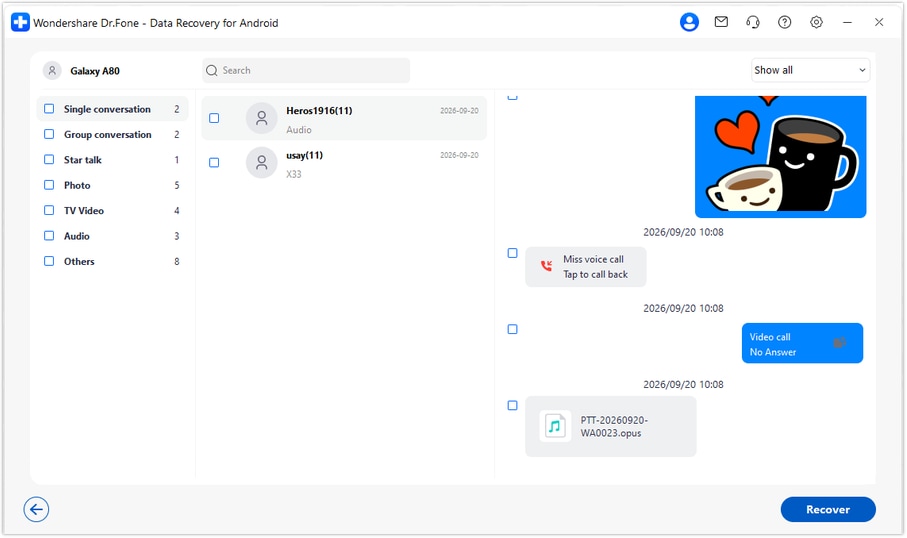
Step 5 Recover the selected available records to a PC
Click Recover and follow the prompts to choose a folder on your computer. Complete the save and open the output to review the selected messages and attachments. Recovery saves a PC copy; it does not place the records into WhatsApp on the tablet or phone.




Conclusion
For a confirmed supported source, Dr.Fone - Data Recovery (Android) gives Galaxy Tab S9 users a practical way to look for important WhatsApp messages, preview shared documents and media, and keep selected results on a PC. Download Dr.Fone for Windows, confirm the relevant device and app configuration, and begin the guided recovery workflow for the records you need.
FAQ
1. Can I recover deleted WhatsApp messages on Galaxy Tab S9 without a backup?
The no-backup Advanced Recovery route is available for supported source configurations, but the supplied Tab S9 reference does not independently confirm its installed or linked WhatsApp behavior. Identify where the missing records belonged and confirm that device and app configuration with Dr.Fone support before using the Windows scan.2. Does pairing let the tablet scan deleted WhatsApp records stored on the phone?
No such capability is established by this workflow. The tablet's connection is not a remote scan of the phone's deleted data. For records that belong to an Android phone, assess that phone's compatibility and connect it directly for its own supported scan.3. What if the conversation is missing on the Tab S9 but still visible on my phone?
Read the retained phone copy to obtain the information you need. Its presence means that at least that copy is not deleted; recovering or synchronizing it onto the tablet is not what the documented PC-output recovery workflow does.4. Can I recover WhatsApp photos, videos and project documents?
From a confirmed supported source, inspect the available WhatsApp photo, video and other attachment results and select the files found. Tablet and phone availability must not be assumed identical, and a recovered file does not establish that the entire conversation was recovered.5. Does the SM-X710 reference confirm my Android version or build?
No. The supplied record names SM-X710 and kernel 5.15.189 but leaves Android and build unknown. Check the actual tablet's Software information and installed-app setup. The public Advanced Recovery guide lists Android 9-13, not blanket support for every Tab S9 update.6. Will recovery restore WhatsApp messages to the tablet?
No. Advanced Recovery saves selected available results to a Windows PC. It does not import them into tablet WhatsApp, merge them with phone history or synchronize them across linked devices.
 Add Wondershare Dr.Fone as a preferred source on Google





