 Recover photos, messages, WhatsApp, and more — no backup
needed.


 100% Security Verified | No Subscription Required | No Malware


 :

 ChatGPT
 Perplexity
 Gemini
 Claude
 Grok
A deleted conversation with a seller can take the agreed price, pickup details and shared receipt with it. When you need to recover deleted WhatsApp messages on your Samsung Galaxy A36 5G without a backup, the priority is a useful record of the exchange, not a long list of unrelated phone files.
Dr.Fone - Data Recovery (Android) helps supported A36 5G users look for those records through a targeted WhatsApp scan. You can review available text and attachments, identify the relevant exchange and save selected items to a Windows PC. Start by confirming the right app and phone configuration so the scan is aimed at the data you actually used.
In this article
Before you start
Confirm the A36 5G region and current software
Find your model in Settings > About phone and record the Android version, build and kernel under Software information. The supplied Root record lists SM-A366W, build A366WVLS3AYG1 and kernel 6.6.46, with Android unspecified. It is not a compatibility list for all A36 5G regional variants or firmware. The public Advanced Recovery range is Android 9-13; confirm your complete current configuration with Dr.Fone support, including any newer Android version.
Identify the app that held the exchange
This guide covers personal WhatsApp. If you messaged a business from personal WhatsApp, select WhatsApp during recovery. If the missing data actually belonged to your installed WhatsApp Business app, it needs that separate selection instead. Do not select both apps together or assume the other participant's account type decides where your local records are stored.
Prepare a PC destination without changing the phone
Use a Windows computer and a USB data cable, and choose a private folder for any recovered messages or receipts. Leave the app installed and avoid clearing storage, resetting the A36 or changing firmware. Root access requirements must be checked for the exact configuration; do not unlock or flash the device based on a general tutorial.
Rule out an overlooked WhatsApp purchase conversation
You cannot find an agreement or booking and want to check whether the exchange is still present before scanning.
Step 1 Search the app you used for the purchase
Open personal WhatsApp and search the seller's contact name, shop name or a distinctive phrase you remember. Inspect matching conversations for the agreed details, not just the contact's presence in the list.
Step 2 Check Archived and identify the remaining gap
Look in Archived for the same exchange. If it is there, read the existing messages. Otherwise, write down the approximate date and whether you need the wording of the agreement, a receipt photo or another attachment before continuing to the scan.
- An archived chat was retained, not restored from deletion.
- The scan below is a no-backup route. A backup restore is a separate option only when an appropriate backup already exists; reinstalling WhatsApp does not create one.
Which part of the agreement do you need to save?
| Missing information | Result to inspect | How to choose a useful item |
|---|---|---|
| The price, date or collection instructions | Available WhatsApp conversation text | Read the exchange and check that it concerns the right transaction. |
| A receipt or payment-related image | Available WhatsApp photo attachments | Inspect the image itself rather than choosing an unrelated picture from the same chat. |
| A clip showing an item's condition | Available WhatsApp video attachments | Check the relevant media preview and select the clip you recognize. |
| A shared document | The corresponding attachment category | Choose the file associated with the agreement, if the scan finds it. |
Common problems and fixes
You scanned WhatsApp Business because the other participant was a shop
The correct selection depends on the app that stored your side of the conversation. For a purchase discussed through personal WhatsApp, scan WhatsApp separately. The seller's business account does not move your messages into your own WhatsApp Business app.
The scan finds several similar images or conversations
Use available search and filters, then read the conversation and inspect the attachment preview. Compare recognizable details with the purchase you are trying to document instead of assuming every result from that contact is relevant.
Your A36 model is not SM-A366W
Ask Dr.Fone support to check the actual regional model and full software information. Do not treat the supplied W-model record as support for every A36 5G version, and do not install the referenced build as a workaround.
How to use Dr.Fone - Data Recovery (Android)
Dr.Fone - Data Recovery (Android) gives you a focused way to look for an important agreement and the files shared around it. On a supported Galaxy A36 5G, Windows-only Advanced Recovery scans selected WhatsApp app data, lets you review the available conversations and attachment categories, and saves your chosen records to a PC without requiring an existing backup. Preview and selective recovery help you keep the relevant exchange instead of collecting unrelated personal messages.
- A dedicated personal WhatsApp selection targets the app that held your messages.
- Conversation and attachment views help you look for both the agreed wording and supporting media.
- Selection before saving lets you keep the useful available records in a PC folder you control.
 Scan Android phones and tablets directly.
- Preview and recover only what you want.
- Supports WhatsApp, photos, videos, contacts, and more.
- Works with 6000+ Android devices.

Follow the official Advanced Recovery workflow
Step 1 Choose Advanced Recovery and connect your A36
Launch Dr.Fone on Windows. Open Toolbox > Data Recovery, choose Android > Recover Android Data, then select Advanced Recovery and click Start Scan. Connect the supported Galaxy A36 5G by USB when prompted and follow the instructions for device detection.

Step 2 Scan the personal WhatsApp category
Choose WhatsApp and click Start Scan. Scan it separately from WhatsApp Business and the other categories. Use the app that held your conversation, rather than choosing based on whether the other participant was a business.

Step 3 Wait while the selected app data is scanned
Maintain the phone's USB connection during scanning. If you need to end the scan, click Cancel before unplugging. Follow the product's on-screen restart instructions if the phone becomes temporarily unresponsive after the scan or recovery.

Step 4 Preview the agreement and related attachments
Open the WhatsApp conversation results and inspect the relevant exchange. Use search or filters where available, and review the photo, video, audio and other attachment categories. Select the records that match the agreement or booking you want to keep.
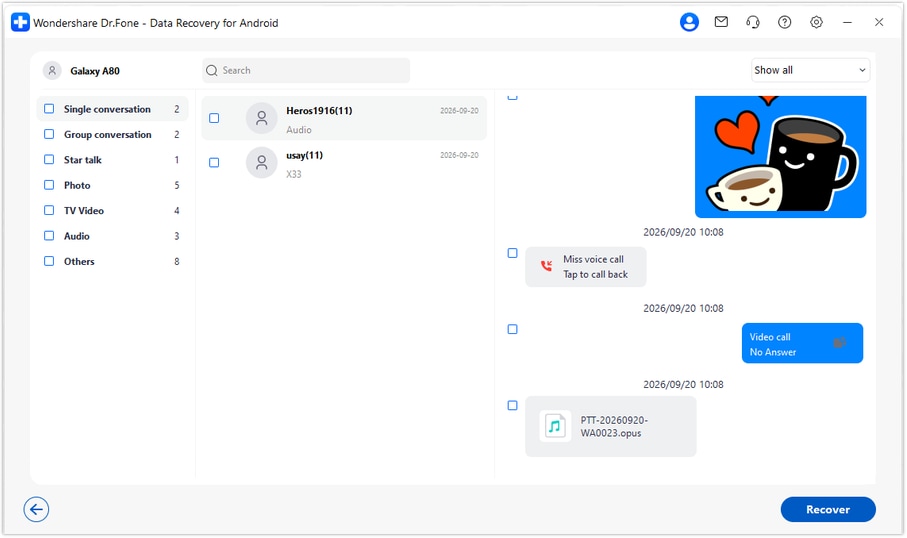
Step 5 Recover the selected records to your PC
Click Recover, select a computer folder through the save prompts and complete the recovery. Open the saved output to check your selections. This produces a PC copy of available records, not an import into the A36's WhatsApp chat list.




Conclusion
For a supported Galaxy A36 5G, Dr.Fone - Data Recovery (Android) can help you look for the messages that explain an agreement, review related photos or attachments, and keep selected results on your PC. Download Dr.Fone for Windows and start the guided WhatsApp recovery workflow to look for the details you need without relying on a backup.
FAQ
1. Can I recover deleted WhatsApp messages on Galaxy A36 5G without a backup?
Dr.Fone - Data Recovery (Android) provides a no-backup scan for supported device and app configurations. Use Advanced Recovery on Windows, preview the available WhatsApp records and recover selected items to a PC. Confirm your exact A36 model and software first.2. Should I select WhatsApp Business to recover a chat with a seller?
Not if you used personal WhatsApp. Select the app that stored your side of the conversation. WhatsApp Business is a separate recovery selection for data from that app, not for every conversation with a business.3. Can I recover a receipt photo or video shared in the deleted chat?
Inspect the available WhatsApp photo, video and other attachment results. Select a receipt or clip if it is found and matches the information you need. Finding the conversation does not guarantee that all its original attachments are available.4. Does the SM-A366W reference cover every Galaxy A36 5G?
No. It is a specific reference model, and the supplied Android field is unknown. It does not establish support across all regions, Android versions or builds. Compare your current identifiers with Dr.Fone support before using the applicable recovery route.5. Will the saved records be merged with my current WhatsApp history?
No. The documented Advanced Recovery result is saved to a PC folder. You can review that separate copy, but this workflow does not place it back into WhatsApp.
 Add Wondershare Dr.Fone as a preferred source on Google





