 Recover photos, messages, WhatsApp, and more — no backup
needed.


 100% Security Verified | No Subscription Required | No Malware


 :

 ChatGPT
 Perplexity
 Gemini
 Claude
 Grok
A storage cleanup was supposed to remove disposable files, not the WhatsApp conversation with a family celebration video and the messages explaining who was in it. On your POCO X6 Pro, you may now see a few photos in the gallery but no longer have the discussion or the clip you actually wanted. With no usable backup, those are separate things to look for.
Dr.Fone - Data Recovery (Android) helps supported POCO X6 Pro configurations search deleted WhatsApp app data rather than relying only on files still visible in the gallery. You can preview the available message and attachment results, then save the useful records to a Windows PC. Start by identifying what is truly missing so the recovery attempt stays focused.
In this article
Before you start
Check the actual Android version and full build
The supplied POCO X6 Pro Root reference lists Kernel 6.1.115 / 6.1.138 but leaves Android, model code and build unspecified. These are separate kernel entries, not a set of confirmed Android/build combinations. Find the installed software and model information in Settings and note the WhatsApp version. The public Advanced Recovery guide covers Android 9-13; confirm your full configuration with Dr.Fone support, particularly on a newer Android version.
Pause further cleanup
Leave WhatsApp installed, avoid clearing its storage and do not run additional deletion or reset operations while trying to retrieve the records. Prepare a Windows PC, a USB data cable and a destination folder. Use only the access steps confirmed for your setup. The supplied Root record does not explain the Root mechanism or guarantee that it is lossless; do not unlock the bootloader, flash firmware or reset the phone to pursue recovery.
Separate missing messages from missing files
List the conversation, approximate date and whether you need text, photos, a video, audio or a document. Note any usable copies already saved outside WhatsApp. This avoids treating a surviving photo as proof that the missing video or conversation was recovered. Advanced Recovery saves selected results to a PC and does not refill WhatsApp on the phone.
Check which WhatsApp media files still exist on POCO X6 Pro
After cleanup, it is unclear whether you lost the conversation, the shared media, or both.
Step 1 Open existing photos and videos
Use your gallery to look around the event date and open any matching photos or clips. Confirm the full item is usable rather than relying on a small thumbnail. A photo taken around the same time is not necessarily the file shared in WhatsApp.
Step 2 Look for documents you previously saved
Use the phone's file manager to check known download or document locations for a file you deliberately saved earlier. Open a matching file to verify its contents. Do not delete folders or move app data while searching.
Step 3 Identify the gap that needs a device scan
Compare the usable retained files with your list of missing records. If you have the photos but not the discussion or video, use the WhatsApp scan below to look for those available deleted results. If a whole chat merely disappeared from the main list, check WhatsApp search and Archived before assuming it was deleted.
- Gallery and file-manager checks only find existing copies; they do not recover truly deleted WhatsApp messages.
- A backup restore is not used as a no-backup solution in this guide.
After cleanup: what your current result means
| What you find | What it establishes | What to check next |
|---|---|---|
| A photo opens in the gallery | That photo still exists outside the missing conversation | Review WhatsApp conversation results if the text is what you need. |
| A video thumbnail will not open | The thumbnail alone does not provide a usable video | Inspect available WhatsApp video results and any actual saved output. |
| A downloaded document opens | You retained a separate copy of the document | Look for the original discussion separately if its context matters. |
| Messages and media appear in the scan | Those records are available to review in the product | Select the relevant items and save the available output to PC. |
Common problems and fixes
A kernel matches one reference, but the phone's Android version differs
Use the full configuration check rather than a kernel-only match. The supplied entries 6.1.115 and 6.1.138 do not identify their Android or build pairings. Send support the actual installed Android, model and build information to determine whether your recovery route is available.
A gallery scan found photos but not the missing WhatsApp conversation
A media-file result does not recover the discussion that accompanied it. In Dr.Fone, use Advanced Recovery with personal WhatsApp selected separately, then inspect the available conversation results as well as the media categories.
The scan contains other event photos but not the celebration video
Check the video category independently and inspect any available preview and saved result. Photos and text can be found even when a particular video is unavailable. Save useful records that are actually present rather than treating related photos as a recovered clip.
How to use Dr.Fone - Data Recovery (Android)
Dr.Fone - Data Recovery (Android) helps you move beyond checking the gallery when deleted WhatsApp messages and media are the real problem. Its Windows-only Advanced Recovery mode scans personal WhatsApp on a supported POCO X6 Pro, organizes available conversations and attachments for review, and saves selected results to your PC without requiring an existing backup. You can focus on the missing discussion and celebration clip while leaving unrelated files out of the selection.
- A WhatsApp-specific device scan looks for supported deleted app data instead of equating existing gallery files with recovered messages.
- Separate conversation and media views make it easier to check text, photos, videos and attachments against your missing-item list.
- Preview and selective PC saving let you keep the available records you value without replacing the current WhatsApp history.
 Scan Android phones and tablets directly.
- Preview and recover only what you want.
- Supports WhatsApp, photos, videos, contacts, and more.
- Works with 6000+ Android devices.

Follow the official Advanced Recovery workflow
Step 1 Enter Advanced Recovery on Windows
Launch Dr.Fone and open Toolbox > Data Recovery. Choose Android > Recover Android Data, select Advanced Recovery and click Start Scan. Connect your supported POCO X6 Pro using USB when prompted and follow the on-screen device-detection guidance.

Step 2 Scan personal WhatsApp separately
Choose WhatsApp and click Start Scan. Do not select WhatsApp Business or the other categories together with it; the official workflow requires personal WhatsApp to be scanned separately.

Step 3 Maintain the connection during scanning
Leave the POCO X6 Pro connected while Dr.Fone scans its selected app data. To interrupt the scan, click Cancel before removing the cable. Follow the product's displayed restart instructions if the phone is temporarily unresponsive after scanning or recovery.

Step 4 Compare message and media previews
Open the WhatsApp conversation results and inspect the available discussion. Use search or filters where available, then review the photos, videos, audio and other attachment categories. Select the records that fill the gaps left by your retained-file checks.
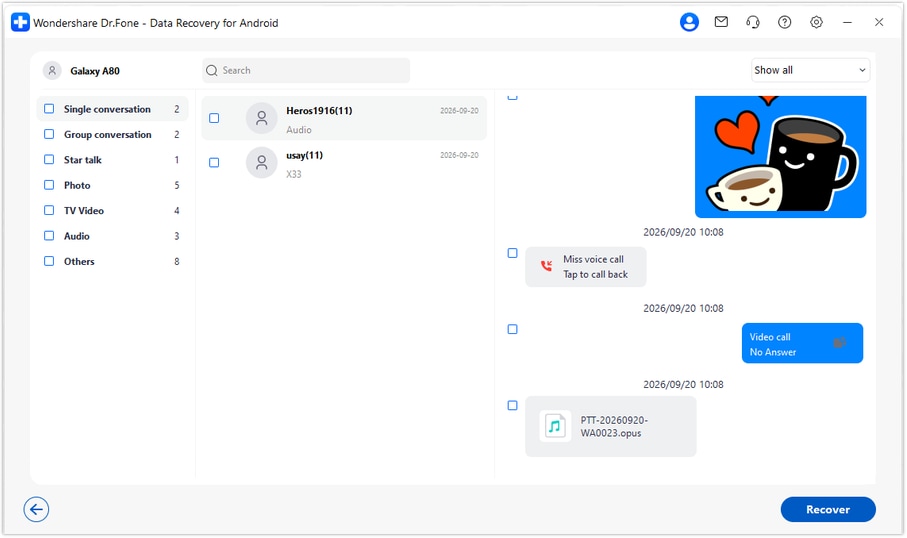
Step 5 Save selected WhatsApp data to your PC
Click Recover, choose a computer folder and complete the on-screen save prompts. Open the saved output and check the selected messages and media. These are PC copies; Advanced Recovery does not import them into WhatsApp on the phone.




Conclusion
For a supported POCO X6 Pro, Dr.Fone - Data Recovery (Android) gives you a focused next step after an accidental cleanup: search deleted WhatsApp data, preview message and media results separately, and save the records you need to your PC. Download Dr.Fone for Windows and start the guided scan to look for the conversations and shared memories that matter.
FAQ
1. Can I recover deleted WhatsApp messages on POCO X6 Pro without a backup?
Dr.Fone - Data Recovery (Android) offers a device-based route for supported configurations. On Windows, select Advanced Recovery, scan WhatsApp separately and preview the available records before saving selected results to a PC. It does not need a Google Drive backup, and the outcome depends on what the scan finds.2. Which Android version does the POCO X6 Pro Root reference confirm?
None is specified. The reference gives Kernel 6.1.115 / 6.1.138 but no Android version, build or model code. Read those details from your phone and confirm the applicable route with support. Do not infer Android from a kernel, a launch specification or the generic device name.3. Why can I see WhatsApp photos but not the deleted messages?
A photo may still exist in the gallery or another saved location even after its conversation was removed. Finding that retained copy does not recover the deleted chat. Inspect the WhatsApp conversation results in Advanced Recovery if message text is what you need.4. Can deleted WhatsApp videos and documents be recovered too?
On supported configurations, review the available WhatsApp video and attachment categories as well as conversations. Select usable items found in the scan; a preview entry or a related photo does not guarantee that a missing video or document is recoverable.5. Will recovery restore the original chat on the POCO X6 Pro?
No. This workflow saves the selected output to your Windows PC. It gives you a separate copy to review and does not rebuild or synchronize the phone's WhatsApp chat list.
 Add Wondershare Dr.Fone as a preferred source on Google





