 Recover photos, messages, WhatsApp, and more — no backup
needed.


 100% Security Verified | No Subscription Required | No Malware


 :

 ChatGPT
 Perplexity
 Gemini
 Claude
 Grok
The instructions arrived as a WhatsApp voice note, followed by a short video showing where to meet. After deleting the conversation, you have neither the spoken detail nor the visual clue, and no backup to fall back on. To recover deleted WhatsApp messages on iQOO Neo10 Pro Plus, it helps to include audio and video in your recovery target rather than searching only for typed text.
Dr.Fone - Data Recovery (Android) gives supported devices a focused app-data scan with conversation and media previews. You can inspect the records found, choose the voice note or clip that matters, and save selected results to a PC. First distinguish a genuinely missing recording from one that is still in the chat but not playing as expected.
In this article
Before you start
Use the Neo10 Pro Plus record, not the Neo10 Pro entry
Check the device's full name, current Android version, build and WhatsApp app version. The supplied iQOO Neo10 Pro Plus Root record lists kernel 6.6.89 but leaves Android, model code and build unknown. A matching kernel or a related model name is not complete compatibility evidence. The public Advanced Recovery guide covers Android 9-13; ask Dr.Fone support to confirm any additional configuration-specific route.
Prepare Windows and avoid improvised access changes
Advanced Recovery is Windows-only, so use a Windows computer, a USB data cable and a folder for the selected output. Preserve the existing WhatsApp installation and avoid app-storage clearing or repeated recovery experiments. Confirm Root/access requirements and potential data effects for your phone; do not unlock, flash or reset it to match a reference configuration.
Identify each missing recording
Write down who sent the voice note, the subject of the explanation and what the associated video or photo showed. Include an approximate exchange date. Audio, video and message text may have different availability, so decide which would still be useful on its own. Selected results are saved to the PC, not imported into WhatsApp.
Rule out a playback problem when the WhatsApp message is still visible
The voice-note or video message remains in the conversation, but you cannot hear the instruction.
Step 1 Inspect the actual message rather than the chat-list preview
Open the relevant conversation and locate the recording. Try playing it and check the phone's media volume and any connected audio device. This can distinguish an audible-output problem from a message or file that is genuinely missing.
Step 2 Decide whether you still need deleted-data recovery
If the recording opens and plays, preserve the information you need from that surviving item. If the conversation was deleted or the required media is unavailable, use the WhatsApp scan below to look for recoverable records rather than repeatedly changing playback settings.
- A visible message or thumbnail alone does not prove that the full recording remains accessible.
- Making an existing recording audible is not recovery of a deleted voice note. No backup restore is required for the device-scan route below.
Choose the WhatsApp result that carries the missing instruction
| What carried the information | Where to inspect | Useful result |
|---|---|---|
| A spoken explanation | Available WhatsApp audio attachments | The found recording, rather than an assumed transcript. |
| A clip showing the meeting point | Available WhatsApp video attachments | The visual detail if the relevant clip is found. |
| A photo of a landmark or written note | Available WhatsApp photo attachments | A selectable image to review independently of the audio. |
| A typed correction to the instruction | Available conversation text | The found wording that may change how you interpret the recording. |
Common problems and fixes
A message is visible, but the voice note will not play
Check ordinary playback and audio output first. If the actual file remains unavailable, do not treat its visible message entry as a recovered recording. Inspect the WhatsApp audio results after a supported scan and save only available useful findings.
You found audio but not the video sent beside it
Inspect the video category separately and review any relevant conversation text or photos. Different items can have different recovery results. Keep useful available audio rather than assuming it includes or recreates the missing clip.
The scan needs to be stopped before you can finish
Click Cancel in the product before unplugging the phone, as the guide directs. Keep the connection stable while it is scanning, and follow any displayed restart instruction if the phone becomes temporarily unresponsive afterward.
How to use Dr.Fone - Data Recovery (Android)
Dr.Fone - Data Recovery (Android) helps you search for the format that actually held your missing WhatsApp information. On a supported iQOO Neo10 Pro Plus, its Windows-only Advanced Recovery mode scans personal WhatsApp without relying on a backup, presents available conversations and attachment categories, and saves selected findings to a PC. You can look for a spoken explanation, a visual clue and any typed correction instead of assuming the answer must be in message text.
- Review available audio and video attachments alongside the conversation results.
- Inspect photo and message findings for context that helps identify the right recording.
- Select useful records for a PC copy rather than saving every unrelated attachment.
 Scan Android phones and tablets directly.
- Preview and recover only what you want.
- Supports WhatsApp, photos, videos, contacts, and more.
- Works with 6000+ Android devices.

Follow the official Advanced Recovery workflow
Step 1 Open the Windows Advanced Recovery workflow
Launch Dr.Fone, open Toolbox > Data Recovery and choose Android > Recover Android Data. Select Advanced Recovery and click Start Scan. Connect your supported Neo10 Pro Plus with a USB cable when prompted and follow the instructions until it is detected.

Step 2 Select personal WhatsApp for scanning
Choose WhatsApp and click Start Scan. Scan this category separately from WhatsApp Business and the other data categories, as required by the official guide.

Step 3 Keep the phone connected as scanning proceeds
Allow the app-data scan to run with the USB connection maintained. If you need to stop, click Cancel before disconnecting. Follow the product's on-screen restart guidance if the phone is temporarily unresponsive after scanning or recovery.

Step 4 Inspect conversation, audio and video findings
Browse the WhatsApp conversations and attachment categories. Use search and filters where available, review the relevant exchange and inspect its audio, video, photo and other available results. Select the found records that match the sender and subject you noted.
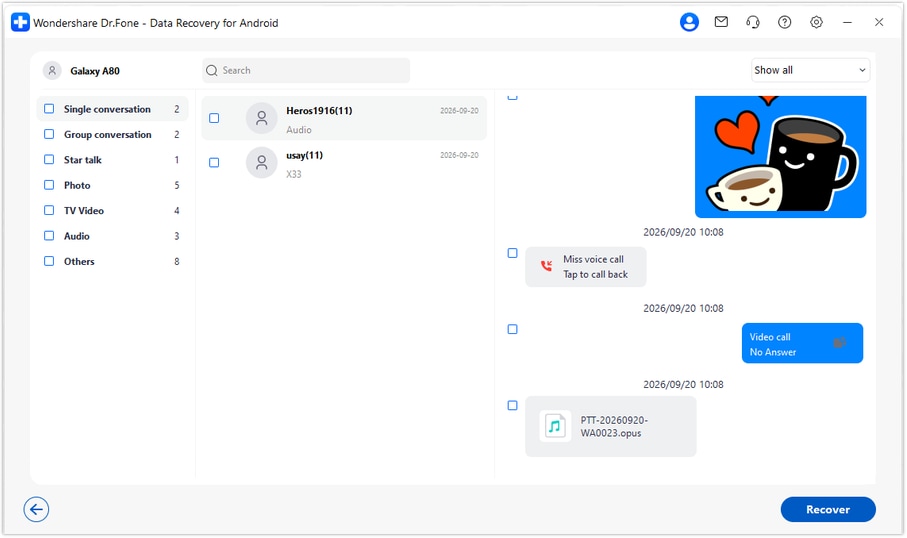
Step 5 Save selected messages and recordings to PC
Click Recover, choose a computer destination folder and complete the displayed save prompts. Open the saved output to check the selected content. This mode saves results to the PC rather than placing recordings or messages back into WhatsApp.




Conclusion
Important WhatsApp information is not always typed: a voice note, video or photo may hold the detail you need most. Dr.Fone - Data Recovery (Android) gives supported iQOO Neo10 Pro Plus users a targeted app-data scan, organized conversation and media previews, and selective saving to a PC. Download Dr.Fone for Windows and begin looking for the messages and recordings you want back.
FAQ
1. Can I recover deleted WhatsApp messages on iQOO Neo10 Pro Plus without a backup?
For a supported configuration, Dr.Fone - Data Recovery (Android) provides a Windows device-scan route. Use Advanced Recovery, select personal WhatsApp separately, preview what the scan finds and save the items you choose to the PC. An existing cloud backup is not required for this route.2. Can I look for a deleted WhatsApp voice note as well as messages?
Inspect the available audio category in the personal WhatsApp results alongside conversation text. If the required recording is found, select it for saving. A found text message does not guarantee that its associated audio is also available.3. Does this workflow automatically turn recovered audio into text?
The documented workflow scans, previews and saves available records; it does not establish an automatic transcription feature. Treat the recording and any typed conversation text as separate results.4. Can a photo or video help when the voice note is not found?
Yes, an available image, clip or typed correction may still contain useful information. Inspect those result categories and save the relevant findings, while keeping clear that they do not recreate the missing recording.5. Is the Neo10 Pro Plus supported because the Neo10 Pro has the same listed kernel?
No. Keep the two device records separate. The Neo10 Pro Plus reference lists kernel 6.6.89 but does not specify Android, build or model code, so support and applicable Root/access requirements must be confirmed for your actual configuration.6. Will the saved voice notes return to their original WhatsApp thread?
No. Advanced Recovery saves selected results to your Windows PC. It does not import or synchronize them back into the original conversation.
 Add Wondershare Dr.Fone as a preferred source on Google





