 Recover photos, messages, WhatsApp, and more — no backup
needed.


 100% Security Verified | No Subscription Required | No Malware


 :

 ChatGPT
 Perplexity
 Gemini
 Claude
 Grok
You clear a busy WhatsApp study group to free space, then realize it contained tomorrow's timetable, a worksheet and the video explaining an assignment. The cleanup may have removed just the large files, the message history or both. Without a usable backup, knowing which information is gone is the first useful step.
If you need to recover deleted WhatsApp messages on OPPO K40, Dr.Fone - Data Recovery (Android) offers supported configurations a Windows scan that does not depend on a previous backup. You can review the available discussion and attachment results, then save the essential records to your computer instead of putting more downloads onto the phone.
In this article
Before you start
Confirm the exact OPPO K40, not a similarly named device
Record the model identifier, installed Android version, build and personal WhatsApp version from settings. The supplied Root record names OPPO K40 and lists kernel 4.19.157, but gives no Android version, model code or build. The kernel does not establish an Android version. The public Advanced Recovery guide covers Android 9-13; confirm your actual configuration with Dr.Fone support rather than borrowing another K-series device's details.
Stop cleanup while checking the loss
Keep WhatsApp installed and leave its remaining storage intact. Do not clear app data, factory-reset the phone or run another cleanup as a supposed recovery step. Access and Root requirements must be confirmed for the configuration; do not unlock or flash it using an unrelated guide.
Prepare a PC folder for the essential records
Have a Windows PC, USB data cable and a destination with room for the files you select. List the group, approximate dates and the items you need most, such as timetable messages, worksheet documents, photos or videos. Advanced Recovery stores the output on the PC, not back in the WhatsApp chat.
Check what the storage cleanup actually removed
The loss happened while deleting large files or clearing an old group, and some material may still be readable.
Step 1 Open the study group and read the relevant exchange
Check whether the timetable or assignment text is still in the conversation. If the entire group is missing from the main list, search its name and check Archived before deciding that its messages were deleted.
Step 2 Inspect the specific worksheet or clip
If a message remains, open the relevant attachment to see whether its contents are still available. Also check for a copy you previously saved in files or the gallery. A message referring to a file is not the same as a complete retained file.
Step 3 Write down the remaining gaps
Separate missing messages from missing documents, photos and videos. Leave retained copies alone and use this gap list to review the recovery preview, rather than deleting more items to repeat the cleanup.
- A readable chat, archived conversation or saved worksheet is retained data, not a recovered deleted record.
- If cleanup truly removed the records, use the supported device scan below. Reinstalling WhatsApp without a usable backup does not supply the missing history.
After cleanup: match the missing study material to the right check
| What is missing | What may still exist | Recovery review priority |
|---|---|---|
| Timetable or assignment message | The group may remain even when some text is gone | Review the available conversation records for the needed instructions. |
| Worksheet or shared document | A separately saved file or a message referring to it | Open retained copies, then inspect corresponding attachment results. |
| Lesson photos or a demonstration video | Some media may have survived separately | Review available photo and video previews rather than assuming all media has the same result. |
| The whole discussion and its files | Copies may be absent from the app | Check conversation and attachment results separately and save useful selections to PC. |
Common problems and fixes
The study group is visible, but old instructions are missing
A visible group does not mean its previous history survived cleanup. Search for a remembered phrase and check the actual exchange. If it is gone, inspect the available conversation results from the supported scan rather than repeatedly reopening or clearing the group.
The worksheet message remains, but the file will not open
Look for a complete copy in your saved files, then check the corresponding WhatsApp attachment results. A retained message or filename cannot substitute for the document's contents. Save an available recovered copy and open the output on your PC.
The PC destination cannot accept the selected output
Choose a writable computer folder with sufficient free space and follow the displayed save prompts. Prioritize the records you actually need instead of selecting every result. Do not free space by deleting additional WhatsApp data from the K40.
How to use Dr.Fone - Data Recovery (Android)
Dr.Fone - Data Recovery (Android) gives you a focused way to look for the WhatsApp material that mattered before cleanup on a supported OPPO K40. Its Windows-only Advanced Recovery mode scans personal WhatsApp without an existing backup and lets you review available conversations and attachment categories before saving. You can select the timetable, worksheet or explanatory media you need and keep the available results on a PC.
- Targeted WhatsApp recovery looks for app records rather than treating a gallery search as deleted-message recovery.
- Conversation and attachment previews help separate readable instructions from a missing worksheet or video.
- Selective PC saving lets you preserve the useful available records without collecting every result.
 Scan Android phones and tablets directly.
- Preview and recover only what you want.
- Supports WhatsApp, photos, videos, contacts, and more.
- Works with 6000+ Android devices.

Follow the official Advanced Recovery workflow
Step 1 Open Advanced Recovery and connect the K40
Launch Dr.Fone on Windows and go to Toolbox > Data Recovery. Choose Android > Recover Android Data, select Advanced Recovery and click Start Scan. Connect your supported OPPO K40 by USB when prompted and complete the on-screen device-detection instructions.

Step 2 Select WhatsApp without other categories
Choose personal WhatsApp and click Start Scan. Scan it separately from WhatsApp Business and the other categories, which cannot be selected together in this workflow.

Step 3 Keep the scan connected
Leave the phone connected while scanning progresses. If you need to end the scan, click Cancel before removing the cable. Follow the displayed restart instructions if the phone becomes temporarily unresponsive after scanning or recovery.

Step 4 Find the useful discussion and study attachments
Review the available WhatsApp conversations and use search or filters where offered. Check the photo, video, audio and other attachment categories for the missing material. Select the records that address your gap list rather than selecting all results automatically.
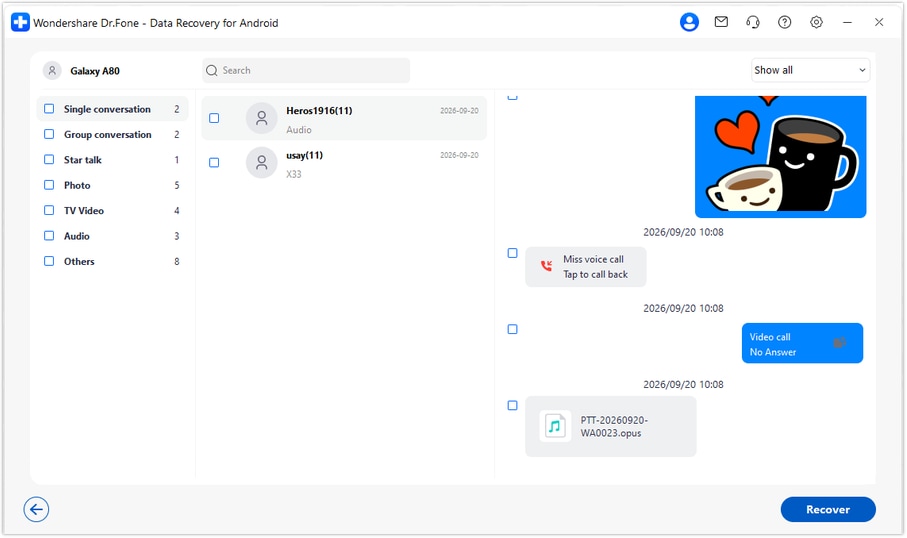
Step 5 Recover the selected results to the PC
Click Recover, choose your computer folder and complete the saving prompts. Open the saved output to check the selected available records. Advanced Recovery does not insert them into WhatsApp or rebuild the group history on the K40.




Conclusion
For a supported OPPO K40 configuration, Dr.Fone - Data Recovery (Android) is a practical next step after an overenthusiastic WhatsApp cleanup. Its focused scan, message-and-attachment previews and selective PC saving help you look for the instructions and files you still need. Download Dr.Fone for Windows, confirm your device setup and begin the guided recovery process.
FAQ
1. Can I recover deleted WhatsApp messages on OPPO K40 after clearing a chat without a backup?
A supported configuration can use Dr.Fone - Data Recovery (Android) to attempt a device scan without a previous backup. Choose Advanced Recovery on Windows, scan personal WhatsApp separately and review what is available before saving selected records to a PC. Not every deleted record will necessarily be found.2. Will clearing WhatsApp cache or storage bring the messages back?
No. Clearing cache does not reconstruct deleted chat history, and clearing app storage can remove remaining app data. Leave the existing WhatsApp data intact while you check retained copies and the supported recovery route.3. Does kernel 4.19.157 tell me which Android version my OPPO K40 uses?
No. The supplied K40 record does not specify Android, a model code or a build. Read the actual installed version and identifiers in settings and have the complete configuration checked. Do not substitute information from another K-series phone.4. Can I recover deleted WhatsApp videos without saving every attachment?
If the scan finds the video and makes it available, you can select the relevant result instead of saving every item. Review photos and other attachments separately as needed. The available media may differ from the available message text.5. Will this put the worksheet and discussion back into WhatsApp?
No. The Advanced Recovery workflow saves selected available results to a PC folder. It does not import the worksheet into the conversation, merge deleted messages with current history or synchronize them back to the phone.
 Add Wondershare Dr.Fone as a preferred source on Google





