 Recover photos, messages, WhatsApp, and more — no backup
needed.


 100% Security Verified | No Subscription Required | No Malware


 :

 ChatGPT
 Perplexity
 Gemini
 Claude
 Grok
A cleanup session on your Pixel 6a removes the WhatsApp group you relied on for course instructions, a voice explanation and a shared assignment file. You need the deadline and context as well as the attachment, but there is no usable chat backup to restore.
Dr.Fone - Data Recovery (Android) offers a device-based way to look for deleted WhatsApp messages on Google Pixel 6a without a backup. On supported configurations, you can review conversation results alongside audio, photos, videos and other available attachments, then save only the relevant items to a PC. Start by identifying what is truly missing so the recovery attempt stays focused on the information you need.
In this article
Before you start
Confirm the exact Pixel 6a configuration
Record the model, installed Android version and build from Settings > About phone; do not substitute a Pixel 6 or Pixel 6 Pro record. Public Advanced Recovery guidance covers Android 9-13. The supplied 6a Root reference says Android 14 and lists CP1A.260405.005 / CP2A.260705.006 plus kernels 6.1.145 / 6.1.157. Those are parallel lists, not verified build/kernel pairings. The CP2A build also appears with different Android labels in the source table. Ask Dr.Fone support to confirm your actual configuration rather than selecting a presumed pairing.
Stop changes that could remove remaining app data
Do not repeat bulk deletion, clear WhatsApp storage, uninstall the app or reset the Pixel while investigating the loss. Do not unlock the bootloader, flash another build or apply an unverified Root process. The Root mechanism and data-loss implications are not established by the reference list; follow applicable product access prompts for a confirmed configuration.
Prepare Windows and prioritize the information
Have a Windows PC, USB data cable and output folder available. Write down the group name and whether the priority is a deadline message, audio explanation, document, photo or video. Advanced Recovery is Windows-only and saves selected results to the PC, not back into WhatsApp.
Check for an existing file copy before replacing the missing information
You urgently need a course document or other shared item, while the original conversation and its context remain missing.
Step 1 Inspect files you deliberately saved outside the chat
Use your normal Files or Downloads view to look for the assignment document if you previously saved it there. Open a matching existing file to check its contents. Do not assume every WhatsApp attachment has a separate accessible copy or start moving app database files.
Step 2 Request a replacement only if it meets the immediate need
If a group member still has the document or deadline, ask them to resend it or confirm the information. Treat that as a new copy or answer. If you need the original deleted exchange, continue with the supported WhatsApp scan.
- An existing download is retained data, and a resent file is replacement content. Neither recreates the original chat, message order or historical context.
- The recovery workflow below scans device app data without a WhatsApp backup; it does not depend on another person retaining the conversation.
Prioritize the course information you need back
| Missing information | Where to review it | How to judge the result |
|---|---|---|
| The deadline or assignment instructions | Available WhatsApp conversation previews | Check the actual wording; a document alone may not include the latest instruction. |
| A spoken explanation | Available audio attachments | Inspect the item available in the results rather than assuming a text record contains the recording. |
| A shared document | A retained download or scanned attachment result | An existing copy and a recovered result have different origins; verify the content you need. |
| A reference photo or video | Photo and video attachment categories | Save the matching available media independently of whether every message is found. |
| A complete original exchange | Conversation and attachment results together | Review what is actually present; a resent file is not restoration of the original history. |
Common problems and fixes
The supplied Pixel 6a list shows two builds and two kernels
Read the values installed on your own handset and give them to support. Do not combine one listed build with either kernel and present that as a supported configuration. Leave the CP2A-to-Android mapping unverified until it is confirmed for this exact device.
The document is available, but the voice explanation is missing
Review audio as a separate attachment category and check the available conversation text for useful instructions. Keep the document if it helps, but do not assume recovery of one file demonstrates recovery of the recording.
A group member resent the file, but you still need the old discussion
Use the replacement for its immediate purpose and inspect the scan's conversation results for the original missing text. A new message in the group does not restore the deleted discussion.
You need to stop a scan before using the phone
Click Cancel before unplugging the USB cable. If the Pixel is temporarily unresponsive after scanning or recovery, follow the restart instructions displayed by the product rather than resetting it.
How to use Dr.Fone - Data Recovery (Android)
Dr.Fone - Data Recovery (Android) helps you look beyond a replacement file to the missing WhatsApp information itself. For supported Pixel 6a configurations, its Windows-only Advanced Recovery mode scans app data without a backup, presents available conversations and attachments for review, and saves your chosen results to a PC so you can keep the useful instructions and files together in your recovery task.
- A personal WhatsApp scan focuses on the app that held the group instructions rather than unrelated device data.
- Conversation and attachment categories help you check text, an audio explanation and shared documents as distinct recovery needs.
- Selective PC recovery lets you retain available relevant records without saving every group conversation or attachment.
 Scan Android phones and tablets directly.
- Preview and recover only what you want.
- Supports WhatsApp, photos, videos, contacts, and more.
- Works with 6000+ Android devices.

Follow the official Advanced Recovery workflow
Step 1 Connect the Pixel 6a through Advanced Recovery
Open Dr.Fone on Windows and go to Toolbox > Data Recovery. Select Android > Recover Android Data, choose Advanced Recovery and click Start Scan. Connect the supported Pixel 6a by USB when prompted and follow the on-screen device-detection instructions.

Step 2 Scan personal WhatsApp on its own
Choose WhatsApp and click Start Scan. Do not select WhatsApp Business or the other categories together with it; the guide requires separate app selection.

Step 3 Keep the phone connected until scanning finishes
Leave the USB cable connected while the scan progresses. Use Cancel before disconnecting if you need to stop. Follow the displayed restart instructions if the phone becomes temporarily unresponsive afterward.

Step 4 Select the instructions and available attachments
Review WhatsApp conversation results from the sidebar and use search or filters where available. Inspect photos, videos, audio and other attachment categories, then select the messages and files matching the course information you need.
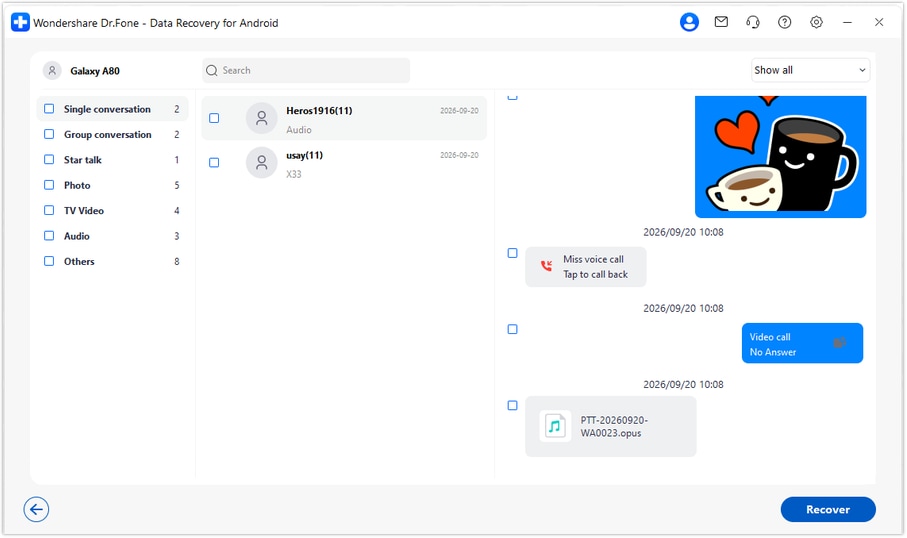
Step 5 Save the selected results to your computer
Click Recover, choose a folder on your PC and complete the save prompts. Open the saved output and check the selected content. This mode saves PC copies; it does not put the group discussion or attachments back into WhatsApp.




Conclusion
A replacement assignment file can solve part of the problem, but recovering the available instructions and shared media gives you more useful context. Dr.Fone - Data Recovery (Android) brings a focused WhatsApp scan, clear conversation and attachment review, and selective PC saving to supported Pixel 6a configurations. Download Dr.Fone for Windows and begin the guided recovery workflow with your compatible phone.
FAQ
1. Can I recover deleted WhatsApp messages on Google Pixel 6a without a backup?
Dr.Fone - Data Recovery (Android) offers a device-scan route for supported Pixel 6a configurations. Use Advanced Recovery on Windows, scan personal WhatsApp separately, and recover the selected records actually found in the preview to your PC.2. Does finding an assignment in Downloads mean the deleted chat is recovered?
No. That file is an existing separate copy. It can supply the document, but it does not reconstruct the original conversation, voice explanation or deadline message.3. Can I look for WhatsApp audio, photos and videos in the same recovery task?
The WhatsApp results include conversation and attachment categories such as photos, video and audio. Inspect the available categories and select the useful items. Their availability can differ, so a photo result does not guarantee that the audio is present.4. Are both listed Pixel 6a builds supported with either listed kernel?
The supplied record does not establish those combinations. Its parallel build and kernel lists must not be expanded into a compatibility matrix, and the CP2A Android mapping is unresolved. Confirm your installed configuration with support; public Advanced Recovery guidance covers Android 9-13.5. Will recovering the group update WhatsApp on my Pixel?
No. Advanced Recovery saves selected available results to your PC. It does not import, synchronize or write the recovered group history into WhatsApp.
 Add Wondershare Dr.Fone as a preferred source on Google





