 Recover photos, messages, WhatsApp, and more — no backup
needed.


 100% Security Verified | No Subscription Required | No Malware


 :

 ChatGPT
 Perplexity
 Gemini
 Claude
 Grok
You clear an old WhatsApp conversation on your Pixel 8a, then realize it contained the repair quote, a voice note with access instructions and the photos you need for a follow-up. With no usable backup, the problem is not restoring your entire phone: it is finding those few useful records again.
Dr.Fone - Data Recovery (Android) gives eligible Pixel 8a users a way to look for deleted WhatsApp messages and attachments, preview the results and select what to keep on a Windows PC. This guide starts with the small checks that may retrieve the information immediately, then explains the no-backup scan when you need records from the phone itself.
In this article
Before you start
Check the exact Pixel 8a software before using Advanced Recovery
Note your device model, Android version and full build under Settings > About phone, plus the WhatsApp version. The supplied Root record for Pixel 8a lists Android 14, kernel 6.1.157 and build CP2A.260805.005; it omits a model code and flags the Build-to-Android mapping for verification. The public Advanced Recovery guide covers Android 9-13. Have Dr.Fone support confirm your exact configuration rather than applying Pixel 8 or Pixel 8 Pro compatibility to the 8a.
Leave the source app intact
Do not uninstall WhatsApp, clear its app storage or reset the Pixel while trying to retrieve deleted records. Avoid generic Root, bootloader-unlock or flashing tutorials. The access process and possible data effects of an additional Root-based route are not confirmed by the device table.
Choose the records and prepare your PC
Have a Windows computer, a USB data cable and a destination folder ready. Write down who sent the quote or instructions and roughly when. Include related photos, videos, documents or audio on your recovery list so that you review the attachment results as well as messages.
Retrieve the information you need before scanning deleted records
You urgently need a quote, instruction or shared file and may be able to obtain an existing copy without recovering the original chat.
Step 1 Search the chat and Archived
Search WhatsApp for the contact or a recognizable phrase, and check Archived. If the conversation remains, open it and find the required message or attachment. A chat removed from the main list is not necessarily deleted.
Step 2 Check a saved document or ask for a resend
Look in your file app for a document you previously saved and open it to confirm its contents. If the sender still has the quote, photo or voice note, ask them to resend the specific item. This is useful when the information matters more than preserving the original exchange.
Step 3 Use a scan when the original records still matter
If you need to inspect what remains recoverable from the Pixel 8a, continue with the supported Dr.Fone workflow below. Keep your target contact and missing items in mind when reviewing its results.
- A resend provides another copy; it does not recover the deleted conversation or recreate its original chronology.
- Saved files and archived chats are existing data. The Advanced Recovery device scan does not require a Google Drive backup.
Choose a useful route for a missing Pixel 8a WhatsApp record
| Your immediate need | Start here | Expected outcome |
|---|---|---|
| Read a chat missing from the main list | WhatsApp search and Archived | Access the retained conversation if it is still there |
| Get a quote or instruction again | A previously saved file or a sender's resend | Obtain the information, not the original deleted chat |
| Find deleted message records without a backup | Dr.Fone Advanced Recovery on an eligible Pixel 8a | Preview available results and select messages for PC saving |
| Keep a relevant voice note, photo, video or document | The matching WhatsApp attachment results | Save the files found, even if other parts of the chat are absent |
Common problems and fixes
You selected WhatsApp Business, but the missing conversation was personal
Use the personal WhatsApp category for personal-app records. The official guide requires WhatsApp and WhatsApp Business to be scanned separately, so a Business selection is not a substitute for the personal WhatsApp scan.
A conversation result appears, but you cannot find the attached quote
Inspect the attachment categories separately and use available search or filters to narrow the results. A conversation entry does not establish that its document or voice note was also found. Keep the useful text while checking for the specific file.
Recovery finished, but the Pixel chat list has not changed
Open the destination folder you selected on the Windows computer. Advanced Recovery saves the selected output there; it does not rebuild WhatsApp on the Pixel 8a. Check the saved records rather than repeating the scan solely because the phone still shows a missing chat.
How to use Dr.Fone - Data Recovery (Android)
Dr.Fone - Data Recovery (Android) helps when a missing WhatsApp conversation contains several different things you need: the agreed amount, a useful voice note and the photos that explain the problem. Its Windows-only Advanced Recovery mode scans supported Pixel 8a app data without a backup, gives you a preview of the available records and saves your chosen results to a PC. You can concentrate on the useful exchange and files rather than selecting every item the scan returns.
- App-focused recovery gives deleted personal WhatsApp records a targeted scan instead of relying on a general file search.
- Separate conversation and attachment views help you look for message text, photos, videos, audio and documents relevant to the same need.
- Preview and selective saving let you build a useful PC copy from the records actually available.
 Scan Android phones and tablets directly.
- Preview and recover only what you want.
- Supports WhatsApp, photos, videos, contacts, and more.
- Works with 6000+ Android devices.

Follow the official Advanced Recovery workflow
Step 1 Start the Windows Advanced Recovery workflow
Launch Dr.Fone and open Toolbox > Data Recovery. Choose Android > Recover Android Data, select Advanced Recovery and click Start Scan. Connect your supported Pixel 8a by USB when prompted, then complete the displayed instructions until the device is detected.

Step 2 Choose WhatsApp as the scan target
Select personal WhatsApp and click Start Scan. Keep it separate from WhatsApp Business and other data types, as required by the official guide.

Step 3 Wait with the Pixel connected
Keep the USB connection stable while the scan runs. Click Cancel before disconnecting if you need to stop. If the device is temporarily unresponsive after scanning or recovery, use the restart instructions shown by the product.

Step 4 Find the useful conversation and shared files
Open the WhatsApp results from the sidebar and preview available conversations. Use search and filters where available to locate the relevant exchange. Review the photo, video, audio and other attachment categories, then select the messages and files you want to keep.
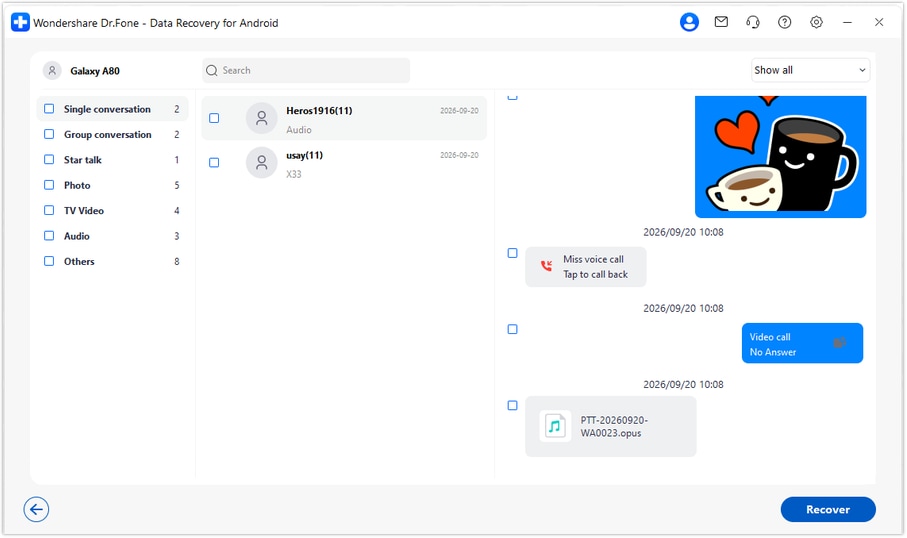
Step 5 Recover the selected output to your PC
Click Recover, choose a computer folder when prompted and complete the save. Open that folder to review the selected results. They remain a PC copy rather than being written directly into WhatsApp on the Pixel 8a.




Conclusion
A deleted chat should not make you abandon the quote, instructions or shared files you still need. For a supported Pixel 8a configuration, Dr.Fone - Data Recovery (Android) offers a focused WhatsApp scan, useful previews and selective recovery to PC without an existing backup. Download Dr.Fone for Windows and start the guided process to look for the records that matter.
FAQ
1. How can I recover deleted WhatsApp messages on Google Pixel 8a without a backup?
Confirm your device and WhatsApp configuration with Dr.Fone, then use Dr.Fone - Data Recovery (Android) Advanced Recovery on Windows. Select personal WhatsApp separately, scan and preview the available results, and recover the records you choose to a PC.2. Does the Pixel 8a reference mean every Android 14 build is supported?
No. The supplied Android 14 Root entry is configuration-specific and its build mapping needs verification. The public Advanced Recovery range is Android 9-13. Confirm the full Pixel 8a build and app version instead of assuming that an entry covers every firmware release.3. Can I recover a deleted WhatsApp voice note or document?
Inspect the available audio and other attachment categories in the WhatsApp results. If the item is found, select it for saving to PC. Its availability is separate from whether the original conversation text can be recovered.4. Is a resent photo the same as recovering the deleted message?
No. A resend can give you the information or file again, which may solve an immediate need, but it does not recover the original message record or its surrounding conversation.5. Does this method recover deleted WhatsApp photos and videos to the phone?
The workflow lets you preview and select available WhatsApp photos and videos, but saves the selected results to your Windows PC. It does not import them into the Pixel's WhatsApp chat history.
 Add Wondershare Dr.Fone as a preferred source on Google





