 Recover photos, messages, WhatsApp, and more — no backup
needed.


 100% Security Verified | No Subscription Required | No Malware


 :

 ChatGPT
 Perplexity
 Gemini
 Claude
 Grok
You clear an old WhatsApp group and realize it held the meeting address, payment details and photos for an upcoming event. With no usable backup, reinstalling WhatsApp does not give you a copy to restore. If you need to recover deleted WhatsApp messages on your POCO X8 Pro Max, start by separating a hidden conversation from genuinely deleted records.
For deleted data on a supported configuration, Dr.Fone - Data Recovery (Android) offers a focused way forward: scan WhatsApp, inspect the messages and media found, and keep selected results on your computer. You can look for the specific address or attachment you need instead of treating every file on the phone as equally important.
In this article
Before you start
Confirm the complete POCO X8 Pro Max configuration
Record the full model name, Android version, build and WhatsApp version from the phone's settings. The supplied POCO X8 Pro Max Root reference lists kernel 6.6.89 but leaves Android, model code and build unspecified. A matching kernel alone does not establish support. The public Advanced Recovery guide covers Android 9-13; ask Dr.Fone support to confirm the exact recovery route for your configuration rather than assuming a newer Android version is covered.
Prepare Windows and protect what is still on the phone
Advanced Recovery is Windows-only. Have a reliable USB data cable and a PC destination folder ready, and keep WhatsApp installed. Avoid clearing app storage, factory-resetting the phone or making unnecessary new recordings and downloads while you investigate the loss. Follow only the product's confirmed access instructions; the reference record is not a verified Root procedure or a guarantee of lossless access.
Define the missing information before scanning
Note the group or contact, an approximate date and whether you need text, a photo, a video or another attachment. Also identify the account where the conversation originally existed. This guide scans personal WhatsApp, not WhatsApp Business, and the recovered selection is saved to a PC rather than imported or synced into the phone's chats.
Check whether the missing group or event file is still present
A conversation disappeared during tidying, or the immediate need is an address image or event attachment rather than the whole chat.
Step 1 Search the group and look in Archived
In WhatsApp, search the group name or a distinctive phrase such as the venue name. Check Archived as well. If the conversation is there, open it and locate the relevant exchange; its absence from the main list did not mean the records were deleted.
Step 2 Look for a copy that was already saved
Check the gallery or file manager for an image, video or document you previously saved from the conversation. Open the candidate file to verify its contents instead of relying on its thumbnail or name. If the chat is still present, inspect its media and documents too.
- An archived chat and an independently saved file are retained data, not recovered deleted messages.
- If the needed conversation or attachment is genuinely gone, use the device-scan process below; it does not require an existing backup.
Choose the route that matches what disappeared
| What you find | Useful next action | What it gives you |
|---|---|---|
| The event group is in Archived | Read the existing exchange and locate the address or agreement | Access to messages that were never deleted |
| The conversation is gone but a photo or document was saved elsewhere | Open and check that retained file | The file's contents, not the surrounding deleted conversation |
| The required messages or media are no longer available in the app | Scan personal WhatsApp with Dr.Fone on a supported configuration | Selected available scan results saved to your PC |
Common problems and fixes
A recovered event image does not explain the payment or meeting details
Review the conversation results as well as the photo category. A useful picture may lack the instructions that accompanied it. Compare the available message text with the image before deciding which records to save; do not assume one proves that the other was also recovered.
The phone matches kernel 6.6.89 but Advanced Recovery is unavailable
Provide Dr.Fone support with the full POCO X8 Pro Max model name, Android version, build and app version. The supplied kernel reference is not sufficient to validate the configuration. Do not change firmware merely to make a reference value match.
Searching for the group name returns no useful scan result
Browse the available conversations and attachment categories directly. Try a contact or a distinctive message phrase if a search field is available. If the requested record is absent, save any relevant items actually shown rather than treating an empty search as a successful recovery.
How to use Dr.Fone - Data Recovery (Android)
Dr.Fone - Data Recovery (Android) helps you pursue the missing information behind a deleted WhatsApp chat, from an event address to a shared receipt. On a supported POCO X8 Pro Max, its Windows-only Advanced Recovery workflow scans personal WhatsApp without relying on a backup, presents available messages and attachments for review, and saves your chosen results to a PC. Previewing first helps you identify the useful exchange instead of saving unrelated material.
- A separate WhatsApp scan keeps the recovery task focused on the app where the address, agreement or file was lost.
- Conversation and media previews let you check whether an image is the one you need and whether supporting message text is also available.
- Selective PC saving gives you a separate copy of the useful records and files found by the scan.
 Scan Android phones and tablets directly.
- Preview and recover only what you want.
- Supports WhatsApp, photos, videos, contacts, and more.
- Works with 6000+ Android devices.

Follow the official Advanced Recovery workflow
Step 1 Open Advanced Recovery and connect the POCO X8 Pro Max
Launch Dr.Fone on Windows. Go to Toolbox > Data Recovery, choose Android > Recover Android Data, then select Advanced Recovery and click Start Scan. Connect the supported phone by USB when prompted and follow the displayed instructions until it is detected.

Step 2 Select personal WhatsApp
Choose WhatsApp and click Start Scan. Scan it separately from WhatsApp Business and the other categories; the official workflow does not allow these selections together.

Step 3 Keep the device connected during scanning
Allow Advanced Recovery to scan while the USB connection remains stable. If you need to stop, click Cancel before unplugging the cable. If the phone is temporarily unresponsive afterward, follow the restart instructions shown by the product.

Step 4 Preview the conversation and event attachments
Choose the WhatsApp results view and review the available conversations. Use search or filters where provided, then examine photos, videos, audio and other attachment categories. Select the records that contain the missing event details or files.
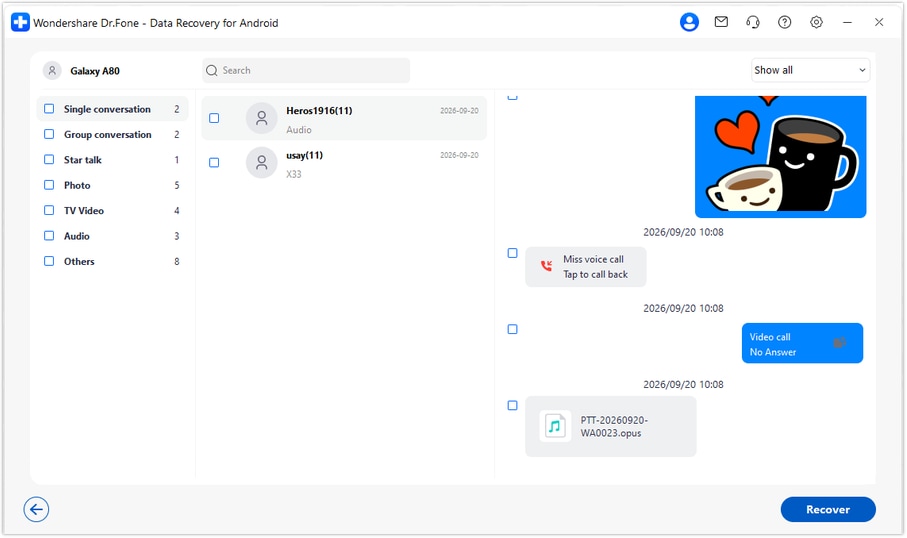
Step 5 Save the selected records to your computer
Click Recover and follow the prompts to choose a PC folder. Open the saved results to check the selected messages and attachments. This creates a computer copy; it does not restore the conversation directly into WhatsApp on the POCO X8 Pro Max.




Conclusion
For a deleted WhatsApp conversation that held important plans, Dr.Fone - Data Recovery (Android) brings the search back to the information you need: the message, the shared image and the useful attachment. On a supported POCO X8 Pro Max, you can preview the available results and save a focused selection to your PC without a backup. Download Dr.Fone for Windows and begin the guided recovery workflow for your compatible configuration.
FAQ
1. Can I recover deleted WhatsApp messages on POCO X8 Pro Max without a backup?
Dr.Fone - Data Recovery (Android) provides a no-backup device-scan route for supported configurations. Confirm your POCO X8 Pro Max configuration, run Advanced Recovery on Windows, select WhatsApp and inspect the results before saving. Recovery depends on which records the scan can still find.2. Does the POCO X8 Pro Max kernel reference confirm my Android version?
No. The supplied record lists kernel 6.6.89 but does not state Android, model code or build. The public Advanced Recovery guide documents Android 9-13. A configuration-specific Root reference does not extend that range to every newer firmware or provide a tested access procedure for your phone.3. Can I recover deleted WhatsApp photos and videos even if I mainly need the group chat?
Review the available photo, video and other attachment categories alongside the conversation results. You can select the media found by the scan as well as useful messages. A photo appearing in the results does not mean every message from its original conversation will also be present.4. Is finding an event document in Downloads the same as recovering the chat?
No. It is an already retained copy of that document. It may solve your immediate need, but it does not restore deleted message text or recreate the original conversation.5. Will the saved messages reappear in WhatsApp on the phone?
No. Advanced Recovery saves the selected available records to a folder on your Windows PC. It does not import, sync or insert them into WhatsApp.
 Add Wondershare Dr.Fone as a preferred source on Google





