 Recover photos, messages, WhatsApp, and more — no backup
needed.


 100% Security Verified | No Subscription Required | No Malware


 :

 ChatGPT
 Perplexity
 Gemini
 Claude
 Grok
You clear an old WhatsApp group and then remember that it contained tomorrow's meeting point, a booking document and the only video someone shared from the trip. Losing the conversation means losing both the messages and the clues that helped you identify those files. If you need to recover deleted WhatsApp messages on your Samsung Galaxy S23+ without a backup, start with a recovery plan that covers the discussion and its attachments together.
Dr.Fone - Data Recovery (Android) gives supported S23+ owners that route. Its Advanced Recovery scan lets you inspect available WhatsApp conversations, photos, videos and attachments before saving a focused selection to your PC. You can look for the specific information you need rather than recreate an entire group conversation from memory.
In this article
Before you start
Check the S23+ model and installed software
Open Settings > About phone and Software information to record the model, Android version, build and kernel. The supplied S23+ Root reference lists SM-S9160, kernel 5.15.153 and builds S9160ZCS8FZE3, S9160ZCS8FZG1 and S9160ZHS8FZE3. Android is not specified. These are configuration references, not verified support for every combination or every regional S23+. The public Advanced Recovery guide covers Android 9-13; ask Dr.Fone support to confirm the applicable route for your complete configuration, particularly if it is newer.
Prepare Windows without changing the phone's data
Advanced Recovery is Windows-only. Have a Windows PC, a USB data cable and a destination folder ready, and keep the existing WhatsApp installation intact. Do not clear WhatsApp storage, reset the phone or unlock its bootloader as an improvised recovery step. Root and access requirements need configuration-specific confirmation; follow the product's supported instructions rather than a generic rooting tutorial.
Make a short list of the missing trip or group records
Note the group name, participant and approximate date, plus the photo, clip or document you want. The list helps you compare conversation and attachment results. Advanced Recovery saves the selected records to your PC, not back into the WhatsApp group, and the recoverable selection depends on what the scan finds.
Check for a surviving WhatsApp conversation or media copy on S23+
Recover the information quickly if it is still accessible, then use the app-data scan for genuinely deleted records.
Step 1 Find out whether the group is hidden or deleted
Search WhatsApp for the group name or a participant and check Archived. If the conversation opens with the required messages, read or save the information there. An archived group can disappear from your usual chat view without its messages being deleted.
Step 2 Look for a photo or video already saved outside the chat
Open Samsung Gallery and look for the needed image or clip among the media already present. A copy previously saved to the phone may still be useful even when the conversation is gone. If you need the surrounding instructions, a document or media that is absent, continue to the WhatsApp scan.
- A surviving Gallery item is an existing copy, not recovery of a deleted WhatsApp conversation.
- This guide does not ask you to restore or create a Google Drive backup as a substitute for a no-backup scan.
What each result gives you after losing a WhatsApp group
| What you find | Useful result | What to check next |
|---|---|---|
| The group is in Archived | Access to messages that remain in WhatsApp | Read the required exchange before starting deleted-data recovery. |
| A trip photo remains in Gallery | A separate image you can keep | Look for the message text separately if the image alone is not enough. |
| Dr.Fone finds conversation records | Selected message results saved to a PC | Identify the relevant group and inspect the available discussion. |
| Dr.Fone finds photos, videos or documents | Selected shared files saved to a PC | Choose the useful attachments even if the complete conversation is not present. |
Common problems and fixes
You found the right image but not the booking instructions
Review WhatsApp conversation results separately from photos and videos. Use search or filters where available to locate the group or a remembered term, then check the document category if the instructions arrived as a file. Media and message availability can differ.
Your S23+ has a different model suffix or build
Send Dr.Fone support your actual model, Android version and full build. The SM-S9160 entry does not establish support for another regional model, and a similar S23 or S23 Ultra entry is not a substitute. Keep the existing firmware rather than attempting to make the phone match a reference.
A filename looks right, but you are not sure it is the missing file
Inspect the available preview and conversation context before selecting the result. After saving, open the PC output to check that it contains the information you need. A matching name alone does not confirm that an entire document or video is available.
How to use Dr.Fone - Data Recovery (Android)
Dr.Fone - Data Recovery (Android) helps you search for the useful parts of a deleted WhatsApp group on a supported Galaxy S23+. Its Windows-only Advanced Recovery workflow scans WhatsApp app data without relying on a backup, organizes the available messages and attachments for review, and saves your chosen results to a PC. That combination is valuable when a single lost conversation held the plans, shared memories and documents you need together.
- Review conversations and attachments in their respective result views instead of relying only on a surviving Gallery copy.
- Use available search and filters to narrow the results to the relevant group or record.
- Keep a selective PC copy of useful messages, photos, videos and other found attachments.
 Scan Android phones and tablets directly.
- Preview and recover only what you want.
- Supports WhatsApp, photos, videos, contacts, and more.
- Works with 6000+ Android devices.

Follow the official Advanced Recovery workflow
Step 1 Open Advanced Recovery for the Galaxy S23+
Launch Dr.Fone on Windows and open Toolbox > Data Recovery. Choose Android > Recover Android Data, select Advanced Recovery and click Start Scan. Connect your supported S23+ by USB when prompted and follow the on-screen instructions until the phone is detected.

Step 2 Select personal WhatsApp data
Choose WhatsApp and click Start Scan. The guide requires WhatsApp, WhatsApp Business and the other categories to be scanned separately, so use the personal WhatsApp selection for the group messages in this article.

Step 3 Keep the phone connected throughout scanning
Allow Advanced Recovery to scan with the USB connection in place. If you need to stop, click Cancel before disconnecting. Follow the displayed restart instructions if the phone becomes temporarily unresponsive after scanning or recovery.

Step 4 Review the group and its available attachments
Open the WhatsApp results and look for the relevant conversation. Use search and filters where offered, then inspect the photo, video, audio and other attachment categories. Select the found message records and files that match your recovery list.
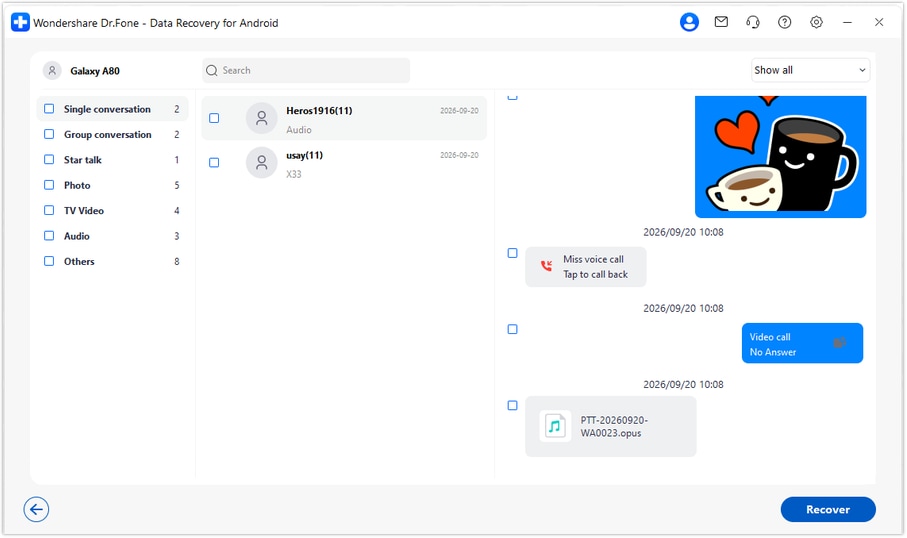
Step 5 Recover the selection to your computer
Click Recover, choose a folder on your PC and finish the save prompts. Open the saved output to review the selected information. This creates a computer copy rather than restoring the original group inside WhatsApp.




Conclusion
The most useful recovery may be the few messages and files that make your plans complete again. For a supported Galaxy S23+, Dr.Fone - Data Recovery (Android) combines a WhatsApp-focused scan, conversation and media preview, and selective saving to a PC without requiring a backup. Download Dr.Fone for Windows and start looking for the group details and shared attachments you want back.
FAQ
1. How can I recover deleted WhatsApp messages on Galaxy S23+ without a backup?
Use Dr.Fone - Data Recovery (Android) on Windows with a supported S23+ configuration. Choose Advanced Recovery and WhatsApp, scan the connected phone, preview the available records and recover your selection to a PC. This is a device scan, not a Google Drive restore.2. Can I recover a deleted WhatsApp group and its videos together?
You can inspect conversation and video results during the WhatsApp recovery workflow, then select useful items from both when found. A scan does not guarantee every message or file from a group will be available, so review each category.3. Does finding a WhatsApp photo in Samsung Gallery bring back the chat?
No. A photo already in Gallery is a surviving copy of that image. To look for deleted message text or other attachments on a supported phone, inspect the WhatsApp results in Dr.Fone.4. Does the SM-S9160 reference cover every Galaxy S23+ Android version?
No. The supplied reference names SM-S9160 and specific build entries but leaves Android unspecified. The public Advanced Recovery range is Android 9-13; additional Root eligibility requires confirmation for the phone's actual software configuration.5. Where can I read the recovered WhatsApp records?
Read the saved output in the destination folder you choose on the Windows PC. Advanced Recovery does not merge the recovered records into your phone's WhatsApp chat list.
 Add Wondershare Dr.Fone as a preferred source on Google





