 Recover photos, messages, WhatsApp, and more — no backup
needed.


 100% Security Verified | No Subscription Required | No Malware


 :

 ChatGPT
 Perplexity
 Gemini
 Claude
 Grok
A deleted WhatsApp conversation can take away more than a few messages. If you approved a renovation layout, changed a delivery date or discussed a price on your Samsung W26, you may need both the written agreement and the image or document it referred to. Without a usable backup, it is easy to end up with a file but no explanation of which version was agreed.
Dr.Fone - Data Recovery (Android) gives compatible W26 users a way to look for available deleted WhatsApp records and compare conversations with related media before saving them. Its preview helps you choose useful information instead of treating every recovered image as the answer. Follow the preparation checklist, then use the five-step Windows scan to keep the selected records on your PC.
In this article
Before you start
Check the W26's own configuration
Record the model, Android version, build and kernel from About phone and Software information. The W26 Root reference names SM-W9026 and lists W9026ZCU7BZF1 and W9026ZCS8BZG3 as build references, plus kernel 6.6. Android is not specified. These entries do not validate arbitrary combinations or establish compatibility by themselves; confirm the actual configuration with Dr.Fone support rather than using a Samsung W25 record.
Establish recovery and access eligibility before changing the phone
The public Advanced Recovery guide is Windows-only and covers Android 9-13. Additional device-specific Root records are not blanket support for Android 14-16 or every regional firmware. Ask what is required for your current setup. Do not unlock the bootloader, flash another build or factory-reset the W26 to imitate a reference configuration; no such preparation is established here.
Match the scan to the app that held the agreement
This guide is for personal WhatsApp. A conversation with a contractor or seller does not by itself mean you used WhatsApp Business; check which app actually contained it. Leave that installation and its storage intact, prepare a USB data cable and Windows PC, and note the contact, approximate exchange date and document or image you need.
Check whether the agreement or only its attachment is missing
You can still find the contact but are unsure how much of the discussion was deleted.
Step 1 Inspect the existing conversation
Open the relevant contact or group in WhatsApp; check Archived if the conversation is absent from the main list. Look for the approval wording and nearby references to a design or date. A conversation that is merely archived remains readable.
Step 2 Check the chat's retained shared items
If the conversation is present, inspect its media and document area for the image or file in question. Distinguish a missing attachment from a deleted exchange: recovering a document and recovering the text that approved it are different targets for the scan.
- Reading existing messages and shared items does not recover deleted data.
- If the required records are absent and no usable backup exists, the eligible device-scan route below is the main recovery attempt.
How to use the WhatsApp results from a Samsung W26 scan
| What the scan finds | What you can preserve | What that result does not establish |
|---|---|---|
| The relevant conversation text | The available discussion or approval wording | That every referenced attachment is also recoverable. |
| A layout image or shared video | The available visual information | That this was the final approved version. |
| A document or audio attachment | The available file or spoken instructions | That missing surrounding messages have been reconstructed. |
| Only part of the target discussion | The useful records visible in the preview | That absent messages can be recreated from the saved copy. |
Common problems and fixes
Several similar design images appear in the preview
Inspect the images themselves and the available conversation context before selecting. Keep useful available records, but do not label an image as the approved revision solely because it appeared in the scan. Use the actual content to distinguish a draft from the version you need.
You selected WhatsApp Business, but the missing conversation was in personal WhatsApp
Use the selection for the app that contained the conversation. Personal WhatsApp and WhatsApp Business are separate scan choices and cannot be combined with all other categories in the same scan. The subject of a conversation does not determine the app category.
Your W26 build differs from the reference entries
Keep the current installation intact and ask support to check the actual build, Android and app version. Do not downgrade or flash firmware to match a list. A difference needs an eligibility answer, not an improvised phone modification.
How to use Dr.Fone - Data Recovery (Android)
Dr.Fone - Data Recovery (Android) helps you recover useful information from eligible WhatsApp app data while keeping the selection under your control. Its Windows-only Advanced Recovery mode lets you inspect the available Samsung W26 conversations alongside photo, video, audio and other attachment categories, then save chosen results to a PC. When the missing discussion involved a design or agreement, previewing text and files separately helps you preserve the parts that actually clarify what was said.
- A targeted WhatsApp scan gives you a route beyond a general search of phone photos when the missing information was in the app.
- Preview available discussions and attachment categories to identify relevant records and avoid selecting unrelated drafts.
- Recover selectively to a PC so the messages and files you choose remain available for review outside WhatsApp.
 Scan Android phones and tablets directly.
- Preview and recover only what you want.
- Supports WhatsApp, photos, videos, contacts, and more.
- Works with 6000+ Android devices.

Follow the official Advanced Recovery workflow
Step 1 Choose Advanced Recovery for the compatible W26
Open Dr.Fone on your Windows computer and go to Toolbox > Data Recovery. Select Android > Recover Android Data, choose Advanced Recovery and click Start Scan. Connect the Samsung W26 by USB when prompted and complete the on-screen device-detection instructions.

Step 2 Choose the personal WhatsApp scan
Select WhatsApp and click Start Scan. Run this selection separately from WhatsApp Business and the other app or browsing-data categories, following the official guide's category-selection restriction.

Step 3 Keep the W26 connected as scanning proceeds
Wait while Advanced Recovery scans the WhatsApp data. If you want to stop, click Cancel before removing the cable. If the phone is temporarily unresponsive after scanning or recovery, use the restart guidance displayed on screen.

Step 4 Preview the exchange and supporting files
Review the available WhatsApp conversations and use search or filters where offered. Browse photo, video, audio and other attachment categories from the sidebar. Select the message records and files that contain the information you need.
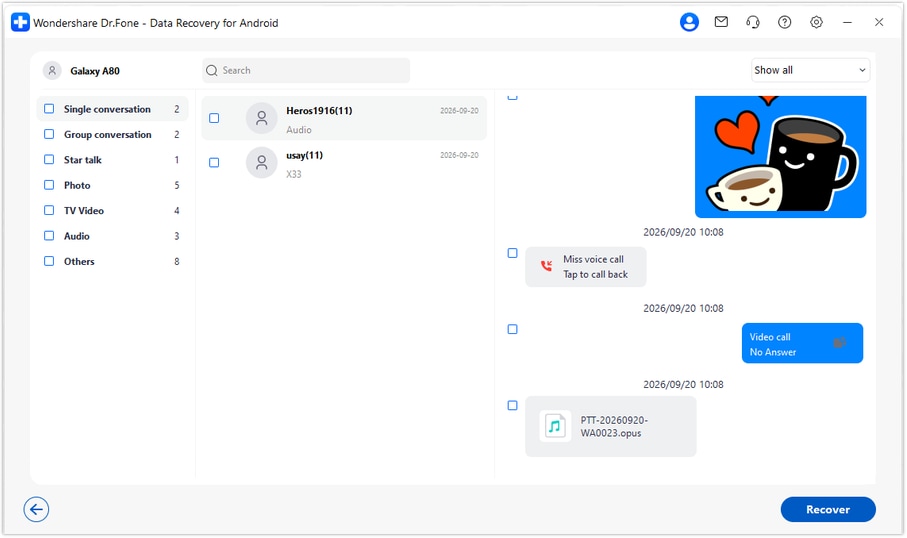
Step 5 Save the chosen records to your Windows PC
Click Recover, choose the computer folder requested by the save prompts and complete recovery. Open that folder to review the saved output. The result is a PC copy, not a restored WhatsApp conversation on the W26.




Conclusion
If an important discussion disappeared from a compatible Samsung W26, Dr.Fone - Data Recovery (Android) is a useful next step for finding available WhatsApp messages, checking related attachments and keeping selected records together on a PC. Download Dr.Fone for Windows, confirm your setup and start the guided recovery workflow for the information you need back.
FAQ
1. Can Dr.Fone recover deleted WhatsApp messages on Samsung W26 without a backup?
For an eligible W26 configuration, Dr.Fone - Data Recovery (Android) can scan WhatsApp app data without an existing backup. Review what the scan finds and save selected results to a PC. The specific messages and attachments available depend on the scan, not simply on the phone's model name.2. Is the Android version of the W26 reference confirmed?
No. The supplied W26 record leaves Android blank, so it should not be inferred from kernel 6.6, a build reference or another Samsung model. Check the actual version in Settings and confirm eligibility for that complete setup. The public Advanced Recovery guide documents Android 9-13.3. Do I need to Root my Samsung W26 before attempting this recovery?
Confirm the supported access route for your exact configuration with Dr.Fone support. The additional Root reference does not explain the Root mechanism, whether existing Root is required or whether a particular modification would erase data. This guide therefore supplies no Root or bootloader-unlock procedure.4. Can I recover deleted WhatsApp photos and videos without the approval messages?
If the scan finds those media items, you can preview and save them separately. Media and text results can differ. A recovered image or video preserves that available item, but it does not prove which version was approved in missing messages.5. Does saving the results restore the conversation to WhatsApp?
No. Advanced Recovery saves the selected available messages and attachments to a PC folder. You can review that copy on your computer, but it is not inserted into WhatsApp on the Samsung W26.
 Add Wondershare Dr.Fone as a preferred source on Google





