Recover photos, messages, WhatsApp, and more — no backup
needed.
Recover photos, messages, WhatsApp, and more — no backup
needed.

 100% Security Verified | No Subscription Required | No Malware

 :
: 
 ChatGPT
 Perplexity
 Gemini
 Claude
 Grok
Grok
You opened a View Once photo in WhatsApp, and your iPhone 18 now shows “Opened” where the image used to be. View Once media follows its own rules, so the usual fixes for deleted WhatsApp photos, like checking Photos or Recently Deleted, won’t find it.
At that point, Dr.Fone – Data Recovery (iOS) offers another way to check for supported View Once content after it disappears from the chat. An eligible backup also helps if the item was still unopened when the backup was created. This guide explains both ways to recover a WhatsApp View Once photo on iPhone 18, depending on what each source contains.
In this article
- Part 1. What Happens to WhatsApp View Once Photos After They Disappear?
- Part 2. Can an iCloud Backup Restore a Disappeared View Once Photo?
- Part 3. How to Recover WhatsApp View Once Photos on iPhone 18 with Dr.Fone – Data Recovery (iOS)
- Part 4. How to Avoid Losing Important WhatsApp View Once Photos Before Opening
Part 1. What Happens to WhatsApp View Once Photos After They Disappear?
WhatsApp treats View Once media differently from regular chat attachments. A View Once photo, video, or voice message disappears from the chat after the recipient opens it once. If you want to recover WhatsApp View Once photo content later, whether it was opened, backed up, or allowed to expire matters. WhatsApp’s help page says View Once media isn’t saved to your Photos library and can’t be forwarded, saved, starred, or shared.
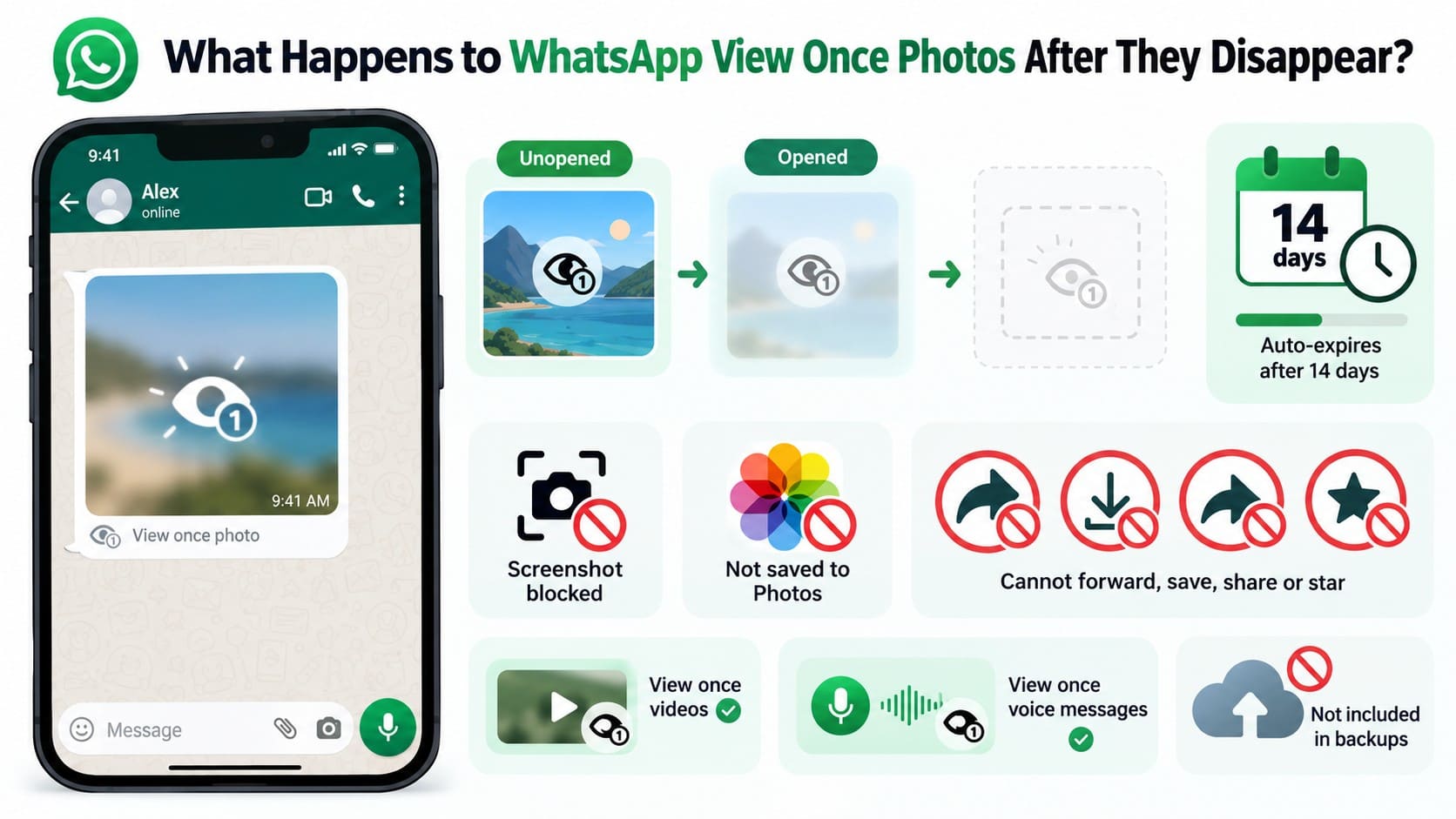
The app also blocks screenshots, while unopened View Once media expires 14 days after it is sent. Once opened, it cannot normally be viewed again. These rules also apply to videos and voice messages. WhatsApp notes that encrypted View Once media may remain on its servers for a few weeks, but this does not provide a native way to reopen already-viewed media.
Opened vs Unopened View Once Photos
The chat bubble shows the state of a View Once photo, since an unopened one still carries its one-time icon. Each state points to a different option when you try to recover a WhatsApp View Once photo on iPhone 18. The table below explains what happens at each stage and what you can still check:
| View Once Status | What WhatsApp Does | What You Can Check |
|---|---|---|
| Unopened and Less Than 14 Days Old | The item remains available in the chat until you open it or the 14-day window ends. | Open it only when you are ready to view it carefully. |
| Unopened When a Backup Was Created | WhatsApp says unopened View Once media can be included in a backup. | Check whether a suitable WhatsApp backup exists before restoring anything. |
| Opened and Disappeared | The item can no longer be opened through the chat and is excluded from later backups. | Dr.Fone can attempt recovery through its dedicated linked-session workflow, depending on what the session detects. |
| Not Opened Within 14 Days | WhatsApp expires the unopened item after the 14-day viewing period. | There is no normal in-chat option to open the item after expiration. |
Part 2. Can an iCloud Backup Restore a Disappeared View Once Photo?
Yes, but only in one specific case. You can recover a WhatsApp View Once photo on iPhone 18 from an iCloud backup if the photo was still unopened when WhatsApp created that backup. Once opened, the photo is excluded from later backups. On iPhone, WhatsApp can restore eligible chat history from an existing iCloud backup.
Before reinstalling WhatsApp, check the backup date and time carefully. For View Once videos, make sure Include Videos was enabled when the backup was created. If the backup contains the unopened media, follow the steps below to restore it.
Step 1 Check the Backup Date
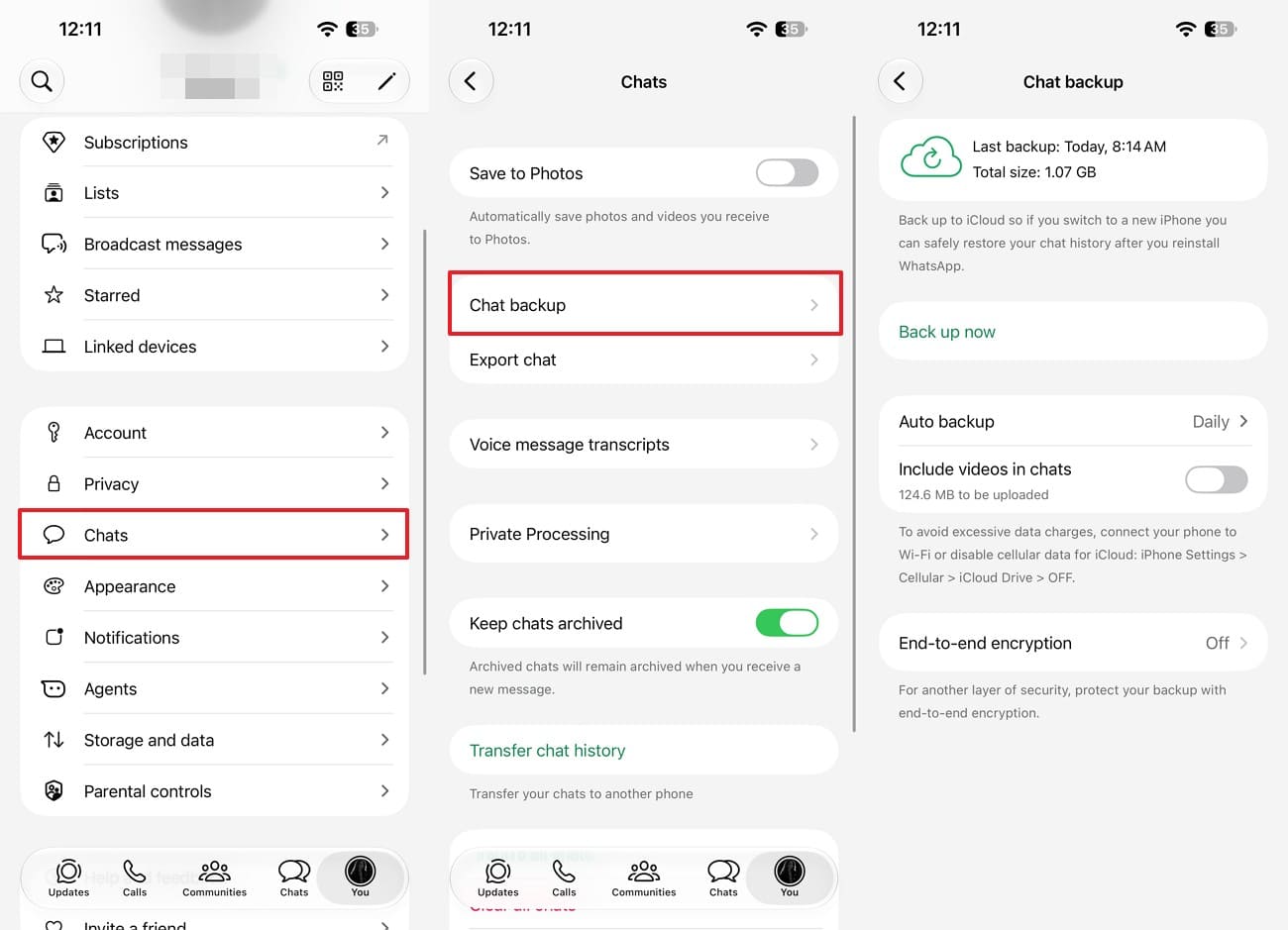
Open “WhatsApp > You > Chats > Chat Backup.” WhatsApp shows the date, time, and size of the latest iCloud backup. Open the conversation and check when the View Once photo was sent. If the backup date falls inside that window, do not create a fresh backup before attempting the restore.
 Important: Restoring an older WhatsApp backup may not preserve newer chats created after that backup. Consider any recent conversations before reinstalling WhatsApp.
Step 2 Reinstall WhatsApp
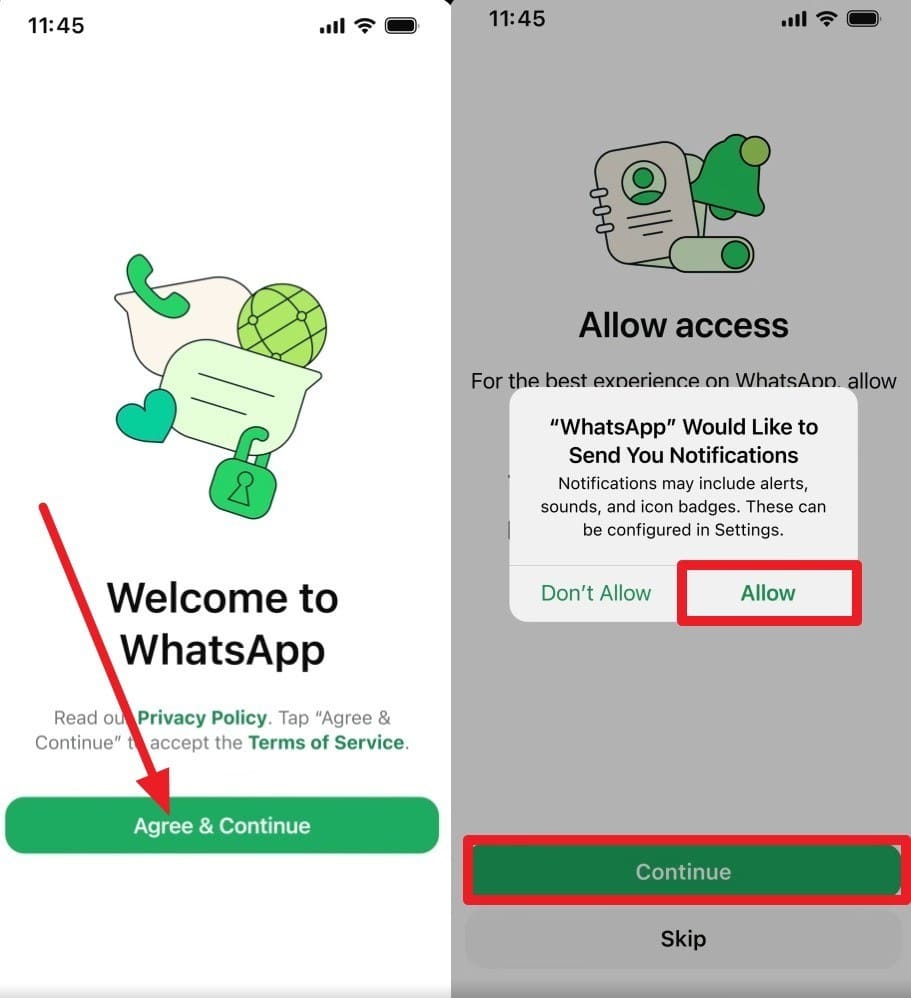
Uninstall and reinstall WhatsApp from the App Store. Select “Agree & Continue,” and use the same phone number and Apple ID used for the backup, then tap “Continue” and “Allow.”
Step 3 Restore from Backup
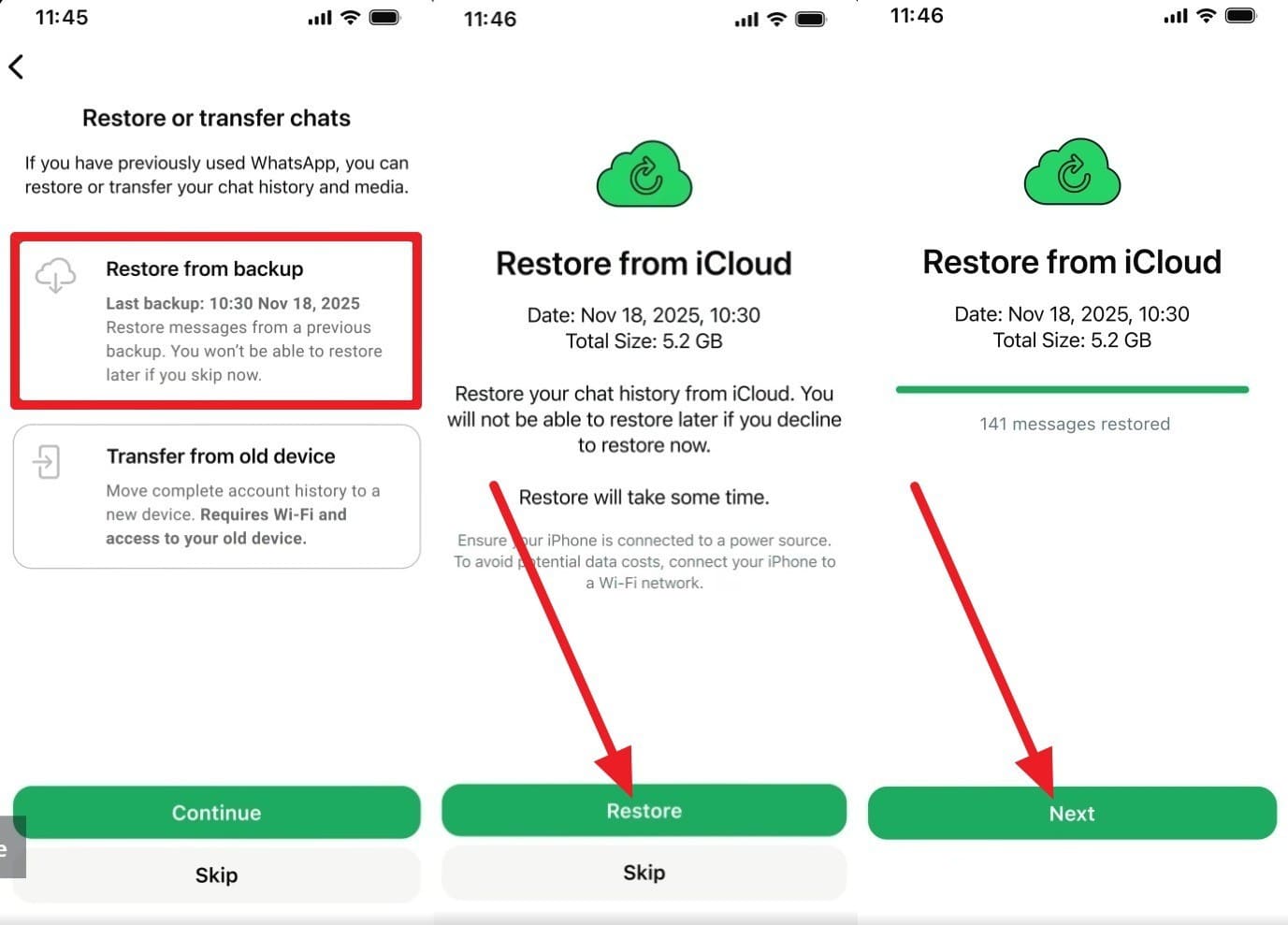
Select “Restore from Backup,” then choose “Continue > Restore > Next.” Once the restore finishes, open the conversation and check whether the View Once item is available.
 Note: View Once media must be opened within 14 days of sending. Restoring an older backup does not extend this viewing period.
Part 3. How to Recover WhatsApp View Once Photos on iPhone 18 with Dr.Fone – Data Recovery (iOS)
If the iCloud backup does not contain the photo, Dr.Fone - Data Recovery (iOS) provides another way to recover WhatsApp View Once photo content on iPhone 18. Its dedicated “Recover WhatsApp View Once Data” mode uses a linked WhatsApp session to detect supported View Once content after it disappears from the chat.
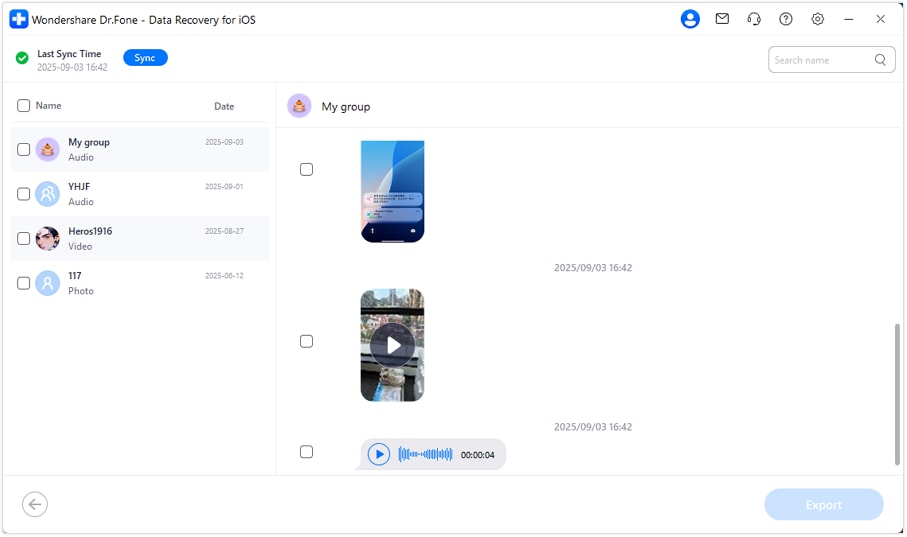
After synchronization, Dr.Fone groups the View Once media it detects in a separate recovery view for easier review. You can preview available photos, videos, and audio before choosing what to keep. Selected items can then be exported to your computer for later access.
 Recovers data after deletion, crashes, or device damage.
- Supports photos, messages, contacts, WhatsApp, and more.
- Supports all major iPhone, iPad, and iPod models.
- Preview and recover only what you need.
Guide to Recover View Once Photos from iPhone 18
Before starting, open Dr.Fone on a supported Windows PC, connect the unlocked iPhone 18, and keep it connected to the internet. WhatsApp supports up to four linked devices, allowing Dr.Fone to establish a linked session for View Once recovery. To recover a WhatsApp View Once photo on iPhone 18, follow these steps:
Step 1 Launch the View Once Recovery Session for the iPhone 18
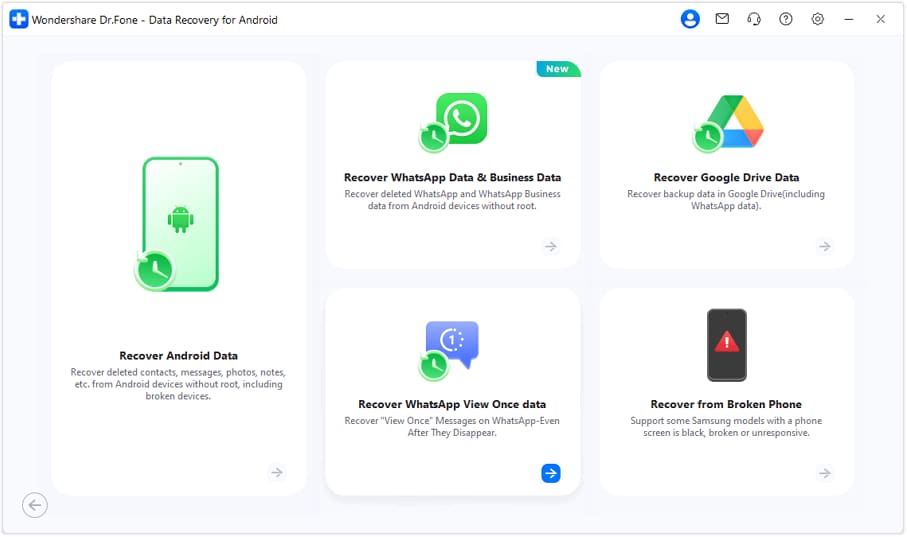
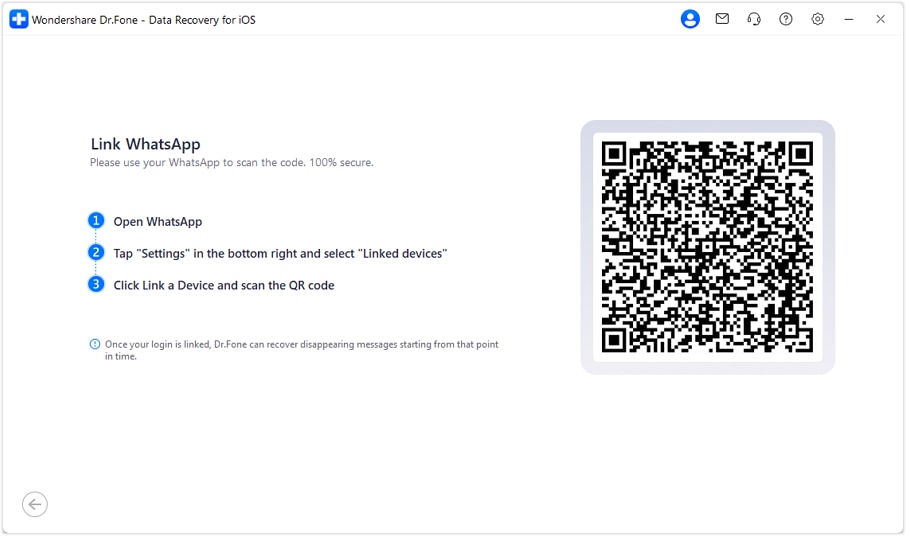
From the “Data Recovery” tool for “iOS,” select “Recover WhatsApp View Once Data.” With your iPhone 18 connected, click “Start Recovery.” Dr.Fone will then display a QR code on the next screen.
Step 2 Link WhatsApp by Scanning the QR Code
On your iPhone 18, open WhatsApp and tap “You > Linked Devices > Link a Device.” Scan the QR code displayed on Dr.Fone, then confirm the connection on your iPhone.
Step 3 Select the Recovered View Once Items and Export
Once syncing is complete, browse the View Once items and preview the available photos. Select the photos you want to keep, then click “Export” to save them to your computer.
 Note: Dr.Fone states that this feature does not modify your WhatsApp messages or upload them to its servers. After recovery, open “WhatsApp > You > Linked Devices,” select the Dr.Fone-linked session, and tap “Log Out” to end its access to your account.




Part 4. How to Avoid Losing Important WhatsApp View Once Photos Before Opening
When you may need a View Once photo later, preparing before opening it can help preserve another copy. These two practical options can reduce the need to recover a WhatsApp View Once photo after it disappears:
- Ask for a Regular Copy: Ask the sender to resend the photo without View Once if you may need it later. A regular photo can be saved and reopened normally.
- Keep a Secondary Phone Ready: Use another phone to photograph or record important View Once content while it is displayed. Make sure you have permission before keeping a copy.
Conclusion
To recover a WhatsApp View Once photo on iPhone 18 after it disappears, Dr.Fone can check for supported content through its linked-session workflow. An eligible backup offers another route if the item was still unopened when that backup was created.
What you can retrieve depends on the media Dr.Fone detects or the backup contains. Checking both sources gives you the best chance of finding a usable copy. If neither source helps, ask the sender to resend the original as a regular photo.
FAQ
1. Can I recover a WhatsApp View Once photo after opening it on iPhone 18?
Dr.Fone - Data Recovery (iOS) supports View Once photos, videos, and audio through its dedicated View Once recovery feature. Once synchronization finishes, you can preview detected media and export the items you need to a computer.2. Can the sender resend a View Once photo after it disappears?
Yes, provided the sender still has the original photo. They cannot forward the disappeared View Once message itself, but they can resend the original from their device. Ask them to send it as a regular photo instead of View Once if you need to save or access it again.3. Can Dr.Fone recover WhatsApp View Once videos and audio as well as photos?
Yes. Dr.Fone - Data Recovery (iOS) supports View Once photos, videos, and audio through its dedicated feature. It captures and saves supported media through a linked WhatsApp session while the content remains accessible.
 Add Wondershare Dr.Fone as a preferred source on Google