 Recover photos, messages, WhatsApp, and more — no backup
needed.


 100% Security Verified | No Subscription Required | No Malware


 :

 ChatGPT
 Perplexity
 Gemini
 Claude
 Grok
The voice note was only a few seconds long, but you cannot replace it by taking another photo. If a family WhatsApp conversation vanished while you were tidying your Galaxy S24+, Dr.Fone - Data Recovery (Android) gives supported devices a route to search for the messages and shared media without relying on a backup.
To recover deleted WhatsApp messages on Samsung Galaxy S24+ usefully, think beyond the chat title: you may want one recording, several photos and the words that explain them. The Windows Advanced Recovery workflow lets you inspect the available categories and choose a meaningful selection for PC saving, rather than keep every unrelated result.
In this article
Before you start
Use the S24+ record, not another S24-series entry
Check Settings > About phone and Software information for the exact model, Android version and build. The supplied S24+ Root record names SM-S9260 and SM-S926B, lists kernels 6.1.145 and 6.1.157, and includes S9260ZCS6DZE2, S9260ZCS6DZF2, S9260ZCS6DZG1 and S926BXXUEDZDR builds. The lists do not establish every kernel/build pairing; keep S9260 and S926B prefixes separate. Android is unspecified. The public Advanced Recovery guide covers Android 9-13; confirm any additional Root route for your complete configuration with Dr.Fone support rather than inferring it from the S24+ name.
Keep the original phone and app ready
Use a Windows computer, a reliable USB data cable and room for your chosen output. This Advanced Recovery workflow is Windows-only. Leave the existing WhatsApp installation in place and avoid app-storage clearing, resets or firmware changes. Do not attempt an unverified Root or bootloader procedure to expose the data; follow confirmed device-access instructions for the supported configuration.
Choose a small set of memories to identify
Write down the family contact or group, approximate occasion and whether you need text, audio, photos, videos or a document. This becomes a useful preview checklist. The scan determines which records are available, and recovery saves a separate PC copy rather than rebuilding the live WhatsApp conversation.
Look for a surviving family copy before deleted-chat recovery
A retained or shared copy can solve a one-item request without requiring a full conversation to be recovered.
Step 1 Search WhatsApp and its Archived area
Search for the family contact or group, then check Archived if the conversation is missing from the main list. If the messages are still present, inspect the recording or media you wanted before moving on.
Step 2 Check whether a participant still has the specific item
If appropriate, ask the original sender or a family participant whether they still have the wanted recording, photo or clip and can share it with you. A surviving copy may meet a single-file need. If nobody has it, or you also need the deleted text around it, continue with the supported device scan.
- Another person's surviving copy is an alternative source of the item, not restoration of the original chat history.
- The Dr.Fone route below does not require the other participant's device or a Google Drive backup.
Ways to regain a family WhatsApp message or attachment
| Route | When it helps | Result you can expect |
|---|---|---|
| Open a retained or archived chat | The conversation was hidden rather than deleted | Access to the original messages that remain in WhatsApp. |
| Receive a surviving copy from a participant | Someone still has the particular recording, photo or video | A new copy of that item, not the deleted conversation around it. |
| Scan WhatsApp with Dr.Fone Advanced Recovery | The phone configuration is supported and the records are available to scanning | Preview of found conversations and attachments, with selected results saved to a PC. |
Common problems and fixes
You see photos, but the voice note was your main priority
Inspect the audio results as well as the conversation view. Use the available preview and search or filters to narrow the selection. Save any relevant audio found, then check message results separately for the surrounding words.
The results contain more media than you want to keep
Use the contact, occasion and item types in your checklist to inspect the available results. Select the records that matter rather than choosing everything. The interface's search and filtering options can help where offered.
The cable connection drops during scanning
Keep the USB connection stable while the scan runs. If you need to change the connection, cancel the scan before disconnecting as the official guide directs. Reconnect using the product's prompts; if detection remains unreliable, report the connection issue and device configuration to support.
How to use Dr.Fone - Data Recovery (Android)
Dr.Fone - Data Recovery (Android) gives supported Galaxy S24+ users a way to look for the pieces of a deleted WhatsApp conversation that are personally important. Its Windows-only Advanced Recovery mode scans WhatsApp app data, presents the available conversation and attachment results for review, and saves your chosen items to a PC without requiring an existing backup. Preview and selective saving let you build a focused recovery selection around a recording, photos, videos and the messages that matter to you.
- Inspect audio and other attachment categories alongside conversation results rather than looking only for pictures.
- Use preview to identify meaningful records before selecting them.
- Save selected available messages and media together to a computer destination.
 Scan Android phones and tablets directly.
- Preview and recover only what you want.
- Supports WhatsApp, photos, videos, contacts, and more.
- Works with 6000+ Android devices.

Follow the official Advanced Recovery workflow
Step 1 Choose Advanced Recovery and connect the S24+
Launch Dr.Fone on Windows. Go to Toolbox > Data Recovery, choose Android > Recover Android Data, select Advanced Recovery and click Start Scan. Connect your supported Galaxy S24+ by USB when requested and follow the device-detection prompts.

Step 2 Scan the personal WhatsApp category
Choose WhatsApp and click Start Scan. Select it separately from WhatsApp Business and the other categories; the official workflow does not scan those categories together.

Step 3 Let the scan run with the connection intact
Keep the S24+ connected while scanning progresses. If you need to stop, click Cancel before unplugging the cable. Follow the on-screen restart instructions if the phone becomes temporarily unresponsive after the scan or recovery.

Step 4 Preview the family conversation and shared memories
Open the WhatsApp result view, inspect relevant conversations and use search or filters where available. Review audio, photo, video and other attachment categories, then select the found messages and media that match the items on your checklist.
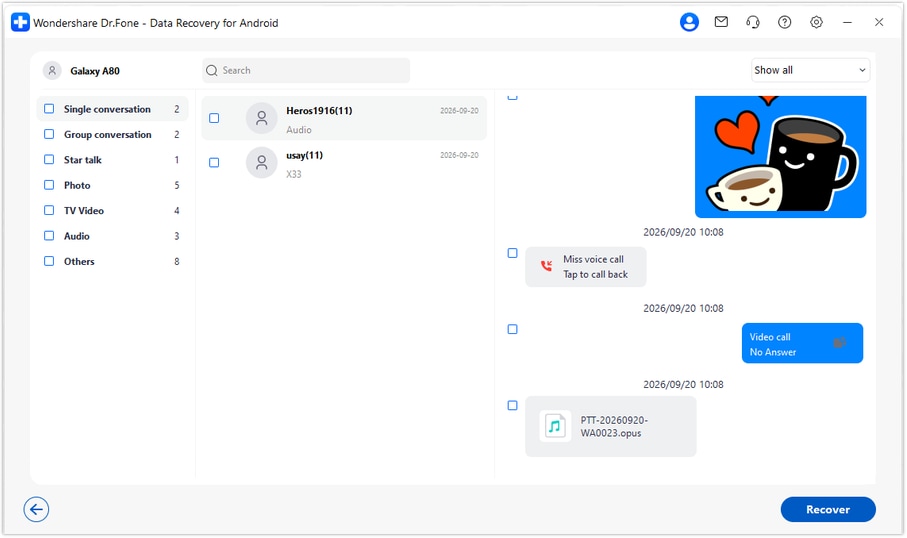
Step 5 Recover the chosen items to your PC
Click Recover and select a computer folder through the save prompts. Complete the operation and open the output to review the selected records. This gives you a PC copy rather than inserting the messages back into WhatsApp on the S24+.




Conclusion
A short voice note or a few lines of a family conversation can be worth a careful second look. For a supported Galaxy S24+, Dr.Fone - Data Recovery (Android) brings together WhatsApp app-data scanning, message and attachment preview, and selective saving to a PC. Download Dr.Fone for Windows and start a focused recovery search for the conversations and shared memories you want to keep.
FAQ
1. How do I recover deleted WhatsApp messages on Galaxy S24+ without a backup?
On a supported configuration, use Dr.Fone - Data Recovery (Android) on Windows. Open Advanced Recovery, scan WhatsApp separately, preview the available conversations and attachments, then save the wanted results to a PC.2. Can I look for a WhatsApp voice message as well as photos and videos?
The WhatsApp results include conversation and attachment views such as audio, photos and videos. Check the relevant category and select the needed item if it was found; availability can differ between a recording and the surrounding message text.3. Will I have to save all of the family group's media?
No. Review the available results and select the messages and files you want to keep. Selective recovery is useful when your goal is a small set of meaningful items rather than every media result.4. Can I use a standard Galaxy S24 recovery reference for the S24+?
The S24+ needs its own check. Its supplied reference names SM-S9260 and SM-S926B with specific software entries, not the standard S24's model codes. Android remains unspecified in the record, so confirm the complete installed configuration.5. Will recovering a recording rebuild the original WhatsApp thread?
Advanced Recovery saves your selected results to a Windows PC. A recovered recording can be useful on its own, but the workflow does not rebuild or merge the original conversation into WhatsApp.
 Add Wondershare Dr.Fone as a preferred source on Google





