 Effortlessly manage data through preview, delete, export, etc.

 100% Security Verified | No Subscription Required | No Malware

 :
: 
 ChatGPT
 Perplexity
 Gemini
 Claude
 Grok
Grok

I transferred my eSIM first and suddenly couldn’t receive SMS—then half my apps asked for verification codes I couldn’t get. I wish I had a checklist with “stop points” before doing anything irreversible.
Apple Support Community user
A clean carrier activation is mostly about sequencing, not speed.
Buying a new phone is easy to start and surprisingly easy to mess up if you skip a single dependency (SIM/eSIM eligibility, number port status, or MFA access). One missed step can leave you without calls/SMS right when you need verification codes.
AI helps by turning your situation into a checklist with a safe order: what to confirm first, what to prepare in parallel, what to test before moving on, and what to delay until you have proof everything works.
AI can’t actually activate your line, move your eSIM, or test network registration on your device. Execution needs real carrier tools, device settings, and (for phone-to-phone data handling) a dedicated device utility.
In this article
- Part 1. How to plan a carrier activation checklist (without missing critical steps)
- Identify point-of-no-return steps
- Protect access to MFA and account recovery
- Define acceptance tests before proceeding
- Delay wipes/resets until you have proof
- Part 2. What the AI needs to know
- Part 3. Using AI prompts to build a safer workflow
- Part 4. AI plan vs. real device constraints
- Part 5. When to stop planning and start execution
Part 1. How to plan carrier activation checklist after buying a new phone without missing critical steps
You bought a new phone and want your number working today, but you’re not sure whether you should transfer the eSIM first, update the OS first, restore data first, or log into your accounts first. You also don’t know which “quick steps” could quietly break your access to MFA codes.

Even if AI explains “how activation works,” it often doesn’t give you a verified sequence tailored to your carrier, phone type (iPhone/Android), and SIM type (physical SIM vs eSIM). The missing piece is a workflow with checkpoints that prove you’re safe to proceed.
The main point-of-no-return moment is deactivating/transferring your eSIM or initiating a number port before confirming you can still receive verification codes, access carrier login, and recover accounts. Another irreversible moment is factory-resetting or wiping the old phone before you confirm calls/SMS/data and MFA all work on the new phone.
Part 2. What the AI needs to know
Share just enough details for a checklist that’s specific and testable.
- Phone you’re leaving (model, iOS/Android version if known)
- New phone (model, iOS/Android version if known)
- Carrier and country/region
- SIM type now (physical SIM / eSIM / dual SIM) and what the new phone supports
- Is this a new number, or a port-in from another carrier?
- Any carrier account access issues (forgot password, locked account, no login email access)
- Your critical services that rely on SMS/voice (banking, work VPN, WhatsApp, iMessage/FaceTime, Google/Apple account)
- MFA method dependencies (SMS codes, authenticator app, hardware key)
- Data transfer approach preference (wireless, cable, or “keep it minimal and set up fresh”)
- Time constraints (need working service within X hours, traveling today, old phone battery condition)
Part 3. Using AI prompts to build a safer carrier activation workflow
Use the prompts below to make the AI produce a sequenced plan with verification gates before you touch anything irreversible.
3-1. Level 1: Basic prompt
I bought a new phone and need to activate my carrier service without losing access to calls/SMS or MFA codes. Build me a short checklist in the safest order, with 3–5 verification checks before any irreversible step. Do not include execution instructions that require you to access my device—planning only.
3-2. Level 2: Advanced prompt
Create a structured workflow for carrier activation after buying a new phone.
- Preparation: list critical vs optional prep steps (carrier login, account PIN, Wi‑Fi, backups, MFA access).
- Execution: list the safest activation sequence for my SIM type (physical SIM vs eSIM), with clear stop points.
- Verification: provide tests for voice, SMS, data, voicemail, and account/MFA access; include pass/fail criteria.
Mark critical steps that must happen first, and optional steps I can postpone.
3-3. Level 3: Evidence prompt
Build me a carrier activation checklist with checks before/during/after, and include “evidence to collect” at each gate. Context:
- Carrier: (Verizon) | Country: (US)
- Old phone: (iPhone 12, iOS 17) | New phone: (iPhone 15, iOS 17)
- SIM: (eSIM) | Goal: (move existing number) | Porting: (No)
- MFA risk: (bank uses SMS; work uses authenticator app)
- Constraints: (need service working within 2 hours; old phone must stay usable as fallback)
Output:
1) A step-by-step sequence with decision points (if X fails, do Y).
2) A checklist of what NOT to do until verification is complete (point-of-no-return warnings).
3) A “final acceptance test” that proves it’s safe to erase/trade-in the old phone.
3-4. Prompt refinement (follow-ups)
Rewrite the workflow as a gated checklist: Gate 0 (account access), Gate 1 (MFA safety), Gate 2 (activation), Gate 3 (post-activation validation). Each gate must have pass/fail criteria.
List the top 10 failure modes for my scenario (eSIM transfer stuck, SMS not receiving, voicemail not provisioning, iMessage issues, port delay). For each, give the earliest signal and the safest rollback.
Create two versions: Fastest safe path (time-boxed 60 minutes) vs Lowest-risk path (no time pressure). Highlight what I’m trading off.
Ask me only the minimum 7 questions you need to finalize the checklist, then output a one-page plan. No generic advice.
Convert the plan into a printable checklist with ‘Done/Not done’ and a ‘Proof’ field (e.g., ‘received SMS from non-iPhone number’).
Part 4. AI plan vs. real device constraints
| AI plan item | Real constraint on devices/carriers |
|---|---|
| Define the safest activation order | The actual order may be forced by carrier provisioning, eSIM eligibility, or port status |
| Specify verification tests (calls/SMS/data) | You must run tests on real networks; results vary by coverage, outages, and device settings |
| Recommend when to keep the old phone active | Only you can confirm the old device still receives SMS/MFA and remains logged in |
| Identify “point of no return” steps | Carriers may finalize transfers instantly; reversing can require support and time |
AI improves planning and reduces avoidable mistakes, but it cannot perform carrier activation, confirm provisioning, or validate your device state—those require real execution and real checks.
Part 5. When to stop planning carrier activation checklist after buying a new phone and start execution
- You can log into your carrier account (or you have the account PIN/port-out PIN) and you know where to request SIM/eSIM changes.
- You have at least one working MFA path that won’t disappear mid-process (e.g., authenticator app available on old phone, backup codes saved).
- You’ve defined your acceptance tests (voice call in/out, SMS in/out, data, voicemail, key apps sign-in) and you know what “pass” looks like.
- You’ve explicitly delayed the irreversible steps (eSIM transfer finalization, number port submission, wiping old phone) until after those tests pass.
At this point, the risk shifts from “missing a step” to “not executing the checks you already decided.”
Execute the workflow safely with Dr.Fone
Execution now matters because the safest activation plan depends on real device state: what data you still need, what accounts must stay logged in, and whether you can fall back if activation stalls. If you also need to move key data between phones before you trigger SIM/eSIM or port changes, Dr.Fone - Phone Transfer can help you prepare a rollback option while you keep the old phone usable.
 Move data between iOS to Android and vice versa.
- Transfer contacts, SMS, photos, videos, music, and more types.
- Available with all phones with Android and iOS versions.
- Simple, click-through process.

-
Step 1 Protect a rollback option (backup/transfer readiness)
Before you trigger any SIM/eSIM or port changes, back up or transfer the data you cannot afford to lose, so your old phone can remain a usable fallback while you validate carrier activation.

Limitation: Dr.Fone can’t activate carrier service or guarantee SMS/MFA delivery—verify those with real network tests.
-
Step 2 Set the correct transfer path (match your two phones)
Select the appropriate phone-to-phone direction for your situation (for example, iOS to Android, Android to iOS, or same‑platform transfer) before starting the transfer.
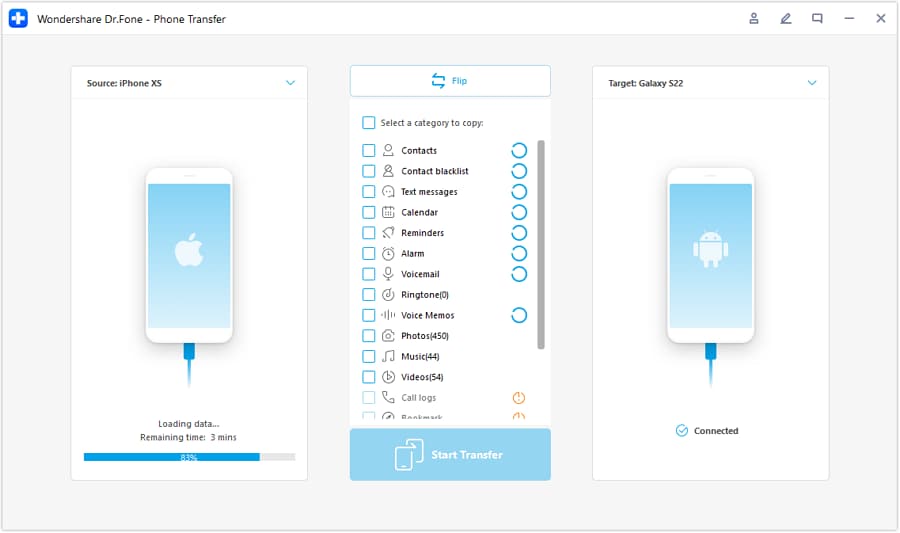
Tip: Keep your carrier activation steps separate from your data transfer steps, so you can troubleshoot one variable at a time.
-
Step 3 Choose what to transfer (keep it minimal if time is tight)
Transfer only the essentials you need for day‑one functionality (contacts, key photos/files, and other critical items), then validate carrier service and MFA before moving the rest.
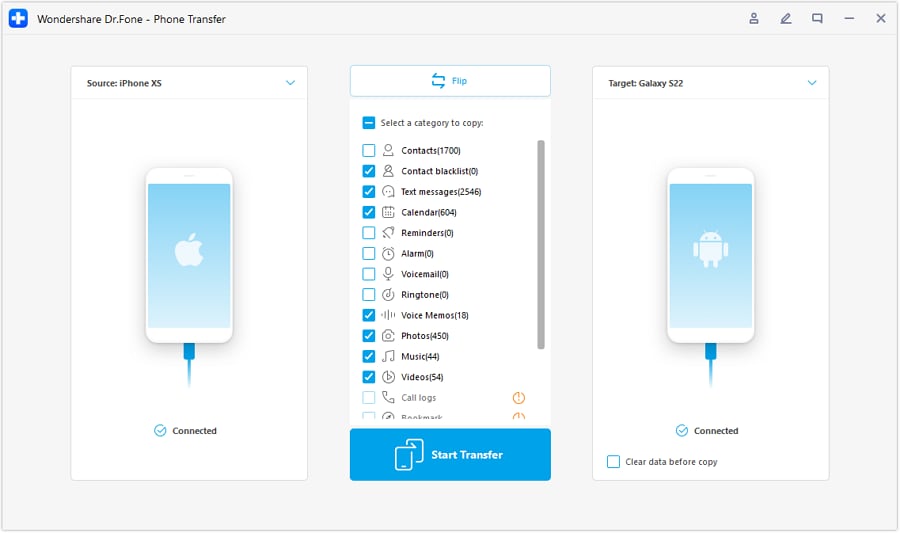
Limitation: If a service depends on SMS/voice verification, you still need to confirm those codes arrive during and after activation.
-
Step 4 Prevent conflicts during transfer, then validate and commit (only after proof)
If prompted, temporarily disable syncing features that could interfere with transfer or create duplication/conflicts. Then run your acceptance tests (voice, SMS, data, voicemail, and MFA‑dependent apps). Only after you have proof everything works should you proceed to irreversible actions like wiping or trading in the old phone.
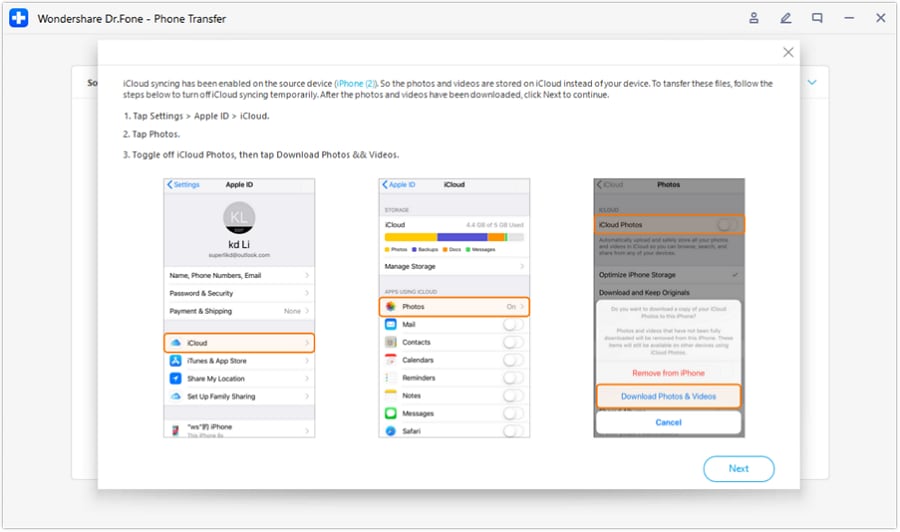
Limitation: If you erase the old phone before verification, rollback may be impossible without carrier intervention and account recovery steps.




Conclusion
Use AI to design a sequenced checklist with verification gates and explicit “do-not-cross-yet” moments, then use real tools and carrier systems to execute—and only commit to irreversible steps after your tests prove the new phone is fully working.
FAQ
-
What’s the most dangerous step to do too early?
Transferring/deactivating an eSIM or initiating a number port before confirming you can receive verification codes and access your carrier/account recovery options. -
What should I verify before moving my SIM/eSIM?
Carrier login access, account/PIN details, at least one stable MFA method, and that the old phone remains usable as a fallback. -
How do I know activation is “fully done,” not just partially working?
You can place/receive calls, send/receive SMS (including from non-iMessage/regular numbers), use mobile data, and access critical MFA-reliant services without errors. -
When is it safe to erase or trade in the old phone?
Only after your post-activation acceptance tests pass and you’ve confirmed any authenticator apps, device-based prompts, and recovery methods are working on the new phone. -
Can AI tell me the exact steps for my carrier screen-by-screen?
AI can outline the sequence and what to look for, but carrier menus, eligibility rules, and provisioning behavior vary; you must confirm the exact steps in your carrier tools. -
What if SMS works but calls don’t (or vice versa)?
Treat it as incomplete provisioning: pause irreversible steps, collect evidence (time, error messages, signal state), and contact the carrier with specific symptoms.
 Add Wondershare Dr.Fone as a preferred source on Google





