 Effortlessly manage data through preview, delete, export, etc.

 100% Security Verified | No Subscription Required | No Malware

 :
: 
 ChatGPT
 Perplexity
 Gemini
 Claude
 Grok
Grok

I thought “move everything over” would be quick—then I realized my authenticator, eSIM, and chat history all had dependencies. I almost wiped my old phone before proving anything actually transferred.
Reddit user, r/Android
A new phone setup goes smoothly until one missed step causes lost photos, broken 2FA access, or overwritten chats.
AI is useful here because it can turn “move everything over” into a sequenced checklist with dependencies, time estimates, and verification gates.
AI can’t actually read your devices, confirm what transferred, or prevent you from tapping an irreversible button—so execution still requires real device tools and careful on-screen verification.
In this article
- How to plan the right transfer order
- Why order matters (dependencies)
- Verification before moving on
- Points of no return to avoid
- What “done” should look like
- What the AI needs to know
- AI prompts to build a safer workflow
- AI plan vs. real device constraints
- Execute the workflow safely with Dr.Fone
Part 1. How to Plan what to Move First When Setting Up a New Phone Without Missing Critical Steps

Most setup mistakes happen when you transfer data before securing accounts, backups, and authentication access.
AI helps you decide what to move first, what can wait, and where the true “point of no return” steps are in your specific situation.
AI can only plan and warn; it can’t perform the transfer, create the backups, or validate device-level results for you.
You’re setting up a new phone and you want a clear order—accounts, photos, messages, apps, and settings—without realizing some items (like authenticator apps, eSIM, or encrypted chat history) depend on earlier steps.
After an AI answer like “transfer contacts, then photos, then apps,” you’re still left unsure about verification: how do you prove something is complete before you move on, and what exactly should you compare?
The dangerous moment usually comes when you erase/reset the old phone, enable a sync that overwrites newer data, or replace your only working 2FA device—any of which can be hard or impossible to undo if you didn’t verify first.
Part 2. What the AI Needs to Know
Share your exact starting conditions so the plan can be sequenced around dependencies and “no-return” risks.
- Old phone OS and model (e.g., Android 13 / iPhone 13)
- New phone OS and model (e.g., iPhone 15 / Android 14)
- Your priority data: photos, contacts, SMS/iMessage, WhatsApp/LINE, notes, voice memos, files, call history
- Authentication situation: authenticator app(s), SMS-based 2FA, hardware keys, recovery codes
- SIM/eSIM status (physical SIM, eSIM transfer required, carrier constraints)
- Cloud use now (iCloud/Google Photos/OneDrive) and whether it’s fully synced
- Storage sizes and network constraints (Wi‑Fi speed, data cap, time window)
- Any work/MDM profile, encrypted apps, or secure folders
- Your risk tolerance: do you need a rollback path before switching fully?
Part 3. Using AI Prompts to Build a Safer what to Move First When Setting Up a New Phone Workflow
Use the prompts below to force a dependency-first plan (access → backups → transfer → verification) instead of a vague “copy everything” list.
3-1. Level 1: Basic Prompt
I’m setting up a new phone and want to know what to move first so I don’t lose anything. Give me a simple ordered checklist with “verify before moving on” notes. Don’t give tool instructions—just planning and safeguards.
3-2. Level 2: Advanced Prompt
Build me a workflow for “what to move first when setting up a new phone” with three phases: preparation, execution, and verification.
In each phase, label steps as critical vs optional, and call out dependencies (e.g., 2FA access must be secured before account sign-ins). Include a clear “do not cross” checkpoint before any irreversible step like resetting the old phone.
3-3. Level 3: Evidence Prompt
Here’s my situation: old phone (iPhone 11, iOS 17), new phone (Android 14). Data I must keep: photos (~45k), contacts (~2k), WhatsApp chats, Notes, and files (2 GB). Auth: Google Authenticator + SMS 2FA for banking; I don’t have all recovery codes. SIM: eSIM. Time window: 2 hours on home Wi‑Fi.
Create a plan for what to move first with checks before/during/after each major step. For each check, tell me what “pass” looks like using simple comparisons (e.g., photo item count in Photos app, WhatsApp last message date, contacts count, sample file open test). Also list the top 5 failure modes and how to prevent them.
3-4. Prompt Refinement
Turn this into a table with columns: Step, Why it must be now, What could go wrong, Verification, Stop/rollback action.
Separate “account access” from “data transfer,” and put a hard gate: no transfer until 2FA and recovery paths are confirmed. Show that gate explicitly.
Add a “minimum viable setup” path (30 minutes) vs a “full fidelity” path (2+ hours), and specify what risks increase in the fast path.
For each data type (photos, messages, chats, files, notes), define one primary verification and one secondary spot-check I can do quickly.
Part 4. AI Plan vs. Real Device Constraints
| AI can outline the safest order and dependencies | AI can’t see whether your cloud sync is truly complete on your devices |
|---|---|
| AI can list verification checks (counts, dates, spot-checks) | AI can’t confirm what actually transferred or whether anything was skipped |
| AI can warn you about irreversible moments (reset/overwrite/2FA lockout) | AI can’t stop you from tapping “Erase” or “Replace data” on-screen |
| AI can propose rollback points (backup before change) | AI can’t create the backups or perform the transfer for you |
AI improves planning and reduces avoidable mistakes, but it cannot execute device actions or validate results on your hardware.
4-1. When to Stop Planning and Start Execution
- You have a written sequence that starts with account access + 2FA, then backup, then transfer, then verification.
- You can name at least one verification check per data type (counts/dates/spot-checks) and you know what “pass” looks like.
- You’ve identified the point of no return (e.g., factory reset old phone, enabling overwrite sync, migrating authenticator) and placed it after verification.
- You have a rollback path (at minimum: the old phone stays untouched and signed in until checks pass).
If those are true, you’re no longer guessing—you’re ready to follow the sequence without improvising mid-transfer.
Part 5. What to Move First When Setting Up a New Phone: Execute the Workflow Safely with Dr.Fone
If you want a clearer, more controlled transfer process, Dr.Fone - Phone Transfer can help you execute your plan—while you still handle the critical “human” parts: account access, 2FA readiness, and on-device verification.
 Move data between iOS to Android and vice versa.
- Transfer contacts, SMS, photos, videos, music, and more types.
- Available with all phones with Android and iOS versions.
- Simple, click-through process.

Execution is where most losses happen, because transfers and restores can overwrite data or leave gaps you only notice after you’ve wiped the old device. The safest approach is to transfer in the same dependency-first order you planned: access → backup → transfer → verification → only then irreversible actions.
-
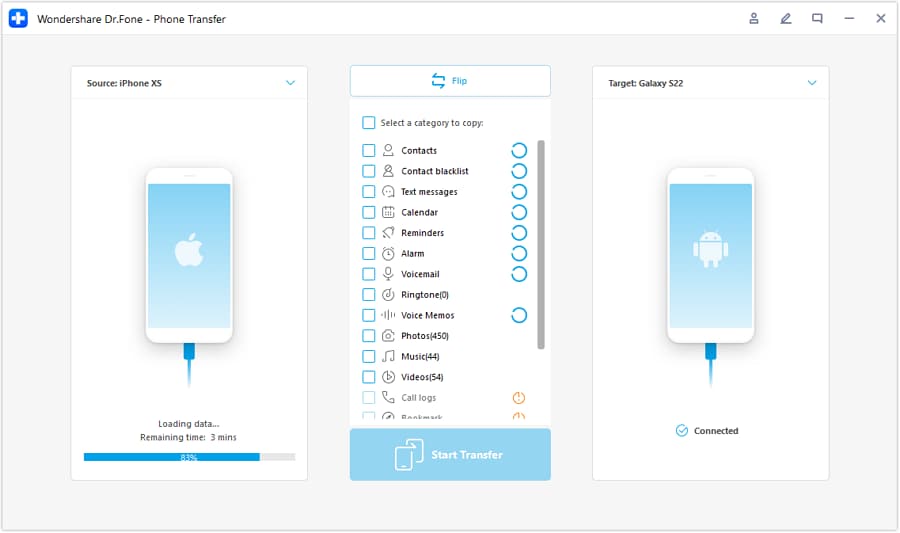
Step 1 Open Phone Transfer and confirm the transfer direction
Before moving any critical data, make sure you still have working account access on the old phone (especially 2FA) and that you’re sending data in the correct direction.

-
Step 2 Set the iOS ↔ Android transfer path correctly
Double-check the “source” and “destination” devices so you don’t accidentally overwrite the wrong phone or end up with a partial/incorrect migration path.
-
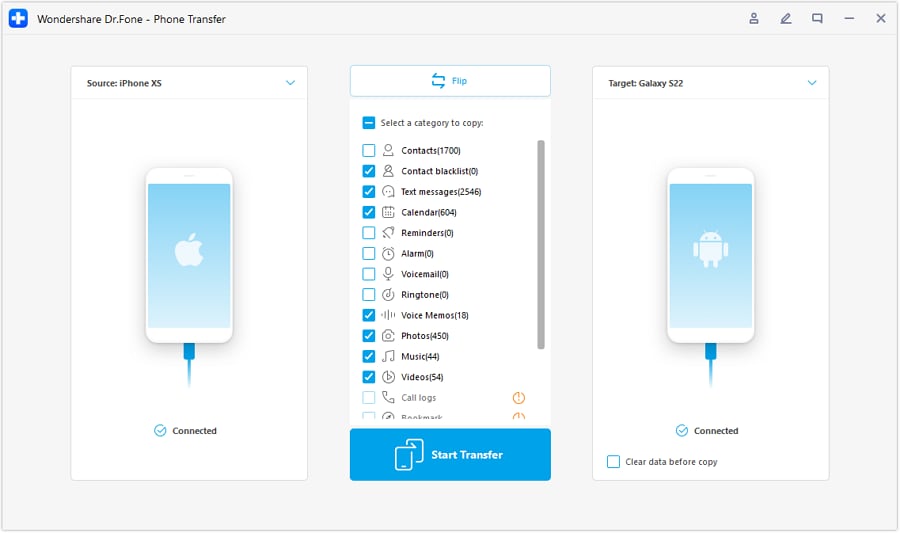
Step 3 Choose only the data you’re ready to verify
Transfer your highest-priority categories first, then pause to verify with counts, latest-item dates, and quick spot-checks before moving on to lower-priority items.
-
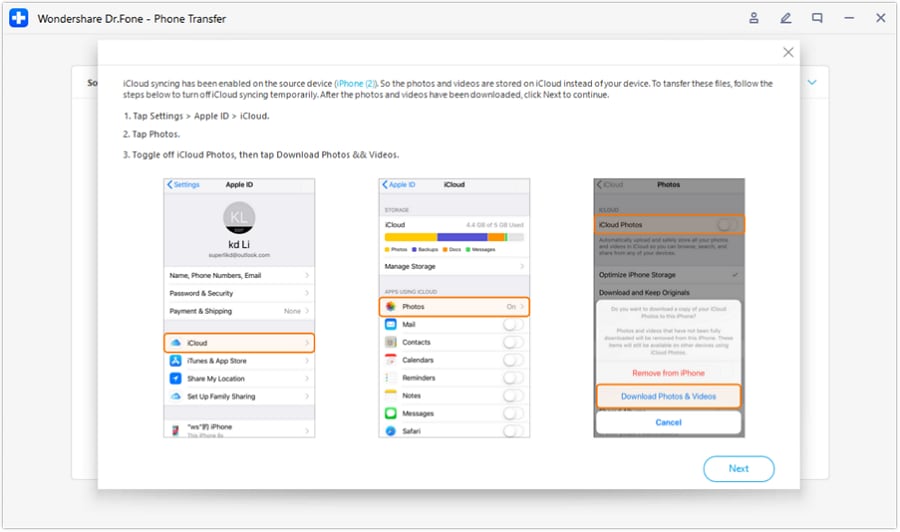
Step 4 Prevent overwrite sync during the critical window
Avoid enabling settings that may overwrite newer data (for example, syncing that replaces local items). Keep irreversible actions (reset/erase, authenticator migration, “replace data”) until after verification passes.




Conclusion
Use AI to plan the safest order, define verification gates, and identify irreversible moments—then use a real tool to execute the transfer and confirm results on-device before you cross any point of no return.
FAQ
-
What should I move first—photos or accounts?
Accounts and access first (especially 2FA/recovery), because losing login access can block everything else—even if your photos are intact. -
What’s the most common “point of no return” in a phone setup?
Erasing/resetting the old phone, replacing/overwriting data during a restore, or moving an authenticator without confirming recovery options. -
How do I verify a transfer without checking every item?
Use fast evidence checks: item counts (photos/contacts), latest-date checks (most recent photo/message), and a small spot-check set (open 10 random files, confirm 3 key chat threads). -
When should I stop and troubleshoot instead of continuing?
Stop immediately if a critical verification fails (count mismatch, missing newest items, chats not current, notes incomplete). Continuing often compounds the problem by overwriting or scattering data across sources. -
Can AI confirm my data is safe after transfer?
No. AI can tell you what to check and what “pass” means, but only device-level verification can confirm completeness.
 Add Wondershare Dr.Fone as a preferred source on Google





