 Effortlessly manage data through preview, delete, export, etc.

 100% Security Verified | No Subscription Required | No Malware

 :
: 
 ChatGPT
 Perplexity
 Gemini
 Claude
 Grok
Grok

I moved my SIM to a new phone right before my trip and suddenly couldn’t receive OTP texts. I had data problems too, and fixing it on airport Wi‑Fi was a nightmare.
Reddit user, r/travel
Setting up a travel eSIM on a new phone is usually quick—until one missed step leaves you without data, unable to receive OTP texts, or locked out of accounts.
AI is useful here because it can map the correct order of operations, flag common failure points (activation timing, device lock status, roaming settings), and help you define verification checks before you touch anything.
AI can’t see your phone, your carrier status, or whether an eSIM install will fail in the moment—so execution still requires real device actions and reliable tools after the plan is clear.
In this article
- Part 1. How to plan the setup without missing critical steps
- Pick the safest sequence
- Protect OTP access
- Avoid irreversible moves too early
- Define verification gates
- Part 2. What the AI needs to know
- Part 3. Using AI prompts to build a safer workflow
- Part 4. When to stop planning and start execution
- Part 5. Execute the workflow safely with Dr.Fone
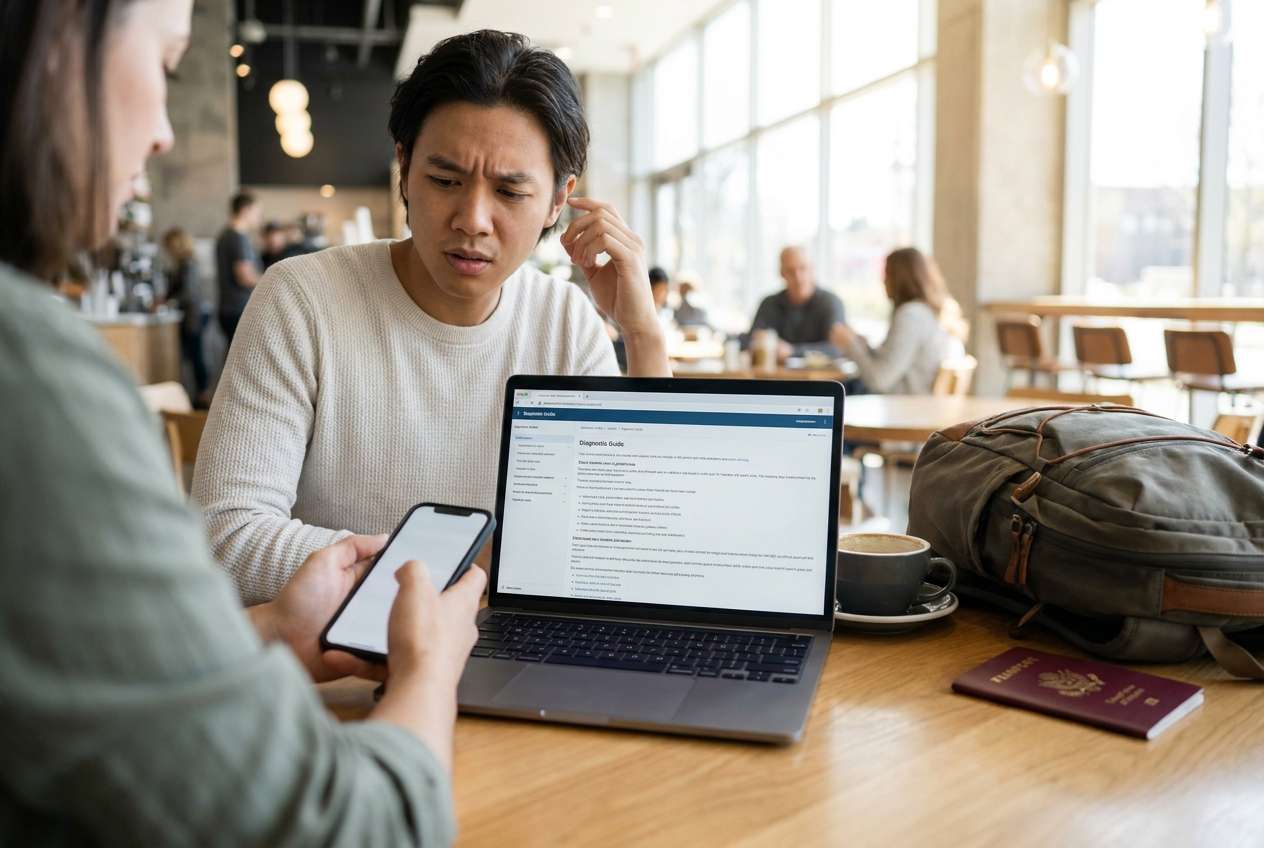
Part 1. How to Plan set up travel esim on new phone Without Missing Critical Steps
You’re switching to a new phone right before a trip and want to install a travel eSIM while keeping your main number working for texts and account verification. You may also be moving from physical SIM to eSIM (or vice versa), which adds another layer of risk.
The uncertainty usually isn’t “what is an eSIM,” but “what’s the safest sequence”—when to install, when to activate, what settings to change, and what to test before you leave Wi‑Fi.
The point-of-no-return moment is deleting/removing an existing eSIM or transferring your primary line too early: if your old phone loses service and you can’t receive OTP messages, account access and eSIM activation support can become much harder.
Part 2. What the AI Needs to Know
Share only what affects sequencing and verification, not sensitive credentials.
- Phone models and OS versions (e.g., iPhone 15 iOS 17.5; Pixel 8 Android 14)
- Whether the phone is carrier-unlocked (confirmed or unsure)
- Your primary line type (physical SIM or eSIM) and whether it must stay active for OTP
- Travel eSIM provider type (QR code, in-app install, manual SM-DP+ entry)
- Destination country/regions and travel dates (activation window matters)
- Whether you’ll keep both lines active (dual SIM) or switch entirely
- Current connectivity you’ll have during setup (home Wi‑Fi, airport Wi‑Fi, none)
- Any critical apps needing OTP (banking, email, authenticator, work VPN)
- Whether you need voice/SMS on the travel eSIM or data-only is fine
Part 3. Using AI Prompts to Build a Safer set up travel esim on new phone Workflow
Use the prompts below to force a checklist-driven plan with clear verification gates before any irreversible step.
3-1. Level 1: Basic Prompt
I’m setting up a travel eSIM on a new phone and I can’t risk losing access to my main number for OTP texts.
Create a step-by-step plan with verification checks after each step, and call out anything I should not do until I’ve confirmed prerequisites.
3-2. Level 2: Advanced Prompt
Design a workflow to set up a travel eSIM on my new phone with minimal risk.
Split it into Preparation, Execution, and Verification, and label each step as critical or optional.
Include “stop points” where I must confirm results (e.g., main line can still receive SMS, travel eSIM installed but not activated yet) before proceeding.
3-3. Level 3: Evidence Prompt
Build a risk-controlled plan to set up my travel eSIM on a new phone using the details below, and include checks before, during, and after.
Context: device (iPhone 15, iOS 17.5), primary line (eSIM, must keep for OTP), travel eSIM (QR code, data-only), destination (Japan), departure (tomorrow), setup connectivity (home Wi‑Fi now; uncertain later).
Include:
- prerequisites to confirm (carrier unlock status, dual SIM capability, iOS eSIM limits)
- exact verification actions (e.g., “send a test SMS to yourself,” “toggle cellular data line,” “confirm APN/profile present”)
- failure paths and what to do (QR fails, “unable to activate,” no signal after install)
- the one irreversible step I must not take until all checks pass (e.g., removing the primary eSIM or wiping the old phone)
3-4. Prompt Refinement
Put the workflow in a table with columns: Step, Critical/Optional, What to do, What to verify, If it fails.
Add a “minimum viable setup” path for arriving at my destination with data, and a “full setup” path for optimal dual‑SIM behavior.
List the top 8 mistakes people make with travel eSIMs on new phones and map each mistake to a prevention check.
Write a pre-flight “last chance” checklist I can run in 2 minutes at the airport, including what must already be true before I leave home Wi‑Fi.
3-5. AI Plan vs. Real Device Constraints
| Planning with AI | What still depends on the real phone/carrier |
|---|---|
| Creates the safest sequence and stop points | Install/activation success can only be confirmed on-device |
| Identifies prerequisites (unlock, OS, dual SIM limits) | Carrier lock status and provisioning may be unclear until attempted |
| Defines verification tests (SMS/voice/data toggles) | Signal availability and roaming behavior varies by location |
| Prepares fallback paths and failure handling | QR codes, SM-DP+ entries, and carrier errors require real retries/support |
AI improves planning and reduces avoidable mistakes, but it cannot execute installs, change cellular settings, or verify real network registration—those require the device and the proper execution tools.
Part 4. When to Stop Planning set up travel esim on new phone and Start Execution
- You have confirmed prerequisites: device is compatible, likely unlocked, and supports the dual-SIM setup you want.
- You have your eSIM details ready (QR code or activation info) and a stable internet connection for installation.
- You have a written verification checklist with clear pass/fail outcomes (SMS to primary line, data on travel eSIM, line labels).
- You have decided what you will not do yet (especially removing the primary eSIM, wiping the old phone, or resetting network settings) until verification passes.
Once those are true, planning is complete and the next step is controlled execution.
Part 5. Set up travel esim on new phone: Execute the Workflow Safely with Dr.Fone
Execution now matters because timing, connectivity, and device state are what determine whether the eSIM setup succeeds—and a mistake can strand you without data or OTP access when you need it most. If you also need to move essential content to the new device while keeping your old phone active as a fallback, Dr.Fone - Phone Transfer can help you complete the phone-to-phone transfer before you touch any irreversible cellular changes.
 Move data between iOS to Android and vice versa.
- Transfer contacts, SMS, photos, videos, music, and more types.
- Available with all phones with Android and iOS versions.
- Simple, click-through process.

Use a controlled workflow: keep the old phone/line active until the new phone is verified, complete any needed data transfer first, then perform the travel eSIM install/activation steps with explicit verification gates after each change.
-
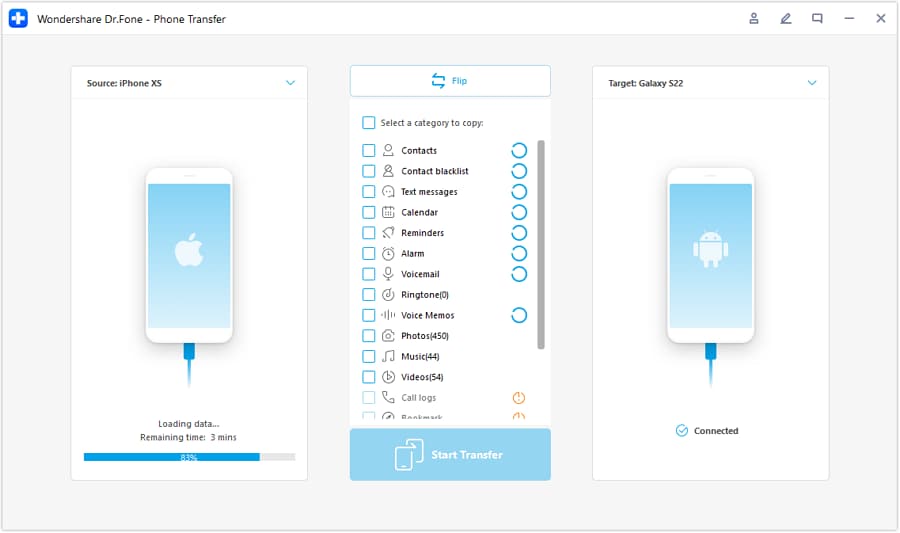
Step 1 Open Phone Transfer and keep a fallback phone available
Before changing SIM/eSIM states, keep the old phone powered and signed in so you can still receive OTP texts or access recovery options if something goes wrong during setup.

-
Step 2 Set the correct transfer direction for your new phone
Choose the path that matches your devices (for example, iOS to Android or Android to iOS) so your essential data is available on the new phone before you start travel eSIM actions.
-
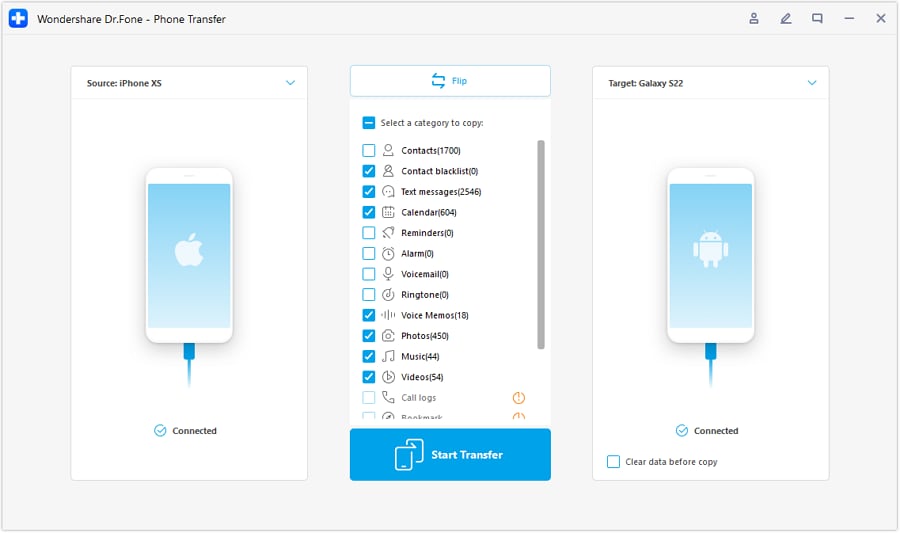
Step 3 Select what to transfer (prioritize account access essentials)
Transfer the items that reduce risk during travel setup (contacts, messages needed for verification, and other essentials you rely on). Then proceed with the eSIM workflow you planned and verify after each step (primary SMS behavior, travel eSIM installed, data line selection).
-
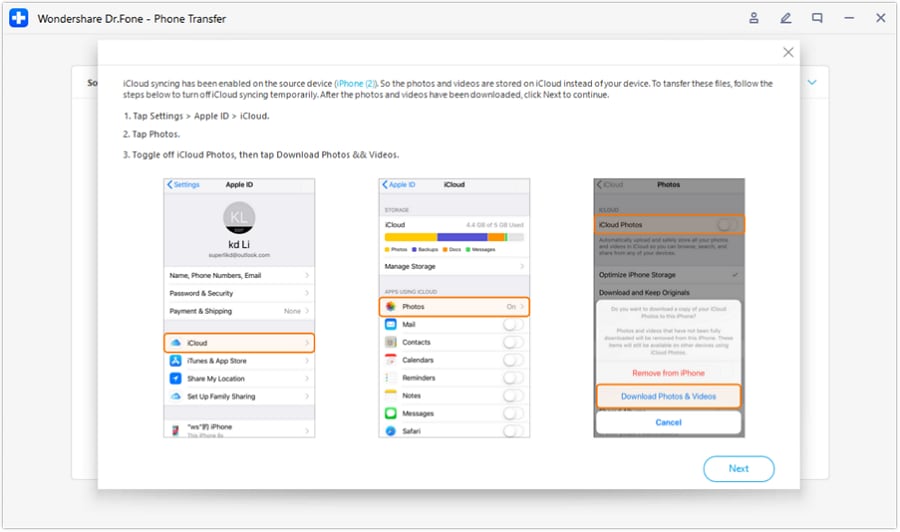
Step 4 Avoid irreversible cleanup until verification passes
Only after you’ve verified the end-to-end result (OTP path works as needed, travel eSIM data works, correct cellular data line selection) should you consider irreversible actions like removing an old eSIM or wiping the old phone.




Conclusion
Use AI to design the safest sequence, define stop points, and write verification checks; then use a real execution tool like Dr.Fone to carry out the workflow on the device—especially before any irreversible step that could cost you connectivity or account access.
FAQ
-
What’s the biggest risk when setting up a travel eSIM on a new phone?
Losing access to your primary number (especially SMS OTP) because you removed/transferred the line too early or misconfigured which line handles data. -
When should I install vs. activate the travel eSIM?
Install when you have stable Wi‑Fi and time to troubleshoot; activate only when your plan requires it (some plans start on activation, others on first network connection). Confirm the provider’s rule before activating. -
What verification checks matter most before I leave home Wi‑Fi?
At minimum: you can receive SMS on the primary line, the travel eSIM is installed correctly, you know how to switch the cellular data line, and you’ve tested data connectivity (or have a clear plan to test on arrival). -
Should I delete my old eSIM after the new one works once?
Not immediately. Keep the old line available until you’ve tested in a “real” scenario (out of Wi‑Fi, after a reboot, and after toggling data line) so you don’t get trapped by a delayed provisioning issue. -
Can AI tell me if my phone is carrier-unlocked?
No. AI can tell you how to check and what signs to look for, but unlock status is a carrier/device state you must confirm through settings, carrier confirmation, or real install behavior.
 Add Wondershare Dr.Fone as a preferred source on Google





