 Effortlessly manage data through preview, delete, export, etc.

 100% Security Verified | No Subscription Required | No Malware

 :
: 
 ChatGPT
 Perplexity
 Gemini
 Claude
 Grok
Grok

I cleaned up old chats, made a new backup, and only later realized it overwrote the one “good” backup I was relying on. Now I’m not sure what’s missing.
Reddit user, r/Android
Organizing chats before a new phone backup sounds simple, but missing one step can lock you into a messy archive, overwrite a clean backup, or preserve the wrong conversations for years.
AI can help you plan the sequence, define what “organized” means for your situation, and build a checklist that prevents avoidable mistakes.
AI can’t access your phone, verify what’s actually backed up, or safely run device actions—so once the plan is clear, you need real tools to execute and confirm results.
In this article
- How to Plan Before Creating a New Phone Backup
- Define the goal and scope
- Understand archive vs. delete vs. backup behavior
- Set the “do-not-cross” checkpoint
- Protect a rollback backup
- What the AI Needs to Know
- AI Prompts for a Safer Workflow
- AI Plan vs. Real Device Constraints
- When to Stop Planning and Start Execution
Part 1. How to Plan organize chats before creating a new phone backup Without Missing Critical Steps
You’re about to create a “fresh” phone backup, but your chats are noisy: old group threads, large attachments, and mixed personal/work conversations. You want the new backup to be smaller, cleaner, and easier to restore later.

1-1. Define what “organized” means for this backup
The uncertainty usually isn’t what to do (archive, export, delete, keep), but when to do it—especially when different apps treat “archive,” “delete,” and “backup included” differently.
1-2. Map actions to app behavior (archive vs. delete vs. included-in-backup)
Before you change anything, decide which actions are reversible (like archiving) and which are irreversible (like deletion), then identify what your chat apps and backup method actually include.
1-3. Create a “do-not-cross” checkpoint before irreversible steps
The point-of-no-return moment is when you delete conversations or media (or when you overwrite an existing good backup with a new one). You should not reach that moment until you’ve verified what will be preserved, what will be excluded, and how you’ll recover anything you later regret removing.
1-4. Protect a rollback backup before you start cleaning
Make sure you have a known-good backup that is clearly separated (name, location, date) so it won’t be replaced by your new “clean” backup run.
Part 2. What the AI Needs to Know
Answer these so the plan can be specific and verifiable:
- Phone OS and model (e.g., iPhone 13 iOS 17 / Samsung S23 Android 14)
- Chat apps involved (e.g., WhatsApp, LINE, Telegram, iMessage)
- Backup destination you intend to create (computer, external drive, cloud) and any space constraints
- Your goal: smaller backup, privacy cleanup, faster restore, work/personal separation, or all of these
- What “organize” means for you (archive only vs delete vs export and remove)
- Any legal/compliance needs (must retain certain chats)
- Current risk factors: low storage, damaged phone, app crashes, frequent failed backups
- What you cannot lose (e.g., “family chat,” “client contracts,” “2FA messages”)
- Whether you already have a known-good backup you can roll back to
- Your tolerance for irreversible actions (low/medium/high)
Part 3. Using AI Prompts to Build a Safer organize chats before creating a new phone backup Workflow
Use the prompts below to make the workflow explicit before you touch anything on the device.
3-1. Level 1: Basic Prompt
Draft a step-by-step plan to organize my chats before creating a new phone backup.
Include a “do-not-cross” checkpoint before any irreversible step like deleting chats or overwriting an existing backup.
Keep it app-agnostic unless you need to ask clarifying questions.
3-2. Level 2: Advanced Prompt
Create a structured workflow with Preparation / Execution / Verification phases for organizing chats before I create a new phone backup.
Mark each step as critical or optional, and list the main failure modes (e.g., deleted chats still included in backup, exports missing media, overwriting a good backup).
End with a go/no-go checklist.
3-3. Level 3: Evidence Prompt
Here’s my context: I’m on (Android 14, Pixel 7), organizing (WhatsApp + SMS) before making a new backup to (my PC).
My goal is (reduce backup size + remove old group chats), but I must keep (family chat + work client threads).
I have (one older backup from March) and about (8 GB) free space.
Build a plan with checks before/during/after each phase, including how to confirm:
(1) exports are readable, (2) required chats are still present, (3) the new backup didn’t overwrite the old one, and (4) media handling is as expected (e.g., videos excluded/included).
Include a short “evidence list” of what I should record (screenshots, file counts, dates).
3-4. Prompt Refinement
Turn this into a two-track plan: “Archive-only safe track” vs “Delete-and-reduce-size track,” each with its own verification gates and rollback options.
Produce a decision table for each chat type (1:1, group, muted, spam) with columns: keep / archive / export / delete, plus “why” and “risk.”
Write a pre-flight checklist that I can complete in 5 minutes, and a post-flight checklist that proves the backup is usable without restoring it yet.
Ask me exactly 7 clarifying questions that eliminate ambiguity about what gets backed up (chat text vs media vs attachments) and what I consider “organized.”
Generate a naming and versioning scheme for exports and backups (e.g., Chats_PreBackup_2026-05-20_v1) to avoid overwriting or confusion.
Part 4. AI Plan vs. Real Device Constraints
| Planning Item | What AI Can Do | What AI Can’t Do | What You Must Verify on Device |
|---|---|---|---|
| Define “keep/archive/delete” rules | Turn your goals into explicit criteria | Detect what each app really includes in backup | Confirm app behavior for archive/delete + included media |
| Design safe sequencing | Create a gated workflow with checkpoints | Enforce those checkpoints for you | Stop before irreversible steps until checks pass |
| Risk assessment | List failure modes and mitigations | See your storage, battery, or error states | Confirm space, stability, and export integrity |
| Evidence and audit trail | Tell you what to document | Capture files/screenshots itself | Verify exports open correctly and files are complete |
AI improves planning, but cannot execute actions on your phone, cannot see what changed, and cannot confirm backup integrity without your real-world checks.
Part 5. When to Stop Planning organize chats before creating a new phone backup and Start Execution
- You have a written “keep / archive / export / delete” rule set that covers all chat categories you care about.
- You have a rollback path (at minimum: a known-good prior backup not at risk of being overwritten).
- You have defined verification proofs (what you will check, where, and what “pass” looks like).
- You have identified the irreversible moment (deleting chats or overwriting backups) and placed it after all required checks.
If all four are true, you’re ready to move from planning to controlled execution.
Product recommendation: Execute the Workflow Safely
Once your plan is clear, use a real tool to run the backup/export reliably and reduce operational mistakes (wrong device, wrong destination, accidental overwrite). A practical option is Dr.Fone - WhatsApp Transfer, which helps you transfer, backup, and restore WhatsApp chats across devices.
 Transfer WhatsApp across Android & iOS.
- Backup & restore WhatsApp to PC securely.
- Preview & export chats selectively.
- Works with all iPhone & Android models.
Execution matters because the main risks are operational: selecting the wrong device, saving to the wrong location, or overwriting a good backup before you notice something is missing.
-
Step 1 Open the WhatsApp Transfer tool
Launch Dr.Fone on your computer and enter the WhatsApp transfer/backup area so you can run the workflow you planned without improvising on-device.

-
Step 2 Choose the WhatsApp backup option and confirm destination
Before starting, confirm the target folder/backup name is clearly new (versioned) so it cannot overwrite your known-good backup.

-
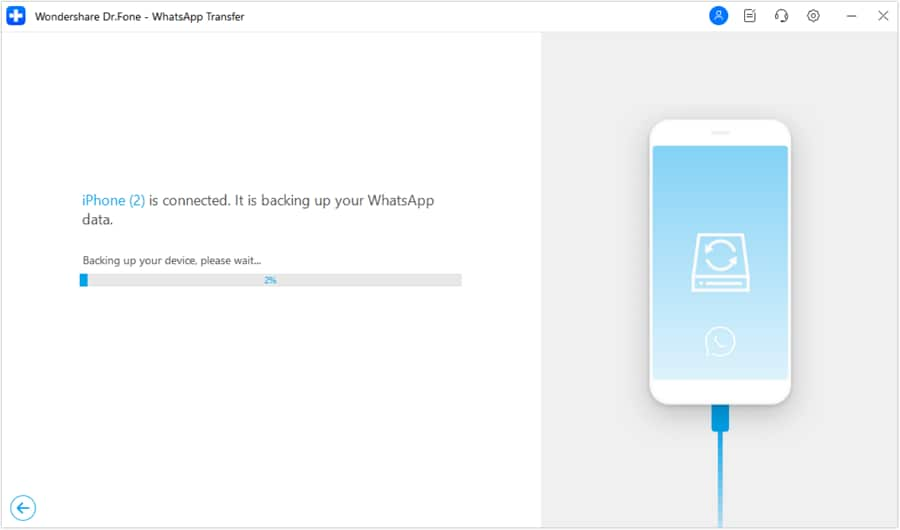
Step 3 Run the planned backup/export (no deletions yet)
Execute the backup/export run first and keep “delete” actions on hold until your verification checks pass.
-
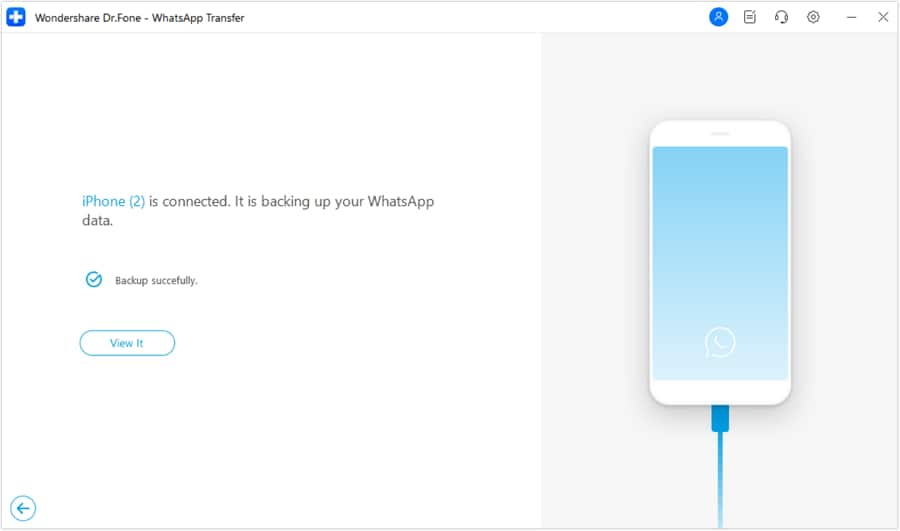
Step 4 Verify outputs, then (and only then) do irreversible cleanup
Confirm exported/backup files are accessible and complete, and confirm your older backup remains intact. Only then proceed with deletion or other irreversible cleanup.




Conclusion
Use AI to define what “organized” means, sequence the steps, and place verification gates before any irreversible moment; then use a real tool to execute the backup/export reliably and confirm the results in practice.
FAQ
-
What’s the biggest risk when “organizing chats” before a new backup?
Accidentally deleting something you later need, or creating a new backup that silently replaces a good older backup. -
Is archiving chats safer than deleting them?
Usually yes, because archiving is typically reversible—but you still must verify whether archived chats are included in backups for your specific app. -
What should I verify before I delete anything?
That your required chats are present, your export/backup files open correctly, media expectations match your plan, and your older known-good backup is still intact. -
When should I create the new backup—before or after organizing?
Create a safety baseline first (a known-good backup), then organize with verification gates, then create the “clean” backup once you’re confident. -
Can AI tell me whether my backup includes media or only messages?
No—AI can list what to check and where to look, but you must confirm actual device/app behavior with real verification.
 Add Wondershare Dr.Fone as a preferred source on Google





