 Effortlessly manage data through preview, delete, export, etc.

 100% Security Verified | No Subscription Required | No Malware

 :
: 
 ChatGPT
 Perplexity
 Gemini
 Claude
 Grok
Grok

I thought “setting up everyone’s new devices” was just signing in and moving photos—then one wrong restore overwrote chats, and we spent the whole night trying to figure out which account was on which device.
Reddit user, r/iphone
Coordinating a family phone and tablet data setup sounds simple until one missed step causes lost photos, overwritten chats, or a child’s device ending up with the wrong Apple ID/Google account.
AI is useful here because it can turn a messy goal (“set up everyone’s devices”) into a sequenced plan with prerequisites, checkpoints, and “don’t proceed until verified” gates.
AI can’t actually back up, transfer, sign in, or confirm what’s truly on each device, so once the plan is solid you’ll still need real device tools to execute the steps safely.
In this article
- How to plan a family phone and tablet data setup without missed steps
- Why order matters in multi-device setups
- Identify the point of no return
- Household details AI needs to build a safe plan
- Quick summary of the workflow approach
- Using AI prompts to build a safer workflow
- AI plan vs. real device constraints
- When to stop planning and start execution
- Execute the workflow safely with a transfer tool

Part 1. How to plan a family phone and tablet data setup without missed steps
1-1. Why the order matters more than the checklist
Families usually have a mix of old and new phones/tablets, multiple accounts, and different “must-keep” data (photos for one person, chats for another, school apps for a kid). The uncertainty isn’t the what—it’s the order: what to back up first, when to sign out, and how to prove nothing is missing.
After asking AI for advice, people often get a general checklist but no hard sequencing: which device gets handled first, when to connect to Wi‑Fi/charging, or how to avoid mixing up accounts across devices.
1-2. Identify and protect the “point of no return”
The point-of-no-return moment is typically an erase/reset, a “restore from backup,” or a migration that overwrites the target device. If you reach that before verification is complete, recovery can become difficult or impossible.
Your plan should force a hard gate: don’t proceed to any irreversible screen until evidence-based verification is complete and the device owner signs off.
1-3. The minimum household details you should provide to AI
Share the minimum details AI needs to produce a safe, ordered plan for your specific household:
- Devices involved (model + OS version if known), and which are source vs target
- Who owns each device (Parent A / Parent B / Child 1) and whether devices are shared
- Data priorities per person (photos, videos, contacts, messages/WhatsApp, notes, calendars, app data, game progress)
- Accounts in use (Apple IDs, Google accounts, Microsoft, school/work accounts) and which person should own each
- Current state (new device sealed, already set up, partially set up, broken screen, low storage, failing battery)
- Security constraints (screen time/parental controls, MDM/school management, 2FA access, known passcodes)
- Connectivity constraints (reliable Wi‑Fi, available cables, computer access, time window)
- Risk tolerance (must preserve everything vs “good enough” for some devices)
- Any “do not do” rules (e.g., don’t merge contacts, don’t upload family photos to a shared account)
1-4. Quick Summary
1. Plan the order, not just the tasks.
Use AI to produce a device-by-device sequence with prerequisites and checkpoints, so you don’t mix accounts or overwrite data.
2. Add verification evidence and hard stop gates.
Define measurable checks (counts/timestamps/examples) and “STOP if…” rules before any erase/reset/restore/overwrite action.
3. Execute one device at a time with disciplined sign-off.
Only move to the next device after verification is complete and the owner confirms everything looks correct.
Part 2. Using AI prompts to build a safer workflow
Use the prompts below to force a clear sequence with verification gates before any irreversible step.
2-1. Level 1: Basic Prompt
Help me plan a safe sequence to coordinate a family phone and tablet data setup across multiple people.
I want a step-by-step order with checkpoints so we don’t overwrite data or mix up accounts.
Do not give execution instructions—only the plan and what to verify at each stage.
2-2. Level 2: Advanced Prompt
Build a structured workflow for coordinating our family phone and tablet data setup.
Preparation (critical vs optional): list what must be confirmed before touching any device settings, and what is nice-to-have.
Execution order: define the exact order to handle devices (one at a time), with “STOP if…” conditions before any irreversible action (reset/restore/overwrite).
Verification: provide checks to confirm each person’s data is present and correct on the target device, and checks to confirm the source device remains intact until sign-off.
Also include a short risk register (top risks + prevention).
2-3. Level 3: Evidence Prompt
Use the context below to produce a plan with checks before, during, and after. Include a “point of no return” gate and a rollback plan.
Household: 2 adults + 2 kids
Devices:
- Parent A: old iPhone (source), new iPhone (target)
- Parent B: old Android phone (source), new Android phone (target)
- Kids: 2 iPads shared sometimes + 1 Android tablet (mixed usage)
Data priorities: photos/videos (critical), contacts (critical), WhatsApp (critical for Parent B), notes (medium), app logins (medium)
Accounts: multiple Apple IDs, one shared family email we want to stop using, Google accounts per adult, kids use managed accounts
Constraints: only one evening to do it, Wi‑Fi OK, some devices low storage (e.g., “2–5 GB free”)
Rules: do not merge contacts across adults; do not sign kids into adult accounts; do not erase any source device until verification sign-off
Deliverables:
- A device-by-device sequence table (who/what/when)
- Checklists for each migration
- Evidence to collect (e.g., “photo count range”, “WhatsApp last message timestamp”) to prove completion
2-4. Prompt Refinement
Return the plan as a table with columns: Device, Owner, Source/Target, Pre-checks, Action group, Verification, Stop conditions, Sign-off.
Add a dedicated section: “Account hygiene rules” listing which Apple ID/Google account must never be used on which device, and how to detect cross-sign-in risk before it happens.
Define “verification evidence” as measurable items (counts/timestamps/examples) for photos, contacts, and messaging, and specify acceptable tolerances (e.g., “photo count within ±2%”).
Include a rollback decision tree: if verification fails for photos vs contacts vs WhatsApp, what do we pause, what do we re-check, and what do we avoid doing next?
Identify the single highest-risk irreversible step in my situation and add a hard gate: exactly what must be true before proceeding.
Part 3. AI plan vs. real device constraints
| Planning element | What AI can do | What AI cannot do | What you must verify on-device |
|---|---|---|---|
| Sequencing & dependencies | Build an ordered workflow with gates | Confirm the real state of your devices | Storage, OS version, account sign-in status |
| Risk control | Identify overwrite/reset risks | Prevent you from tapping a destructive option | “Erase/Reset/Restore” screens before confirming |
| Evidence checklist | Suggest counts/timestamps/screenshots to collect | Read your actual photo totals/messages | Compare evidence on source vs target |
| Troubleshooting logic | Provide decision trees | Repair devices, extract data, run transfers | Whether data is truly complete and accessible |
AI improves planning, but cannot execute: you still need to perform backups/transfers/resets and confirmations using real tools on real devices.
Part 4. When to stop planning and start execution
- You have a written device order (one device at a time) and a named owner responsible for sign-off on each device.
- You have verification evidence defined for each critical data type (photos, contacts, WhatsApp/messages) and you know how you’ll record it.
- You have identified the irreversible step(s) (erase/reset/restore/overwrite) and added a hard gate that prevents reaching them early.
- You have the needed access ready (passwords, 2FA, charging cables, Wi‑Fi, enough time) so execution won’t be rushed.
Once those are true, planning is no longer the bottleneck—the risk shifts to careful execution and disciplined verification.
Part 5. Execute the workflow safely with a transfer tool
Execution now matters because the safest plan still fails if actions happen out of order, devices get mixed up, or an overwrite happens before evidence-based verification.
Product recommendation: Coordinate family setup safely with Dr.Fone
If you’re ready to move from planning to action, Dr.Fone - Phone Transfer can help you carry out the backups and transfers while you follow your AI-built sequence and verification gates.
 Move data between iOS to Android and vice versa.
- Transfer contacts, SMS, photos, videos, music, and more types.
- Available with all phones with Android and iOS versions.
- Simple, click-through process.

Use your plan’s “one device at a time” rule, keep sources untouched until sign-off, and stop immediately if the current device/account doesn’t match what your plan says.
-
Step 1 Launch the phone transfer tool and confirm the current device pair
Open the transfer module on your computer and confirm you are working on the intended person’s devices before selecting any options.

-
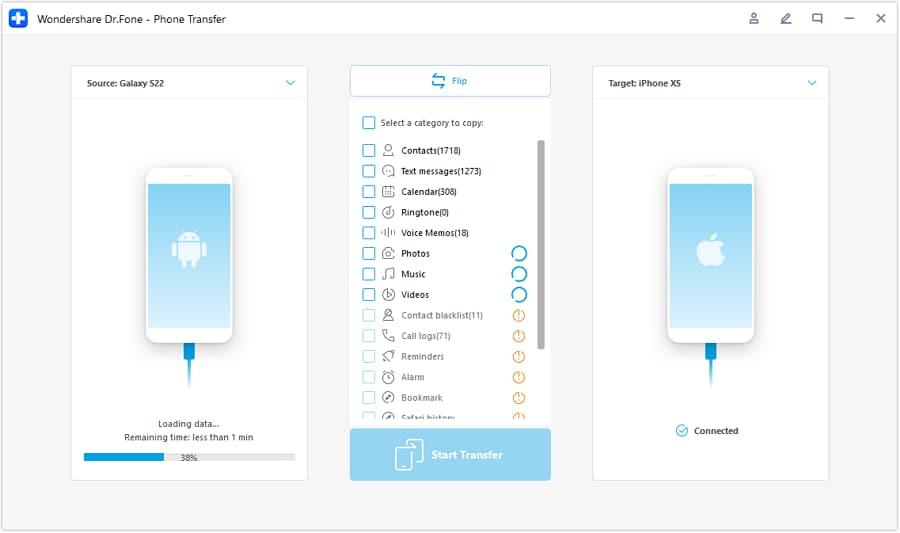
Step 2 Set the correct source and target path (do not proceed if they’re reversed)
Match the plan’s “source vs target” assignment and double-check device names/models so you don’t overwrite the wrong device.
-
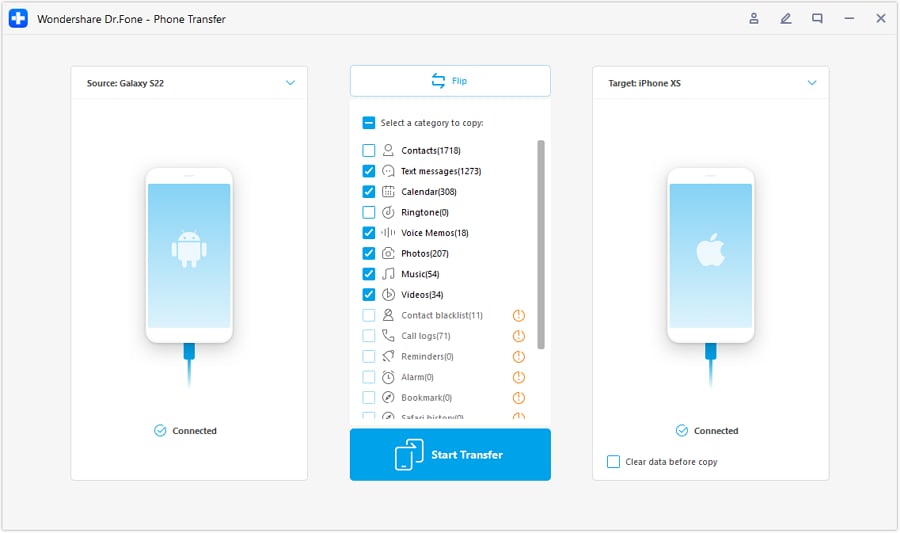
Step 3 Choose the data categories for the current owner, then run the transfer
Select only the data types that belong to this person/device migration, then transfer. Pause after completion to run your verification checklist before moving on.
-
Step 4 Monitor progress, verify evidence, and sign off before any irreversible step
After the transfer finishes, compare your evidence (photo count range, last message timestamps, contact counts) and only then proceed to any high-risk action like wiping a source device.




Conclusion
Use AI to design a strict, gated workflow with clear verification evidence and a defined point of no return; then rely on Dr.Fone to carry out the backups and transfers once the plan is locked and you’re ready to verify each device before moving on.
FAQ
-
What’s the most common way families lose data during setup?
Doing a reset/restore or transfer to the wrong device/account before confirming a backup and verifying what’s on the source. -
What should I verify before any “erase/reset/restore” screen?
That you have a usable backup, that the target has the right account(s), and that your evidence checks (counts/timestamps) are documented and comparable. -
How do we avoid mixing up Apple IDs/Google accounts across family devices?
Assign an owner per device, write explicit “never sign into X on Y” rules, and verify the signed-in account on each device before starting any transfer. -
How long should verification take compared to the transfer itself?
Often longer than expected—plan time for checking photos, contacts, and message recency rather than trusting a “completed” status alone. -
Can AI tell me whether my data transfer worked?
No. AI can define what to check and how to interpret results, but only you (and your tools) can confirm what’s truly on each device.
 Add Wondershare Dr.Fone as a preferred source on Google





