 Effortlessly manage data through preview, delete, export, etc.

 100% Security Verified | No Subscription Required | No Malware

 :
: 
 ChatGPT
 Perplexity
 Gemini
 Claude
 Grok
Grok

I moved to a new phone and thought WhatsApp would restore everything, but a bunch of older videos never came back. Now I’m scared to delete anything on the old device because I don’t know what’s actually “safe” to do next.
Forum user
Moving a large WhatsApp media library to a new device sounds simple until one missed step leaves you with incomplete media, duplicated threads, or chats that won’t restore.
AI can help you map the safest sequence, clarify what to verify before you touch anything, and surface the “gotchas” that usually cause partial restores. But AI can’t access your phone, read your storage, or run transfers—so once the plan is locked and verified, you still need reliable execution on real devices.
In this article
- Planning a safe workflow (and avoiding irreversible mistakes)
- Why “sequence” matters more than generic steps
- Common failure points with large media libraries
- Define your “point of no return”
- Set verification gates before you proceed
- What the AI needs to know
- AI planning prompts (Level 1–3) + prompt refinement
- When to stop planning and start execution
- AI plan vs. real device constraints (comparison table)
Part 1. Planning a safe workflow (and avoiding irreversible mistakes)
You’re switching phones and your WhatsApp storage is massive (tens or hundreds of GB). You’re not sure whether to prioritize chats, media, or both—and you’re worried the process will fail halfway due to storage limits, network timeouts, or OS restrictions.
1-1. Why “sequence” matters more than generic steps
Even after asking AI “how do I move WhatsApp,” the answer can feel incomplete because the sequence matters: what you back up first, what you verify, and when you sign in on the new device can change the outcome.
1-2. Common failure points with large media libraries
With large libraries, partial restores often happen when storage runs short, transfers get interrupted, or you end up mixing restore paths (for example, starting one method and then switching to another mid-way).
1-3. Define your “point of no return”
The point of no return is usually when you delete WhatsApp, factory reset, or initiate a restore that overwrites existing WhatsApp data on the new device. You should not reach any of those actions until verification is complete.
1-4. Set verification gates before you proceed
Before you do anything irreversible, make sure your plan includes explicit “pause and verify” gates and pass/fail criteria (storage headroom, backup/restore readiness, and post-move spot checks).
Part 2. What the AI needs to know
Share the details below so the AI can produce a plan that matches your constraints instead of generic steps.
- Old device OS/version (e.g., iOS 17 / Android 14)
- New device OS/version
- Transfer direction (Android→Android, iPhone→iPhone, Android→iPhone, iPhone→Android)
- WhatsApp type (personal / Business)
- Approximate WhatsApp size (e.g., 85 GB) and what’s included (videos-heavy, voice notes, documents)
- Current backup status (iCloud/Google Drive on/off, last backup time, backup size if known)
- Free storage on old device and new device (e.g., old: 30 GB free, new: 160 GB free)
- Connection constraints (slow Wi‑Fi, limited data, unstable power, only USB available)
- Whether the new device already has WhatsApp messages you must keep
- Your deadline and tolerance for downtime (minutes vs hours)
- Any “must-not-lose” items (specific chats, starred messages, media from certain dates)
Part 3. AI planning prompts (Level 1–3) + prompt refinement
Use the prompts below to force a clear, verifiable sequence before you do anything irreversible.
3-1. Level 1: Basic Prompt
I need a planning checklist to move a large WhatsApp media library to a new device without losing chats or media.
Ask me only the minimum questions you need, then give me a step-by-step sequence with verification checks before any point of no return.
Do not include execution clicks—planning only.
3-2. Level 2: Advanced Prompt
Design a workflow to move WhatsApp (chats + large media) from my old device to my new device.
Separate it into Preparation, Execution, and Verification, and label each item as Critical or Optional.
Include risk notes for the top 5 failure modes (storage shortfall, backup mismatch, restore overwrite, account/number issues, interrupted transfer) and where in the sequence they happen.
3-3. Level 3: Evidence Prompt
Create a safe move plan for WhatsApp with a large media library using my context, and include checks before / during / after transfer.
Context: old device (Android 14, 128 GB, 22 GB free), new device (Android 14, 256 GB, 140 GB free), WhatsApp size (~85 GB), videos-heavy, limited Wi‑Fi, I can use USB and a laptop, and the new device currently has no important WhatsApp data (it’s okay to overwrite).
Output:
- Preconditions to confirm (with pass/fail criteria)
- A sequence that avoids irreversible steps until checks pass
- A “pause and verify” gate right before the point of no return (e.g., uninstall/reset/overwrite)
- Post-move validation checklist (spot checks like “search chat history,” “open oldest media,” “confirm media count range,” “verify recent messages”)
- A rollback plan if verification fails mid-way
3-4. Prompt Refinement (follow-up prompts)
Put the plan into a table with columns: Step, Goal, What I need, How to verify, If it fails, Stop/Continue rule.
Identify every step that could cause overwrite, deletion, or irreversible state changes, and place them after a single “final verification gate.”
Add a storage math check: estimate required free space on the new device for transfer/restore (use a buffer rule, e.g., “WhatsApp size × 1.2”).
Produce two sequences: one that prioritizes chat continuity (minimal downtime) and one that prioritizes maximum media completeness (slower but safer), then tell me which fits my constraints.
List the exact evidence I should capture before starting (screenshots/log items), and explain how each one will help if something is missing afterward.
Part 4. When to stop planning and start execution
- You can state your transfer direction, WhatsApp type, approximate library size, and storage headroom on both devices without guessing.
- You have a written “final verification gate” that must pass before any overwrite/uninstall/reset action.
- You have a validation checklist that includes at least one deep spot-check (older media + search + recent messages), not just “it opened.”
- You have a rollback rule (what you’ll do if restore is incomplete) and you’ve identified the first irreversible moment you’ll avoid until the end.
Once those are true, the remaining risk is mostly execution quality and interruptions—not missing steps in your plan.
Part 5. AI plan vs. real device constraints (comparison table)
| Planning item | What AI can do | What AI cannot do | What you must verify on-device |
|---|---|---|---|
| Storage readiness | Estimate buffers and failure risks | Read actual free space/hidden cache usage | Real free space, WhatsApp storage breakdown, large video footprint |
| Backup/restore integrity | Define checks and validation steps | Inspect backup contents or confirm media completeness | Backup timestamps, size trends, restore results and spot checks |
| Sequence safety | Place irreversible steps behind gates | Prevent you from tapping “overwrite/delete” | You confirm the “point of no return” is not reached early |
| Post-move validation | Provide a test checklist | Confirm counts, missing media, corrupted files | Open old media, search messages, verify key chats, confirm recent send/receive |
AI improves planning, sequencing, and verification logic—but it can’t access your devices, run transfers, or guarantee outcomes without real device-level execution and confirmation.
Recommended tool for execution: move WhatsApp media safely with Dr.Fone
Execution matters most with large WhatsApp libraries because failures usually come from interruptions, storage constraints, or accidental overwrite. If your plan is verified and you want a controlled way to run the move, Dr.Fone - WhatsApp Transfer can help you perform the transfer/backup workflow more reliably than ad-hoc methods.
 Transfer WhatsApp across Android & iOS.
- Backup & restore WhatsApp to PC securely.
- Preview & export chats selectively.
- Works with all iPhone & Android models.
Before you run any transfer, lock your “no-return” gate: confirm storage headroom, stable power, and whether overwriting data on the new device is acceptable in your situation. Then follow your verification-first sequence: transfer first, validate second, and only then consider uninstall/reset actions on the old device.
-
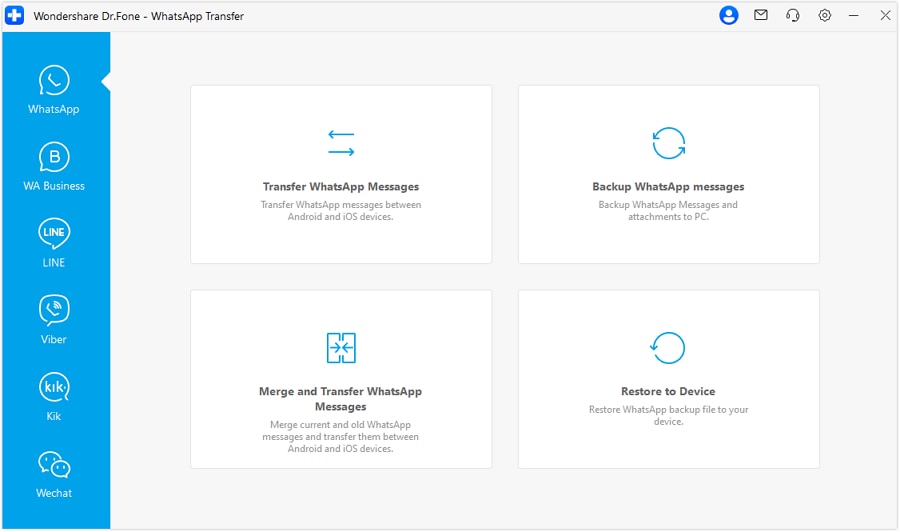
Step 1 Open the WhatsApp transfer module
Start the tool on your computer and navigate to the WhatsApp transfer/backup area so you can follow a controlled workflow instead of improvising mid-way.

-
Step 2 Choose the WhatsApp transfer option you planned for
Pick the transfer/backup path that matches your plan (and avoid mixing multiple restore paths during the same run).
-
Step 3 Confirm source and destination devices before starting
Double-check which phone is the source (old device) and which is the destination (new device), especially if your plan assumes an overwrite is acceptable on the new device.

-
Step 4 Run the transfer, then validate before any delete/reset actions
Minimize interruptions (power, cables, OS popups) and only move to “point of no return” actions after your post-move validation checklist passes.




Conclusion
Use AI to design a cautious sequence with clear verification gates and an explicit “do not cross yet” moment, then carry out the transfer only after your pre-checks pass. Once execution is complete, validate chats and older media on the new device before you delete, reset, or overwrite anything that might remove your only good copy.
FAQ
-
What’s the most common way people lose WhatsApp media during a move?
Starting an overwrite/restore before confirming storage headroom and backup/transfer integrity, then deleting the old app/data too early. -
What should my “point of no return” be?
Any action that removes your only good copy (uninstalling WhatsApp on the old device, factory reset, deleting backups) or overwrites the new device’s existing WhatsApp data. -
How do I verify the move worked without checking everything manually?
Do targeted spot checks: search for old keywords, open several older media items, verify recent messages send/receive, and check a few key chats across different date ranges. -
When should I do the move to reduce failure risk?
When you can keep both devices charged, avoid interruptions, and you have enough time for a full run plus verification (large libraries can take much longer than expected). -
Can AI guarantee that my WhatsApp transfer will work?
No—AI can only help you plan and reduce avoidable mistakes; only real device execution and your verification checks confirm success.
 Add Wondershare Dr.Fone as a preferred source on Google





