 Effortlessly manage data through preview, delete, export, etc.

 100% Security Verified | No Subscription Required | No Malware

 :
: 
 ChatGPT
 Perplexity
 Gemini
 Claude
 Grok
Grok

I thought switching phones would be quick, but one missed step meant I lost access to my authenticator and couldn’t log into important apps.
Reddit user, r/Android
Switching phones sounds simple until one missed step leads to lost messages, missing photos, broken authenticator access, or a wiped old device before you confirmed anything transferred.
AI can help you turn a vague “move my stuff” goal into a clear checklist with the right order, required info, and verification points—so you don’t discover problems after the point of no return.
AI can’t actually move data, sign into accounts, or validate what’s on your device screens; you still need real device tools to execute the plan safely.
In this article
- How to plan a new phone migration checklist without missing critical steps
- What to do first (sequence)
- Where people usually lose data
- How to define pass/fail verification
- How to avoid “point of no return” mistakes
- What the AI needs to know
- Using AI prompts to build a safer workflow
- When to stop planning and start execution
- Execute the workflow safely with Dr.Fone

Part 1. How to Plan new phone migration checklist before switching devices Without Missing Critical Steps
You’re moving from an old phone to a new one, but you’re not sure what to do first: cloud backup, cable transfer, app-by-app logins, or something else. You also don’t know how to confirm the transfer is complete beyond “it looks fine.”
Even after you ask AI for a checklist, you may still be missing the sequence (what must happen before what), and you may not have clear pass/fail checks (what “done” actually means for photos, messages, WhatsApp, or 2FA apps).
The biggest risk moment is irreversible: factory-resetting the old phone, erasing data during trade-in prep, or signing out of key accounts (2FA/Authenticator) before you’ve confirmed the new phone can access everything.
Part 2. What the AI Needs to Know
Share the minimum details needed to build a safe, ordered migration plan.
- Old phone OS/version (e.g., iOS 16 / Android 13) and new phone OS/version
- Transfer type preference (wireless, cable, computer-assisted) and constraints (slow Wi‑Fi, limited storage, no PC/Mac)
- Data you must keep (photos, videos, messages/SMS, contacts, notes, voice memos, call history)
- App risk list (banking apps, authenticator/2FA, WhatsApp/Telegram/Signal, work apps/MDM, eSIM, health data)
- Current backups status (cloud backup on/off, last backup date/time, storage available)
- Account access readiness (Apple ID/Google account credentials, recovery email/phone, password manager access)
- SIM/eSIM situation (physical SIM swap, eSIM transfer, carrier restrictions)
- Trade-in timeline and the earliest time you must wipe the old phone
- Any special needs (encrypted storage, compliance rules, work profiles, parental controls)
Part 3. Using AI Prompts to Build a Safer new phone migration checklist before switching devices Workflow
Use the prompts below to force a sequence, name the risky points, and define verification checks before you touch anything irreversible.
3-1. Level 1: Basic Prompt
Create a new phone migration checklist for moving from my old phone to my new phone.
Put the steps in the safest order and include a short “how to verify” line for each step.
Highlight anything I should not do until verification is complete.
3-2. Level 2: Advanced Prompt
Build me a structured migration workflow with Preparation / Execution / Verification sections for switching to a new phone.
Mark steps as Critical vs Optional, and add “Stop points” where I must confirm results before continuing (especially before any wipe/reset).
Include a short list of the most common failure modes and how to prevent them.
3-3. Level 3: Evidence Prompt
I’m switching phones and need a checklist that prevents data loss and lockouts. Here’s my context:
- Old phone: (Android 13, 128GB, nearly full)
- New phone: (Android 14, 256GB)
- Must keep: (photos, videos, SMS, contacts, WhatsApp, authenticator codes, notes)
- Constraints: (Wi‑Fi is unstable, I can use a cable, I can’t risk losing 2FA access)
- Deadline: (trade-in in 48 hours; old phone must be wiped after I confirm success)
Create a step-by-step plan with:
1) Checks before starting (what I must confirm about accounts, backups, storage, and app access)
2) Checks during transfer (what to monitor, what errors mean, what to pause for)
3) Checks after transfer (a pass/fail verification list with specific examples like “open WhatsApp and confirm latest chat is present” and “verify authenticator codes work for (Gmail)”)
Also list the exact point of no return steps and what proof I need before doing them.
3-4. Prompt Refinement
Turn this into a table with columns: Step / Why it matters / What can go wrong / Verification / If verification fails. Keep it concise.
Split “messages” into categories I might confuse (SMS/MMS vs chat apps) and add separate verification checks for each.
Ask me only the missing questions needed to finalize the plan, and stop after (10) questions maximum.
Add a “Minimum viable migration” path for a same-day switch and a “Full verification” path when I have time—both must include a no-reset-until-verified rule.
Identify which apps are likely to require re-login or device re-authorization, and add a pre-check list so I’m not locked out mid-migration.
3-5. AI Plan vs. Real Device Constraints
| AI plan focus | Real device constraint that can block it |
|---|---|
| Define the safest sequence and stop points | Devices may show different menus, prompts, and permission flows |
| Specify verification checks (pass/fail) | You must manually open apps and confirm real data is present |
| Flag irreversible steps (wipe/reset/sign-out) | A single tap can erase data or remove local-only items instantly |
| Outline contingencies and fallbacks | Actual transfer success depends on cables, Wi‑Fi, storage, OS quirks, and account security |
AI improves planning, but it cannot execute transfers, read your device state, or confirm what actually moved—you still need real tools and on-device verification.
Part 4. When to Stop Planning new phone migration checklist before switching devices and Start Execution
- You have a single, ordered checklist with Critical steps clearly separated from Optional steps.
- You can answer “What proves this worked?” for each critical data type (photos, messages, chat apps, 2FA).
- You have written down (or secured) required credentials and recovery paths (account passwords, recovery email/phone, password manager access).
- You have explicitly identified the point-of-no-return actions (wipe/reset/trade-in) and the proof you’ll require before doing them.
If all four are true, you’re no longer guessing—you’re ready to execute without improvising mid-switch.
Part 5. New phone migration checklist before switching devices: Execute the Workflow Safely with Dr.Fone
Execution is where most losses happen, because real transfers can fail silently, stop partway, or skip app-specific data—so you need a tool-driven run plus your verification checks before any wipe.
-
Step 1 Prepare and lock your verification targets
Open Dr.Fone - Phone Transfer and keep your AI-generated verification list visible so you know exactly what you must confirm afterward.

Limitation: a transfer tool can run the migration, but it can’t decide what “complete” means for your specific apps—you still must verify by opening apps and spot-checking.
-
Step 2 Set source/target correctly (don’t sign out or wipe anything yet)
Select the old phone as the source and the new phone as the destination. Confirm the direction before you start to avoid overwriting or missing data.
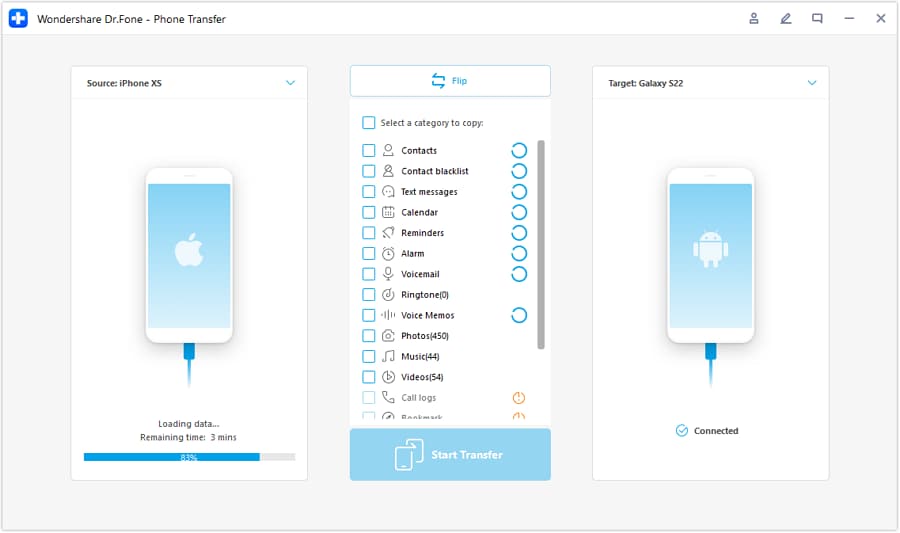
Keep the old phone untouched and available until you finish verification. Treat “connected” as part of your safety net.
-
Step 3 Choose what to transfer and run the transfer
Select the data types required by your plan (for example: contacts, photos, videos, messages where supported), then start the transfer and monitor for interruptions.
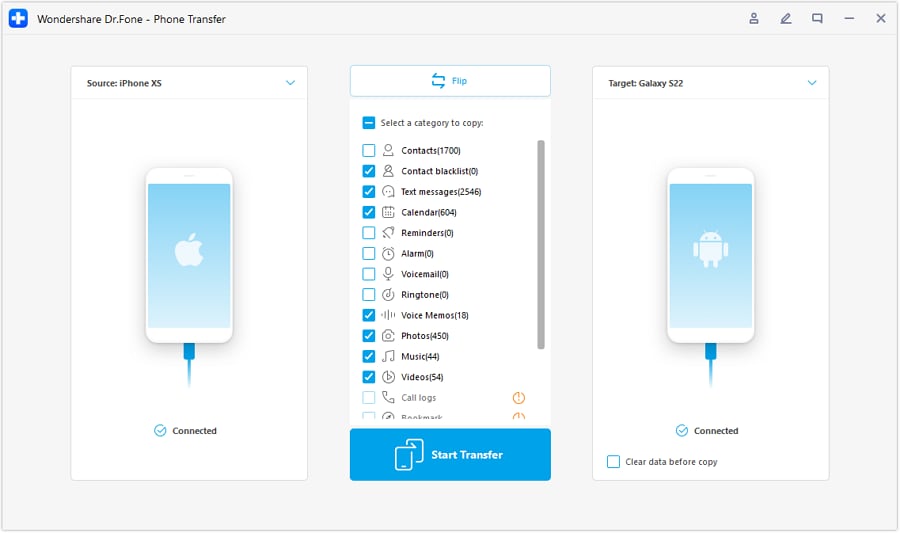
Limitation: “Transfer finished” should be treated as “ready to verify,” not “safe to erase,” especially for chat apps and 2FA apps with their own migration rules.
-
Step 4 Verify first, then do irreversible actions only after pass/fail is green
Use your checklist to confirm critical items on the new phone (sample photos across dates, latest message threads, chat app history, authenticator logins), and only then proceed with any reset/wipe needed for trade-in.
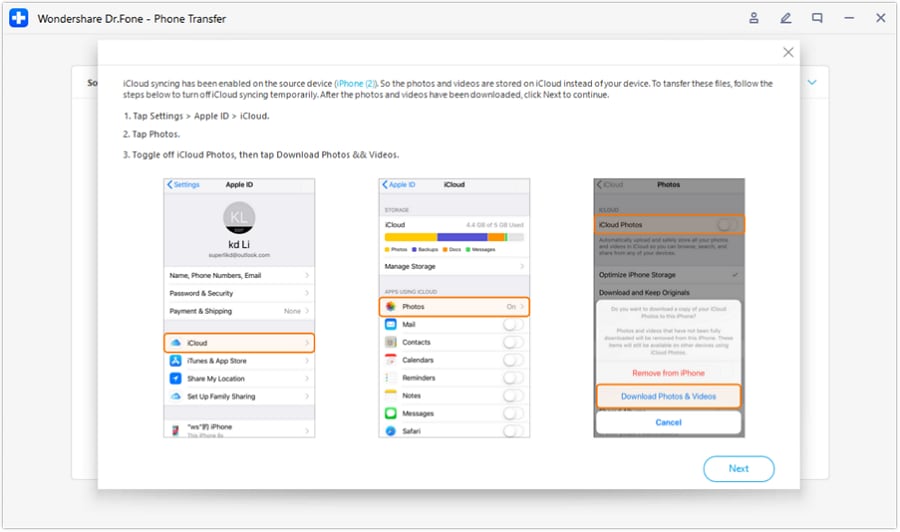
Once you factory reset or wipe the old phone, you may permanently lose local-only data—do not proceed unless your verification criteria are fully met.

Recommended tool to execute your migration plan
If you already have an AI-ordered checklist, the next step is executing it with a reliable transfer workflow—while keeping the old phone intact until every critical verification item passes.
 Move data between iOS to Android and vice versa.
- Transfer contacts, SMS, photos, videos, music, and more types.
- Available with all phones with Android and iOS versions.
- Simple, click-through process.

A practical way to reduce risk is to separate “transfer completion” from “migration success.” Let the tool finish, then follow your verification gates (photos across dates, latest conversations, banking/2FA access, and any work profile requirements) before you erase anything.
If one critical verification fails (for example, WhatsApp history or authenticator access), pause the wipe/reset step and use that app’s official restore/migration path while the old phone is still available.




Conclusion
Use AI to build a precise, risk-aware migration checklist with verification gates, then rely on a real execution tool to perform the transfer—saving irreversible steps (like wiping the old phone) for the moment after your checks pass.
FAQ
-
What’s the most common “I lost something” mistake in phone migration?
Wiping or trading in the old phone before verifying app-specific data (chat apps, authenticator, banking re-authorization) on the new phone. -
How do I verify photos and videos without checking everything manually?
Spot-check by date ranges (oldest, a mid-range month, newest), confirm totals where available (gallery counts), and open a few large videos to ensure playback. -
When should I transfer eSIM or move my SIM card?
After you’ve ensured you can still receive verification codes and you have account access secured; moving SIM/eSIM too early can interrupt logins and recovery flows. -
What should I do if verification fails for one critical app (like WhatsApp or Authenticator)?
Stop before any wipe/reset, keep the old phone intact, and follow that app’s official migration/restore path using your plan’s fallback steps. -
Can AI tell me whether my transfer actually worked?
No. AI can define what to check and in what order, but only you can confirm real app data on the device.
 Add Wondershare Dr.Fone as a preferred source on Google





