 Effortlessly manage data through preview, delete, export, etc.

 100% Security Verified | No Subscription Required | No Malware

 :
: 
 ChatGPT
 Perplexity
 Gemini
 Claude
 Grok
Grok

I switched phones the night before a trip and didn’t realize my 2FA and eSIM were the real problem—not my photos. Everything looked “transferred” until I couldn’t log into anything at the airport.
Reddit user, r/iPhone
You’re migrating to a new phone right before travel, and one missed step can mean lost photos, broken two‑factor logins, or a phone that won’t work the moment you land.
AI can help you map a safe sequence, identify what to verify, and spot common failure points (SIM/eSIM, authenticator apps, encrypted backups, and messaging history) before you touch anything on the device.
AI can’t access your devices, confirm what actually transferred, or run backups/transfers for you—so once the plan is verified, you’ll need real tools to execute the migration.
In this article
- Plan the migration sequence before travel
- Why order matters for travel-critical apps
- The “point of no return” to avoid too early
- Verification gates before irreversible actions
- Backup + rollback assumptions to lock in
- What the AI needs to know
- AI prompts: Levels + prompt refinement
- AI plan vs. real device constraints
- When to stop planning and start execution

Part 1. Plan how to migrate to a new phone before travel without missing critical steps
You’re leaving soon, your current phone is “fine,” and you’re tempted to do a quick transfer the night before. The uncertainty is usually not what to move, but what order to do things in—especially when travel depends on working eSIM, boarding passes, banking apps, and 2FA.
AI advice can feel complete until you realize it doesn’t account for your exact setup: multiple accounts, limited storage, an old phone with a weak battery, or carrier restrictions. The gaps show up when you try to log in and can’t receive verification codes.
1. Sequence first, then transfer.
Use AI to define the correct order (prep → execution → verification) with explicit “do not proceed until verified” checkpoints.
2. Treat eSIM + 2FA as the highest-risk items.
Plan and test service (calls/SMS/data) and authenticator/SMS verification on the new phone before you wipe or trade in the old one.
3. Don’t cross the irreversible line until proofs are passed.
Factory reset/trade-in is the point of no return; delay it until your must-have checklist is fully verified and you have a fallback backup.
1-1. Why order matters for travel-critical apps
Travel depends on things that “look fine” until you actively test them: eSIM activation, SMS delivery, authenticator codes, and app sign-ins. A safe plan forces checks in the middle—not just at the end.
1-2. The “point of no return” to avoid too early
There’s a clear point of no return: factory resetting or trading in the old phone (or wiping it to hand down). Do not reach that step until you’ve verified your data, logins, and 2FA on the new phone.
1-3. Verification gates you should include
AI is most useful when it adds “verification gates” between stages—so you don’t confuse “transfer finished” with “travel-ready.” Your plan should include explicit stop points for:
- eSIM/SIM activation and call/SMS/data tests
- Authenticator migration and a real login test for at least one critical account
- Messaging history spot-check (recent + older range)
- Photos access and a quick count/spot-check sampling plan
1-4. Backup + rollback assumptions to lock in
Before you start, define your fallback path (at least one reliable backup route) and keep the old phone untouched until verification is complete. This reduces the risk of getting stuck mid-move.
Part 2. What the AI needs to know
Share the details below so the workflow can be sequenced safely and verified.
- Old phone model + OS (e.g., iPhone 12 iOS 17 / Galaxy S21 Android 14)
- New phone model + OS
- Travel deadline and time window available (e.g., “6 hours tonight, flight tomorrow 7am”)
- Connectivity constraints (Wi‑Fi quality, data cap, roaming concerns)
- SIM/eSIM situation (physical SIM, eSIM, dual SIM, carrier name)
- Authentication methods in use (authenticator app, SMS 2FA, hardware keys)
- Critical apps for travel (airline, hotel, maps, banking, rideshare, work chat)
- Messaging needs (WhatsApp/LINE/Signal/iMessage/SMS history importance)
- Photo/storage setup (iCloud/Google Photos/OneDrive/local-only)
- Any previous backup method (computer backup, cloud backup, none)
- Any device constraints (low storage, cracked screen, unstable battery, water damage)
- What “done” means (must-have items vs nice-to-have)
Part 3. Using AI prompts to build a safer “before travel” migration workflow
Use the prompts below to force a clear sequence, reduce ambiguity, and add verification gates before irreversible actions.
3-1. Level 1: Basic prompt
Create a step-by-step plan to migrate from my old phone to my new phone before travel.
Include what I should verify after each stage, and call out any “do not proceed until verified” checkpoints.
Keep it planning-only and assume I’ll use a dedicated phone tool to execute later.
3-2. Level 2: Advanced prompt
Design a structured migration workflow with Preparation / Execution / Verification phases for moving to a new phone before travel.
Mark each step as critical or optional, and include risk notes for SIM/eSIM activation, 2FA/authenticator apps, messaging history, and photos.
Add a “stop point” checklist before any irreversible step (like factory reset or trade-in).
3-3. Level 3: Evidence prompt
I’m migrating (iPhone 12 iOS 17 → iPhone 15 iOS 17) tonight with (3 hours available) before a flight tomorrow.
I use (eSIM on Carrier X), banking apps with (authenticator + SMS fallback), and I must keep (WhatsApp chats + photos).
Build a workflow with:
- Checks before migration (storage space, account passwords, backup state, battery/charger, Wi‑Fi)
- Checks during migration (what “normal” looks like, what errors mean, when to pause)
- Checks after migration (app logins, 2FA verification, eSIM/calls, photos count spot-check, messages verification)
Include a “proof list” of what I should confirm (e.g., “verify 2FA works by logging into (Gmail) and (bank app)”).
3-4. Prompt refinement (follow-ups)
Turn this into a single-page checklist with sections: “Must work at the airport,” “Must work abroad,” and “Can wait until after travel.”
Add decision gates: “If X fails, stop and do Y,” especially for eSIM activation, authenticator transfer, and messaging history.
Create a verification sampling plan: what to count/spot-check (photos range, recent messages, files) so I don’t rely on assumptions.
Generate a time-boxed schedule for the last 24 hours before travel, including buffer time for carrier support and app lockouts.
Part 4. AI plan vs. real device constraints
| What AI can plan well | What AI can’t confirm | What you must verify on-device | Typical failure point |
|---|---|---|---|
| Correct step order + dependencies | Whether your backup is complete/usable | Backup completion, last backup time, and restore integrity | “Backup succeeded” but key apps/data missing |
| Risk checklist for eSIM/2FA/messages | Carrier/account restrictions | Calling/SMS/data + eSIM activation status | Losing service when old SIM/eSIM deactivates |
| Verification gates before wiping old phone | Actual transfer of app data | Logins, 2FA tests, message history spot-check | Authenticator not migrated; accounts lock |
| Time-boxed workflow | Device performance issues | Storage headroom, battery stability, Wi‑Fi reliability | Transfer stalls or corrupts due to low resources |
AI improves planning, sequencing, and verification logic, but it cannot execute the migration or observe what truly transferred—execution requires real device tools and on-device checks.
Part 5. When to stop planning and start execution
- You can state your must-have outcomes (e.g., “eSIM working, WhatsApp history present, photos accessible, bank login works”).
- You have a verified backup path (at least one reliable fallback) and know where it is stored.
- You’ve defined stop conditions (what failure means “pause and do not wipe the old phone”).
- You have enough time buffer for carrier/app lockouts (not starting 30 minutes before sleep or departure).
At this point, planning should stop because the remaining uncertainty can only be resolved by running the migration and verifying results on the devices.
Try a controlled execution workflow for your migration
Once your AI plan is ready, you need a reliable way to actually move data and keep your old phone intact as a fallback. Dr.Fone - Phone Transfer can help you run the transfer in a deliberate, repeatable way—then you validate the must-have items (service, 2FA, messages, photos) before any irreversible action.
 Move data between iOS to Android and vice versa.
- Transfer contacts, SMS, photos, videos, music, and more types.
- Available with all phones with Android and iOS versions.
- Simple, click-through process.

Execution matters now because travel-critical functions (service, 2FA, tickets, and maps) can’t be proven “ready” until the new phone is actually set up and tested end-to-end.
-
Step 1 Lock in a rollback-safe starting state
Open the phone transfer tool on your computer and keep the old phone untouched as your fallback while you prepare the migration.

-
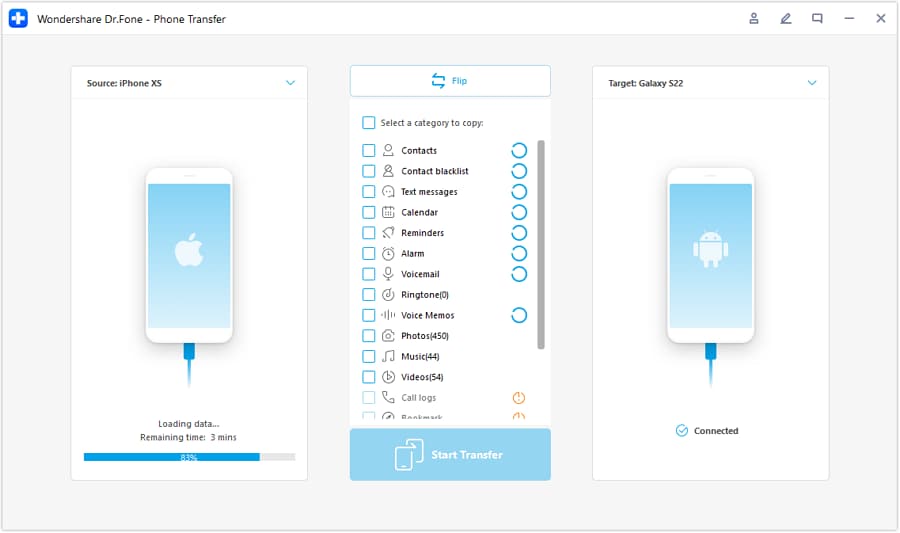
Step 2 Set the correct transfer direction (old → new)
Confirm the source device and destination device before you begin, so the transfer follows your AI plan’s sequence and dependencies.
-
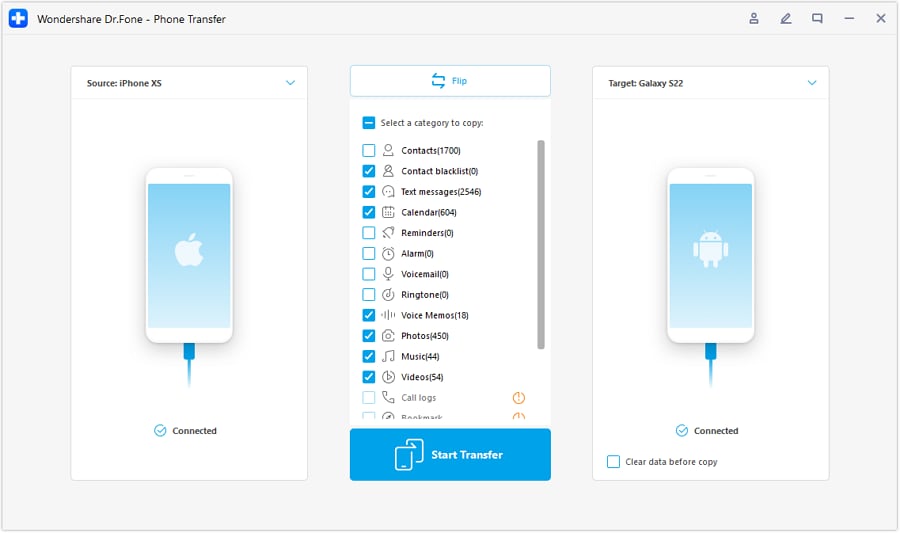
Step 3 Choose the data to move in one controlled pass
Run the migration while keeping both devices charged and stable. Avoid changing variables mid-transfer (network switches, low battery, heavy tasks) that can cause partial results.
-
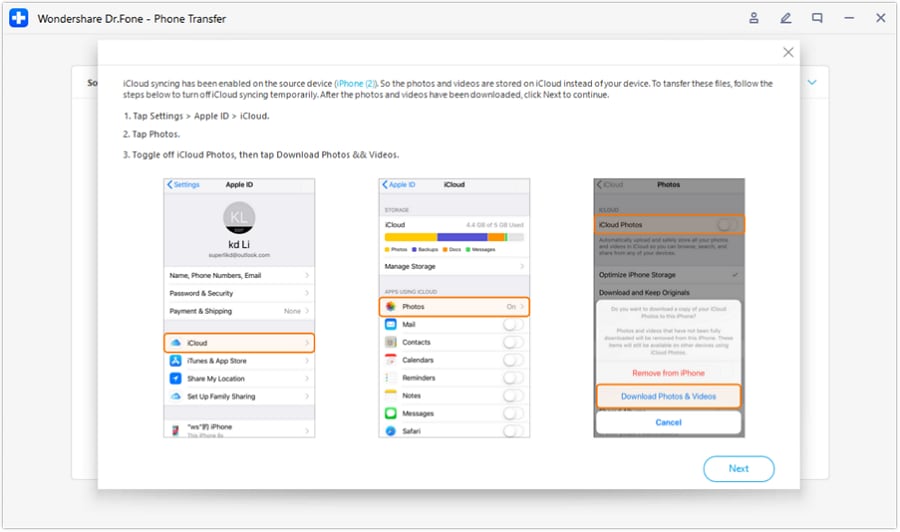
Step 4 Verify outcomes before any irreversible action
After the transfer completes, verify your must-have list on the new phone (calls/SMS/data, 2FA tests, messaging history spot-check, photos access). Only then consider factory resetting or trading in the old phone.




Conclusion
Use AI to design a migration workflow with clear sequencing, risk flags, and verification gates; then use Dr.Fone to execute the plan and confirm results on the devices before any irreversible step like wiping or trading in the old phone.
FAQ
-
How do I avoid losing 2FA access during the move?
List every account that uses 2FA, identify whether it’s authenticator-based or SMS-based, and test at least one real login on the new phone before wiping the old one. -
What’s the biggest “hidden” risk right before travel?
eSIM/service disruption plus app lockouts: if your number or authenticator doesn’t work, you may be unable to sign into banking, email, or airline apps when you need them. -
How can I verify photos and messages without checking everything manually?
Use a sampling plan: check a few known recent items, a few older items (e.g., 6–12 months back), and confirm counts/status where available; verify the apps open and search works. -
When is it safe to factory reset the old phone?
Only after the new phone passes your must-have verification list and you have at least one confirmed backup you can restore from. -
Can AI tell me whether my transfer succeeded?
No. AI can define what to check and how, but only on-device verification (and your tools’ completion status) can confirm success.
 Add Wondershare Dr.Fone as a preferred source on Google





