 Effortlessly manage data through preview, delete, export, etc.

 100% Security Verified | No Subscription Required | No Malware

 :
: 
 ChatGPT
 Perplexity
 Gemini
 Claude
 Grok
Grok

I’m moving from an old Galaxy to a new Samsung and I’m unsure whether to clone everything or start fresh. I’m worried I’ll wipe something too early or break 2FA and get stuck.
Reddit user, r/samsung
Moving from an old Galaxy to a new Samsung can go wrong fast if you miss one step—especially when accounts, backups, or encryption are involved.
AI is useful for turning a messy situation (two phones, many apps, mixed data, time pressure) into a clear sequence with checkpoints, so you know what to verify before you commit.
AI can’t actually migrate your data, sign you in on-device, or recover from a wipe you didn’t mean to do—execution requires real device tools and real confirmation at each step.
In this article
- How to Plan “Clone vs Start Fresh” Without Missing Critical Steps
- Decide what “clone” vs “start fresh” means for you
- Separate verification-first tasks from later tasks
- Identify the “point of no return” actions
- Use checkpoints before any irreversible step
- What the AI Needs to Know
- Using AI Prompts to Build a Safer Workflow
- When to Stop Planning and Start Execution
- Execute the Workflow Safely (Real-Device Steps)
Part 1. How to Plan clone old galaxy or start fresh on new samsung Without Missing Critical Steps
You’re setting up a new Samsung and debating: should you “clone” the old Galaxy so everything looks the same, or start clean and bring only what you need?
The uncertainty usually isn’t about what’s possible—it’s about sequence. People get stuck after an AI answer because it doesn’t clearly separate what to verify first (accounts, backups, storage, authentication) from what to do later (transfer method, app re-logins, cleanup).
Your point of no return is typically factory resetting the old phone, erasing the new phone after setup, or overwriting/locking yourself out of an encrypted backup. Those should not happen until your verification checklist is complete.
Part 2. What the AI Needs to Know
Answer these so the workflow can be sequenced safely:
- Old device model + Android version (e.g., Galaxy S10 / Android 12)
- New device model + Android version (e.g., Galaxy S24 / Android 14)
- Your goal: full clone, mostly clone, or start fresh with selected data
- Data types that matter most (photos, WhatsApp, SMS, contacts, notes, files, authenticator apps, work profile)
- Current backup situation (Samsung Cloud, Google One/Drive, local PC backup, none)
- Storage situation (old phone used / new phone capacity)
- Account access readiness (Google + Samsung passwords, 2FA methods, recovery email/phone)
- Any device constraints (broken screen, limited battery, USB port issues, no computer available)
- Risk tolerance + time window (needs to be done tonight vs can take a day)
- Whether either phone already has data you cannot lose (new phone already set up/used?)
Part 3. Using AI Prompts to Build a Safer clone old galaxy or start fresh on new samsung Workflow
Use the prompts below to force a verification-first plan before you execute anything on the devices.
3-1. Level 1: Basic Prompt
I’m moving from an old Galaxy to a new Samsung and I’m unsure whether to clone everything or start fresh.
Give me a simple, step-by-step plan with checkpoints, and clearly mark any steps that could cause data loss if done too early.
3-2. Level 2: Advanced Prompt
Build me a structured workflow to decide between “clone” vs “start fresh” for a move from my old Galaxy to a new Samsung.
Split it into Preparation / Execution / Verification, and label items as Critical vs Optional.
Also list “Do NOT do yet” actions (like factory reset) until specific verifications are complete.
3-3. Level 3: Evidence Prompt
Here’s my situation: old phone (Galaxy S10, Android 12), new phone (Galaxy S24, Android 14).
I want my photos, contacts, messages, and WhatsApp to carry over, but I’m open to reinstalling apps manually.
I have limited time (2 hours) and I cannot risk losing photos.
(I do have my Google password, but I’m not 100% sure about my Samsung account password.)
Create a workflow with checks before, during, and after transfer.
Include example verification items like: storage check (e.g., “old used 110GB”), account check (e.g., “2FA via old phone”), and a “point of no return” list that I must not cross until the final verification passes.
3-4. Prompt Refinement
Put the plan into a table with columns: Step, Why it matters, What could go wrong, How to verify, Stop/Go rule.
Ask me exactly 10 questions maximum, but only the questions that change the sequence (not nice-to-have details).
Add a “minimum safe finish line” definition: what I must confirm on the new phone before I wipe or retire the old phone.
Identify which items cannot be reliably transferred and need manual setup (e.g., authenticator apps, some app logins), and add a separate checklist for them.
Give me two branches: Branch A (Clone-like) and Branch B (Start-fresh), each with its own verification checklist and estimated time.
3-5. AI Plan vs. Real Device Constraints
| Planning item (AI can help) | Reality on devices (AI can’t do) |
|---|---|
| Decide whether to clone vs start fresh based on risk and priorities | Perform the actual transfer and handle on-device prompts/permissions |
| Build a checklist of what to verify (accounts, backups, storage, 2FA) | Confirm sign-ins, 2FA approvals, and encryption/backup access in real time |
| Identify “point of no return” actions and when they’re safe | Prevent accidental wipes or recover data after a mistaken reset |
| Create pass/fail criteria for success on the new phone | Validate data integrity across apps and fix transfer errors automatically |
AI improves planning, sequencing, and verification logic—but it cannot execute device actions or guarantee results without the real devices and tools.
Part 4. When to Stop Planning clone old galaxy or start fresh on new samsung and Start Execution
- You can sign into the required accounts (Google/Samsung) and you have a working 2FA path that won’t be broken mid-move.
- You have a clear “must-move” list (and a “can-reinstall” list) so you don’t chase low-value items under time pressure.
- You’ve defined your point of no return actions (factory reset, erase, overwrite) and the exact verification gates that must pass first.
- You’ve chosen one primary transfer approach and one fallback (if the primary fails, you know what you’ll try next).
Once these are true, you’re no longer guessing—you’re ready to execute carefully.
Part 5. Clone old galaxy or start fresh on new samsung: Execute the Workflow Safely with Dr.Fone
Execution now matters because this is where accidental overwrites, incomplete transfers, and premature resets typically happen—so follow your verification gates exactly.
To run the transfer with a controlled, checkpoint-driven process, you can use Dr.Fone - Phone Transfer.
-
Step 1 Create a safety fallback first
Make a backup (or otherwise capture a restorable copy) of the old phone data you can’t afford to lose before attempting major changes.
Limitation: This still depends on device access, cables/connection stability, and you confirming the backup completed successfully.

-
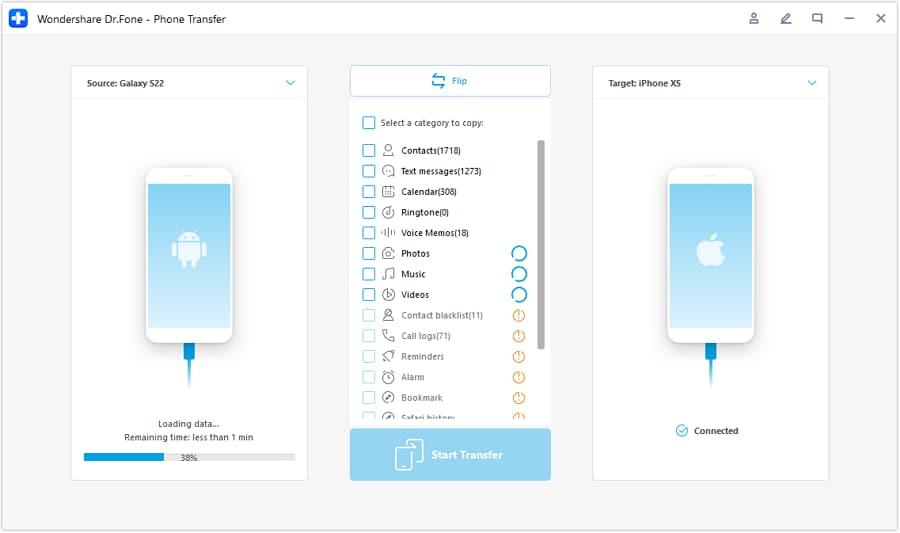
Step 2 Set the transfer direction (old Galaxy → new Samsung)
Confirm which device is the source (old phone) and which is the target (new phone) before you start, so you don’t risk overwriting the wrong device.
-
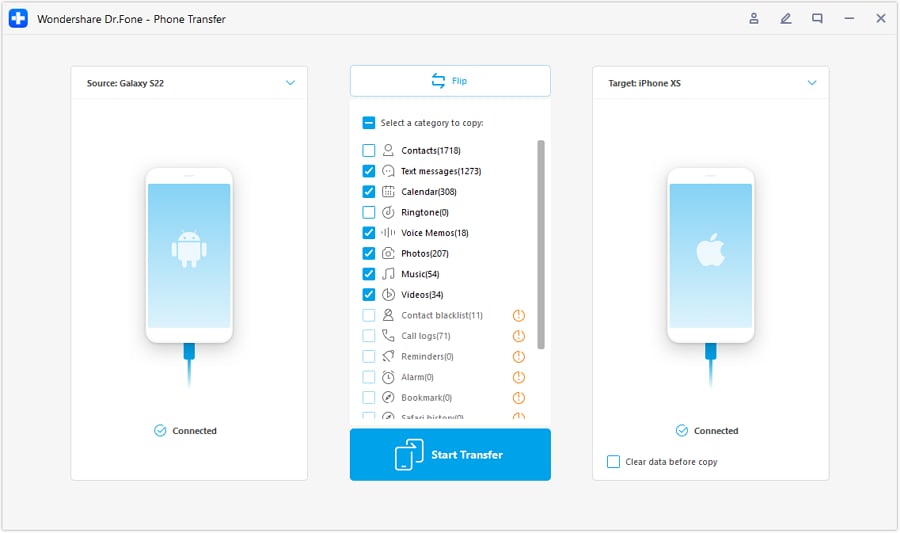
Step 3 Run the chosen transfer path (clone-like or selective)
Transfer the selected data set from the old Galaxy to the new Samsung based on your “must-move” list.
Limitation: Not every app’s internal state is transferable; expect some apps to require re-login or manual reconfiguration.
-
Step 4 Verify on the new phone before any wipe/cleanup
Use your verification checklist to confirm counts/samples (photos, contacts, messages, key files) on the new device before you take any irreversible action.
Limitation: AI cannot confirm your on-device results, and you should not factory reset/erase anything until you personally verify success.

Recommended Tool for a Controlled Samsung-to-Samsung Transfer
If you want a practical way to execute the plan you built (with less guesswork during the move), a dedicated transfer tool can help you run the actual device-to-device steps while you follow your verification gates.
 Move data between iOS to Android and vice versa.
- Transfer contacts, SMS, photos, videos, music, and more types.
- Available with all phones with Android and iOS versions.
- Simple, click-through process.

Keep your workflow “verification-first”: confirm accounts/2FA and backups before you start, transfer only what you decided is critical, and validate the results on the new phone before you do any cleanup or factory resets.




Conclusion
Use AI to decide whether to clone or start fresh, to sequence the work, and to define verification gates—then use a real execution tool like Dr.Fone to perform the transfer/backup steps once you’ve confirmed you’re not about to cross an irreversible point of no return.
FAQ
-
What’s the biggest risk when switching phones: cloning or starting fresh?
The biggest risk is usually sequence, not the choice—people wipe the old phone or disrupt 2FA before confirming the new phone is complete. -
When is it safe to factory reset the old Galaxy?
Only after your “minimum safe finish line” passes: you can access key accounts, your critical data is present on the new phone, and you’ve spot-checked integrity (not just “it seems there”). -
How do I verify photos moved correctly without checking every file?
Verify totals (approximate counts), open a spread of old/new photos across different dates, and confirm key albums/folders you care about are present. -
Why does AI advice still feel incomplete after I ask it how to switch phones?
Because execution depends on real device prompts, permissions, account security, and transfer outcomes—AI can outline the workflow but can’t observe or complete the transfer. -
What should I do if I’m missing something after the transfer?
Stop before any wipe. Re-run the transfer for the missing category (or use the fallback path you planned), then re-verify.
 Add Wondershare Dr.Fone as a preferred source on Google





