 Effortlessly manage data through preview, delete, export, etc.

 100% Security Verified | No Subscription Required | No Malware

 :
: 
 ChatGPT
 Perplexity
 Gemini
 Claude
 Grok
Grok

We factory reset our family Android phone, but setup still asks for the parent Google account like nothing was erased. We can’t finish setup for the child/new user.
Reddit user, r/AndroidQuestions
A family Android phone can still ask for the parent’s Google account after a factory reset, even when you’re sure you “erased everything.” This often shows up as a verification screen that won’t let the child (or new user) finish setup.
AI can help you describe the symptoms clearly, narrow the most likely causes (like Google FRP, Family Link, or a reset done the “wrong” way), and decide what evidence to check next—without taking risky trial steps.

AI can’t see your device state, confirm ownership, or safely perform actions for you, and repeated guessing (accounts, reset loops, random tools) can create delays, lockouts, or data loss.
In this article
- Why family phone still linked to parent account after reset happens
- What typically triggers the verification screen
- FRP vs Family Link: why it feels “still linked”
- What the setup loop usually looks like
- What to collect before asking AI
- Using AI prompts to diagnose parent account verification safely
- When to stop troubleshooting parent account lock after reset
- AI output vs reality: what you should verify on-screen
- Resolve the FRP step with Dr.Fone
Part 1. Why family phone still linked to parent account after reset happens and what it means
This typically happens right after you tap Factory data reset (or run a reset from Recovery mode) on a shared phone—like a Samsung Galaxy A53 or Pixel 6—and then restart into the setup screen. You expect a fresh start, but Android asks for the previous Google account instead.
In many cases, this is Factory Reset Protection (FRP): a theft-deterrent feature that can require the last synced Google account after certain kinds of resets. If the phone was under Family Link or managed by a parent account, it can feel like the device is “still linked” even after wiping.
From the user side, it’s confusing because nothing changes after multiple restarts—the setup keeps looping back to “Verify it’s you,” and it’s unclear whether the phone is still “updating” or truly blocked.
1-1. Before You Prompt the AI
Gather these basics so the AI can classify the lock correctly:
- Android brand/model and Android version (if known)
- What reset method you used (Settings reset vs Recovery reset)
- Exact on-screen text (copy it) and any error code
- Whether the parent account email is known/accessible
- Whether Family Link or a work/school profile was ever used
- Whether you can reach Wi‑Fi/mobile data during setup
Part 2. Using AI prompts to diagnose parent account verification after factory reset safely
2-1. Level 1: Basic Prompt
My family Android phone was factory reset, but during setup it still asks for the parent’s Google account. Help me identify whether this is FRP, Family Link, or something else based on the symptoms. Ask me only the minimum questions needed and suggest the lowest-risk next steps.
2-2. Level 2: Advanced Prompt
Act as a diagnostic assistant for Android setup locks. Based on my answers, rank the top 3 likely causes of “phone still linked to parent account after reset,” and for each cause list: (1) what evidence would confirm it on-screen, (2) safe next step, (3) risks of trial-and-error. Prioritize options that avoid data loss or lockouts. Also tell me when I should stop troubleshooting and switch to a dedicated tool.
2-3. Level 3: Evidence Prompt
Diagnose my “family phone still linked to parent account after reset” issue using evidence.
Device: (e.g., Samsung Galaxy A53)
Android version: (e.g., Android 13 / unknown)
Reset method: (Settings > System > Reset) or (Recovery mode wipe data)
What I did right before it happened: (e.g., tapped “Erase all data” then rebooted)
Current screen text: (paste exact wording)
Asks for: (parent Gmail / PIN / pattern / SIM PIN)
Can connect to Wi‑Fi?: (yes/no)
Family Link used?: (yes/no/unsure)
Work/school account ever added?: (yes/no/unsure)
Time since reset: (e.g., 10 minutes / 24 hours)
What I can still access: (Recovery mode / emergency dialer / nothing)
Now:
1) Tell me the most likely lock type.
2) List what NOT to do to avoid lockouts.
3) Give a short, safe decision tree of next checks.
2-4. Prompt Refinement
Use these follow-ups to force clarity and reduce guesswork:
“What 3 questions do you still need answered to separate FRP from a screen lock or carrier/SIM lock?”
“Rank the causes again, but separate them into account-related, device-policy, and network/setup categories.”
“What single piece of on-screen evidence would most strongly confirm FRP on this device?”
“If the parent account credentials are available, what is the cleanest path to remove the link after getting into Android?”
“If credentials are not available, what are the lowest-risk options that remain legitimate for a family-owned device?”
Part 3. When to stop troubleshooting parent account lock after reset and avoid risks
Stop experimenting when continuing is more likely to waste time or create new restrictions than to resolve the lock.
- You’re stuck on a Google verification screen and don’t have (or can’t recover) the last synced account credentials.
- You’ve tried correct credentials and still can’t pass setup (suggesting a mismatch, policy lock, or device state issue).
- You’re considering random “workarounds,” repeated resets, or unofficial tools that could create lockouts or security risks.
- The phone is needed quickly (school, travel, family safety) and repeated trial-and-error is causing delays.
Once you’ve identified the most likely lock type, the next step is moving from diagnosis to a controlled execution path that matches that lock.
Part 4. AI output vs reality: what you should verify
AI can suggest likely causes, but you still need to verify what’s actually on your screen and what the device will allow. Treat AI output as a hypothesis until your on-screen evidence matches.
| AI output | Reality you should verify |
|---|---|
| “It’s probably FRP.” | Does setup explicitly ask for a previously synced Google account? |
| “Wait 24–72 hours and try again.” | Is there evidence of a cooldown message, or is the device simply blocked? |
| “It’s a Family Link restriction.” | Can you confirm the device was supervised and tied to the parent in Google settings? |
| “Just reset again.” | Another reset may not change FRP status and can increase confusion or risk. |
AI helps you reason; it doesn’t confirm the lock type or carry out the steps on the device—so verify first, then act.
Part 5. Family phone still linked to parent account after reset: resolve the FRP step with Dr.Fone
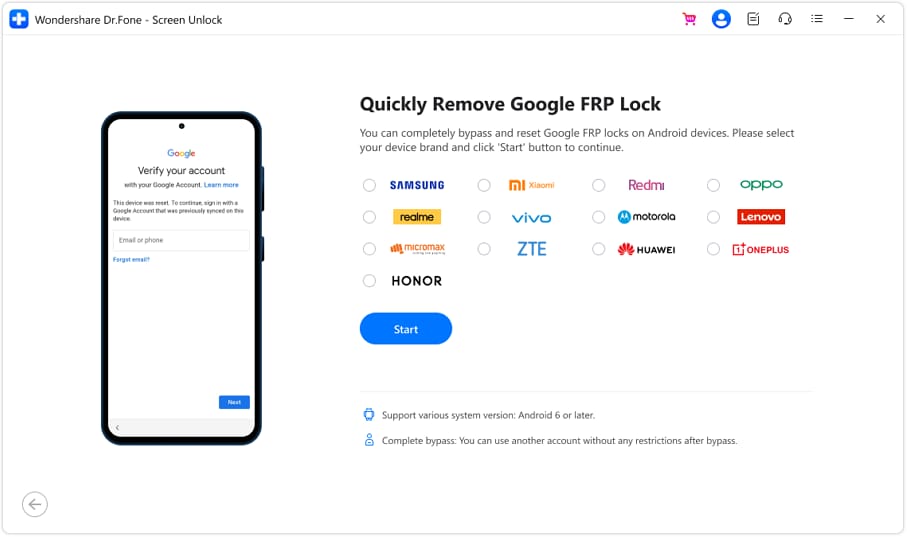
If your AI diagnosis points to Google FRP (common after a reset performed before properly removing the Google account), you’ll likely need a purpose-built method to complete the process reliably. Dr.Fone - Screen Unlock (Android) can handle the execution for supported devices via its Bypass Google FRP Lock on Android Devices workflow, which is relevant specifically when setup is blocked at Google verification and you’re resolving access for a legitimately owned family device.
 Unlock Android phone in seconds.
- Remove PIN, pattern, password, fingerprint.
- Bypass Google FRP lock easily.
- Works on all Android brands & models.
- No tech skills required – user-friendly.

-
Step 1 Confirm the lock type
Re-check the setup screen to ensure it’s requesting the previous Google account (FRP), not a PIN/pattern or SIM lock.

-
Step 2 Prepare a stable environment
Use a reliable USB cable and steady PC connection, and keep the phone powered to avoid interruptions mid-process.

-
Step 3 Run Screen Unlock (Android) and pick the FRP path
In Dr.Fone, choose the FRP-related path and follow the on-screen instructions for your device/Android version.

-
Step 4 Complete setup carefully after verification
After the device proceeds past verification, finish Android setup and then review Google accounts/Family supervision settings to prevent a repeat.




Conclusion
Use AI (e.g., ChatGPT or Gemini) to turn your symptoms into a clear lock classification, rank the most likely causes, and choose low-risk next checks—then hand off to an execution tool like Dr.Fone when you’ve confirmed the issue is an FRP-style verification block and you need a controlled way forward.
FAQ
-
Why does a factory reset still ask for the parent Google account?
Because FRP can require the last synced Google account after certain resets, especially if the account wasn’t removed before wiping. -
Is Family Link the same as FRP?
No. Family Link is supervision/management; FRP is an Android security check during setup. They can coexist and feel similar. -
What on-screen wording usually indicates FRP?
Prompts like “Verify it’s you” or requests to sign in with a Google account that was previously synced to the device commonly indicate FRP. -
Will resetting again remove the parent account requirement?
Usually not. Repeating resets often returns to the same verification screen and can add confusion without changing FRP status. -
What should I do if I don’t know the previous Google account?
First, use AI to confirm it’s FRP (not a different lock). Then consider a supported execution method designed for FRP scenarios on legitimately owned devices.
 Add Wondershare Dr.Fone as a preferred source on Google





