 Effortlessly manage data through preview, delete, export, etc.

 100% Security Verified | No Subscription Required | No Malware

 :
: 
 ChatGPT
 Perplexity
 Gemini
 Claude
 Grok
Grok

I tried moving my work eSIM to a new phone and suddenly couldn’t receive texts for 2FA—then I realized I was about to wipe the old phone. I need a plan that tells me what to verify first so I don’t get stranded.
Forum user
Combining business and personal lines on one new phone is doable, but missing one dependency (carrier access, eSIM timing, app verification, backups) can strand you without calls, texts, or key accounts.
AI helps by turning a messy goal into a sequenced workflow: what to confirm first, what to postpone, and which checks reduce “surprise” lockouts.
AI can’t activate eSIMs, move SIM credentials, or guarantee carrier/app behavior—so once the plan is verified, you still need real tools to execute transfers and backups on the device.
In this article
- How to plan this setup without missing critical steps
- Define your separation goal
- Decide the right order
- Protect the point-of-no-return
- Prepare verification tests
- What the AI needs to know
- Using AI prompts to build a safer workflow
- When to stop planning and start execution
- Execute the workflow safely with Dr.Fone
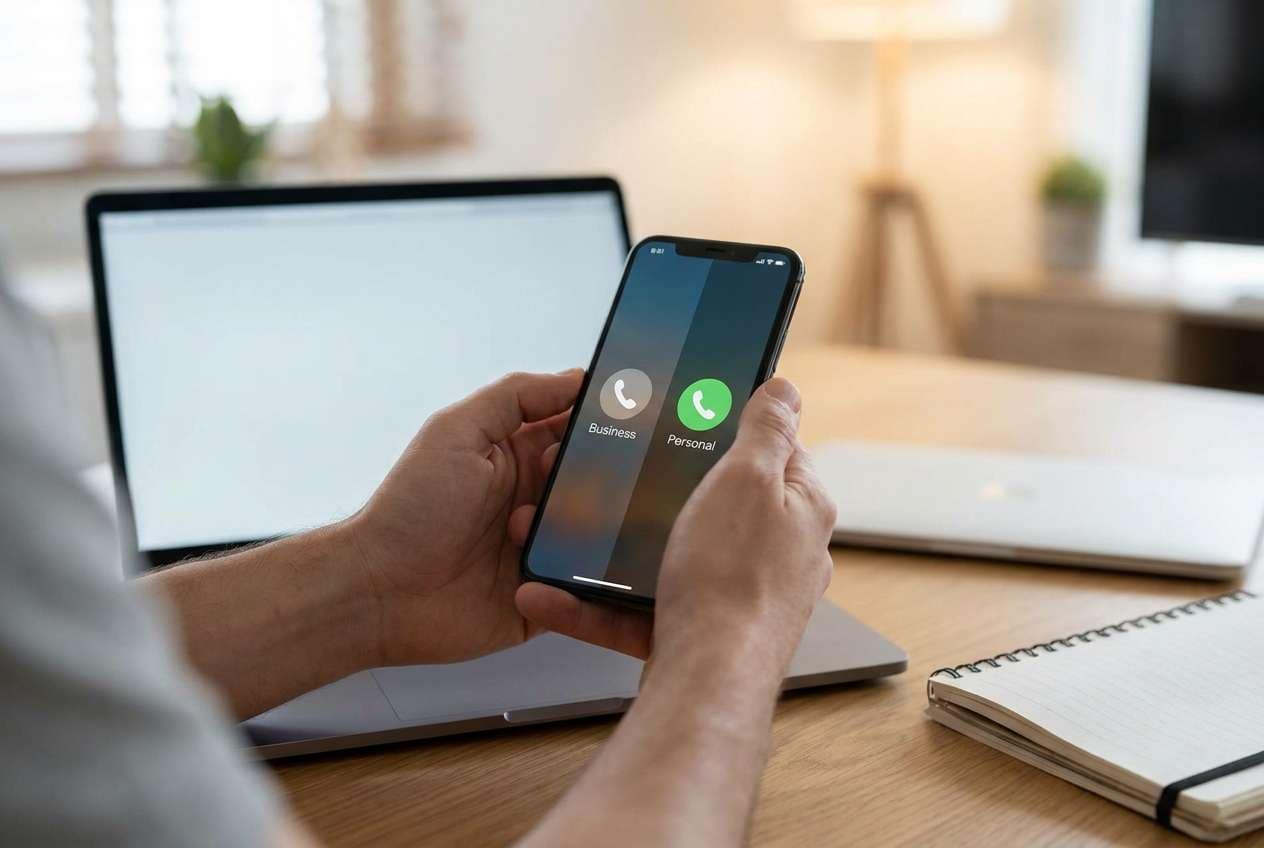
Part 1. How to Plan set up business and personal lines on one new phone Without Missing Critical Steps
1-1. Start by defining what “separation” should look like
You have a new phone and want one device to handle both your personal number and your work number—while keeping contacts, messages, and apps separated enough that you don’t accidentally mix business and personal communications.
1-2. The real problem is usually the order of operations
The uncertainty usually isn’t “can it be done,” but “what’s the right order?” For example: whether to move data first or activate the work line first; how to avoid breaking 2FA; and whether your carrier requires the old phone online to move an eSIM.
1-3. Identify your “point of no return” before you touch SIM/eSIM
Your point-of-no-return moment is typically wiping/trading in the old phone or deleting the eSIM profile before you’ve confirmed both lines can place/receive calls/SMS and your critical apps can authenticate on the new device.

Part 2. What the AI Needs to Know
Answering these details lets the AI produce a sequence you can actually follow without guessing.
- Phone models (old + new) and OS versions (e.g., “iPhone 12 iOS 17 → iPhone 16 iOS 18” or “Pixel 7 Android 14 → Galaxy S25 Android 15”)
- Your two lines’ setup: physical SIM, eSIM, or one of each (and which number is which)
- Carrier(s) involved and whether either line is managed by an employer/MDM
- What “separation” means for you (separate contacts? separate messaging apps? separate work profile? separate voicemail?)
- Critical apps tied to SMS/voice verification (banking, payroll, authenticator, WhatsApp/Signal, work apps)
- Data you must keep (SMS history, call logs, photos, chats, notes) vs “nice to have”
- Your deadline and acceptable downtime (e.g., “can’t miss work calls 9–5”)
- What you can still access during setup (old phone available? carrier login? backup password? authenticator recovery codes?)
Part 3. Using AI Prompts to Build a Safer set up business and personal lines on one new phone Workflow
Use the prompts below to force a clear order, explicit checks, and a “don’t-cross-yet” gate before any irreversible step.
3-1. Level 1: Basic Prompt
I’m setting up one new phone to handle both my personal and business lines. Create a step-by-step plan that prioritizes avoiding loss of service, missed 2FA codes, and data loss. Include a short checklist of what to verify before I wipe or trade in the old phone.
3-2. Level 2: Advanced Prompt
Design a structured workflow for putting business + personal lines on one new phone.
Split the plan into:
1) Preparation (accounts, backups, carrier access, app/2FA readiness)
2) Execution (data transfer, SIM/eSIM moves, line labeling, default line rules)
3) Verification (tests to prove both lines + key apps work)
Mark each step as CRITICAL or OPTIONAL.
Add “stop points” where I must verify results before moving on, especially before any irreversible action (e.g., removing an eSIM or factory resetting the old phone).
3-3. Level 3: Evidence Prompt
Build me a detailed, low-risk workflow to set up business and personal lines on one new phone, using my specifics below. I want checks before/during/after, plus a final “ready to erase old phone” checklist.
Context:
- Old phone: (iPhone 13 iOS 17.5)
- New phone: (iPhone 16 iOS 18)
- Personal line: (physical SIM, Carrier A)
- Business line: (eSIM, Carrier B, may require employer approval)
- Separation goal: (business calls/texts must use business number by default; personal remains personal; avoid mixing contacts)
- Critical apps: (banking app, Microsoft Authenticator, WhatsApp, work email)
- Downtime limit: (no missed business calls during 9am–5pm)
Output requirements:
- A dependency map (what must be true before each step)
- Exact verification tests for both lines (call in/out, SMS in/out, voicemail, data)
- A “2FA risk list” (which apps can lock me out and what to do first)
- A rollback plan if the eSIM transfer fails
- A point-of-no-return warning section (what NOT to do until all checks pass)
3-4. Prompt Refinement
Rewrite the workflow as a table with columns: Step, Purpose, Prerequisites, Success Check, If It Fails (Fallback), Risk Level.
Identify the top 5 ways this setup commonly fails (carrier/eSIM, 2FA, messaging apps, contacts duplication, default line confusion) and add prevention checks to the plan.
Add a “minimal downtime” variant: I must keep the old phone active while I validate the new phone, then switch over during a 30-minute window.
Create a final go/no-go checklist titled “Safe to erase or trade in old phone” that requires proof for each item (e.g., screenshot, test call log, received SMS).
Separate what AI can help me decide (sequence, checks, risk gates) vs what must be done inside device settings/carrier support/tools.
3-5. AI Plan vs. Real Device Constraints
| AI can plan/clarify | Real device constraint AI can’t perform |
|---|---|
| Order of operations and dependency checks | Carrier activation/eSIM provisioning and carrier-side permissions |
| Risk gates before irreversible actions | Actually moving an eSIM, activating SIM, or fixing carrier errors |
| Verification script (what to test and how to record results) | Reading your phone’s live state, call routing, SMS delivery, voicemail provisioning |
| Data-migration strategy and rollback plan | Executing transfers/backups/restores and confirming data integrity on-device |
AI improves planning, but it cannot execute carrier steps or operate your phone—so you use the plan to reduce mistakes, then rely on real device tools for the actual transfer and backup work.
Part 4. When to Stop Planning set up business and personal lines on one new phone and Start Execution
- You can log in to your carrier account(s) (or you’ve confirmed the business line’s admin can approve transfers) and you know whether each line is SIM vs eSIM.
- You have a written “point-of-no-return” rule: do not erase/trade in the old phone until both lines pass call/SMS/voicemail tests and your critical apps re-authenticate.
- Your verification checklist is specific (who you’ll call, which numbers will text you, how you’ll confirm voicemail, what “pass” looks like).
- You have a fallback plan (keep old phone powered/connected, know how to re-enable the old SIM/eSIM, and have alternative 2FA access if SMS doesn’t arrive).
Once those are true, the work shifts from deciding to carefully executing—and recording results as you go.
Part 5. Set up business and personal lines on one new phone: Execute the Workflow Safely with Dr.Fone
Execution matters now because this is where data can be duplicated, lost, or partially transferred—and where a rushed switch can break authentication or leave one line unreachable. For the data-migration part of the workflow, you can use Dr.Fone - Phone Transfer.
 Move data between iOS to Android and vice versa.
- Transfer contacts, SMS, photos, videos, music, and more types.
- Available with all phones with Android and iOS versions.
- Simple, click-through process.

- Transfer and protect your data first
Use Dr.Fone to back up and/or transfer the data you’ve decided is in-scope (especially the items you can’t easily re-download). Limitation: Dr.Fone cannot activate your carrier lines or guarantee app-level re-verification—treat data migration as separate from line activation. - Switch/activate lines only after your data is safe
After your backup/transfer is complete, proceed with SIM/eSIM and carrier steps using your pre-written order and stop points. Limitation: AI and Dr.Fone can’t complete carrier provisioning; if eSIM transfer requires carrier approval, you must resolve that with the carrier/employer before proceeding. - Verify both lines and lock in defaults before any wipe
Run your verification script (calls/SMS in/out, voicemail, data, key apps/2FA) and only then consider wiping or trading in the old phone. Limitation: Once you erase the old phone or delete an eSIM profile, rollback may be slow or impossible—do not cross this step until every required check passes.
5-1. Data transfer steps (example workflow)
-
Step 1 Open Phone Transfer
Launch the transfer module so you can start moving the data you’ve defined as “must keep” before doing any carrier changes.

-
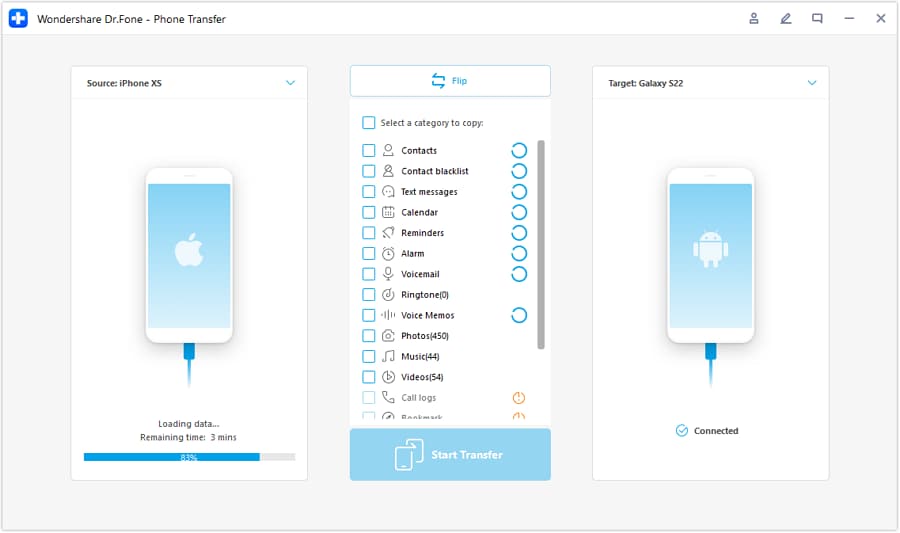
Step 2 Set the transfer direction
Select the correct source phone and destination phone to prevent accidental overwrites or duplication caused by choosing the wrong path.
-
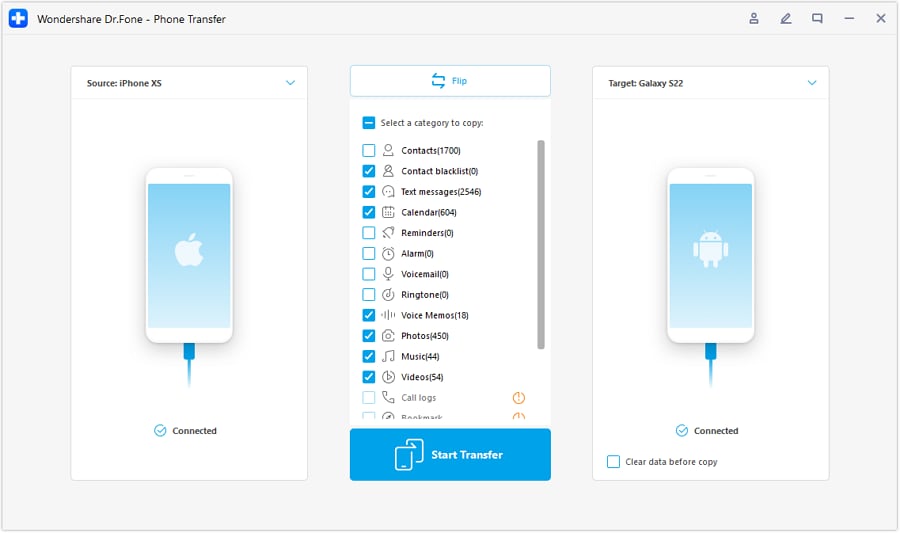
Step 3 Choose what data to transfer
Transfer only what you decided is in-scope (for example, contacts/photos/messages if required), then confirm the transfer completes before moving on to SIM/eSIM steps.
-
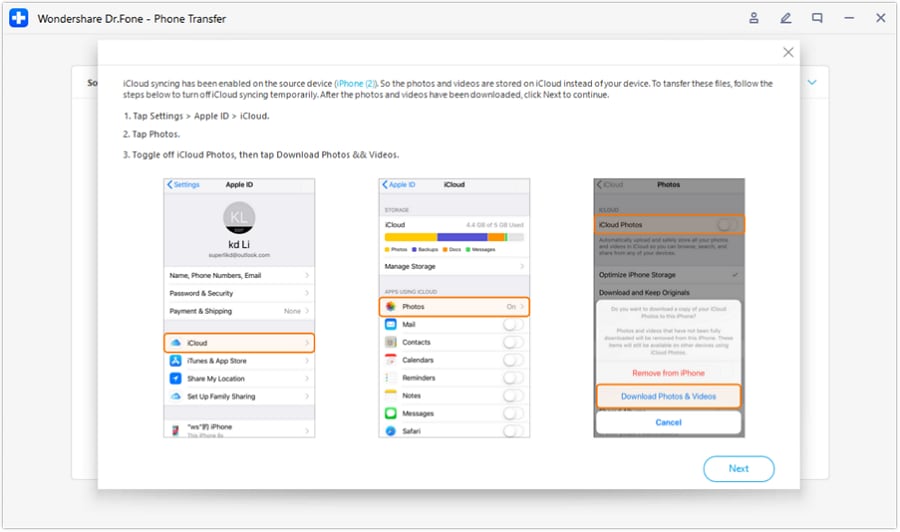
Step 4 Follow any required on-screen sync warnings
Some platforms require you to pause certain syncing behaviors during transfer. Treat these prompts as part of your “stop point” checks before proceeding.




Conclusion
Use AI to design a cautious sequence with explicit verification gates and a clear point-of-no-return rule, then use a real tool like Dr.Fone to execute the data transfer and backup steps while you handle carrier activation separately and only erase the old phone after all checks pass.
FAQ
-
What’s the biggest risk when combining two lines on one phone?
Breaking service or 2FA by moving an eSIM/SIM too early, then losing access to texts/calls needed to log in to critical accounts. -
Should I transfer data before activating the business line?
Often yes, because data transfer is more predictable than carrier provisioning—but your best order depends on whether the business eSIM requires admin approval or the old phone to be online. -
What should I verify before I wipe/trade in the old phone?
Both numbers can call and receive calls, send/receive SMS, voicemail works, and your critical apps can authenticate without relying on the old phone. -
How do I reduce downtime during business hours?
Keep the old phone active while you prepare and transfer data, then switch lines during a short planned window and immediately run the call/SMS/voicemail tests. -
Can AI tell me exactly where my phone settings are or whether my carrier transfer succeeded?
No—AI can provide a checklist and decision logic, but it can’t see your device state or carrier provisioning results.
 Add Wondershare Dr.Fone as a preferred source on Google





