 Effortlessly manage data through preview, delete, export, etc.

 100% Security Verified | No Subscription Required | No Malware

 :
: 
 ChatGPT
 Perplexity
 Gemini
 Claude
 Grok
Grok

I’m about to erase my phone, but I’m worried my “backup” doesn’t actually include everything I need. I don’t want to find out after the reset that something important never made it into the backup.
Apple Support Community user
Erasing a phone is simple—recovering what you forgot to back up is not. Missing one category (messages, authenticator codes, hidden app data, local notes, WhatsApp media, device-only photos) can turn a “clean reset” into a permanent loss.
AI is useful to map your exact situation into a clear workflow: what to back up, how to confirm it’s complete, and when it’s safe to proceed. But AI cannot access your device or confirm what truly synced—execution and verification must be done with real tools and on-device checks.
In this article
- How to plan a second-backup-before-erase workflow
- Why “having a backup” still isn’t enough
- Sequence: backup, sync, export, verify
- Define the point of no return
- Verification gates before erasing
- What the AI needs to know
- Using AI prompts to build a safer workflow
- When to stop planning and start execution
- Execute the workflow safely with Dr.Fone
Part 1. How to Plan should i make a second backup before erasing phone Without Missing Critical Steps
You’re about to erase your phone to troubleshoot issues, sell it, trade it in, or start fresh. You already have “a backup,” but you’re not fully sure what it contains, when it was made, or whether it includes the items you care about most.

After an AI answer like “yes, make a second backup,” the uncertainty usually becomes sequence: should you back up again first, update cloud sync, export anything manually, or verify restoreability? Without a checklist, it’s easy to do steps in the wrong order and create a backup that’s incomplete but looks “successful.”
The concrete point of no return is the factory reset/erase step. Once you confirm the erase, you may lose device-only data permanently—so you should not proceed until verification is complete and you can prove the backup is usable.
Part 2. What the AI Needs to Know
Share the details below so the AI can build a backup-and-erase plan that fits your device and risk level.
- Phone type and OS version (iPhone/Android; iOS/Android version)
- Why you’re erasing (sell/trade-in, troubleshooting, switching phones, privacy)
- Current backup types you think you have (cloud backup, computer backup, third-party tool)
- When the last backup was made (date/time, approximate is fine)
- What data matters most (photos, chats, notes, contacts, files, voice memos, app data, health data, authenticator apps)
- Apps with special backup rules (WhatsApp/LINE/Signal/WeChat, banking apps, 2FA apps)
- Whether you have access to a computer and cables (yes/no; Windows/macOS)
- Storage constraints (low phone storage, low cloud storage, limited computer disk space)
- Time constraints (need to erase today vs can wait 24–48 hours)
- Your risk tolerance (cannot lose anything vs “some loss acceptable”)
Part 3. Using AI Prompts to Build a Safer should i make a second backup before erasing phone Workflow
Use the prompts below to force a sequence, define verification checks, and avoid “I assumed it was backed up” mistakes.
3-1. Level 1: Basic Prompt
I’m planning to erase my phone and I’m not sure if I should make a second backup first. Ask me for the minimum details you need, then give me a safe step-by-step plan that prioritizes verification before any erase actions. Include a short “stop” list of what not to do until backups are confirmed.
3-2. Level 2: Advanced Prompt
Build me a workflow with three phases: Preparation, Execution, and Verification for deciding whether to make a second backup before erasing my phone.
In each phase, label steps as critical vs optional, and include clear pass/fail criteria (e.g., “backup date is today,” “backup size is within expected range,” “restore test succeeds”). Also list the top 5 failure modes that cause data loss during resets.
3-3. Level 3: Evidence Prompt
Here’s my situation: device (iPhone 13, iOS 17.5) / goal (trade-in tomorrow) / current backups (iCloud on, last backup “maybe last week”; no computer backup) / key data (Photos, Messages, WhatsApp, Notes, 2FA app) / constraints (only 2 hours, Wi‑Fi available, limited iCloud space).
Create a plan with:
- Before: what I must check and document (backup timestamp, storage, account status)
- During: what I should avoid changing (logouts, deleting apps, clearing caches) and how to keep evidence (screenshots of backup status)
- After: the minimum verification that proves I can restore (e.g., restore test to a spare device if available, or other concrete checks)
Include a decision rule for “make a second backup or not,” and call out the exact point when erasing becomes irreversible.
3-4. Prompt Refinement
Ask me 10 yes/no questions that determine whether a second backup is required, then output a decision (“required / recommended / optional”) with reasons.
Convert your plan into a checklist with gates: “Do not proceed unless Gate 1/2/3 is passed,” and define what proof satisfies each gate.
Identify which of my “must-keep” data is not reliably covered by a standard backup and propose specific export/verification steps for each.
Give me two timelines: Fast (same day) and Safer (24–48 hours), and show what risk increases when I choose the fast path.
Produce a “restore rehearsal” plan that minimizes disruption: what I can test-restore and how to confirm success without fully switching devices.
3-5. AI Plan vs. Real Device Constraints
| What AI can do | What only real tools/on-device checks can do |
|---|---|
| AI can draft a safe sequence and decision gates | Only a real device/tool can generate the backup file and show completion results |
| AI can list what to verify (timestamps, sizes, restore tests) | Only you can view backup screens/logs and confirm what actually appears |
| AI can warn about high-risk moments (factory reset, sign-outs) | Only you can prevent accidental taps and irreversible erase actions |
| AI can suggest evidence to capture (screenshots, lists) | Only you can collect and store that evidence outside the phone being erased |
AI improves planning and reduces omissions, but it cannot access your phone or certify that a backup is complete; verification must happen in real tools before you erase anything.
Part 4. When to Stop Planning should i make a second backup before erasing phone and Start Execution
- You can state exactly what “done” means (e.g., “two independent backups + proof of today’s timestamp + at least one restore check”).
- You have identified your critical data list and any apps needing special handling (especially chat apps and 2FA).
- You have a written pass/fail checklist and you know the irreversible moment you will not cross without passing it.
- You have enough storage, power, stable connection, and time buffer to complete backups without rushing.
Once those are true, further planning usually adds less safety than completing backups and collecting verification evidence.
Part 5. Should i make a second backup before erasing phone: Execute the Workflow Safely with Dr.Fone
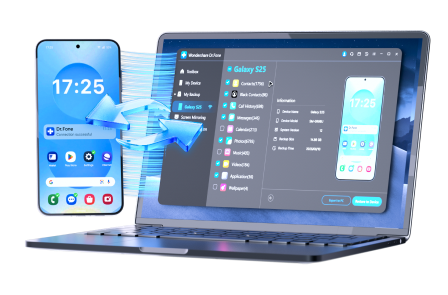
Execution matters now because the only way to reduce uncertainty is to create the backup(s) and verify them with real outputs (timestamps, sizes, and restore-readiness), before you trigger the erase. If you want a computer-based backup you can manage and verify, Dr.Fone Basic - Data Manager can help you create an independent second copy and keep your evidence off-device.
 Easily manage data through preview, delete, export, etc.
- Transfer all data between devices.
- Robust backup solutions for reliable data protection.
- Mirror screens to PC for meetings, teaching, and control.
-
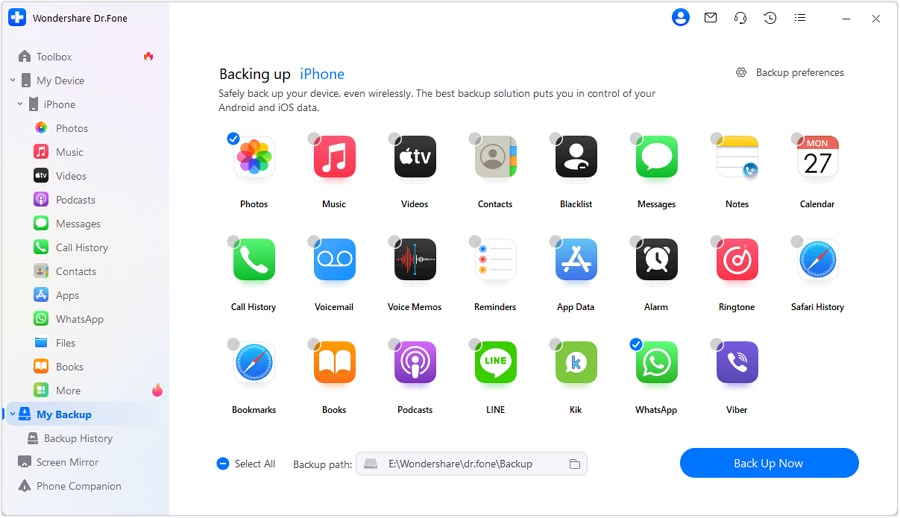
Step 1 Start a new, independent backup
Use Dr.Fone to run a new backup to a computer/location separate from your existing backup so a single failure doesn’t wipe out your only copy.
AI limitation: AI cannot run the backup, see what was saved, or confirm completion—only you can confirm the backup finished without errors.
-
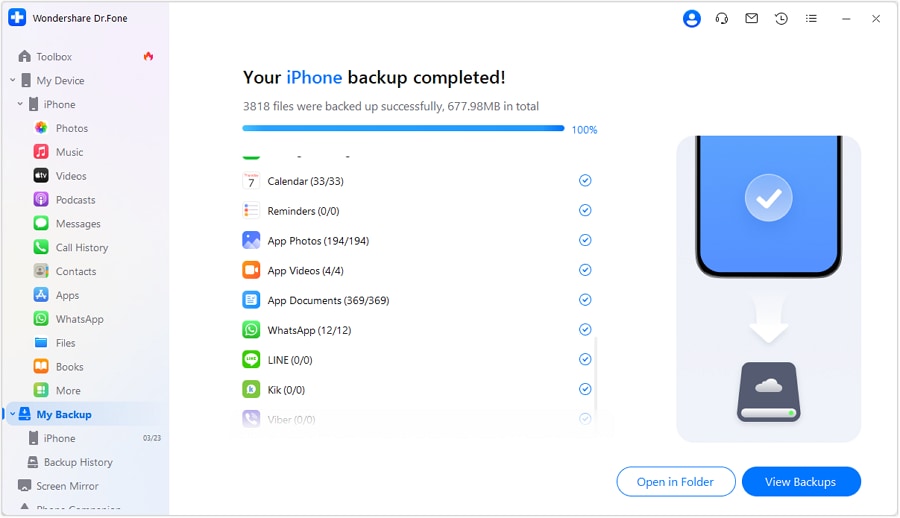
Step 2 Complete the backup and capture completion evidence
Let the backup process finish fully, and capture proof (such as completion screens) so you’re not relying on memory later.

-
Step 3 Verify backup evidence before erasing
Use Dr.Fone and your device’s backup indicators to confirm the backup date/time, expected size, and that your critical categories are included (at least spot-check items like recent photos/messages/chat media if applicable).
AI limitation: AI cannot inspect the backup contents or perform a real restore test; it can only tell you what to check and what “good” looks like.
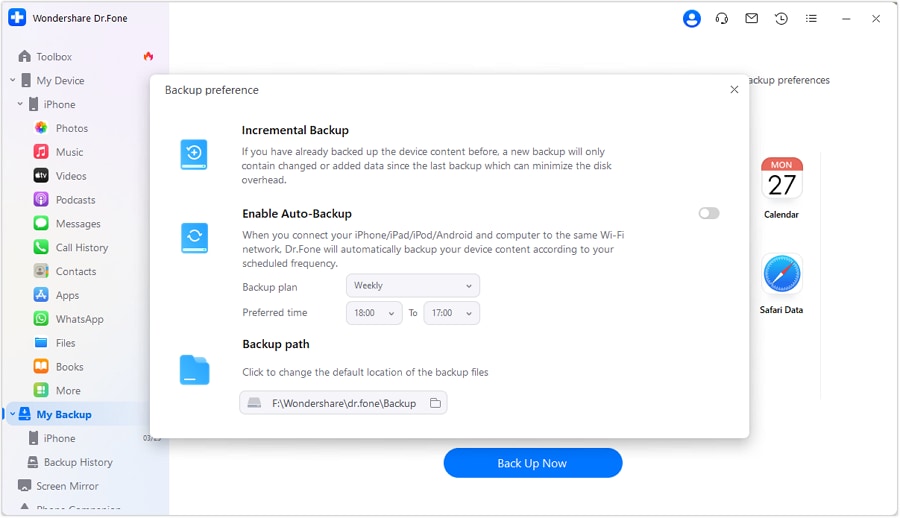
-
Step 4 Erase only after verification gates are passed
After you’ve passed your checklist gates, proceed with the phone erase/reset, keeping your verification screenshots/notes stored off-device.
AI limitation: AI cannot prevent irreversible taps—once the erase starts, recovery may be impossible if something wasn’t backed up.




Conclusion
Use AI to define the safest sequence, decision gates, and verification checks for whether you should make a second backup before erasing your phone; then use a real tool to create and verify the backup before you take the irreversible erase step.
FAQ
-
Is a second backup always necessary before erasing a phone?
Not always, but it’s strongly recommended when your existing backup is old, unverified, stored in only one place, or you have high-value data (chats, photos, 2FA) you can’t replace. -
What’s the biggest mistake people make before a factory reset?
Confusing “sync is on” with “data is safely backed up,” and skipping verification (timestamp, size, and at least one restore-readiness check). -
What should I verify before I erase (minimum)?
Backup timestamp is current, backup completed without errors, storage location is accessible, and you can spot-check that recent critical items are included (or have app-specific exports where needed). -
When is the point of no return?
When you confirm the erase/reset and the device begins wiping data. Do not proceed until your verification gates are passed and evidence is saved somewhere not on the phone. -
Can AI tell me whether my backup contains everything?
No. AI can list what should be included and what to check, but only real tools and on-device/account checks can confirm what’s actually in your backup.
 Add Wondershare Dr.Fone as a preferred source on Google





