 Effortlessly manage data through preview, delete, export, etc.

 100% Security Verified | No Subscription Required | No Malware

 :
: 
 ChatGPT
 Perplexity
 Gemini
 Claude
 Grok
Grok

I’m moving to a new phone and I’m stuck on one question: should I back up days ahead to be safe, or right before I transfer so I don’t lose anything—without risking an unverified backup?
Forum user
A phone transfer can go sideways when one small step is missed—like backing up too early, skipping verification, or overwriting the wrong device.
AI can help you decide how “recent” your backup needs to be, map a safe sequence, and add checkpoints so you don’t reach irreversible steps too soon.
AI can’t access your phones, accounts, cables, or backup files, so execution (backup/restore/transfer) must be done with real device tools after the plan is confirmed.
In this article
- How to plan backup recency without missing critical steps
- Why backup timing matters
- What to verify before you commit
- Freeze window for high-change data
- Point-of-no-return awareness
- What the AI needs to know
- Using AI prompts to build a safer workflow
- When to stop planning and start execution
- Execute the workflow safely with Dr.Fone
Part 1. How to Plan How Recent Should a Phone Backup Be Before Transfer Without Missing Critical Steps
You’re moving to a new phone and trying to time the backup: too old and you’ll lose recent photos, chats, and 2FA changes; too close to transfer and you may not have time to confirm the backup is complete and restorable.
The uncertainty usually isn’t “how to back up”—it’s the order: what to freeze (messages, authenticator apps), what to verify (backup integrity, storage), and what to keep until the end (SIM swap, device wipe).
The point of no return is when you erase or trade in the old phone or you restore onto the new phone in a way that overwrites its current data—you should not reach that moment until verification checks are complete.
Part 2. What the AI Needs to Know
Answer this so the AI can tailor the backup-recency decision and checkpoints to your transfer situation:
- Current phone OS and model (iPhone/Android; exact model if known)
- New phone OS and model (same OS or cross-platform)
- Transfer method preference (device-to-device, backup/restore, cloud, cable)
- Data that must not be lost (photos, WhatsApp, SMS, notes, app data, 2FA tokens)
- Your change-rate (how much changes daily: chats, photos, work files)
- Time window for transfer (e.g., “90 minutes tonight” vs “all weekend”)
- Account access readiness (Apple ID/Google account passwords; 2FA availability)
- Storage and connectivity limits (cloud space, Wi‑Fi reliability, cable/PC access)
- Whether the old phone will be wiped/traded in immediately (yes/no; deadline)
Part 3. Using AI Prompts to Build a Safer How Recent Should a Phone Backup Be Before Transfer Workflow
Use these prompts to force a clear sequence, define “recent enough,” and add verification gates before any irreversible step.
3-1. Level 1: Basic Prompt
I’m transferring from my old phone to a new phone and I’m unsure how recent my backup should be. Ask me the minimum questions needed, then propose a safe sequence with a clear recommendation for backup timing and a short verification checklist. Keep it planning-only (no tool instructions).
3-2. Level 2: Advanced Prompt
Build me a structured workflow to decide how recent my phone backup should be before transfer.
Separate it into Preparation, Execution plan (high level only), and Verification, and label each step as critical or optional.
Include “do not proceed” gates before any irreversible actions like wiping the old phone or restoring data that could overwrite the new phone.
3-3. Level 3: Evidence Prompt
Here’s my context: old device (iPhone 12), new device (iPhone 15), transfer window (2 hours), data priorities (Photos, Messages, WhatsApp, Authenticator codes), constraints (cloud storage is almost full; Wi‑Fi is stable).
Create a plan that answers:
- How recent should the backup be (e.g., “within 1–4 hours of starting transfer” or “same day”), and why for my change-rate
- Checks before backup, during backup, and after backup that prove it’s complete and restorable
- A “freeze window” plan (what I should stop changing, like WhatsApp chats or authenticator changes, and when)
- A clear point-of-no-return warning (e.g., “do not erase old phone until X is confirmed”)
3-4. Prompt Refinement
Turn this into a decision tree where each branch ends with “Backup should be within ___” and a verification gate.
List the top 10 failure modes for my scenario (e.g., missing 2FA, incomplete WhatsApp migration, insufficient storage) and a prevention check for each.
Rewrite the workflow as a one-page runbook with “Stop / Go” criteria at each checkpoint.
Define “recent enough” for each data type separately (photos vs chats vs authenticator apps), then give me a single recommended backup time that satisfies the strictest one.
Add a rollback plan: if verification fails after restore, what should I avoid doing that would make recovery harder?
Part 4. When to Stop Planning How Recent Should a Phone Backup Be Before Transfer and Start Execution
At some point, planning is “done enough” and you should move into real-device execution with a checklist-driven approach.
- You have a written “recent enough” target (example: backup within the last 2–6 hours, plus a freeze window for high-change apps).
- You’ve confirmed access to required accounts and 2FA methods (and have a fallback if the old phone becomes unavailable).
- You’ve identified the point-of-no-return step and placed it after verification (no wiping, no trade-in handoff, no overwrite restore yet).
- You have a verification checklist that can prove success (not just “it seemed to copy”).
At this point, the main uncertainty is no longer planning—it’s whether the real devices and backups behave as expected.
4-1. AI Plan vs. Real Device Constraints
| AI planning output | Real-world constraint |
|---|---|
| Defines “backup recency” target and freeze window | Actual backup duration varies with device storage, network, and encryption |
| Creates verification gates (what must be proven before proceeding) | Some checks require signing in, hardware access, or viewing system backup status |
| Flags irreversible moments (wipe/overwrite/trade-in) | The device may still be auto-wiped by IT/trade-in policies or remote management |
| Produces a risk list and contingency options | Whether data is recoverable depends on existing backups, app-specific migrations, and account access |
AI improves planning, but cannot execute backups, transfers, restores, or device changes—those require real access to your phones and the right execution tools.
Part 5. How Recent Should a Phone Backup Be Before Transfer: Execute the Workflow Safely with Dr.Fone Basic - Data Manager
Execution is where timing matters most: the closer your backup is to the transfer, the less data you risk losing—but only if you still leave time to verify the backup and avoid irreversible actions.
-
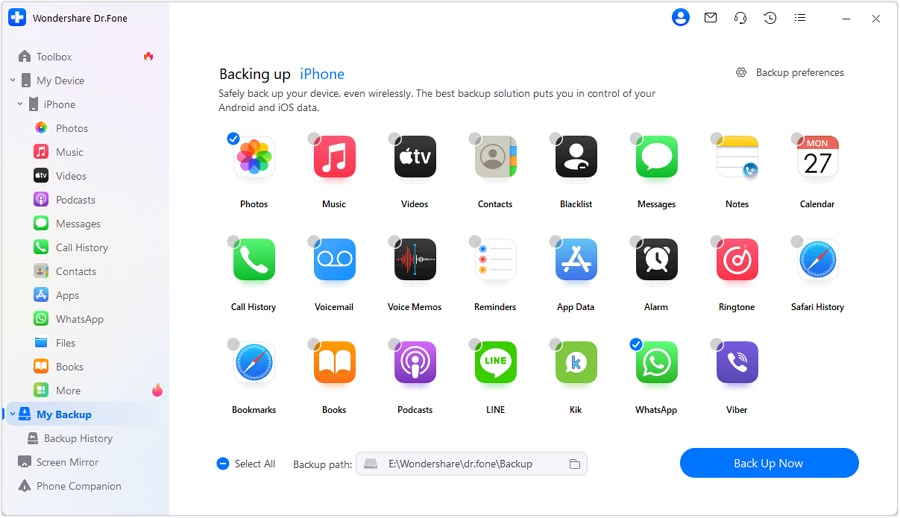
Step 1 Start the planned backup/transfer flow
Run the backup/transfer/restore flow that matches your decided “recent enough” window and sequence.
-
Step 2 Let the backup complete (don’t rush into irreversible steps)
Give the process enough time to finish so you’re not forced to proceed with an incomplete or uncertain backup.

-
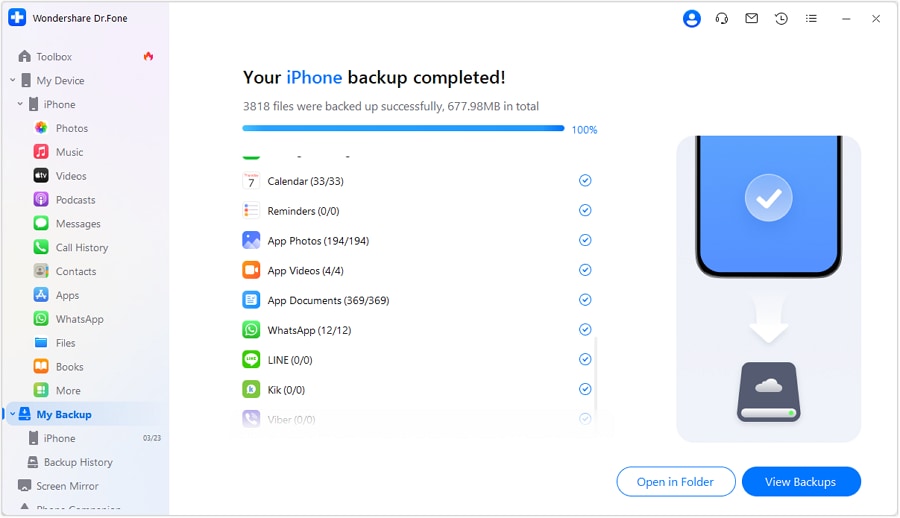
Step 3 Verify against your checklist before any point-of-no-return
Confirm critical data categories are present and usable (not just visible) before you proceed further. If you skip verification, you may only discover missing items after you’ve already overwritten data or wiped the old phone.
-
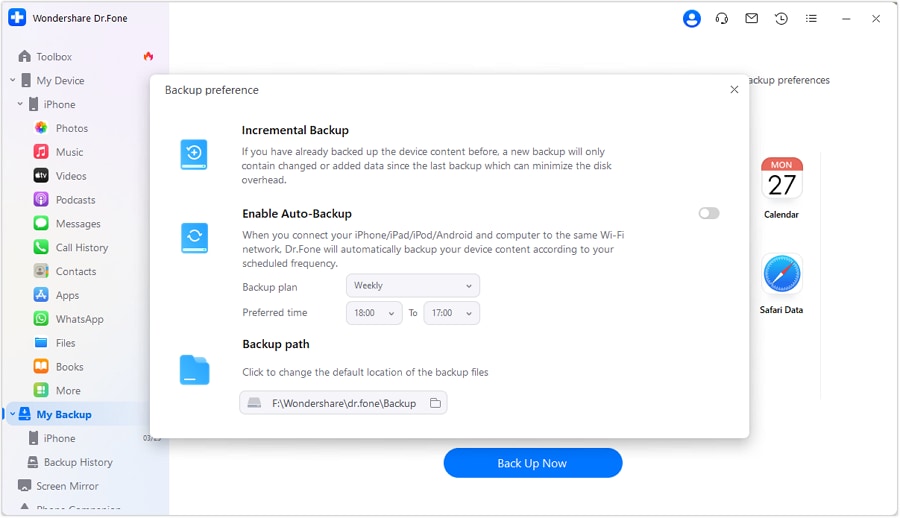
Step 4 Finalize only after verification passes (the irreversible moment)
After verification passes, complete the final step you identified as irreversible (e.g., erase old device, trade-in handoff, or last restore that overwrites). If you finalize before verification is complete, recovery may be impossible or require incomplete older backups.
Recommended Tool: Dr.Fone Basic
If your AI plan is locked (backup timing, freeze window, and verification gates), you can use a real device-management tool to execute the backup/transfer/restore steps more reliably and keep your workflow consistent.
 Easily manage data through preview, delete, export, etc.
- Transfer all data between devices.
- Robust backup solutions for reliable data protection.
- Mirror screens to PC for meetings, teaching, and control.
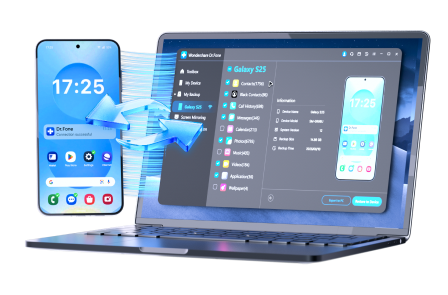
Keep the roles clear: AI helps you decide how recent the backup must be, what to freeze, and what to verify; the device tool executes the backup/transfer/restore steps after you’ve confirmed the plan.




Conclusion
Use AI to decide how recent your backup should be, build a freeze window, and place verification gates before any irreversible step; then use a real tool to execute the backup/transfer reliably once the plan is locked.
FAQ
-
How recent should my backup be before transfer?
As recent as you can reasonably make it while still leaving time to verify it’s complete and restorable—often “same day” or “within a few hours” for high-change data like chats and photos.
-
Is “right before I start” always best?
Not always—if a last-minute backup fails or can’t be verified in time, you may end up transferring with no reliable rollback option.
-
What data types usually require the strictest backup timing?
Messaging apps, authenticator/2FA changes, and newly captured photos/videos tend to be most time-sensitive; plan a freeze window for these.
-
What’s the biggest point-of-no-return in a phone transfer?
Wiping the old phone or restoring in a way that overwrites the new phone’s existing data—don’t do either until verification gates are passed.
-
Can AI tell me whether my backup is valid?
No—AI can only tell you what to check and when; validity must be confirmed by real device status, backup listings, and post-restore spot checks.
-
How much time should I reserve for verification?
Enough to check the highest-risk items (accounts/2FA, key chats, recent photos, essential apps) before you erase or hand over the old phone.
 Add Wondershare Dr.Fone as a preferred source on Google





