 Effortlessly manage data through preview, delete, export, etc.

 100% Security Verified | No Subscription Required | No Malware

 :
: 
 ChatGPT
 Perplexity
 Gemini
 Claude
 Grok
Grok

I factory reset my old phone before I moved my authenticator and de-registered it from my bank. Now I’m locked out and support says I need extra verification to get back in.
Reddit user, r/Android
Removing banking app data before selling a phone can go wrong if you miss one small step—like leaving a device linked, skipping a cloud check, or wiping before you’ve confirmed the right backups.
AI helps by turning “I think I should factory reset” into a clear, ordered workflow with decision points, checks, and a list of what to verify before any irreversible action.
AI can’t actually inspect your phone, confirm what’s still on-device, or perform secure erasure—so once the plan is verified, execution needs real device tools and on-device confirmations.
In this article
- How to plan without missing critical steps
- Why the sequence matters
- What to preserve vs remove
- Verification gates before any wipe
- The irreversible step (and when to do it)
- What the AI needs to know
- Using AI prompts to build a safer workflow
- When to stop planning and start execution
- Execute safely with Dr.Fone
Part 1. How to Plan remove banking app data before selling phone Without Missing Critical Steps

You’re selling or trading in a phone, and you want to ensure banking apps, tokens, cached data, and any saved credentials are removed—without locking yourself out or losing access to accounts.
The uncertainty usually isn’t “should I wipe the phone?”—it’s the sequence: what to back up, what to sign out of first, what to de-link, and what to verify afterward (on a different device) before you erase anything.
The point-of-no-return moment is the factory reset / secure erase. If you do that before confirming account access, 2FA migration, and device de-registration, you can strand yourself outside your banking apps or leave the old device still trusted.

Part 2. What the AI Needs to Know
Share the details below so the workflow can be specific and checkable.
- Phone OS and model (e.g., iPhone 13 on iOS 17.5 / Galaxy S22 on Android 14)
- Your sale type (private sale, trade-in, carrier return, repair shop handoff)
- Banking/finance apps involved (bank app, payment app, brokerage, crypto wallet—names help)
- Your login/2FA setup (SMS, authenticator app, hardware key, in-app approval, device-bound passkey)
- Whether you have a second device ready to test logins (yes/no)
- What must be preserved (photos, messages, notes, authenticator data, eSIM, contacts)
- Current device security state (screen lock on, biometrics enabled, encryption default, work profile/MDM?)
- Cloud services in use (iCloud/Google, password manager, photo sync)
- Your timeline (selling today vs later this week)
Part 3. Using AI Prompts to Build a Safer remove banking app data before selling phone Workflow
Use the prompts below to force a clear sequence and verification gates before any wipe.
3-1. Level 1: Basic Prompt
Help me plan a safe checklist to remove banking app data before I sell my phone.
Include the correct order of steps and the “do not proceed until verified” checks, especially before factory reset.
Assume I want to avoid getting locked out of my bank accounts.
3-2. Level 2: Advanced Prompt
Build me a workflow to remove banking app data before selling my phone, split into Preparation, Execution, and Verification.
Requirements:
- Mark each step as Critical or Optional
- Include at least 3 verification gates (before logout, before wipe, after wipe)
- Include common failure modes (2FA loss, device still trusted, cloud resync)
- End with an irreversible step (factory reset/secure erase) but only after prerequisites are met
3-3. Level 3: Evidence Prompt
Create a step-by-step plan to remove banking app data before I sell my phone, using my context:
- Device: (iPhone 13, iOS 17.5) or (Samsung S22, Android 14)
- Sale type: (trade-in tomorrow)
- Banking apps: (Bank A, Bank B, Pay App)
- 2FA method: (authenticator app + SMS fallback)
- Password manager: (iCloud Keychain / 1Password)
- Backup needs: (photos + contacts only)
- Second device available for testing: (yes—iPad/old phone)
Output format:
1) Preparation (Critical vs Optional)
2) Execution (Critical vs Optional)
3) Checks BEFORE / DURING / AFTER the irreversible wipe
4) A “Stop—do not wipe yet if…” list
Also list what I should confirm on the second device (example: log into Bank A and approve 2FA successfully).
3-4. Prompt Refinement
Turn this into a decision-tree with “If yes/If no” branches for each verification gate, especially for 2FA migration and device de-registration.
List the exact artifacts that commonly remain after uninstalling a banking app (cached files, tokens, autofill entries, trusted device status), and which ones require account-side action vs on-phone action.
Create a minimal plan for “selling today” that reduces risk, and a full plan for “selling in 3 days” that maximizes verification time—show the differences.
Add a final pre-wipe checklist that I can read out loud in 30 seconds, with only items that are truly critical and verifiable.
3-5. AI Plan vs. Real Device Constraints
| AI can… | But it cannot… |
|---|---|
| AI can sequence steps and define verification gates | But it cannot confirm your device/account state |
| AI can flag common lockout risks (2FA, trusted devices) | But it can’t see how your specific bank app handles device binding |
| AI can draft a wipe-ready checklist | But it can’t perform the wipe or prove data is unrecoverable |
| AI can suggest what to test on a second device | But it can’t complete real logins, approvals, or migrations for you |
AI improves planning, but cannot execute actions on your phone—execution and confirmation must happen with real device steps and tools.
Part 4. When to Stop Planning remove banking app data before selling phone and Start Execution
- You have confirmed you can sign into each banking/finance app on a second device (including 2FA approval).
- You’ve identified the irreversible step (factory reset/secure erase) and listed prerequisites that must be true first.
- You know what must be preserved and where it’s backed up (and you’ve spot-checked the backup).
- You have a post-wipe verification plan (what “clean” looks like and how you’ll confirm it).
If all four are true, you’re no longer guessing—you’re ready to execute in a controlled order.
Part 5. Remove banking app data before selling phone: Execute the Workflow Safely with Dr.Fone
Execution now matters because the risk comes from partial actions (e.g., uninstalling apps but leaving accounts trusted) and from doing the irreversible wipe too early. For device-side cleanup and secure erasure, you can use Dr.Fone - Data Eraser.
 Erase all data on iOS & Android
- Military-grade wiping to fully protect your privacy.
- Generate verified erasure reports better for device resale.
- Selectively erase private data and remove junk & large files.
-
Step 1 Lock in what you’re keeping (before any deletion)
Back up only the data you intend to keep, then spot-check that the backup opens correctly.

Limitation: AI cannot verify the backup contents or confirm nothing sensitive was included—review what you selected.
-
Step 2 Review what can be erased on-device (do not wipe early)
Follow the workflow you planned and confirmed: remove selected data in the right order, and pause at each verification gate before moving forward.
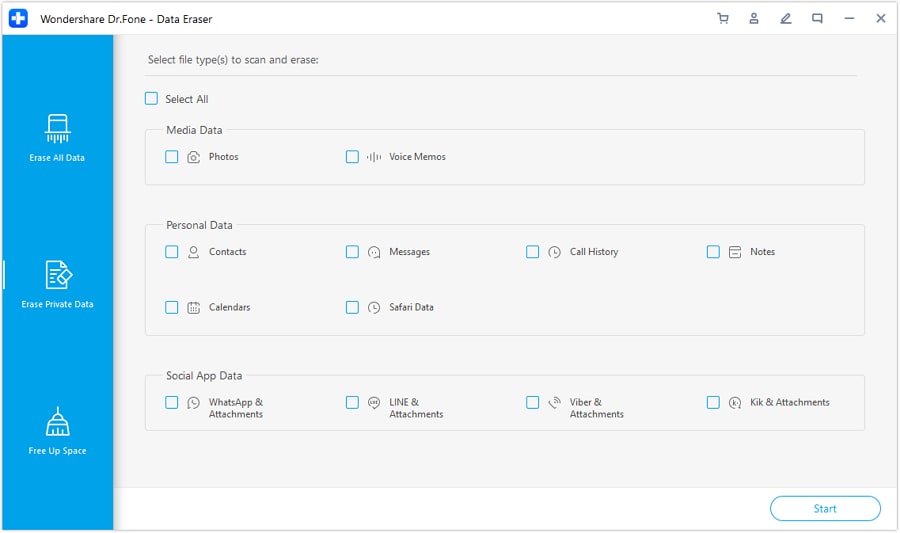
Limitation: AI cannot see whether a banking app still treats the phone as “trusted”—you must confirm in each account’s security/devices list where available.
-
Step 3 Select private data types intentionally
Choose only the relevant private data categories you want removed as part of your pre-wipe cleanup, aligned with your preservation plan.
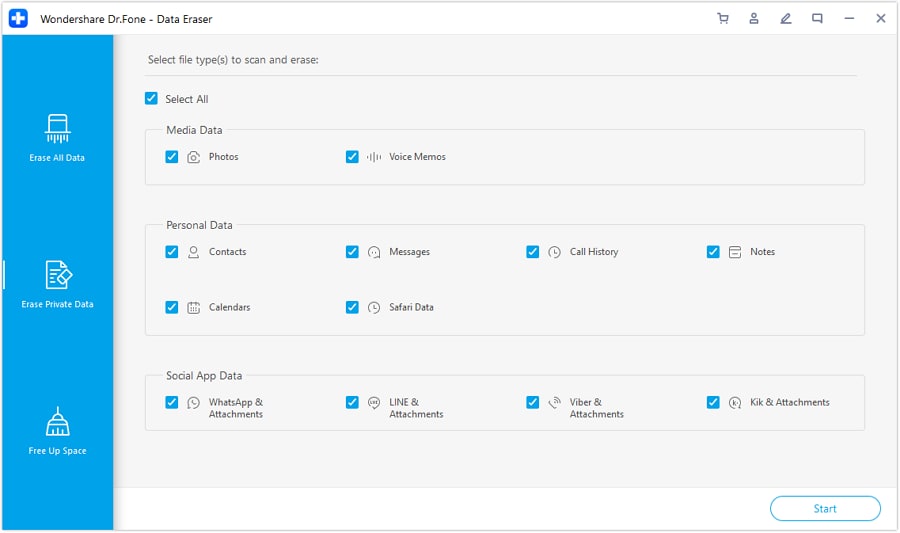
Limitation: If any required 2FA or login recovery is still tied to the phone, stop and migrate it first.
-
Step 4 Perform the irreversible erase only after passing all gates
Run the final analysis, confirm your “Stop—do not wipe yet if…” list is clear, then proceed with the irreversible erase (factory reset/secure erase) only after prerequisites are met.
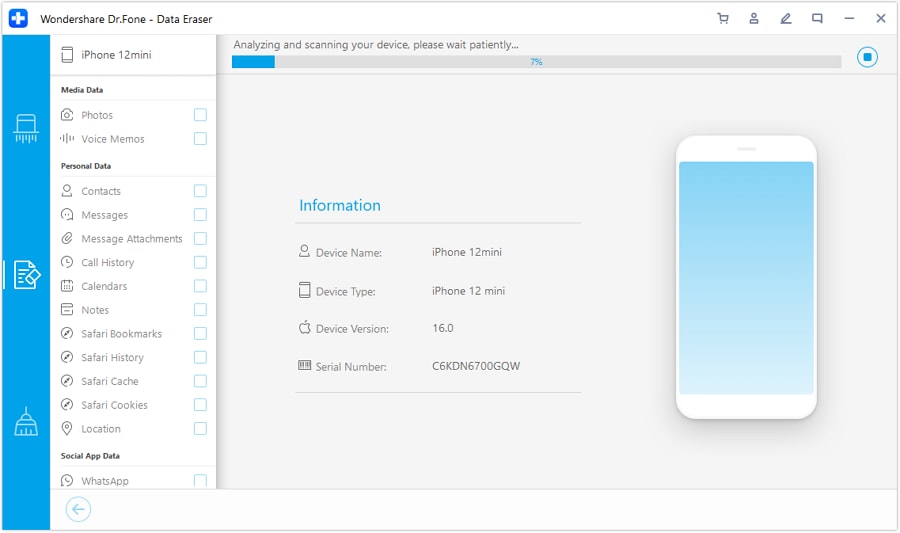
Limitation: After the erase, you cannot recover anything you didn’t back up—do not proceed unless your pre-wipe checks are fully satisfied.




Conclusion
Use AI to plan the sequence, verification gates, and “do not proceed” checks—then use a real tool to execute the backup and irreversible erase safely once you’ve confirmed everything that matters.
FAQ
-
Is uninstalling banking apps enough before selling my phone?
Usually not. Uninstalling may remove the app locally, but trusted-device status, tokens, and account-side links can remain until you explicitly de-link/sign out and then wipe the device. -
What’s the biggest risk if I wipe too early?
Account lockout—especially if 2FA is tied to the phone (authenticator, device prompts, passkeys) and you haven’t confirmed logins on another device. -
How do I verify I won’t be locked out after I sell the phone?
Log into each banking/finance app on a second device and complete a full 2FA cycle (receive and approve a code/prompt) before you wipe the old phone. -
When should the factory reset/secure erase happen?
Only after backups are verified, account access is confirmed elsewhere, and you’ve completed your pre-wipe checklist. That’s the irreversible step. -
Can AI tell me whether my phone is actually “clean”?
No. AI can define what to check, but only you (and real device/account screens) can confirm what’s signed in, what’s linked, and what’s erased.
 Add Wondershare Dr.Fone as a preferred source on Google





