 Effortlessly manage data through preview, delete, export, etc.

 100% Security Verified | No Subscription Required | No Malware

 :
: 
 ChatGPT
 Perplexity
 Gemini
 Claude
 Grok
Grok

I’m switching to a new phone with eSIM and I’m worried I’ll lose my number if I delete the old eSIM too early. What’s the safest order of steps and what should I verify before I do anything irreversible?
Reddit user, r/iPhone
Moving a phone number to a new device with eSIM is easy to start—and easy to get wrong if you skip carrier checks, device compatibility, or a final “number is active” verification.
AI helps by turning a messy situation (carrier rules, device differences, timing constraints, and “what if it fails” risks) into a clear sequence with decision gates and verification checkpoints.
AI can’t actually transfer your eSIM, confirm carrier-side activation, or fix a failed activation by itself, so execution still requires real device tools and carrier actions once the plan is locked.
In this article
- How to plan an eSIM number move without missing critical steps
- What usually goes wrong
- Why sequence matters
- The point-of-no-return moment
- What AI can and can’t solve
- What the AI needs to know
- Using AI prompts to build a safer workflow
- AI plan vs. real device constraints
- When to stop planning and start execution
Part 1. How to plan an eSIM number move without missing critical steps
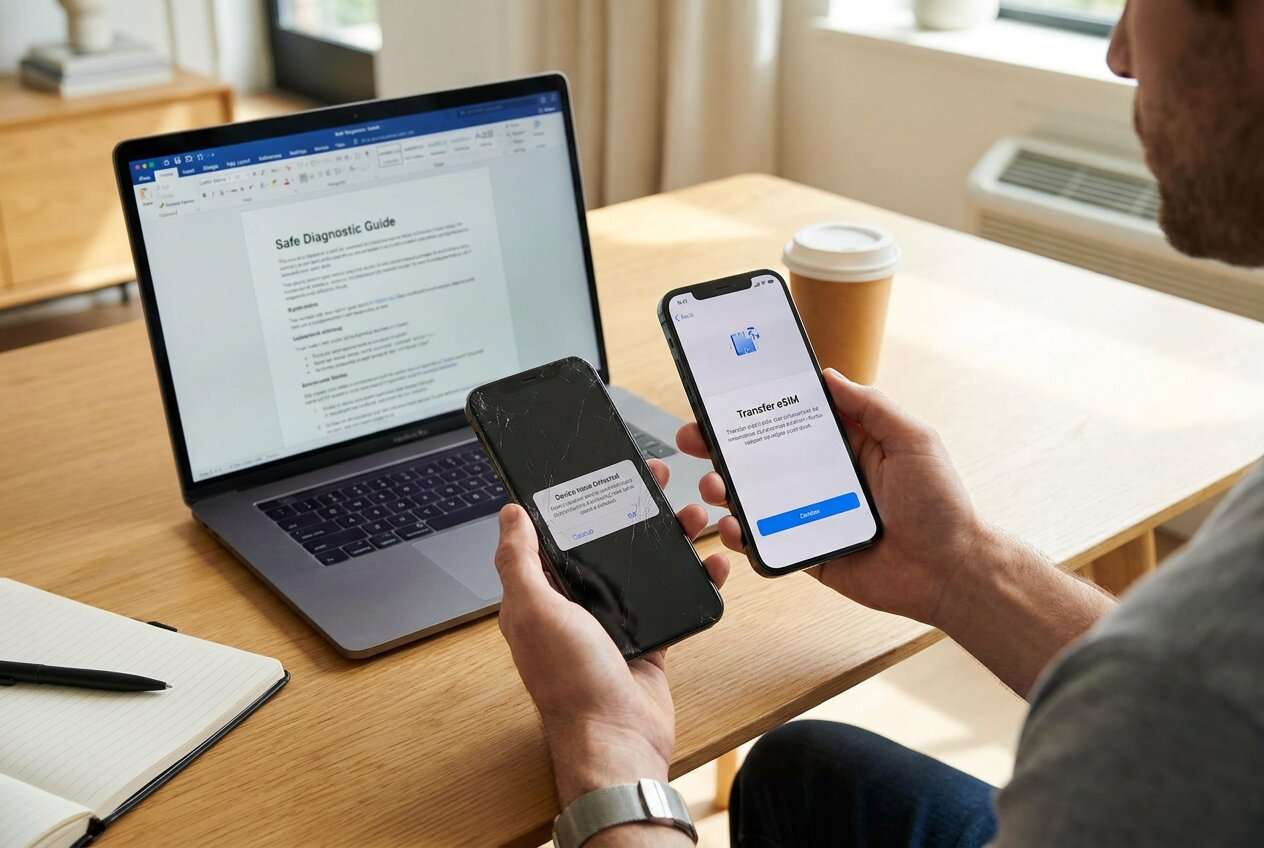
You’re switching phones (or restoring a replacement) and need your existing number on the new device via eSIM. You might be unsure whether your carrier uses a QR code, an in-app transfer, or a carrier push—and whether the old phone must stay online during the move.
1-1. What usually goes wrong
Most failures come from skipping carrier eligibility/unlock checks, missing device compatibility constraints, or starting the transfer without a working recovery path (like account access that depends on SMS to the number being moved).
1-2. Why sequence matters
Even after an AI answer, the unclear part is usually the sequence: when to back up, when to remove the eSIM from the old device, when to power-cycle, and what to check before you risk losing service.
1-3. The point-of-no-return moment
The point-of-no-return moment is deleting/removing the eSIM from the old phone (or initiating a carrier-side eSIM swap) before you’ve confirmed the new phone is compatible, unlocked, connected to Wi‑Fi, and ready to download/activate the new eSIM profile.
1-4. What AI can and can’t solve

Part 2. What the AI needs to know
Share the specifics below so the plan matches your carrier, devices, and risk level.
- Carrier and country/region (e.g., “Verizon US”, “EE UK”)
- Current device model + OS version (e.g., “iPhone 13 iOS 17”, “Galaxy S22 Android 14”)
- New device model + OS version
- Is the new device carrier-unlocked? (yes/no/unsure)
- eSIM method available (QR code, carrier app, device-to-device transfer, carrier support only, unknown)
- Whether you must keep the old phone active until the new one works (yes/no/unsure)
- Your access to account credentials / carrier PIN / two-factor method
- Your timing constraints (e.g., “cannot lose service during work hours”)
- Your fallback options (physical SIM available? second line? access to another phone?)
- What “success” means (calls/SMS/data all working; iMessage/RCS working; WhatsApp verified, etc.)
Part 3. Using AI prompts to build a safer workflow
Use the prompts below to force a step-by-step plan with verification gates before any irreversible action.
3-1. Level 1: Basic Prompt
Help me plan how to move my phone number to my new device using eSIM without losing service. List the minimum steps in the safest order, with a “stop and verify” check before any irreversible step. Do not include execution instructions beyond planning and checks.
3-2. Level 2: Advanced Prompt
Build a structured workflow to move my number to a new phone using eSIM.
Split it into **Preparation / Execution / Verification**, and label steps as **Critical** vs **Optional**. Include decision points for “carrier unlock/eligibility unknown,” “QR code vs in-app vs support,” and “old phone must stay active.” Add a rollback/fallback plan if activation fails.
3-3. Level 3: Evidence Prompt
Here’s my context: Carrier (**T‑Mobile US**), old phone (**iPhone 12 iOS 17**), new phone (**iPhone 15 iOS 17**), new phone unlock status (**unlocked**), eSIM method (**device-to-device transfer, not sure**), I can’t lose service (**9am–6pm**), I have account access (**yes**) and carrier PIN (**yes**).
Create a checklist with **checks before / during / after** the move. Include the exact “go/no-go” criteria before the irreversible step (e.g., “Wi‑Fi connected,” “carrier eligibility confirmed,” “2FA reachable on another device”). Provide a short failure-triage table (symptom → likely cause → what to verify next).
3-4. Prompt Refinement
Put the workflow into a table with columns: **Step**, **Goal**, **Prerequisites**, **Verification**, **Stop-if**, **Fallback**.
Identify the single highest-risk moment in this process and add a verification gate immediately before it with clear pass/fail criteria.
Assume I might lose access to SMS during transfer—revise the plan to avoid SMS-based 2FA lockout and specify alternate verification methods.
Create two variants: **Variant A: iPhone to iPhone eSIM transfer** and **Variant B: Android to iPhone**, highlighting what changes and what stays the same.
Add a “carrier contact readiness” list: what details I should have ready before contacting support (IMEI/EID, account PIN, billing ZIP, etc.).
Part 4. AI plan vs. real device constraints
| Planning with AI | What AI can’t do on your device |
|---|---|
| Map the safest sequence and decision points | Actually download/activate the eSIM profile |
| Define verification checks and go/no-go criteria | Confirm carrier-side provisioning in real time |
| Anticipate failure scenarios and fallback paths | Fix a stuck activation or network registration issue |
| Reduce avoidable mistakes (timing, 2FA, backups) | Transfer data, reset devices, or change carrier account settings |
AI improves planning and clarity, but it cannot execute the transfer or validate carrier activation—those require real tools and device-side actions.
Part 5. When to stop planning and start execution
- You can state the exact eSIM path you’ll use (QR code vs in-app vs device-to-device vs carrier support) and what triggers each branch.
- You’ve confirmed the new device is compatible, sufficiently charged, on stable Wi‑Fi, and (if needed) carrier-unlocked and eligible for eSIM.
- You have account access details ready without relying solely on SMS to the number being moved.
- You have a defined “do not cross” point: you will not remove the eSIM from the old phone until the go/no-go checks pass.
At this point, further planning adds less value than controlled execution with verification.
Move phone number to new device with eSIM: Execute the Workflow Safely with Dr.Fone
Execution now matters because the risk is operational: one wrong tap (like removing the old eSIM too early) can interrupt service and complicate reactivation, especially if your 2FA depends on that number.
 Move data between iOS to Android and vice versa.
- Transfer contacts, SMS, photos, videos, music, and more types.
- Available with all phones with Android and iOS versions.
- Simple, click-through process.

Prepare the device state and safety net
Use Dr.Fone - Phone Transfer to support your device-to-device readiness work (such as ensuring your data is in a safe state before you touch anything related to eSIM). Limitation: it cannot confirm carrier eSIM eligibility or reserve your number during the switch.
Run the transfer with verification gates
Follow your pre-written plan’s sequence and pause at the go/no-go gate before the irreversible step (removing/deleting the old eSIM), then proceed only if each check passes. Limitation: eSIM provisioning still depends on your carrier/device flow.
Verify end-to-end service before cleanup
After the number appears active on the new phone, verify calls, SMS, data, and any app-specific messaging tied to the number before wiping/resetting or decommissioning the old device. Limitation: verification must be done through real tests.
-
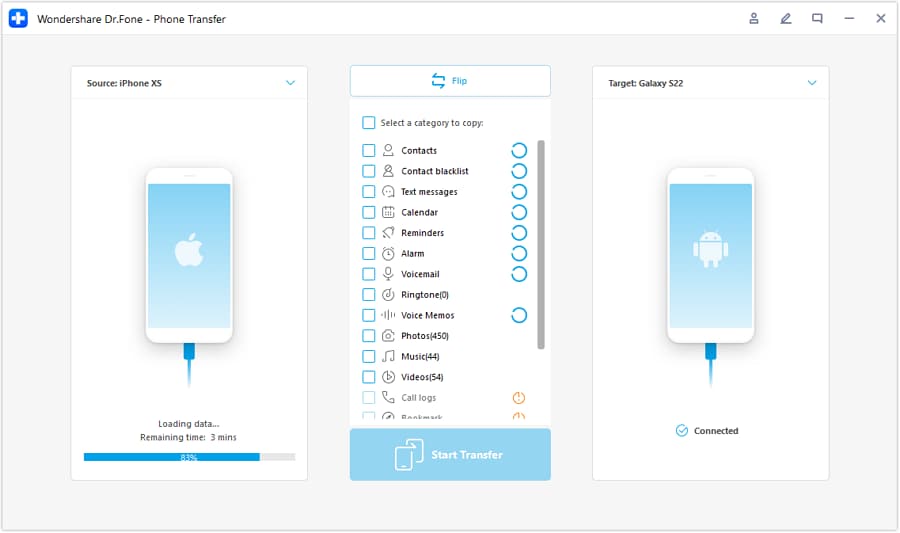
Step 1 Open the transfer tool and confirm both devices are detected
Launch the transfer module and make sure both phones can be recognized reliably before you proceed with any irreversible eSIM actions.

-
Step 2 Set the correct transfer direction (old phone → new phone)
Double-check source/target selection so you don’t accidentally reverse the direction and complicate recovery.
-
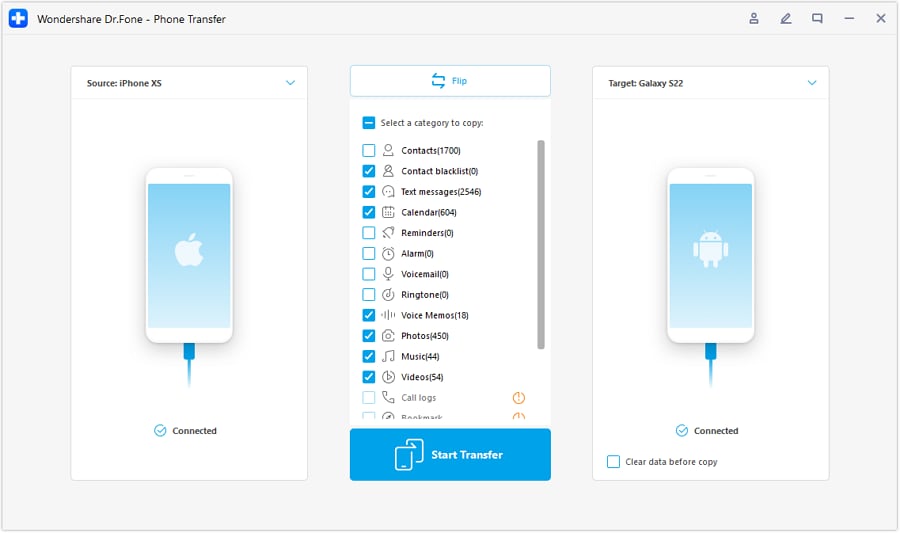
Step 3 Choose what you need to carry over for continuity
Select the data that supports a smooth switch (contacts, messages, and other essentials), then proceed with your planned verification gates.
-
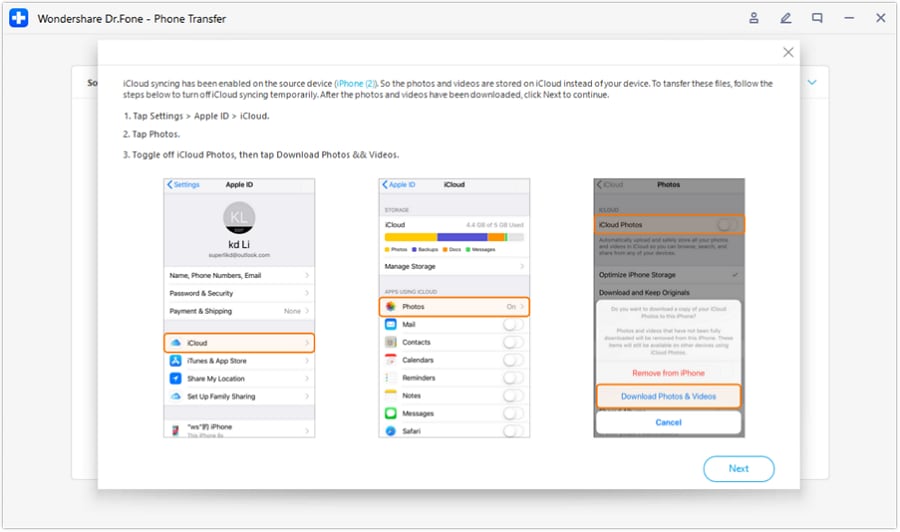
Step 4 Follow on-screen requirements and keep cloud syncing conflicts in mind
If the workflow prompts you about cloud syncing (for example, iCloud), follow the guidance so the transfer doesn’t get blocked—then return to your eSIM go/no-go checks before removing the old eSIM.




Conclusion
Use AI to design a careful, verifiable sequence with a clear stop point before irreversible actions; then use Dr.Fone for the real execution support around backups and device readiness while you complete carrier-dependent eSIM activation and confirm service end-to-end.
FAQ
-
What is the most dangerous step in an eSIM move?
Removing/deleting the eSIM from the old phone (or initiating a carrier swap) before confirming the new phone is ready and eligible—this can immediately cut off service.
-
What should I verify before I touch the old eSIM?
New device compatibility/unlock status, stable Wi‑Fi, sufficient battery, access to carrier account/PIN, and at least one non-SMS way to receive 2FA (email/authenticator/another device).
-
How do I know the move is actually complete?
Test inbound/outbound calls, SMS (both directions), and mobile data with Wi‑Fi off; also confirm any number-linked services (iMessage/RCS/WhatsApp) re-register correctly.
-
When should I plan to do the switch?
When you can tolerate troubleshooting time and possibly contacting your carrier—avoid tight windows where losing service blocks work or account access.
-
Can AI tell me the exact screens I’ll see in my carrier app?
Not reliably; screens vary by carrier, region, account type, and app version. AI is best used to plan the sequence and verification gates, not to mirror UI steps.
-
If activation fails, what should I do first?
Stop and verify prerequisites (Wi‑Fi, correct account, device eligibility, EID/IMEI readiness), then power-cycle and re-check carrier status; if still stuck, contact the carrier with your identifiers and the exact symptom.
 Add Wondershare Dr.Fone as a preferred source on Google





