 Effortlessly manage data through preview, delete, export, etc.

 100% Security Verified | No Subscription Required | No Malware

 :
: 
 ChatGPT
 Perplexity
 Gemini
 Claude
 Grok
Grok

My screen is cracked and I keep looping between “repair” and “replace.” I don’t want to waste money, but I also can’t afford surprises or days without my phone.
Reddit user, r/iphone
“Repair or replace?” sounds simple, but generic “best choice” answers miss what actually drives regret: time without your phone, hidden costs, reliability, and how long you need the device to last.
AI helps by turning your messy situation (budget, model age, trade-in value, data risk, urgency) into a clear set of trade-offs—and then mapping those trade-offs to a decision that fits your priorities.
AI can’t verify the real condition of your phone (frame bends, internal damage, water ingress), the quality of a local shop, or how a repaired screen will feel day-to-day—so once you decide, real-world checks and a safe data plan still matter.

In this article
- How to compare repair vs replace based on real priorities
- What a “cracked screen” can really mean
- Where uncertainty creates regret
- Compare by timeline, risk, and “good enough”
- What you should optimize for
- What the AI needs to compare
- Using AI prompts to evaluate more clearly
- When to stop researching and make the call
- After choosing: switch or prepare smoothly with Dr.Fone
Part 1. How to Compare cracked screen repair or replace with ai guide Based on Real Priorities
A cracked screen isn’t one problem—it’s several possible problems: usability (touch/visibility), safety (glass shards), reliability (future failure), and resale value. The right choice depends on which of those you’re optimizing for.
The tension usually comes from uncertainty: you don’t know whether repair will “truly fix it,” whether replacement is overkill, or whether spending money now just delays the inevitable.
A useful comparison focuses less on specs and more on your timeline (how long you’ll keep the phone), your tolerance for risk, and what “good enough” means for your daily use.
Part 2. What the AI Needs to Compare
Answer these so the AI can compare repair vs replace in a way that matches real-life constraints:
- Phone make/model and approximate age
- Severity: hairline crack vs shattered, touch issues, dead pixels/lines, black spots, glass splinters
- Any signs of deeper damage: bent frame, battery swelling, overheating, camera issues, random restarts, water exposure
- Your urgency: can you be without the phone for 1–3 days?
- Repair quotes you’ve received (official vs third-party) and what’s included (frame, seal, warranty)
- Replacement options: buy new, refurbished, used, or upgrade via carrier
- Your budget ceiling and whether you’d finance
- How long you need the device to last (3 months vs 2–3 years)
- Resale/trade-in intent and timing
- Data risk tolerance and backup status (cloud/local)

Part 3. Using AI Prompts to Evaluate cracked screen repair or replace with ai guide More Clearly
Use the prompts below to force a decision based on priorities—not generic advice.
3-1. Level 1: Basic Prompt
I have a cracked screen and I’m deciding whether to repair or replace my phone.
Ask me the minimum questions you need, then recommend one option and explain the main trade-off in plain language.
3-2. Level 2: Advanced Prompt
Help me choose between repairing my cracked screen vs replacing the phone by ranking what matters most to me (cost, downtime, reliability, resale value, and risk of hidden damage).
Give a side-by-side comparison using my priorities, then tell me which option fits me better and why—and who should choose the other option instead.
3-3. Level 3: Evidence Prompt
Here’s my situation: [phone model/age], crack severity [describe], symptoms [touch/display/lines], repair quotes [official/third-party + price + warranty], replacement option [new/refurb/used + price], and I plan to keep it [timeframe].
Recommend repair or replace, and include “what I gain / what I give up” for each choice.
Also name one key assumption that—if wrong—would flip your recommendation, and tell me how to test that assumption quickly.
3-4. Prompt Refinement
If I choose repair, what’s the most likely “regret scenario” within 90 days, and how can I reduce that risk (shop choice, parts, warranty, inspection)?
If I choose replace, what’s the most likely “overspend scenario,” and what cheaper replacement path fits my constraints (refurb, used, older model, carrier promo)?
Based on my inputs, estimate the break-even point: at what repair price does replacement become the smarter move for my timeline?
Show the logic.
What single symptom (touch glitches, lines spreading, battery swelling, frame bend) should weigh heaviest in the decision, and why?
Create two decision rules I can follow today: one for “repair now” and one for “replace now,” using only facts I can verify in 10 minutes.
3-5. AI Recommendation vs Real-World Fit
| Likely AI recommendation or conclusion | What real-life use may change or reveal |
|---|---|
| “Repair if the phone is relatively new and the only issue is the glass/display.” | A bent frame or weak adhesive can cause poor fit, touch issues, or reduced durability after repair. |
| “Replace if there are display lines, touch failures, or multiple problems beyond the screen.” | Some issues may be connector-related and cheaper to fix—but only a technician inspection can confirm. |
| “Replace if repair cost is close to the phone’s current value or a good refurb deal.” | Local pricing, surprise fees, and part quality can swing total cost and long-term reliability. |
| “Repair if downtime matters and a same-day trusted shop is available.” | Actual turnaround, queue delays, and warranty responsiveness vary a lot by shop. |
AI can clarify likely fit and trade-offs, but hands-on inspection, workflow friction (downtime/transfer), and your daily habits (drops, outdoor use, screen sensitivity) often decide whether you feel satisfied later.
Part 4. When to Stop Researching cracked screen repair or replace with ai guide and Make the Call
- You have two concrete price paths (repair total vs replace total) including tax, accessories, and any trade-in value.
- You’ve decided your time horizon (how long you realistically plan to keep this phone).
- You’ve identified the one risk you’re least willing to accept (hidden damage after repair, or overspending on replacement).
- You can state the choice as a rule: “Given X and Y, I’m choosing repair/replace because Z matters more.”
At this point, the decision is clear enough that more browsing mostly adds noise, not certainty.
Part 5. After Choosing cracked screen repair or replace with ai guide: Switch or Prepare Smoothly with Dr.Fone
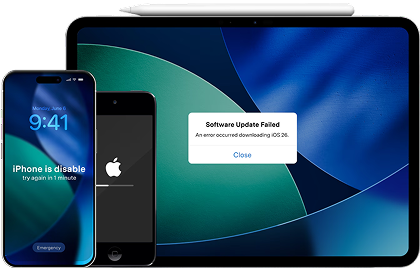
Once you’ve decided, the practical risk is no longer “which option is best”—it’s losing data, forgetting accounts, or carrying clutter to your next device (or leaving personal data behind if you sell). If your drop also caused iOS instability (restarts, boot loops, glitches), Dr.Fone - System Repair (iOS) can help you repair iOS system issues before/after you move on.
 Fix iOS issues, no data loss.
- One-click repair for all iOS problems.
- Solve recovery mode, Apple logo, black screen, etc.
- Upgrade or downgrade iOS without iTunes
-
Step 1 Open Dr.Fone and enter System Repair
Launch Dr.Fone on your computer and open the toolbox so you can access repair features.

-
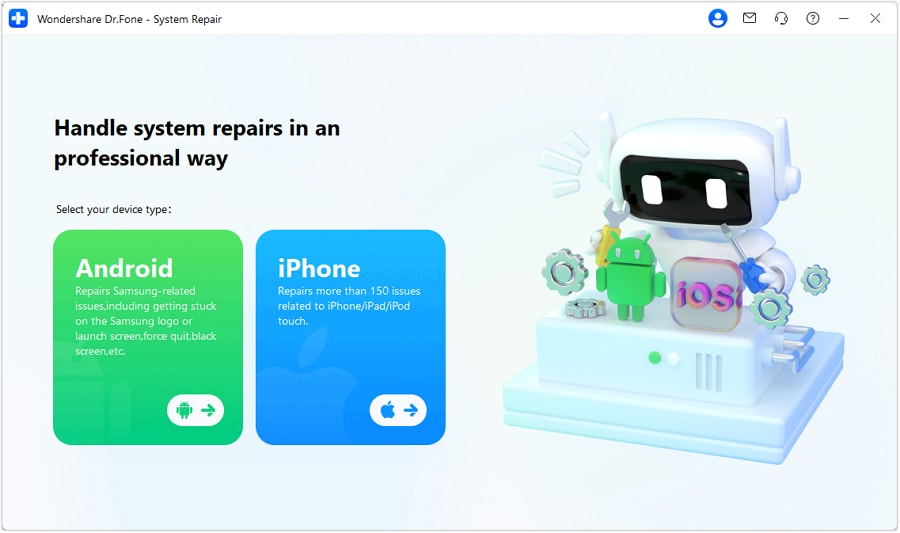
Step 2 Select iOS for System Repair
Choose the iOS option to ensure the workflow matches your device type.
-
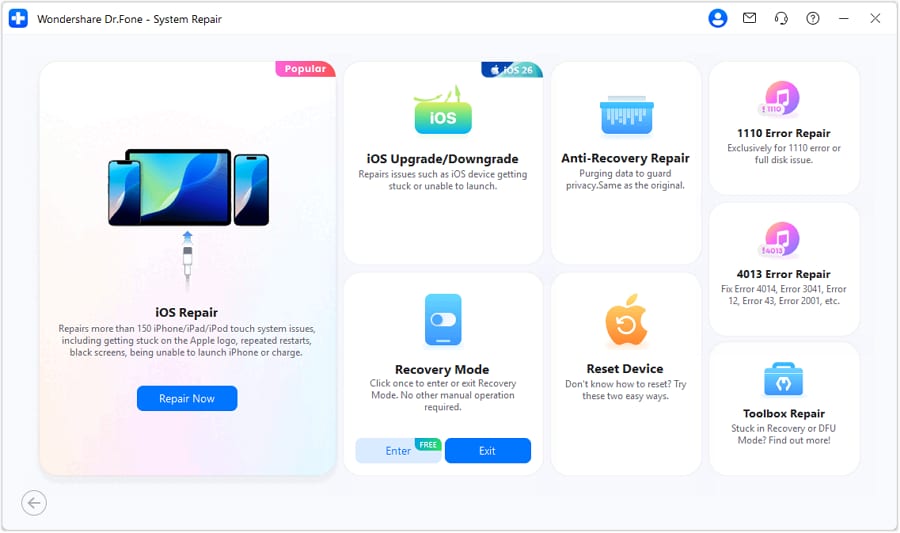
Step 3 Continue to iOS repair
Proceed and follow the on-screen prompts to let the tool detect the issue and guide you forward.
-
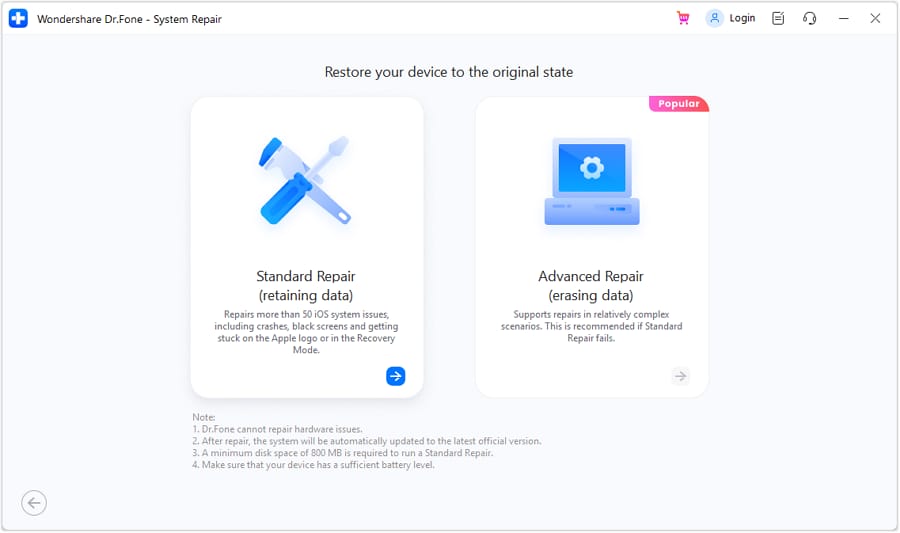
Step 4 Use Standard Mode to proceed
Standard Mode is designed to fix common iOS system errors while prioritizing data preservation.
5-1. Practical preparation checklist (backup, transfer, and trade-in readiness)
- Secure a clean backup before any repair or swap: Back up your phone data so you’re covered if the device fails during repair or while you migrate. Limitation: backups can’t recover data that’s already missing or corrupted before you back up.
- Transfer what you actually need (not everything): Move key data to your replacement device so your essentials work on day one. Limitation: some app-specific logins and encrypted app data may still require signing in again.
- Prepare the old phone for trade-in, resale, or recycling: Remove personal data and tidy your device so you don’t leave accounts, photos, or messages behind. Limitation: resale condition and trade-in acceptance still depend on the buyer’s inspection and carrier/manufacturer rules.




Conclusion
AI is best used to turn “repair or replace” into a clear priority-based trade-off, but real-world inspection and daily use determine whether it truly feels right; once you’ve chosen, Dr.Fone helps with the practical follow-through—backup, transfer, and preparation for resale or trade-in.
FAQ
-
Can I trust AI to tell me whether my phone has hidden damage?
AI can flag risk factors based on symptoms, but it can’t confirm internal damage. Use AI to decide what to check; use a technician or inspection to verify. -
What’s the most important trade-off in repair vs replace?
It’s usually certainty vs cost: replacement buys more predictability; repair is cheaper but carries more “what if” risk (part quality, underlying damage, durability). -
How do I avoid a generic, spec-based decision?
Anchor on your timeline and constraints: how long you’ll keep the phone, your downtime tolerance, and the one risk you won’t accept. Then compare totals and regret scenarios. -
When is repair the smarter choice?
When the phone otherwise works normally, the quote is reasonable for your time horizon, and you have a trusted repair option with a clear warranty. -
What should I prepare after choosing—especially if I’m replacing the phone?
Back up first, list your must-have data/apps, and plan for account sign-ins (2FA codes, password manager access). If selling/trading in, wipe the device and remove accounts properly.
 Add Wondershare Dr.Fone as a preferred source on Google





