 Effortlessly manage data through preview, delete, export, etc.

 100% Security Verified | No Subscription Required | No Malware

 :
: 
 ChatGPT
 Perplexity
 Gemini
 Claude
 Grok
Grok

My phone’s battery is awful, but I’m not sure if replacing it is just throwing money at an aging device. I want an upgrade, but I also don’t want to regret the setup hassle and cost.
Reddit user, r/Android
“Best phone” lists won’t tell you whether fixing your current device is smarter than replacing it. The right choice depends on how you use your phone, what annoys you daily, and how long you need it to last.
AI can help by turning vague thoughts (“my battery is terrible” or “I want an upgrade”) into a structured comparison: cost vs reliability, short-term relief vs long-term value, and what you’ll realistically notice day to day.
AI can’t feel your phone’s real-world friction (random shutdowns, heat, lag, bad charging port) or guarantee repair quality. After you decide, the practical work—backup, switching, cleanup, and resale prep—still matters.
In this article
- How to Compare Repair vs Replace Based on Real Priorities
- Battery issues are rarely “just the battery”
- Why the decision feels uncertain
- Think in risk management, not vibes
- Match the choice to your time horizon
- What the AI Needs to Compare
- Using AI Prompts to Evaluate More Clearly
- When to Stop Researching and Make the Call
- AI Recommendation vs Real-World Fit
Part 1. How to Compare Repair vs Replace Based on Real Priorities

1-1. Battery issues are rarely “just the battery”
A battery problem is rarely just a battery problem. Sometimes a replacement restores a phone to “good enough” for another year or two; other times the battery is only the most visible symptom of aging (slow performance, weak camera, limited storage, no longer getting updates).
1-2. Why the decision feels uncertain
The uncertainty usually comes from mixed signals: the repair seems cheaper, but you worry you’ll spend money and still want a new phone soon. Or the new phone sounds exciting, but you don’t want the hassle of setup, data transfer, and learning a new device.
1-3. Think in risk management, not vibes
The decision tension is mostly about risk management: do you pay less now with a chance of regret later, or pay more now to reduce uncertainty and get a longer runway?
1-4. Match the choice to your time horizon
The cleanest way to avoid regret is to decide how long you need the next solution to last (for example, 6–12 months vs 2–4 years) and judge each option by whether it can realistically meet that runway.
Part 2. What the AI Needs to Compare
Share these inputs so the AI can compare repair vs replace based on your real priorities, not generic advice:
- Your phone model and age (and whether it still receives security updates)
- Your battery symptoms (fast drain, swelling, random shutdowns, overheating, charge-port issues)
- Repair option details (official vs third-party, price, warranty length, turnaround time)
- Your budget ceiling and your “regret threshold” (how bad it would feel to pay twice)
- Your daily use (camera, gaming, navigation, hotspot, work apps, calls)
- Other device pain points (lag, storage full, cracked screen, weak reception, water damage history)
- How long you need the next solution to last (6 months vs 2–4 years)
- Switching friction concerns (data transfer, authentication apps, work profiles, eSIM, photos)
- Resale/trade-in value and whether battery health affects it in your market

Part 3. Using AI Prompts to Evaluate More Clearly
Use these prompts to force clear trade-offs and reduce “maybe” thinking.
3-1. Level 1: Basic Prompt
I’m deciding whether to repair my phone’s battery or buy a new phone.
Ask me the minimum questions needed, then recommend one option with the top 3 reasons and the biggest risk of that choice.
3-2. Level 2: Advanced Prompt
Compare “repair battery” vs “buy new phone” using my priorities: cost over the next 24 months, reliability risk, daily usability, and hassle/time.
Output a table with what I gain / what I give up for each option, then tell me which option fits better for (a) someone who hates setup hassle and (b) someone who needs long-term reliability.
3-3. Level 3: Evidence Prompt
Here’s my situation: [phone model + age], battery symptoms: [details], other issues: [list], repair quote: [$] with [warranty] from [official/third-party], new phone budget: [$], I want it to last: [time], my usage: [top 5 tasks], my switching concerns: [apps/2FA/eSIM].
Recommend repair or replace, explain what I gain and what I lose with each, and name one key assumption that would flip your recommendation (and how I can quickly validate that assumption).
3-4. Prompt Refinement (Follow-up Prompts)
If I repair the battery, what are the most likely next failures in the next 12–18 months for a phone like mine, and how would each failure change the total cost?
If I buy a new phone, what features will I actually notice weekly (not specs), and which “upgrades” tend to be emotionally appealing but practically minor?
Given my regret threshold (I’d hate to pay twice), which option minimizes the chance of a second purchase within 6–12 months?
What decision would I make if I had to commit to keeping the choice for 18 months—no switching—repair or replace, and why?
What’s the most important question I haven’t answered that keeps this decision ambiguous, and what quick test or check resolves it?
Part 4. When to Stop Researching and Make the Call
- You can state your #1 priority in one sentence (lowest cost now, lowest risk, least hassle, or longest runway).
- You’ve identified the one “flip factor” assumption (e.g., repair quality/warranty, hidden damage, update support) and you know how you’ll validate it.
- You can explain the main thing you gain and the main thing you give up with your choice without mentioning specs.
- You’ve set a time horizon (e.g., “I need this to last 18–24 months”) and your choice matches it.
Once those are true, you’re not missing information—you’re just delaying the trade-off.
Part 5. AI Recommendation vs Real-World Fit
| Likely AI recommendation or conclusion | What real-life use may change or reveal |
|---|---|
| “Repair if the phone is otherwise fine and supported; replace if it’s aging and unreliable.” | You may discover the battery wasn’t the only issue (charging port, heat, random restarts, storage wear). |
| “Repair is best when you need a low-cost bridge for 6–12 months.” | If your usage grows (more video calls, travel, navigation), the “bridge” may feel limiting quickly. |
| “Replace if you need dependable performance and longer support runway.” | New-phone setup friction (2FA, work apps, eSIM transfer) may be more painful than expected. |
| “If repair is third-party with weak warranty, replacement risk may be lower overall.” | A high-quality local repair with a real warranty can outperform the AI’s generic risk assumptions. |
AI can clarify likely fit and trade-offs, but hands-on use, workflow friction, and daily habits ultimately decide satisfaction—especially around reliability, setup hassle, and how “fixed” the phone truly feels after repair.
After Choosing Repair or Replace: Switch or Prepare Smoothly with Dr.Fone
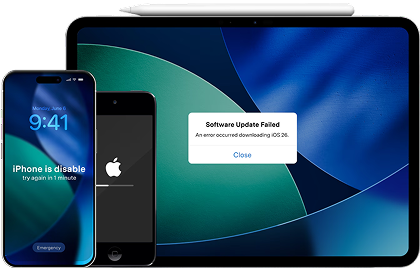
After the decision, the risk shifts from “Which option is best?” to “How do I avoid data loss, messy transfers, and leftover personal data?” That’s where a practical workflow matters—especially if you’re moving to a new phone or preparing the old one for trade-in/resale. If your iPhone is unstable (random restarts, stuck on Apple logo, recovery mode loops) while you’re trying to back up or switch, Dr.Fone - System Repair (iOS) can help you stabilize the device first, which can make the rest of the process less risky.
 Fix iOS issues, no data loss.
- One-click repair for all iOS problems.
- Solve recovery mode, Apple logo, black screen, etc.
- Upgrade or downgrade iOS without iTunes
-
Step 1 Open Dr.Fone and enter the toolbox
Launch Dr.Fone on your computer so you can access repair tools before you start moving data or wiping anything.

-
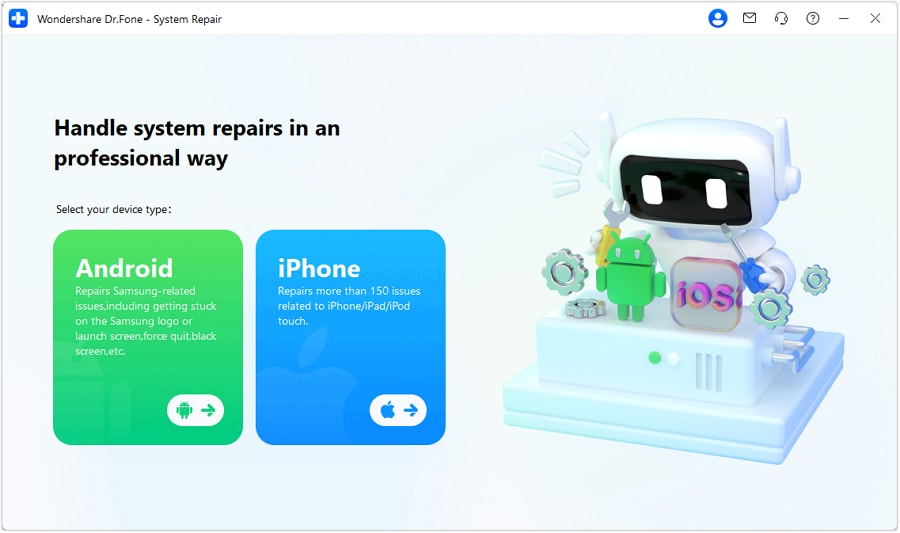
Step 2 Choose iOS System Repair
Select the iOS option in System Repair to target iPhone/iPad system-level problems that can interfere with normal use and backups.
-
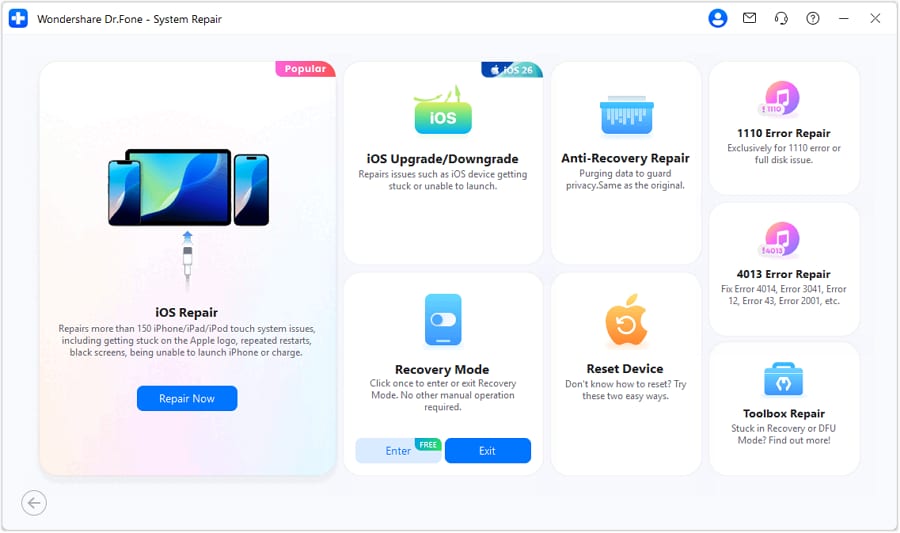
Step 3 Continue into iOS repair
Follow the on-screen flow to proceed, so you can repair the device in a guided way instead of trial-and-error troubleshooting.
-
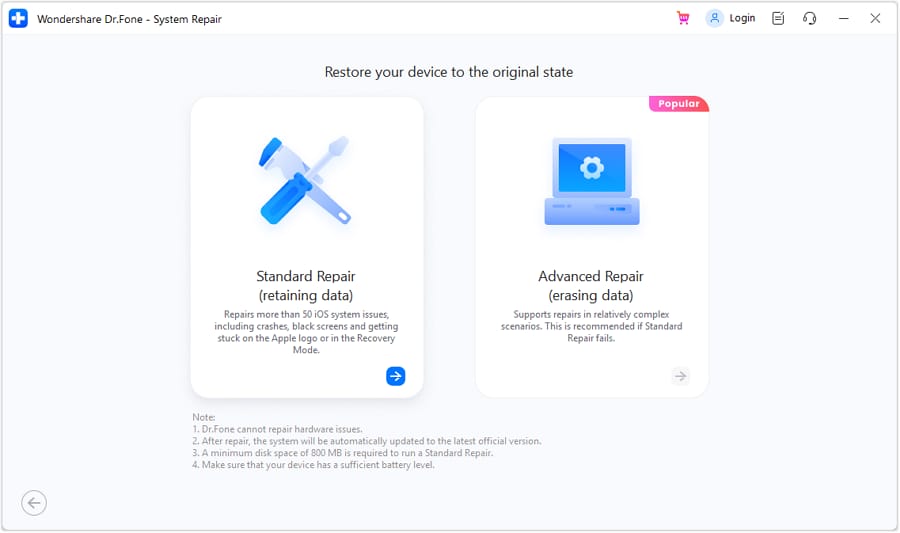
Step 4 Use Standard Mode to reduce risk
When available, choose Standard Mode first to prioritize fixing common iOS errors with minimal disruption before you do transfers, cleanup, or resale prep.
Create a reliable backup before you change anything
Action: Use Dr.Fone to back up key data (photos, messages, contacts, and app data where supported) so the repair/switch doesn’t become a data-recovery problem.
Limitation: Some apps restrict what third-party tools can back up or restore due to encryption and account-based syncing.
Transfer essentials with a “must-work-first” order
Action: Move core content first (contacts, photos, messages), then verify logins and 2FA apps before wiping or trading in the old phone.
Limitation: Carrier features (eSIM), banking apps, and some authenticator setups may still require manual reactivation.
Clean up and prep the old phone for repair, resale, or trade-in
Action: Remove personal traces you don’t want lingering, then factory reset only after you confirm the new device is complete.
Limitation: If the phone is unstable or won’t boot reliably, cleanup options may be constrained and you may need alternative recovery steps.




Conclusion
AI is best used here as decision support: it helps you name priorities, compare what you gain vs give up, and identify the one assumption that could flip your choice. Real-world use—reliability, friction, and habits—is the final proof. Once you decide, tools like Dr.Fone help you execute the switch or prep safely so the logistics don’t create regret.
FAQ
-
Can I trust AI to tell me whether to repair or replace?
Trust it for structuring trade-offs and surfacing risks, not for guaranteeing repair outcomes or predicting your exact daily satisfaction. -
What’s the single most important trade-off in this decision?
Short-term savings (repair) versus long-term reliability runway (replace). Most regret comes from underestimating the chance of a second issue—or underestimating switching hassle. -
How do I avoid making a specs-only decision when buying new?
Ask what you’ll notice weekly: battery confidence, camera consistency, screen readability outdoors, call reliability, storage headroom, and how long you expect security updates to matter to you. -
What’s a common assumption that flips the recommendation?
Repair quality and warranty. If you can get an official (or truly reputable) battery replacement with a meaningful warranty, “repair” becomes much safer; if not, “replace” often wins on risk. -
What should I prepare right after choosing?
A verified backup, a list of must-have apps/accounts (especially 2FA/banking), and a plan for old-phone cleanup if you’re trading in or reselling. -
If I repair, do I still need to back up and clean up?
Yes—repairs can involve resets, part swaps, or unexpected failure during servicing, and you may still decide to sell later.
 Add Wondershare Dr.Fone as a preferred source on Google





