 Effortlessly manage data through preview, delete, export, etc.

 100% Security Verified | No Subscription Required | No Malware

 :
: 
 ChatGPT
 Perplexity
 Gemini
 Claude
 Grok
Grok

I thought upgrading my parent’s iPhone would be quick, but one missed step caused missing contacts and broken two‑factor logins. Now I need a checklist that forces the right order and tells me what to verify before I erase anything.
Forum user
Helping a parent move to a new iPhone sounds simple, but one missed step can mean lost photos, missing contacts, broken two‑factor logins, or a phone that won’t activate when you’re not there.
AI is useful here for turning a fuzzy goal (“move everything over”) into a clear sequence with checkpoints, dependencies (Apple ID, SIM/eSIM, 2FA), and a short list of things to verify before anything irreversible happens.
AI can’t access the devices, confirm what actually transferred, or perform backups/transfers—so once the plan is locked, you’ll still need real device tools to execute and validate the results.
In this article
- Part 1. Plan the upgrade without missing critical steps
- Why the sequence matters
- Dependencies to watch (Apple ID, SIM/eSIM, 2FA)
- Define the point of no return
- What AI can and can’t do
- Part 2. What the AI needs to know
- Part 3. Use AI prompts to build a safer workflow
- Part 4. AI plan vs. real device constraints (and when to start execution)
- Part 5. Execute the workflow safely with Dr.Fone
Part 1. Plan the upgrade without missing critical steps
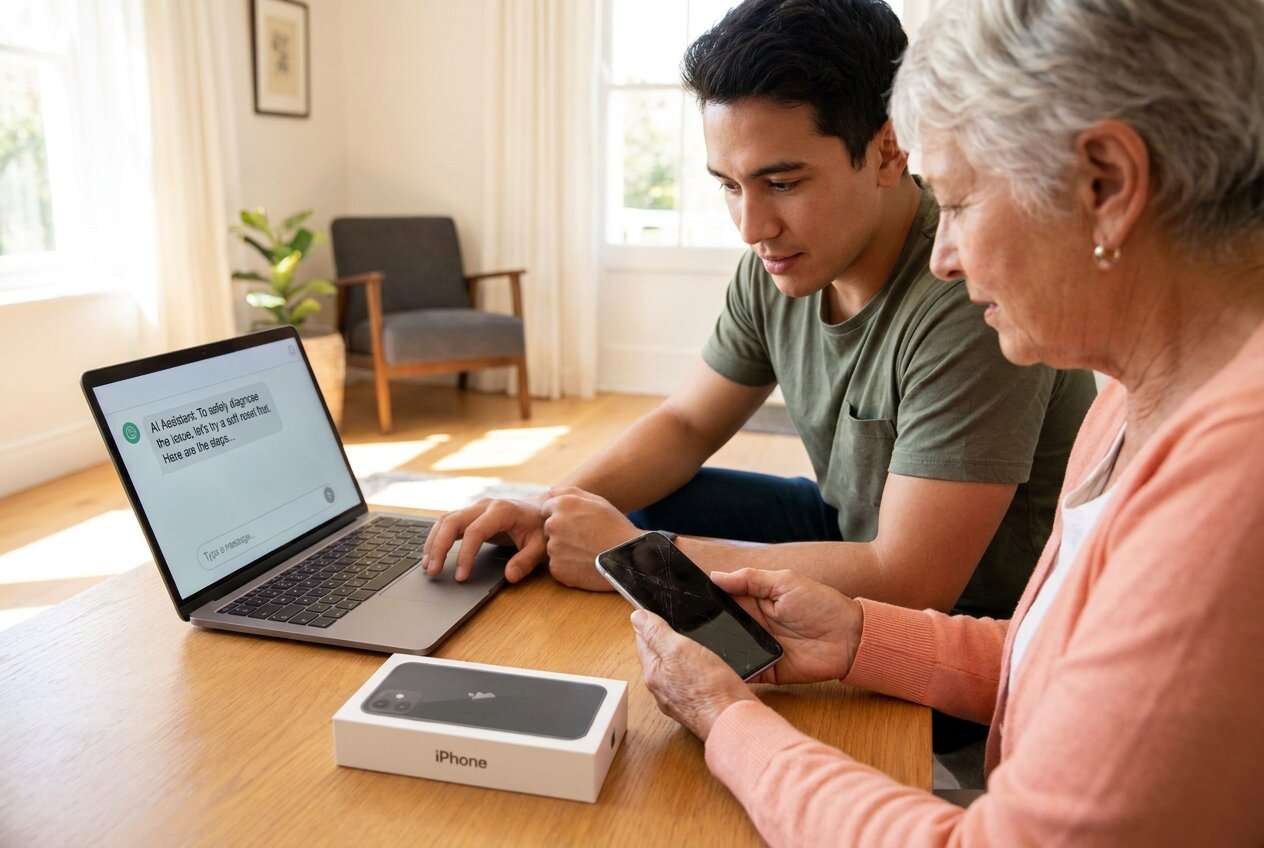
1-1. Why the sequence matters
You’re upgrading a parent’s iPhone, but they don’t remember passwords, they have photos “somewhere,” and they rely on texts for bank logins. You might also be doing this quickly (at a store, during a visit, or right before a trade‑in deadline).
Even after AI gives general advice, the uncertainty is usually about sequence: Do you update iOS first or transfer first? Do you switch the SIM/eSIM before login checks? What do you verify before wiping the old phone? Without an ordered flow, you can accidentally lock them out of accounts or end up with partial data.
1-2. Dependencies to watch (Apple ID, SIM/eSIM, 2FA)
The upgrade process often hinges on dependencies like Apple ID access, 2FA delivery, and whether the phone number is tied to a physical SIM or an eSIM workflow. If those dependencies aren’t handled in the right order, logins and verification codes can fail mid‑setup.
1-3. Define the point of no return
The point of no return is typically erasing the old iPhone (or handing it to the carrier for trade‑in). Do not move past that moment until you’ve confirmed data, logins, and 2FA work on the new device.
1-4. What AI can and can’t do
AI improves planning, but cannot execute device actions; once your gates are defined, use real tools on the devices to carry out the workflow and verify outcomes.
Part 2. What the AI needs to know
Share the details below so the AI can build a safe, step-by-step plan with verification gates.
- Old iPhone model + iOS version (e.g., iPhone 11, iOS 16.7)
- New iPhone model + iOS version (if known)
- Transfer method preference/constraints (Quick Start, iCloud backup/restore, computer backup/restore)
- Storage sizes (old used / new capacity) (e.g., 110 GB used, 128 GB new)
- Apple ID situation (known email? password known? 2FA phone number accessible?)
- SIM setup (physical SIM vs eSIM; carrier; any carrier store involvement)
- What data matters most (Photos, Messages, WhatsApp, Contacts, Notes, Health, Authenticator apps)
- Any work/MDM profiles, school accounts, or corporate email setup
- Time window and risk constraints (e.g., “I have 45 minutes at the store”)
- Trade-in/return deadline and whether old phone must be wiped immediately
- Whether the old phone is still functioning normally (screen, battery, storage, Wi‑Fi)
Part 3. Use AI prompts to build a safer workflow
Use these prompts to force a clear sequence, define verification checks, and prevent irreversible actions too early.
3-1. Level 1: Basic Prompt
Help me plan a safe iPhone upgrade for my parent from an old iPhone to a new iPhone. Give me a simple checklist in the correct order with key verification steps before anything irreversible. Do not include execution instructions—planning and checks only.
3-2. Level 2: Advanced Prompt
Create a structured workflow to upgrade my parent to a new iPhone with minimal risk.
Split it into Preparation / Execution / Verification, and label each step as critical or optional. Include explicit “stop points” (e.g., do not erase old phone yet) and the exact things to confirm before moving on.
3-3. Level 3: Evidence Prompt
Design a risk-controlled upgrade plan for my parent’s iPhone with verification gates and failure fallbacks. Here’s the context:
- Old iPhone: (iPhone 11, iOS 16.7), storage used: (110 GB)
- New iPhone: (iPhone 15, 128 GB)
- Apple ID email: (known), password: (uncertain), 2FA: (goes to old phone number)
- Carrier: (Verizon), SIM: (currently physical SIM), new phone: (eSIM-only)
- Must keep: (Photos, Messages, Contacts, WhatsApp, Notes), plus banking apps using SMS codes
- Deadline: (trade-in due in 3 days), but I prefer not to wipe the old phone until fully verified
For each phase (before/during/after), list:
1) required inputs I must gather, 2) checks to run, 3) common failure modes, 4) what to do if a check fails, 5) the explicit “point of no return” and the conditions to meet before it.
3-4. Prompt Refinement
Rewrite the plan as a gated checklist where each gate has: goal → evidence to collect → pass/fail rule → fallback if fail.
Produce a minimum-viable upgrade path (must-have only) and a full upgrade path (nice-to-have), and state when to choose each.
List all credentials and recovery items needed, then map each to how I can verify access before transfer (Apple ID, email, carrier account, banking apps, WhatsApp PIN/backup).
Add a “trade-in safe” branch: what to do if the store pressures us to wipe immediately, and what evidence we must capture first (screenshots, device status, backup confirmation).
Create a post-upgrade audit: exactly what to check on the new iPhone in the first 15 minutes, first 24 hours, and before wiping the old phone.
Part 4. AI plan vs. real device constraints (and when to start execution)
4-1. AI plan vs. real device constraints
| Planning with AI | Real-world constraint |
|---|---|
| Can define the safest order and verification gates | Cannot see whether data actually transferred or whether apps re-authenticated |
| Can list risks (2FA, eSIM activation, storage mismatch) and fallbacks | Cannot activate eSIM, restore backups, or resolve carrier/account lockouts |
| Can generate checklists for “what to confirm” before erasing the old phone | Cannot confirm backups are complete/corruption-free on your devices |
| Can help you document evidence to capture for trade-in/returns | Cannot perform the transfer, backups, or device wipes |
AI improves planning, but cannot execute device actions; once your gates are defined, use real tools on the devices to carry out the workflow and verify outcomes.
4-2. When to stop planning and start execution
- You have confirmed Apple ID access (or you have a recovery path that fits your time window).
- You know the transfer path you’ll use and why (and it fits storage and network constraints).
- You have a written verification checklist for the specific data and apps your parent depends on.
- You have defined the irreversible moment (erase/trade-in) and the pass criteria required before it.
If those four items are true, planning is complete enough to move forward without improvising mid-upgrade.
Part 5. Execute the workflow safely with Dr.Fone
Execution now matters because the plan only reduces risk if you actually follow the sequence, capture the evidence, and delay irreversible actions until verification passes. If you want a dedicated transfer tool to carry out that plan, Dr.Fone - Phone Transfer can help with the execution steps.
 Move data between iOS to Android and vice versa.
- Transfer contacts, SMS, photos, videos, music, and more types.
- Available with all phones with Android and iOS versions.
- Simple, click-through process.

Dr.Fone can execute the workflow steps, but it can’t decide whether your parent’s critical accounts/2FA risks are acceptable—your verification gates must already be defined.
-
Step 1 Prepare devices and safeguards (pre-flight)
Run the pre-flight actions you planned (power/connection readiness, selected backup/transfer setup) while keeping the old iPhone untouched.

-
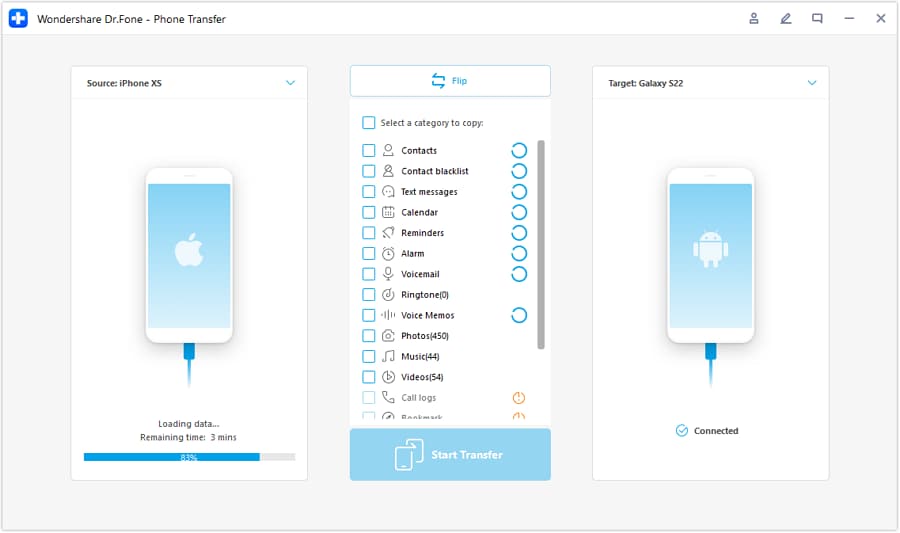
Step 2 Set the transfer direction and connect both phones
Choose the correct source and destination devices before starting, so your transfer matches the plan’s sequence and scope.
-
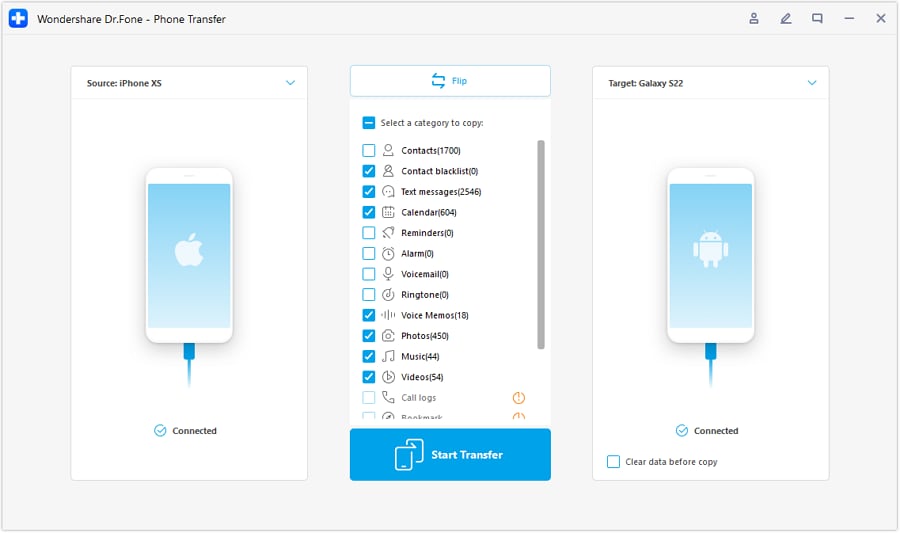
Step 3 Select what to move (critical-first if time is tight)
Transfer only what your plan calls for (especially must-have items first). A completed transfer is not proof that everything works—some apps still require re-login, re-verification, or separate in-app migration.
-
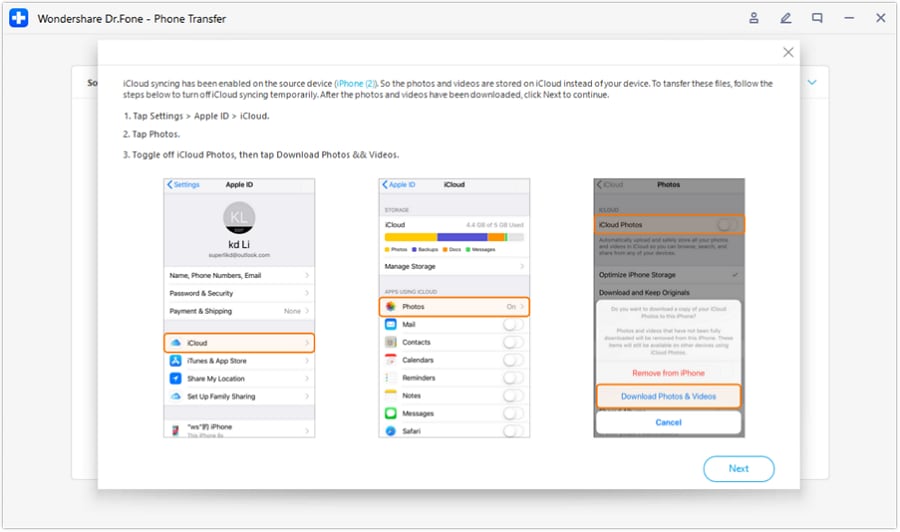
Step 4 Verify, then handle the point of no return
Use your checklist to verify photos/messages/contacts and the must-have apps, and only then proceed with any cleanup action you planned (including erase) if all pass criteria are met.




Conclusion
Use AI to design a gated, low-risk upgrade plan with explicit verification and a clearly defined point of no return; then use a real execution tool to carry out the transfer and only proceed to irreversible actions after the checks pass.
FAQ
-
What’s the biggest risk when upgrading a parent’s iPhone?
Account lockout (Apple ID/2FA), partial transfers, and losing access to SMS-based verification if SIM/eSIM changes happen too early. -
When should I switch the SIM/eSIM?
After you’ve confirmed the plan’s dependencies (Apple ID access, Wi‑Fi, time window) and you know how verification codes will be received during setup; switching too early can break login flows. -
How do I know it’s safe to erase the old iPhone?
Only after your verification gates pass: core data present (photos/messages/contacts), must-have apps open and are authenticated, and 2FA/SMS codes can be received on the new device. -
What should I verify first on the new iPhone?
The items that prevent recovery if they fail: Apple ID sign-in, phone number activation, Messages sync, Photos presence, and any banking/2FA-dependent apps. -
Can AI tell me whether the transfer succeeded?
No—AI can only tell you what to check. You must confirm results on the devices and in the apps themselves.
 Add Wondershare Dr.Fone as a preferred source on Google





