 Effortlessly manage data through preview, delete, export, etc.

 100% Security Verified | No Subscription Required | No Malware

 :
: 
 ChatGPT
 Perplexity
 Gemini
 Claude
 Grok
Grok

I transferred my eSIM too early and lost service on both phones—then I couldn’t receive the SMS codes I needed to log in. I wish I’d followed a checklist with “don’t proceed unless…” gates.
Samsung Community user
Moving an eSIM to a new Samsung phone is easy to start and surprisingly easy to mess up if you skip a carrier-specific step. Missing one detail can leave you without service right when you need SMS for logins or banking.
AI helps by turning “I think I know what to do” into a sequenced checklist: what to confirm, what to capture (screenshots/IDs), and what order reduces failures. It can also flag carrier rules that change the plan.
AI can’t actually move your eSIM, verify carrier provisioning, or restore connectivity if the line gets deactivated. Once the plan is verified, you still need real device tools and carrier steps to execute safely.
In this article
- Part 1. How to Plan transfer esim to new samsung phone Without Missing Critical Steps
- Why the order matters
- Carrier method differences
- The “point-of-no-return” step
- Downtime, 2FA, and backup access
- Part 2. What the AI Needs to Know
- Part 3. Using AI Prompts to Build a Safer Workflow
- Part 4. When to Stop Planning and Start Execution
- Part 5. Transfer eSIM to New Samsung Phone: Execute the Workflow Safely with Dr.Fone
Part 1. How to Plan transfer esim to new samsung phone Without Missing Critical Steps
You have a new Samsung phone and want your eSIM active on it today—without losing service on your old phone until you’re ready. You may also be worried about losing access to 2FA texts, WhatsApp registration, or emergency calls during the switch.
The uncertainty usually isn’t “how do I do it?”—it’s “in what order do I do it, and what do I verify before I hit the step that can’t be undone?” Different carriers handle eSIM moves differently (transfer inside settings vs. new QR code vs. carrier app vs. support activation), and the wrong assumption can cause delays.
The point-of-no-return moment is when the carrier deactivates the eSIM on the old phone (or you delete the eSIM profile). If you do that before confirming you can activate on the new phone, you can end up with no service on both devices until the carrier reissues the eSIM.
Part 2. What the AI Needs to Know
Share the details below so the plan matches your carrier rules and your risk tolerance.
- Carrier and country/region (e.g., “Verizon US”, “EE UK”, “Telstra AU”)
- Current phone model and Android version (old Samsung or other brand?)
- New Samsung model (e.g., Galaxy S24) and Android version if known
- Whether your plan supports eSIM transfer/self-service reactivation
- Do you still have access to the carrier app/online account login?
- Do you have the original eSIM QR code or activation details (if any)?
- Is the old phone still working and connected to cellular/Wi‑Fi?
- Any time pressure (travel, work SIM needed, port-in pending)
- 2FA risk: which accounts rely on SMS to that number (banking, email, work)
- Whether you need to keep the old phone usable as backup after the move
Part 3. Using AI Prompts to Build a Safer transfer esim to new samsung phone Workflow
Use the prompts below to force a clear sequence with verification gates before you touch anything irreversible.
3-1. Level 1: Basic Prompt
Help me plan a safe workflow to transfer an eSIM from my current phone to a new Samsung phone. List the steps in the safest order, and include what I must verify before I delete or deactivate anything. Assume carrier rules may vary and I want to avoid losing service.
3-2. Level 2: Advanced Prompt
Create a structured plan to transfer my eSIM to a new Samsung phone.
Preparation: list what info to collect, settings to check, and what to confirm with my carrier account.
Execution: give the safest sequence for activation/transfer, and call out the first irreversible step.
Verification: define pass/fail checks (calls, SMS, data, voicemail, RCS) and a rollback plan if activation fails.
Mark steps as critical vs optional, and include common failure points and how to avoid them.
3-3. Level 3: Evidence Prompt
I’m moving an eSIM to a new Samsung phone and want a plan with checks before/during/after, plus a “do not proceed unless” gate.
Context:
- Carrier: (T‑Mobile US)
- Old phone: (Galaxy S21, Android 14)
- New phone: (Galaxy S24, Android 14)
- Access: I can log in to my carrier app/website (yes)
- QR code available: (no)
- SMS 2FA risk: (bank + email)
- Must keep service interruption under: (15 minutes)
Please output:
- A pre-flight checklist (account access, Wi‑Fi, IMEI/EID notes, carrier app readiness)
- A step-by-step sequence that minimizes downtime
- Checks during activation (what I should see on the device and in settings)
- Post-activation tests (call in/out, SMS, data, hotspot, voicemail, RCS if applicable)
- A recovery path if the eSIM won’t activate (what to try first, what info to give carrier)
- A clear warning about any step that is irreversible or high-risk
3-4. Prompt Refinement (follow-up prompts)
Rewrite the workflow as a decision tree with ‘If/Then’ branches for: no QR code, carrier app login fails, activation stuck, and no SMS after activation.
Add a verification gate before the first irreversible step. Specify exactly what evidence counts as ‘verified’ (screenshots to capture, settings pages to check).
Separate what I can do on-device vs. what requires carrier account actions. Label each step with who/what is responsible.
Give me a minimal-downtime variant and a safest-possible variant, and explain the tradeoffs and when each is appropriate.
List the top 5 mistakes people make when moving an eSIM to a new Samsung phone, and add prevention checks to the plan.
3-5. AI Plan vs. Real Device Constraints
| Planning element | AI can do | Real-world constraint | What to do about it |
|---|---|---|---|
| Carrier-specific transfer method | Draft a method based on carrier norms | Carrier rules vary by plan, region, and account status | Confirm in carrier app/account or support before proceeding |
| Risk gating (“don’t delete yet”) | Define verification checkpoints | You may still lose service if carrier auto-deactivates old eSIM | Keep Wi‑Fi ready and schedule a low-risk time window |
| Troubleshooting tree | Provide likely causes and next checks | Device and network state can differ (provisioning delays, outages) | Collect evidence (screenshots/errors) and retry in controlled steps |
| Post-move validation | List tests to run | Some services (RCS, voicemail, banking SMS) can take time | Test in order; wait recommended intervals; escalate with details |
AI improves planning, sequencing, and verification clarity—but it cannot activate an eSIM, move carrier provisioning, or recover service on the device. Execution needs device-level actions and carrier systems.
Part 4. When to Stop Planning transfer esim to new samsung phone and Start Execution
- You have confirmed your carrier’s required method (in-app transfer, QR reissue, support activation, or settings-based transfer) for your exact line.
- You can log in to the carrier account (or you have a support path ready) without relying on SMS to that same number.
- You’ve captured the essentials (line details, EID/IMEI if needed, error screenshots plan) and chosen a low-risk time window.
- You know the first irreversible step and have a “stop and recover” path if activation fails.
At this point, the workflow is clear enough to move from planning to controlled execution.
Part 5. Transfer esim to new samsung phone: Execute the Workflow Safely with Dr.Fone
Execution now matters because the risk is not theoretical: a single premature deletion or incomplete activation can break calls/SMS and lock you out of accounts. Use Dr.Fone - Phone Transfer after your verification gates and recovery plan are ready, so your data move is controlled while the carrier-managed eSIM activation happens in parallel.
 Move data between iOS to Android and vice versa.
- Transfer contacts, SMS, photos, videos, music, and more types.
- Available with all phones with Android and iOS versions.
- Simple, click-through process.

5-1. Prepare the safety net (before any eSIM change)
Action: Use Dr.Fone to back up or transfer the data you can’t afford to lose (photos, messages, contacts, and other supported content) and confirm you can access critical accounts without SMS-only login.
Limitation: Dr.Fone cannot transfer or activate the eSIM itself, and it can’t guarantee carrier authentication will work during the switch.
5-2. Transfer your data in a controlled flow (separate from carrier eSIM activation)
-
Step 1 Launch Phone Transfer
Open Dr.Fone on your computer and choose the Phone Transfer tool so you can move key data while you keep the eSIM plan focused on carrier steps.

-
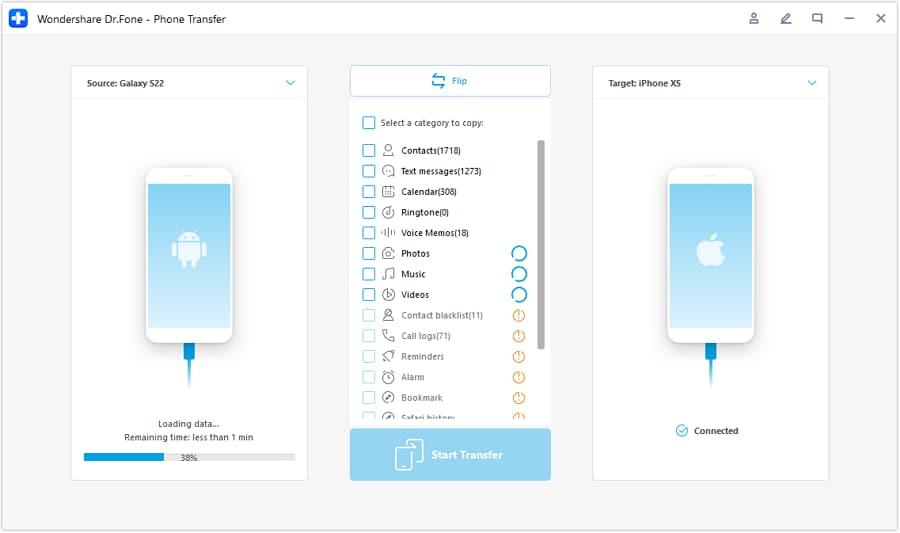
Step 2 Set the source and target phones
Connect both phones and confirm the direction (old phone as source, new Samsung as target) before starting any transfer action.
-
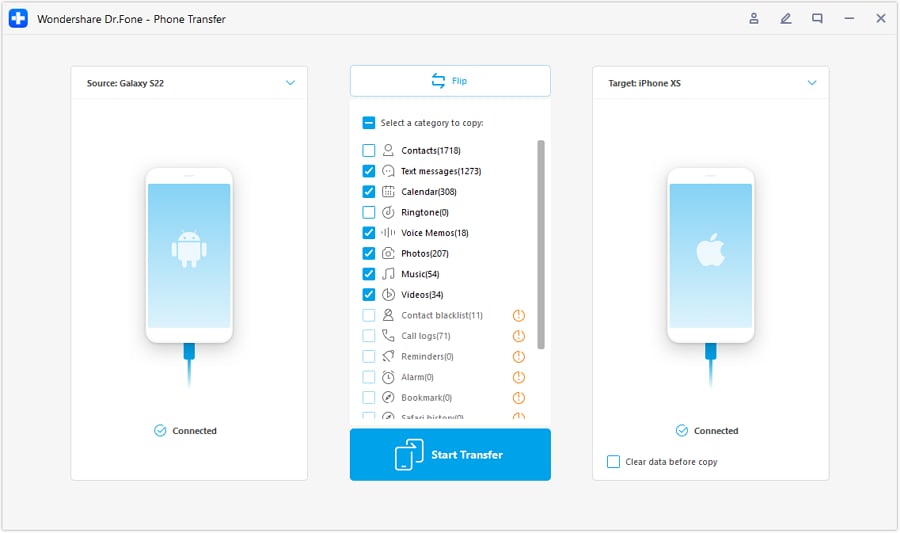
Step 3 Choose what to transfer
Select the data types you want to move and begin the transfer. Keep your carrier eSIM steps gated separately (don’t delete the old eSIM just because data transfer is done).
-
Step 4 Monitor progress and finish
Wait for completion and review results. Then proceed to the carrier-controlled eSIM activation checks and only finalize cleanup after service is proven stable.

5-3. Run the eSIM move only after verification gates pass
Action: Follow your carrier’s confirmed method to add/activate the eSIM on the new Samsung, and do not delete the old eSIM profile until the new phone proves it has working service.
Limitation: AI and Dr.Fone can’t complete carrier provisioning; if activation fails, you may need carrier support and may experience downtime.
5-4. Verify service end-to-end, then finalize cleanup
Action: Test outbound/inbound calls, SMS, mobile data, and voicemail on the new phone; only then remove/disable the old eSIM profile if your carrier requires it and you’ve confirmed the new line is stable.
Limitation: Some features (RCS/Chat, voicemail sync, banking short codes) can lag; don’t treat “signal bars” as proof—use real tests.




Conclusion
Use AI to design a cautious, verifiable sequence with clear stop points before any irreversible step, then use Dr.Fone as execution-layer support for safeguarding and moving your data while you complete the carrier-controlled eSIM activation on the new Samsung phone.
FAQ
-
What’s the biggest risk when moving an eSIM to a new Samsung phone?
Triggering deactivation on the old device before the new one is fully activated, leaving you with no service and no SMS for 2FA. -
What should I verify before I do anything irreversible?
Carrier method for your line, account access that doesn’t depend on SMS to the same number, Wi‑Fi availability, and a recovery path (how to contact carrier + what identifiers they’ll ask for). -
Is deleting the eSIM the irreversible step?
Often yes. Deleting the eSIM profile (or confirming a transfer that deactivates the old eSIM) can require a carrier reissue to restore service. -
How do I confirm the new phone is truly activated?
Make a call out and receive a call in, send/receive SMS, and confirm mobile data works with Wi‑Fi off. If you use voicemail/RCS, test those too. -
How long should I wait if activation seems stuck?
Wait a short, defined window (e.g., 10–20 minutes), then follow your recovery branch: toggle airplane mode, reboot, re-check the carrier app/account status, and escalate with screenshots/error text if it still fails. -
Can AI or Dr.Fone perform the eSIM transfer for me?
No. AI can plan and check the workflow; Dr.Fone can help protect and transfer data, but carrier eSIM activation must be done through device settings and carrier systems.
 Add Wondershare Dr.Fone as a preferred source on Google





