 Effortlessly manage data through preview, delete, export, etc.

 100% Security Verified | No Subscription Required | No Malware

 :
: 
 ChatGPT
 Perplexity
 Gemini
 Claude
 Grok
Grok

I switched from iPhone to Android and suddenly some people’s texts never arrived—later I realized my number was still tied to iMessage.
Reddit user, r/Android
Moving from iPhone to Android changes how your messages are routed and stored, and missing one step can cause dropped texts, split threads, or “lost” messages you can’t easily recover later.
AI helps by turning a vague goal (“move to Android, keep messages working”) into a clear sequence with prerequisites, decision points, and verification checks so you don’t hit problems after the switch.
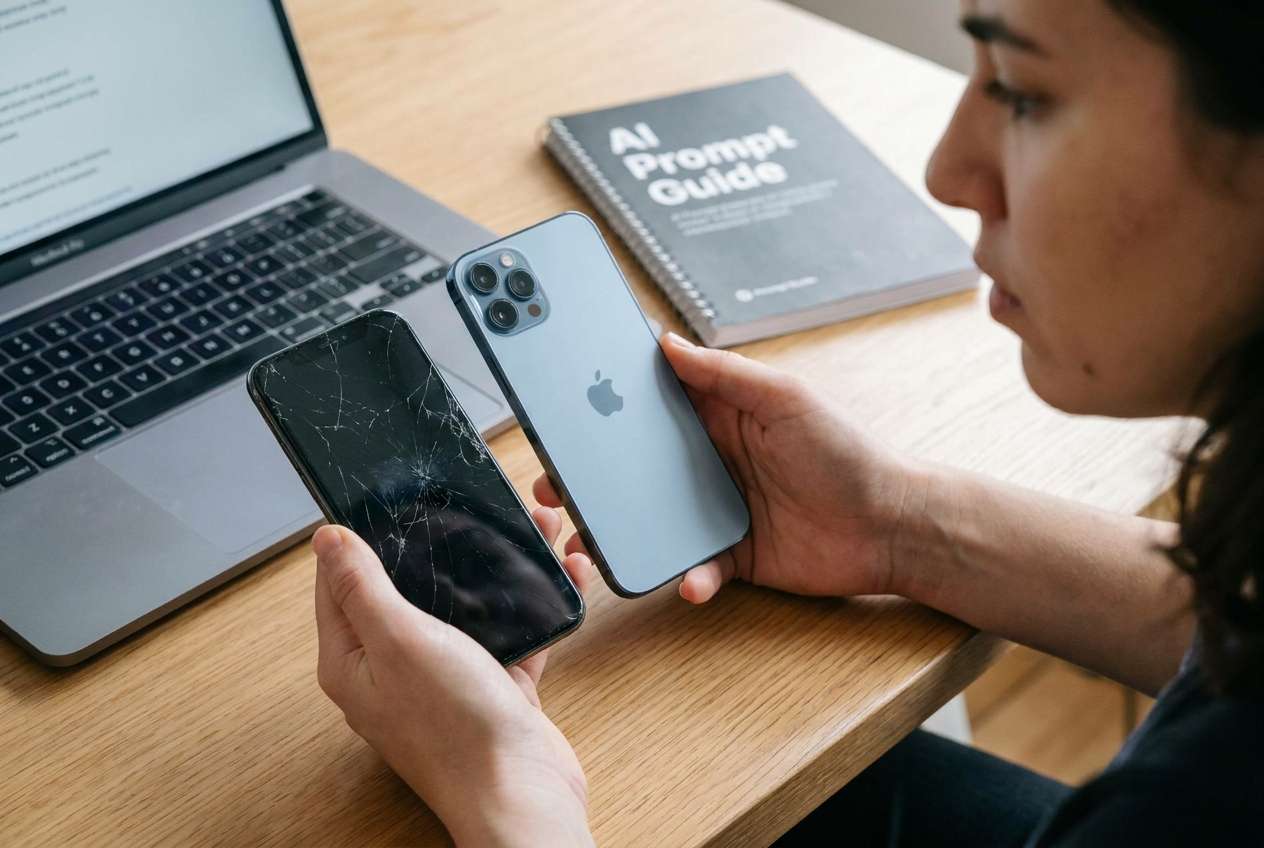
AI can’t read your devices, confirm carrier provisioning, or actually transfer/disable anything—so once the plan is correct, you still need real tools and on-device actions to execute safely.
In this article
- Plan iMessage behavior before you switch
- What “happens” to iMessage after switching
- Details AI needs to plan safely
- Why sequence and verification matter
- Define the irreversible moment
- AI prompts to build a safer workflow
- AI plan vs. real device constraints (table)
- When to stop planning and start execution
- Execute the workflow safely with Dr.Fone
Part 1. Plan iMessage behavior before you switch
1-1. How to plan what happens to iMessage when moving from iPhone to Android
You’re switching to Android, but you’re unsure what “happens” to iMessage: Will old iMessages show up on Android? Will people still reach you? Will your group chats break? The answers vary based on whether you keep the same phone number, whether iMessage stays activated, and what you’re transferring (SMS/MMS history vs iMessage-only content).
Even after an AI explanation, many people get stuck on sequence: do you transfer first or deregister iMessage first, and how do you verify it worked? The order matters because some steps change how messages route immediately.
The point of no return is when you wipe/reset/sell the iPhone (or remove the SIM and lose access to the Apple ID + device)—if you do that before confirming iMessage is deregistered and your Android is receiving SMS/MMS correctly, you can get “silent” delivery failures where contacts’ messages keep going to iMessage.
1-2. What the AI needs to know
Share the details below so the workflow can be planned precisely around your devices, accounts, and routing risks:
- iPhone model + iOS version (e.g., iPhone 13, iOS 17.x)
- Android model + Android version (e.g., Pixel 8, Android 14)
- Are you keeping the same phone number and SIM/eSIM? (yes/no)
- Carrier and country (routing behavior can vary)
- Do you use iMessage with phone number, email, or both?
- Do you use FaceTime with the same Apple ID? (yes/no)
- What you want to preserve:
- message history (SMS/MMS)
- iMessage conversations (blue-bubble content)
- photos/videos in chats
- Whether you’ll keep the iPhone as a secondary device (yes/no)
- Your timeline (same-day swap vs gradual transition)
- Any 2FA dependency on the iPhone number/Apple ID (yes/no/unsure)
1-3. Why verification gates matter
Planning should explicitly separate three things: (1) data transfer, (2) routing change (iMessage no longer claiming your number), and (3) proof that the change worked (real inbound/outbound tests).
If you don’t define “proof signals” (for example: you reliably receive SMS/MMS on Android from multiple senders), you can’t know whether it’s safe to proceed to the irreversible step.
1-4. Define the irreversible moment
Write down the exact action you consider irreversible (factory reset, trade-in, sale, shipping the iPhone away, removing the only SIM and losing access), and place it only after verification passes.
Part 2. AI prompts to build a safer workflow
Use the prompts below to have AI produce a checklist-like plan with sequencing and verification before you touch settings.
2-1. Level 1: Basic Prompt
I’m moving from an iPhone to an Android phone and I want to understand what happens to iMessage and how to avoid missing texts.
Create a step-by-step plan that includes what to do before switching, what to do during the switch, and how to verify it worked.
Don’t give device-execution instructions beyond high-level actions—focus on the correct order and checks.
2-2. Level 2: Advanced Prompt
Build me a workflow for moving from iPhone to Android focused on iMessage behavior and message deliverability.
Separate the plan into Preparation, Execution, and Verification, and label each step as critical or optional.
Include: (1) prerequisites, (2) risk notes, (3) “stop and verify” checkpoints, and (4) what NOT to do until verification is complete (e.g., wiping the iPhone).
2-3. Level 3: Evidence Prompt
Here’s my situation: iPhone (iPhone 12, iOS 17.5), new Android (Samsung S24, Android 14), keeping the same number (yes), carrier (T-Mobile US), Apple ID uses iMessage with phone number + email (both), I plan to sell the iPhone (yes, same day), and I need to preserve SMS/MMS history (yes) and attachments (some).
Create an evidence-based workflow that lists checks before, during, and after the switch.
Include specific “proof” signals to confirm success (e.g., test messages from a non-iPhone number, iPhone number turning green bubble, iMessage activation status), and call out the irreversible moment I must not reach before all checks pass (factory reset/sale).
2-4. Prompt refinement (follow-ups)
Output the plan as a table with columns: Step, Critical/Optional, Owner (Me / AI planning only / Tool), What could go wrong, Verification proof, Rollback.
Assume I have only one SIM and will be without service for up to 30 minutes—rewrite the plan to minimize downtime and include a “no-service window” checklist.
Add a “group chat risk” section: how to prevent mixed iMessage/SMS group issues and what to test to confirm group messaging is working after the switch.
Create a final “pre-wipe gate” checklist with 8–12 yes/no questions; if any answer is “no,” the iPhone must not be erased yet.
Part 3. AI plan vs. real device constraints (table)
| What AI can plan | What AI can’t confirm | What you must verify on-device | Why it matters |
|---|---|---|---|
| Correct sequence to reduce message-routing errors | Whether iMessage is actually deregistered for your number | Incoming SMS/MMS to your number from multiple senders | Prevents messages going to iMessage instead of Android |
| Risk checklist for selling/wiping the iPhone | Whether your carrier provisioning updated | Calls, SMS, MMS, group texts function on Android | Ensures core deliverability works post-switch |
| Data-transfer scope (what can/can’t be moved) | Whether all messages/attachments transferred intact | Spot-check message threads + media samples | Prevents discovering missing history after wipe |
| “Stop points” and rollback options | Real-time device status, Apple/Google service state | Your own checkpoints before irreversible actions | Avoids irreversible loss from premature reset |
AI improves planning, but cannot execute. You still need to do the device actions, run the transfer, and perform real verification tests before any irreversible step (like factory reset or selling the iPhone).
Part 4. When to stop planning and start execution
- You have a written sequence that separates transfer, routing change (iMessage off/deregister), and verification.
- You’ve defined the irreversible moment (reset/sale) and placed it only after multiple verification checks pass.
- You know what content is transferable vs not (especially iMessage-only history expectations).
- You’ve prepared test cases (at least: one iPhone sender, one Android sender, one non-smartphone/SMS-only sender if possible).
Once those are true, planning is complete and the next step is controlled execution with real tools.
Part 5. Execute the workflow safely with Dr.Fone
Execution now matters because the message-routing change (iMessage) and any message-history transfer are time-sensitive and easy to mis-order—verification needs to happen before you lose access to the iPhone. If you want a guided phone-to-phone move, Dr.Fone - Phone Transfer can help you run the transfer and then you can validate results before you deregister iMessage and wipe the old device.
 Move
data between iOS to Android and vice versa.
Move
data between iOS to Android and vice versa.- Transfer
contacts, SMS, photos, videos, music, and more types.
- Available
with all phones with Android and iOS versions.
- Simple,
click-through process.

-
Step 1 Open Phone Transfer
Launch Dr.Fone and go to the Phone Transfer feature so you can prepare a controlled transfer before making routing changes that affect deliverability.

-
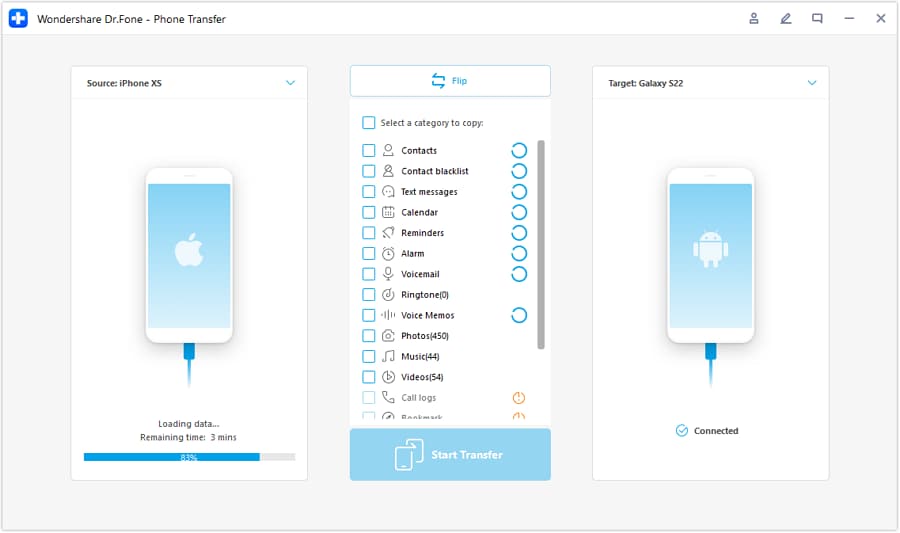
Step 2 Set the iOS → Android transfer path
Confirm the source device is the iPhone and the destination is the Android phone. This helps avoid transferring in the wrong direction, which can waste time during your service window.
-
Step 3 Choose the data you intend to move and run the transfer
Transfer the message data you intend to move, then spot-check a few key threads on Android (especially threads with attachments you care about) before proceeding.
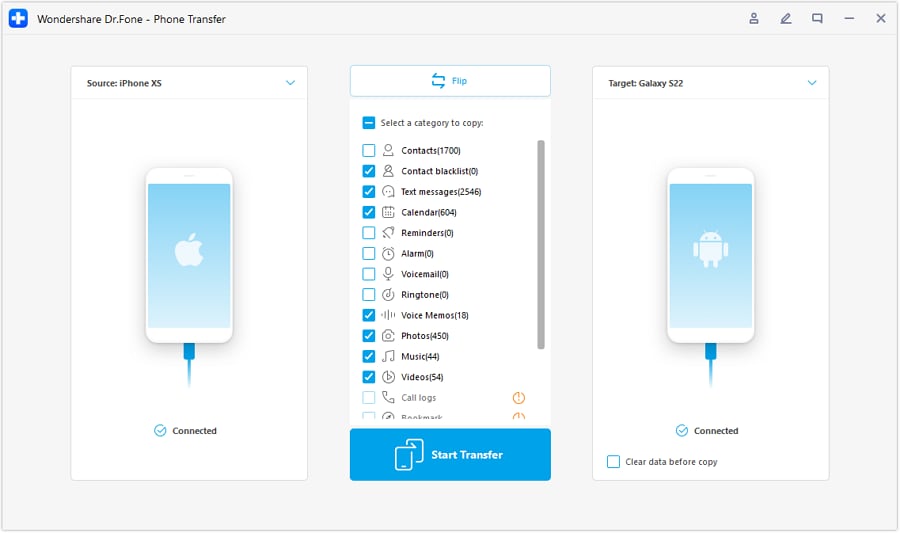
 Note: AI can’t see what transferred; you must manually confirm the right conversations and attachments appear before moving on.
 -
Step 4 Only after transfer: prevent iMessage misrouting and verify deliverability
After transfer, complete the on-device steps to ensure iMessage no longer claims your phone number, then re-test inbound texts to your number. Do not factory reset/sell the iPhone until your verification tests pass.
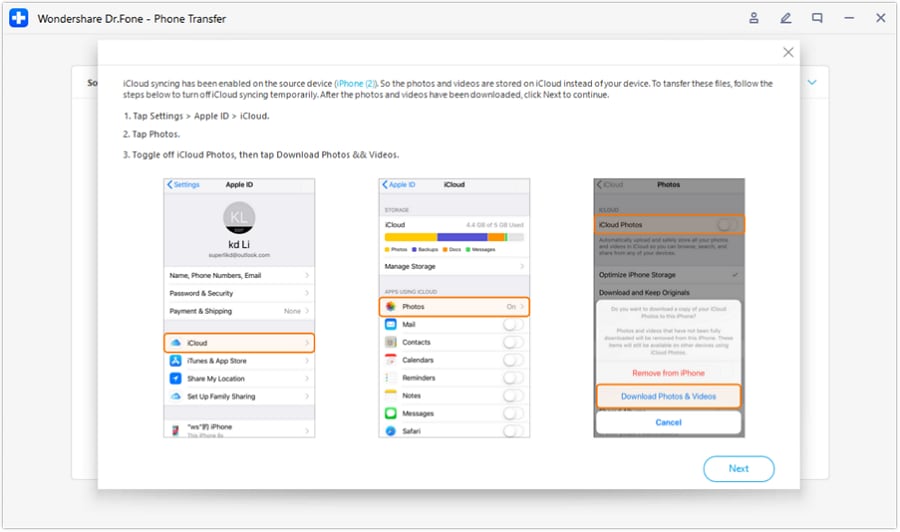 Note: Dr.Fone executes transfers, but it can’t guarantee carrier-side routing or every sender’s cached iMessage state—your real message tests are the proof.
Final verification gate (before the irreversible moment): run your test plan (single texts, group texts, SMS/MMS with media, and replies from iPhone contacts) and only then proceed with any factory reset/sale.




Conclusion
Use AI to map the sequence, define risks, and build verification gates—then use Dr.Fone for the actual transfer and complete on-device changes only after you’re confident the plan prevents misrouting and message loss.
FAQ
-
Will my old iMessages appear on Android after switching?
Usually not as true iMessage threads; what you can move depends on what’s being transferred (often SMS/MMS history is more portable than iMessage-only content). Plan for partial portability unless you’ve confirmed otherwise. -
What’s the biggest risk when switching from iPhone to Android with the same number?
Message misrouting: iPhone users’ texts may keep going to iMessage if your number isn’t properly deregistered, causing you to miss messages on Android. -
When is it safe to wipe or sell the iPhone?
Only after you’ve verified: inbound SMS/MMS to your number works, iPhone senders reach you reliably, and group messaging behaves correctly. Wiping too early is the high-risk, hard-to-reverse moment. -
How do I verify iMessage is no longer intercepting my number?
Use evidence-based tests: have multiple people message you (including at least one iPhone user), confirm you receive on Android, and confirm replies stay in the expected format (SMS/MMS where appropriate). -
Can AI tell me if my transfer succeeded?
No. AI can only define what to check; you must inspect threads/media on the Android and confirm critical conversations are present before proceeding.
 Add Wondershare Dr.Fone as a preferred source on Google





