 Effortlessly manage data through preview, delete, export, etc.

 100% Security Verified | No Subscription Required | No Malware

 :
: 
 ChatGPT
 Perplexity
 Gemini
 Claude
 Grok
Grok

Moving to a new phone is simple until one missed step leaves you without photos, chats, or authenticator access.
Forum user
Use AI to plan your verification checklist before you erase anything.
Moving to a new phone is simple until one missed step leaves you without photos, chats, or authenticator access. The biggest risk is assuming “it looks transferred” and erasing the old phone too early.
AI helps by turning a vague goal (“make sure everything is moved”) into a structured workflow with a clear order, explicit verification checks, and stop/go gates before any irreversible action.
AI can’t see your devices, confirm what actually copied over, or detect hidden app-specific data gaps. After the plan is clear, you still need real device tools to run the transfer, create backups, and perform any wipe safely.
In this article
- Plan a verification-first checklist (before you erase)
- Why “looks transferred” isn’t verified
- Sequence, stop/go gates, and the point of no return
- Commonly missed data types
- How to reduce uncertainty
- What the AI needs to know
- AI prompts (Level 1–3) + refinement
- AI plan vs. real device constraints
- Execute the workflow safely with Dr.Fone
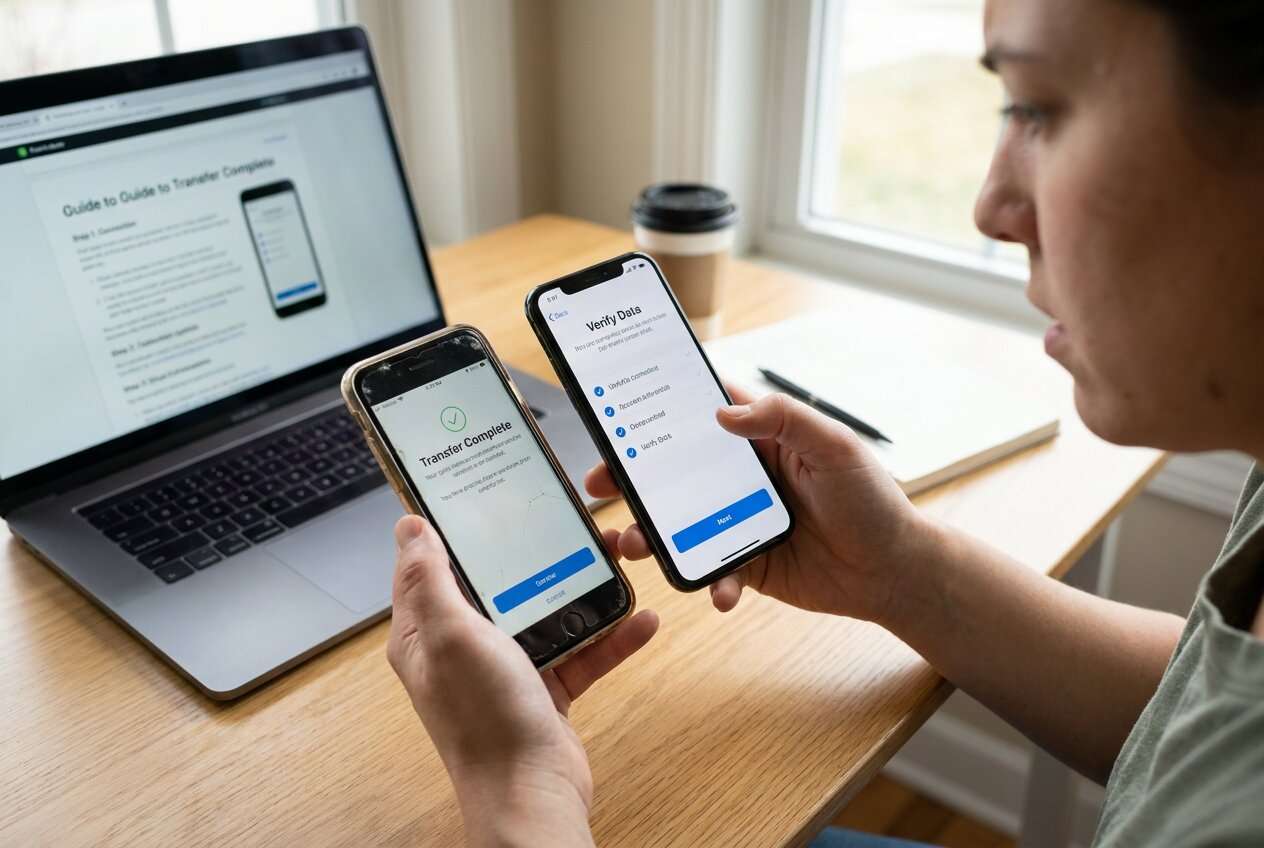
Part 1. How to Plan How to Verify Transfer Before Erasing Old Phone Without Missing Critical Steps
You’ve got a new phone set up and most apps seem fine, but you’re not sure what “verified” really means beyond eyeballing a few photos. Some items (WhatsApp chats, authenticator apps, offline notes, encrypted files) can look “present” while actually being incomplete or not restorable.
The uncertainty usually comes from missing sequence: what to back up first, what to transfer next, and what to check before touching the old phone. Without a checklist, you may skip the one app that doesn’t sync automatically.
The point of no return is any factory reset/secure erase/trade-in handoff of the old phone—once done, you may permanently lose data that wasn’t properly backed up or transferred.
Part 2. What the AI Needs to Know
Share just enough specifics so the AI can build a verification-first workflow that matches your devices and data types.
- Old phone OS + model (e.g., iPhone 12 iOS 17 / Galaxy S22 Android 14)
- New phone OS + model
- Transfer method you intend to use (cable, Wi‑Fi, cloud restore, computer tool)
- What data matters most (photos, messages, WhatsApp, contacts, notes, files, call logs)
- Auth/security dependencies (authenticator apps, banking apps, passkeys, SIM/eSIM)
- Storage constraints (old used space, new free space, external drive availability)
- Any work/school management (MDM, corporate profiles, encrypted containers)
- Deadline and risk tolerance (trade‑in date, travel tomorrow, “must not lose chats”)
Part 3. Using AI Prompts to Build a Safer How to Verify Transfer Before Erasing Old Phone Workflow
Use these prompts to make the AI produce a step-by-step plan with verification gates before you do anything irreversible.
3-1. Level 1: Basic Prompt
I’m switching from my old phone to a new phone and want to verify everything transferred correctly before erasing the old one.
Create a simple checklist in the right order, focusing on the most commonly missed data.
Keep it planning-only and include a clear “do not erase yet” gate.
3-2. Level 2: Advanced Prompt
Design a structured workflow to verify my transfer before I wipe my old phone.
Separate it into Preparation / Execution / Verification, and label each step as Critical or Optional.
Include explicit stop points (go/no-go) before any irreversible action and list the most common failure points for photos, messages, and app data.
3-3. Level 3: Evidence Prompt
Context: Old phone = (iPhone 12, iOS 17.5), New phone = (iPhone 15, iOS 17.5).
I transferred via (Wi‑Fi quick start) and I’m trading in the old phone tomorrow.
Data that must be perfect: (Photos 40k items, WhatsApp 12 GB, Notes, Contacts, 2 authenticator apps).
Create a verification plan with checks before/during/after transfer, including:
- What to compare (counts, timestamps, spot checks) and acceptable thresholds (e.g., “photo count within 0.5%”)
- App-by-app checks for WhatsApp and authenticators (what “success” looks like)
- A “proof list” I can record (screenshots or counts) before I even consider erasing
- A final go/no-go decision rule that blocks factory reset until all critical checks pass
3-4. Prompt Refinement
Put the plan in a table with columns: Step / Why it matters / Evidence to collect / Pass criteria / If it fails.
For each critical data type (photos, messages, WhatsApp, notes, files), give two verification methods: one quick and one thorough.
Identify hidden data traps relevant to my setup (e.g., end‑to‑end encrypted notes, “On My Phone” folders, offline downloads) and add checks for each.
Create a minimum viable verification I can finish in 30 minutes, and a full verification that takes 2–3 hours—both must include a hard “do not erase” rule.
Write a trade‑in ready checklist that ends with “I am ready to erase” only if every critical pass criterion is met.
Part 4. AI Plan vs. Real Device Constraints
| AI planning output | Real device constraint |
|---|---|
| Defines what “verified” means (pass criteria) | Devices may not show reliable totals for every app/data type |
| Lists a safe sequence with stop/go gates | Transfers can fail mid‑way due to cable, Wi‑Fi, battery, or storage limits |
| Identifies app-specific risks (e.g., WhatsApp/authenticators) | Some apps require in‑app migration steps that vary by version/account |
| Suggests evidence to record (counts, screenshots) | You still must manually capture evidence and confirm it on the device |
AI improves planning, but it cannot execute transfers, read your device state, or certify that data is truly complete—those require real device actions and tools.
4-1. When to Stop Planning How to Verify Transfer Before Erasing Old Phone and Start Execution
- You have a written critical-data inventory (what must not be lost) and it matches your real usage.
- You have pass/fail verification criteria (what you’ll compare, what “good enough” is) for each critical item.
- You have a rollback option (at least one backup or a way to re-run transfer) if a check fails.
- You can clearly identify the irreversible moment (factory reset/secure erase/trade‑in handoff) and you’ve placed it last.
If all four are true, you’re no longer guessing—you’re ready to follow the workflow without improvising mid‑transfer.
Part 5. How to Verify Transfer Before Erasing Old Phone: Execute the Workflow Safely with Dr.Fone
Execution matters now because verification depends on what actually lands on the new device and what recoverable copy still exists on the old device before any wipe.
If you want a guided transfer workflow, you can use Dr.Fone - Phone Transfer to complete the device-side steps after you’ve drafted your verification plan.
-
Step 1 Create a recoverable baseline (backup) of the old phone
Create a backup so you still have a restore path if a verification check fails later. AI cannot confirm the backup is complete; you must confirm the backup finishes and is readable.

-
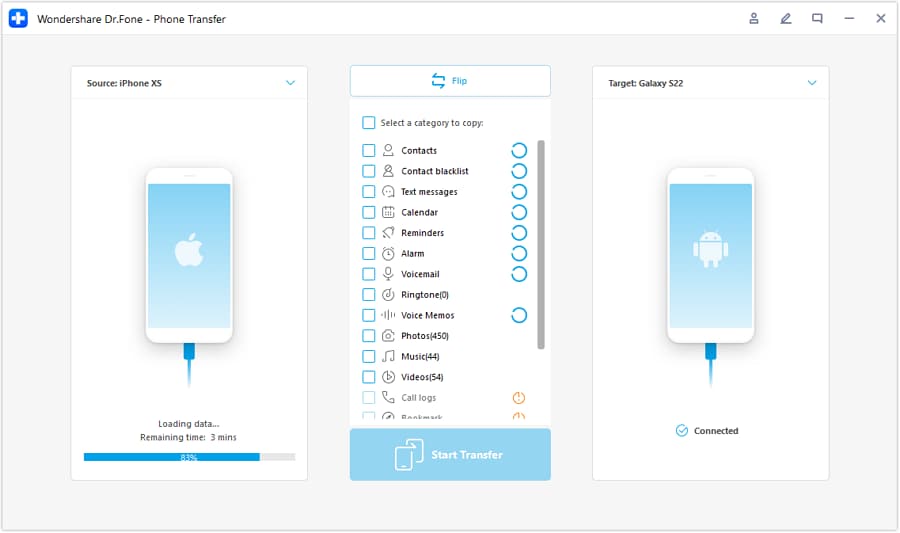
Step 2 Set the transfer direction and prepare the run
Set the correct source and target devices before starting. AI cannot see transfer errors or mismatches; you must watch for interruptions (storage, disconnects) and re-run if needed.
-
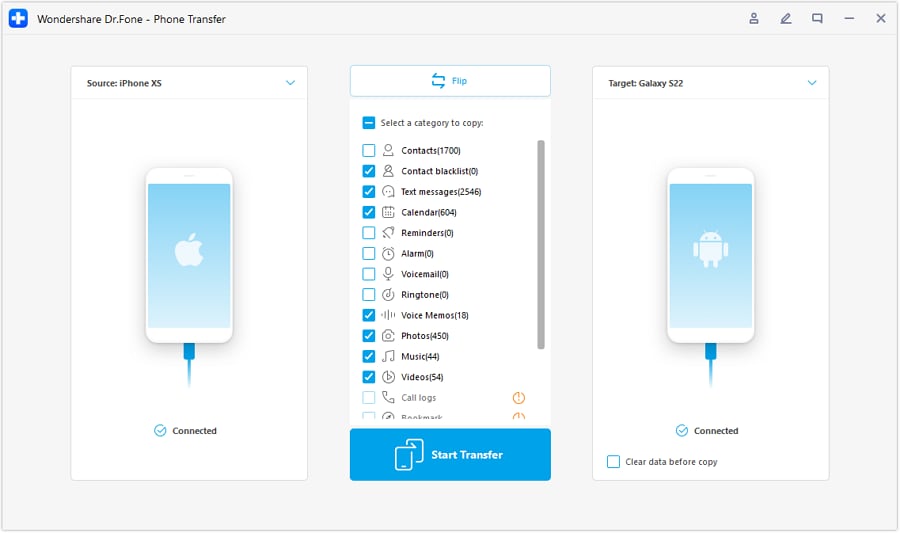
Step 3 Choose what to move based on your critical list
Transfer or restore the selected data to the new phone according to your planned critical list (prioritize the items you cannot easily re-download).
-
Step 4 Prevent sync conflicts and complete the workflow before any wipe
If prompted or relevant to your setup, reduce interference from syncing during transfer/restore. Keep the process stable and re-run the transfer if anything was interrupted.
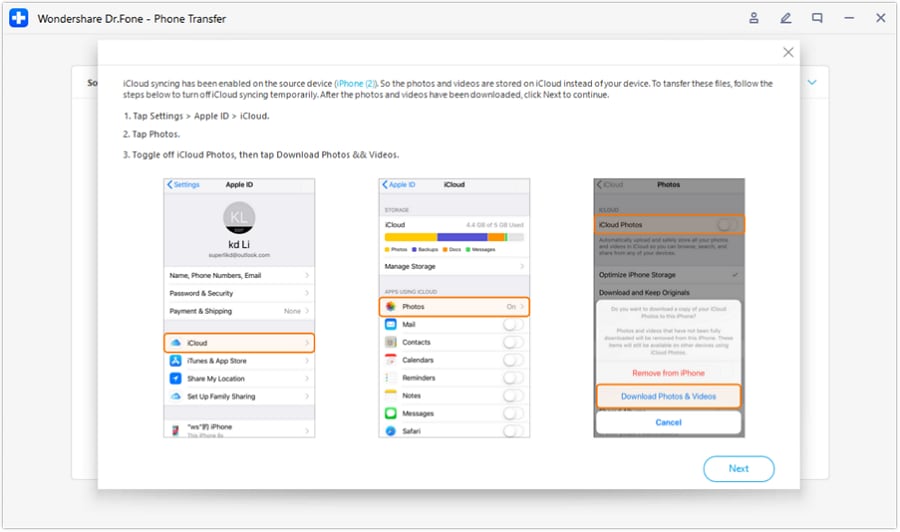
After the transfer finishes, verify on the new phone using your checklist (counts, spot checks, app logins, WhatsApp/authenticator validations). Erasing is irreversible—do not proceed without recorded evidence that every critical pass criterion has been met.
Recommended Tool to Reduce Transfer Risk
If you’re close to a trade-in deadline, a dedicated transfer tool can help you re-run transfers, keep a recoverable backup, and reduce manual guesswork when you’re executing your verification-first plan.
 Move data between iOS to Android and vice versa.
- Transfer contacts, SMS, photos, videos, music, and more types.
- Available with all phones with Android and iOS versions.
- Simple, click-through process.

Even with a strong AI-generated plan, the device-side work still decides the outcome: you need a completed backup, a completed transfer/restore, and proof on the new device that matches your pass criteria before you factory reset or hand over the old phone.




Conclusion
AI is best used to design a verification-first sequence with clear pass/fail gates, while real tools handle the actual backup, transfer, and (only after proof) erasure.
FAQ
-
What should I verify beyond photos and contacts?
Anything that may be local-only or encryption-bound: WhatsApp chats/media, authenticator tokens, offline files/downloads, notes stored “on device,” and app-specific documents.
-
How do I know when it’s safe to erase the old phone?
When every critical item has a defined pass criterion and you’ve collected evidence it passed (counts, spot checks, successful app access) on the new phone.
-
Is “I can see my photos” a good verification?
It’s a start, not proof. Add at least one stronger check such as total item count, oldest/newest timestamp checks, and opening several full-resolution items across different years/albums.
-
What’s the highest-risk moment in this process?
Factory reset/secure erase/trade‑in handoff of the old phone. Treat it as a blocked step until all critical checks pass and you have a fallback copy.
-
Can AI tell me whether my transfer succeeded?
No. AI can only define what to check and in what order; only you (and your tools) can confirm the device state.
 Add Wondershare Dr.Fone as a preferred source on Google





