 Effortlessly manage data through preview, delete, export, etc.

 100% Security Verified | No Subscription Required | No Malware

 :
: 
 ChatGPT
 Perplexity
 Gemini
 Claude
 Grok
Grok

I upgraded to a new phone and thought “sync is done,” so I erased the old one. Later I realized some messages and my authenticator access didn’t fully carry over—getting back in was a nightmare.
Reddit user, r/iPhone
Upgrading to a new phone on the same platform (iPhone→iPhone or Android→Android) is usually straightforward—until a missed step costs you photos, messages, or authenticator access after you erase the old device.
AI is useful here because it can turn a messy list of “things to remember” into a sequence with checkpoints, dependencies, and clear pass/fail verification before you do anything irreversible.
AI can’t actually inspect your devices, confirm what copied over, or perform the erase. Once the plan is locked and your checks are defined, you’ll need real device tools to execute the transfer, backup, and verification steps safely.
In this article
- How to Plan a Same-Platform Upgrade Without Missing Critical Steps
- Why “final step” isn’t final
- Anchor the plan to your setup
- Build verification gates
- Define the “safe to erase” moment
- What the AI Needs to Know
- Using AI Prompts to Build a Safer Workflow
- AI Plan vs. Real Device Constraints (and When to Start Execution)
- Execute the Workflow Safely with Dr.Fone
Part 1. How to Plan a Same-Platform Upgrade Without Missing Critical Steps
1-1. Why “final step” isn’t final
You have a new device ready, and you want a clean start—so erasing the old device feels like the obvious final step. The uncertainty is what “final” really means: what if messages didn’t fully sync, a local-only album didn’t migrate, or a 2FA app can’t be recovered?
1-2. Anchor the plan to your exact setup
Even after asking AI “what should I do,” the answer can feel correct but still risky because it’s not anchored to your exact setup (cloud vs local storage, multiple accounts, encryption, work profiles, authenticator apps, eSIM, etc.). What you need is a sequence with verification gates—so you don’t rely on hope.
1-3. Build verification gates before any irreversible action
The point of no return is the erase/reset itself. Once you wipe the old device (especially if it was the only copy of certain app data, local files, or authenticator tokens), recovery may be impossible or expensive—so your workflow must prove “safe to erase” before you reach that moment.
1-4. Define “safe to erase” in pass/fail terms
Don’t treat “looks fine” as a verification standard. Write down what you will check on the new device, what “pass” means, and what you will do if any check fails (for example: stop, keep the old device intact, and re-run the transfer via an alternate method).
Part 2. What the AI Needs to Know
Share just enough context for the AI to build a step-by-step plan with verification gates.
- Platform path (iPhone→iPhone, Android→Android)
- Old/new device models and OS versions (if known)
- Transfer method preference (device-to-device, cloud restore, local computer backup)
- What data matters most (photos, messages, WhatsApp, call logs, notes, files, voice memos)
- Any high-risk apps (authenticator/2FA, banking, work apps, password manager)
- Accounts in use (Apple ID/Google account count, work profile/MDM, multiple SIM/eSIM)
- Storage and connectivity constraints (low storage, slow Wi‑Fi, limited time window)
- Whether you need to keep the old device usable as a fallback for a while
- Your acceptable verification standard (“spot-check” vs “audit-level” confirmation)
Part 3. Using AI Prompts to Build a Safer Same-Platform Upgrade Workflow
Use the prompts below to force a clean sequence: preparation → transfer/restore → verification → erase readiness.
3-1. Level 1: Basic Prompt
Draft a safe, same-platform upgrade plan for moving from my old phone to my new phone without erasing the old one too early. Include a short checklist of what to verify on the new phone before I even consider wiping the old device. Do not include execution instructions—planning and verification only.
3-2. Level 2: Advanced Prompt
Build a structured workflow for a same-platform phone upgrade with **Preparation**, **Execution (high-level only)**, and **Verification** sections.
Mark each step as **Critical** or **Optional**, and add “stop points” where I must confirm results before proceeding—especially before any irreversible action like factory reset/erase.
3-3. Level 3: Evidence Prompt
Create a verification-first upgrade plan for **iPhone→iPhone** (or **Android→Android**) using my context below. Include checks **before**, **during**, and **after** transfer, and define what counts as “safe to erase.”
Context:
- Transfer method: (device-to-device)
- Data priority: (Photos, Messages, WhatsApp, Notes, Authenticator)
- Accounts: (1 Apple ID / 1 Google account, plus 1 work email)
- Constraints: (low storage on old device, 2 hours available, Wi‑Fi stable)
Requirements:
- Identify data that often **does not migrate fully** and how to verify it
- Include a “2FA/authenticator continuity” verification gate
- Provide a short evidence checklist: what I should screenshot/write down before the move (e.g., app list, storage usage, last backup time)
- Add a “fail-safe” path if verification fails (do not erase; keep old device as source)
3-4. Prompt Refinement (follow-up prompts)
Rebuild the workflow as a table with columns: **Step**, **Dependency**, **Risk if skipped**, **How to verify**, **Pass criteria**, **Fallback**.
Split verification into **account-level**, **app-level**, and **content-level** checks, and tell me exactly what to open on the new device to confirm each.
List the **top 10 most common ‘look transferred but isn’t’ items** for my platform path, and add a specific verification step for each.
Add a dedicated “irreversible actions” section and specify the **earliest safe moment** each action can occur (erase, SIM/eSIM removal, trade-in handoff).
Create two plans: **Conservative** (maximum verification, slower) and **Fast** (minimum safe verification), and highlight what risk increases in the fast plan.
Part 4. AI Plan vs. Real Device Constraints (and When to Start Execution)
4-1. AI Plan vs. real-device reality
| Planning with AI (what it’s good at) | Real-device reality (what AI can’t do) |
|---|---|
| Map dependencies and the safest sequence | Access your phone to confirm what actually copied |
| Identify high-risk apps/data that need extra handling | Perform transfers, backups, restores, or account sign-ins |
| Define verification gates and pass/fail criteria | Detect hidden sync delays, stalled uploads, or partial migrations |
| Create fallback paths if a check fails | Guarantee recovery after an erase/reset |
AI improves planning and reduces avoidable mistakes, but it cannot execute the migration or validate outcomes on your devices. Verification must happen on the devices, and execution requires real tooling.
4-2. When to stop planning and start execution
- You have a written “safe to erase” definition (pass criteria) and a short checklist you will follow on the new device.
- You’ve identified your highest-risk items (2FA/authenticator, encrypted chats, local-only files) and added explicit verification steps for them.
- You’ve chosen a fallback strategy if anything fails (keep old device intact; delay erase; re-run transfer; alternate backup method).
- You know the irreversible moment you will not cross until all critical checks pass (factory reset/erase/trade-in handoff).
Once those are true, planning is complete—and the next phase is controlled execution with verification, not more advice.
Part 5. Verify Same-Platform Upgrade Before Erasing Old Device: Execute the Workflow Safely with Dr.Fone
Execution now matters because the safest plan still fails if the transfer is interrupted, incomplete, or verified too casually. The goal is to complete the move, prove the results, and only then approach the erase/reset moment. To carry out the transfer steps you planned, you can use Dr.Fone - Phone Transfer.
 Move data between iOS to Android and vice versa.
- Transfer contacts, SMS, photos, videos, music, and more types.
- Available with all phones with Android and iOS versions.
- Simple, click-through process.

-
Step 1 Open Phone Transfer and choose your transfer/restore path
Start the tool and select the transfer/backup/restore flow that matches the plan you created (including your dependencies around accounts, storage, and connectivity).

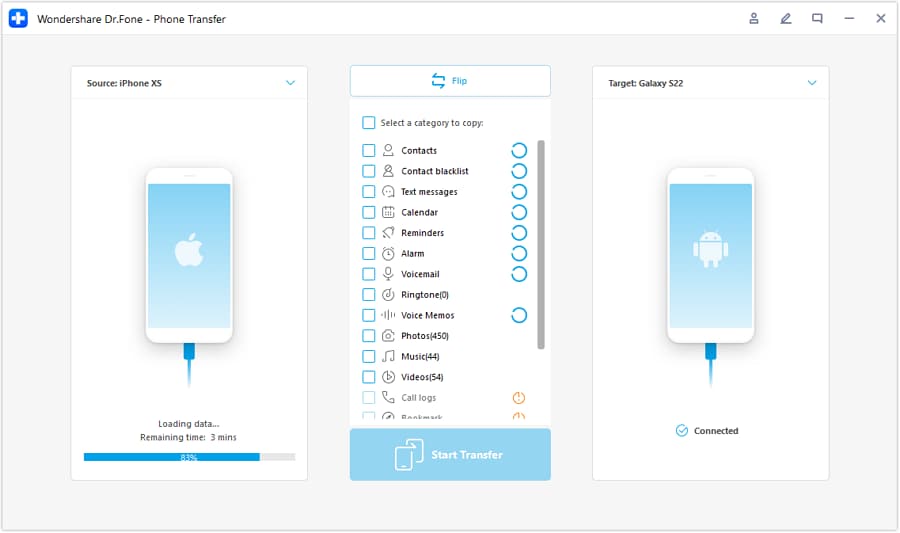
-
Step 2 Set the correct source and target devices before you proceed
Double-check the direction (old → new) and confirm the intended path before running anything that could overwrite data.
-
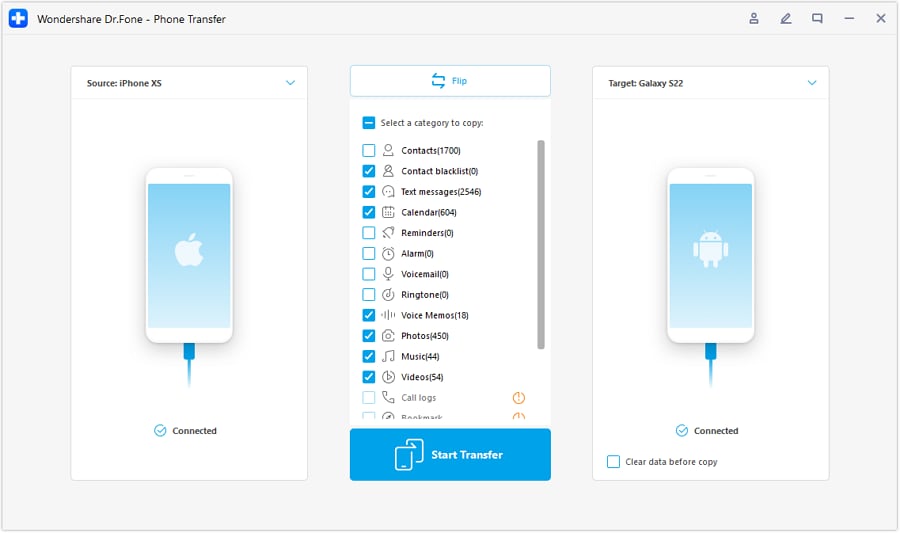
Step 3 Select the data categories that match your verification checklist
Choose the data types you care about most (photos, messages, notes, files, and any app-related content your plan identified as high-risk), then run the transfer.
-
Step 4 Verify outcomes against pass criteria before any irreversible action
Use your pass/fail gates (account-level, app-level, and content-level checks) to confirm the new phone is complete. Only after all critical checks pass should you erase/reset the old device or hand it off for trade-in.
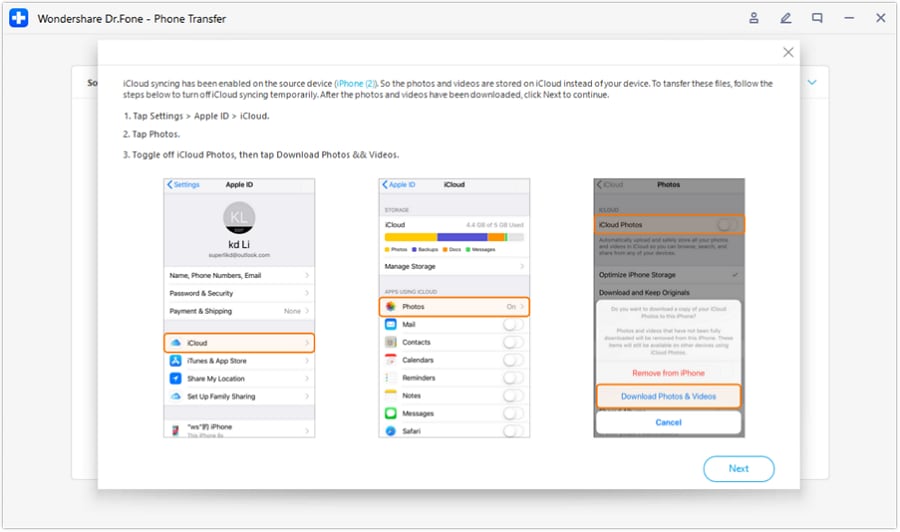
Limitation reminder: AI cannot perform or monitor transfers on your device, and it cannot confirm whether the result matches your priorities. If you erase too early, some app data (especially authenticator tokens or local-only content) may be unrecoverable regardless of later troubleshooting.




Conclusion
Use AI to design a verification-first workflow with clear stop points and a strict “safe to erase” gate, then use a real tool like Dr.Fone to execute the transfer and follow your checks before you touch the irreversible erase/reset step.
FAQ
-
What’s the biggest risk in a same-platform upgrade?
Assuming “sync” equals “migrated.” Some data may be delayed, partial, or stored locally inside specific apps. -
What should I treat as a “do not erase yet” red flag?
Missing authenticator access, incomplete message history, photo library discrepancies, or any critical app that won’t sign in or show expected data. -
How long should I keep the old device before wiping it?
Until your critical verification checks pass and you’ve operated normally on the new device long enough to notice gaps (often at least a day or two, longer if you rely on 2FA frequently). -
Can AI tell me whether everything transferred correctly?
No. AI can define what to check and what “complete” means, but only device-side verification can confirm the outcome. -
Do I need verification if the transfer tool says “completed”?
Yes. “Completed” means the process ended, not that every high-risk app/data type is intact and accessible.
 Add Wondershare Dr.Fone as a preferred source on Google





