 Effortlessly manage data through preview, delete, export, etc.

 100% Security Verified | No Subscription Required | No Malware

 :
: 
 ChatGPT
 Perplexity
 Gemini
 Claude
 Grok
Grok

I thought Telegram would “just sync,” but changing phones turned into a mess when I couldn’t get the code and realized some files were only on the old device.
Reddit user, r/Telegram
Migrating Telegram to a new phone is usually quick, but one missed step (like losing your SIM/number access or skipping a verification check) can delay logins, break access to accounts, or leave important files behind.
AI helps by turning “I’m switching phones” into a structured workflow: what to confirm first, what order to do things in, what to back up (and what you can’t), and what evidence to capture before you touch anything.
AI can’t log in to your Telegram account, move files between your phones, or verify what’s actually on-device. Once your plan is clear, you’ll need real tools to execute the transfer and backup steps safely.
In this article
- Plan your Telegram migration without missing critical steps
- What you want to keep (success criteria)
- What typically causes lockouts
- The point-of-no-return checkpoint
- A planning checklist you can verify
- What the AI needs to know
- Using AI prompts to build a safer workflow
- AI plan vs. real device constraints
- When to stop planning and start execution
Part 1. Plan your Telegram migration without missing critical steps
1-1. Define what “success” looks like on the new phone
You’re moving from an old phone to a new one and want Telegram to “just appear” exactly the same—chats, media, settings, and access to all accounts. You may also be juggling a SIM change, a new number, or a trade-in deadline.
1-2. Understand why advice conflicts (cloud vs. device-only)
The uncertainty usually starts after you read mixed advice: some people say “everything is in the cloud,” others warn that media, downloads, Secret Chats, or two-step verification can trip you up. What’s missing is a reliable sequence with checkpoints.
1-3. Identify the “point of no return”
The point-of-no-return moment is wiping/erasing or trading in the old phone before you confirm Telegram login on the new phone and verify that the specific items you care about (downloads, local files, Secret Chats, export needs) are actually accessible.
1-4. Use verification gates before any irreversible step
A good plan forces you to prove access (code delivery and passwords) and prove completeness (your must-keep items are present and usable) before you take actions you can’t undo.
Part 2. What the AI needs to know
Answer these so the AI can build a plan that matches your risk level and timeline:
- Your current phone OS and new phone OS (Android → Android, iPhone → iPhone, Android → iPhone, iPhone → Android)
- Whether you still control the phone number used for Telegram (SIM active? eSIM? traveling? porting?)
- Whether you use Telegram two-step verification password (yes/no/unsure)
- Whether you use multiple Telegram accounts on the same device (yes/no)
- Whether you use Secret Chats you need to keep (yes/no/unsure)
- What “must not lose” means for you: chat history, photos/videos in chats, saved messages, files in Downloads, voice notes, stickers, settings
- Whether your old phone is intact and unlockable (screen working? storage healthy?)
- Time pressure and constraints (trade-in date, remote wipe policy, MDM/work device, limited Wi‑Fi)
- Your backup preference (cloud-only vs also keeping an offline copy of critical files)
Part 3. Using AI prompts to build a safer workflow
Use the prompts below to make the AI produce a step-by-step plan with verification gates before any irreversible step.
3-1. Level 1: Basic Prompt
Draft a safe Telegram migration plan for switching phones.
Include the order of steps and the top mistakes that cause lockouts or missing data.
Do not include execution instructions—focus on planning, checks, and what to verify before wiping the old phone.
3-2. Level 2: Advanced Prompt
Create a structured Telegram migration workflow with Preparation / Execution / Verification sections.
Mark items as critical vs optional, and include “stop points” where I must confirm access before proceeding.
Examples of stop points: number access, two-step verification, multi-device sessions, downloads, Secret Chats.
3-3. Level 3: Evidence Prompt
Build a Telegram migration plan using this context, and include checks before / during / after the move.
Include what evidence to capture (screenshots, counts, file locations) so I can confirm nothing important was missed.
Context:
- old phone: Android 13
- new phone: iPhone 15
- Telegram number: +1-555-0100
- two-step verification: enabled
- Secret Chats: unknown
- multiple accounts: no
- trade-in: 48 hours
- must keep: work group chats, saved files, photos/videos, downloaded PDFs in Telegram folder
Include: risk list, decision gates, and a “do not wipe old phone until…” checklist.
3-4. Prompt Refinement (follow-up prompts)
Output the plan as a table with columns: Step / Why it matters / What to verify / Evidence to collect / If it fails then.
Separate Telegram items into cloud-synced vs device-only.
List what is typically not transferable (for example, Secret Chats) so I can decide what to export or screenshot first.
Add a credential readiness check.
Confirm I can receive SMS/phone calls to my Telegram number.
Confirm I know my two-step verification password (or my recovery email status).
Create a minimal-risk path for my timeline (trade-in in 48 hours).
Include explicit gates before any irreversible action.
Part 4. AI plan vs. real device constraints
| What AI can plan well | What AI cannot do | What you must verify yourself | Why it matters |
|---|---|---|---|
| Step order, risk points, checklists | Log into Telegram or transfer files | You can receive codes; account access works | Prevents lockout loops and delays |
| Identify cloud vs device-only items | Read your local Telegram folders | Downloads/files you need are present | Avoids silent loss of local-only data |
| Define “done” criteria and evidence | Confirm app state on your devices | Chats/media/settings match expectations | Stops you from wiping too early |
| Suggest decision gates | Perform backups/transfers | Backups exist and can be opened | A backup that can’t restore is not protection |
AI improves planning, but cannot execute. After the plan is validated, you need real device workflows and tools to move data and confirm results.
Part 5. When to stop planning and start execution
- You can clearly state your success criteria (what must be present on the new phone for you to consider the migration complete).
- You’ve identified critical risks (number access, two-step verification, Secret Chats, device-only downloads) and how you’ll verify each one.
- You have a verification gate that blocks wiping/trading-in the old phone until all checks pass.
- You’ve chosen the transfer approach for device data (especially local downloads/files) and have time/resources to complete it.
At this point, planning should stop—further debating usually adds delay without reducing risk.
Product recommendation: execute the workflow safely
Execution now matters because the main failure mode is not “Telegram didn’t sync,” but “I erased the old phone before confirming access and local files.” To reduce risk, you can use Dr.Fone - WhatsApp Transfer to help back up device data and keep a protected fallback before any irreversible wipe or trade-in.
 Transfer WhatsApp across Android & iOS.
- Backup & restore WhatsApp to PC securely.
- Preview & export chats selectively.
- Works with all iPhone & Android models.
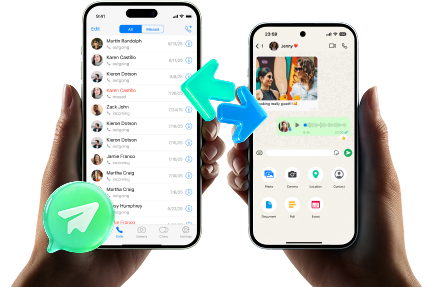
Prepare a protected baseline: Back up the old phone data you may need (especially local Telegram downloads/files and device content) before you sign out, erase, or hand it over. AI can’t confirm what is actually backed up or whether the backup is usable—you must check the backup output and storage location.
Transfer/restore the needed device data: Transfer or restore the backed-up data to the new phone as needed for your scenario (same OS vs cross-platform). AI can’t see what transferred successfully; you must confirm the specific folders/files you care about are present and open correctly.
Verify, then take the irreversible step: On the new phone, confirm Telegram login and validate your checklist (key chats visible, media/files accessible, downloads present) before you erase/reset the old phone. Once the old phone is wiped/traded in, recovery options can be limited or impossible—do not proceed until every verification gate is satisfied.
-
Step 1 Start the tool and keep the old phone as your fallback
Begin with the old phone still accessible and unlocked, so you can validate credentials and confirm what’s local before anything irreversible.

-
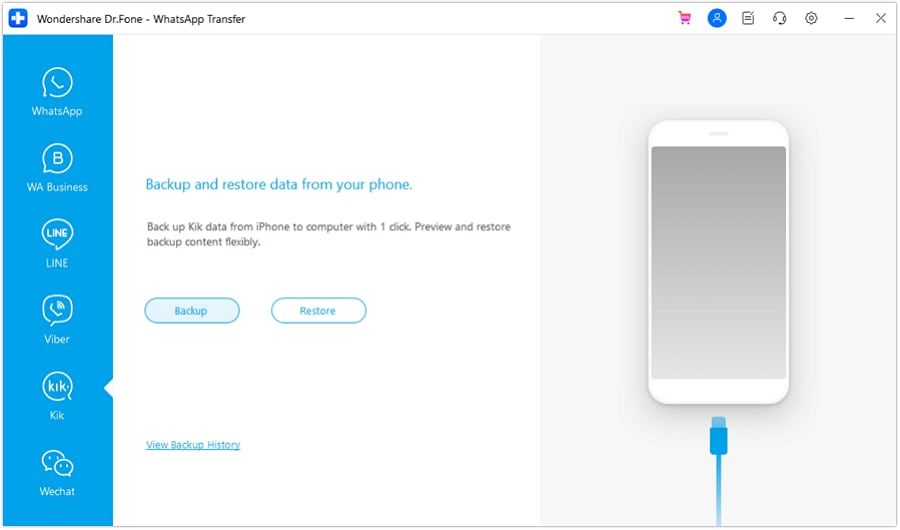
Step 2 Create a protected baseline backup before changing sessions
Back up device data you may need later (especially local downloads/files). This is your safety net if login or transfer checks fail.
-
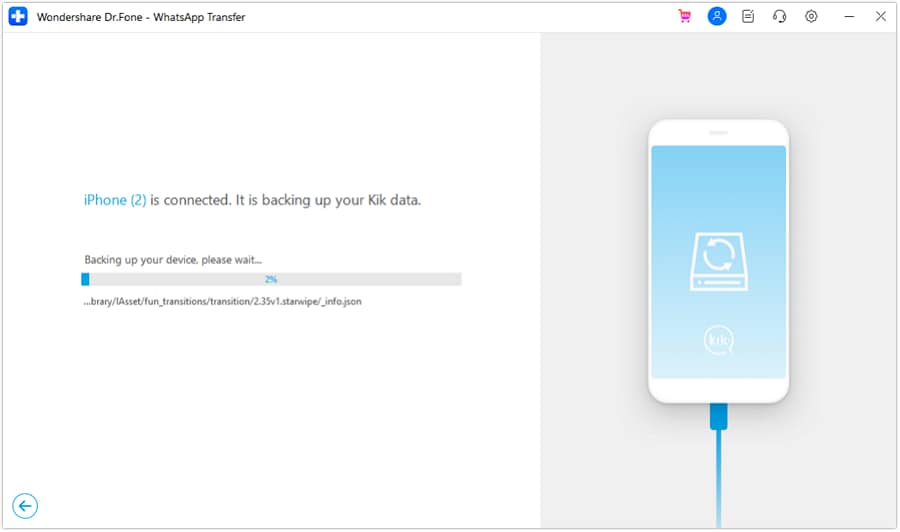
Step 3 Monitor the process and record what was captured
Wait for the backup/transfer to finish and document where the output is stored so you can verify it’s usable.
-
Step 4 Complete, then verify on the new phone before wiping the old one
Confirm Telegram login works and your must-keep items are accessible. Only after all verification gates pass should you erase or trade in the old phone.




Conclusion
Use AI to design the sequence, risk checks, and verification gates for your Telegram migration plan when changing phones, then use real tools like Dr.Fone to execute the backup/transfer steps—especially before any irreversible wipe or trade-in.
FAQ
-
Does Telegram automatically move all my chats to the new phone?
Most regular chats sync via Telegram’s cloud after you log in, but some items can be device-only (like certain downloaded files) and Secret Chats don’t transfer like normal chats. -
What’s the biggest cause of Telegram migration failure?
Losing access to the phone number (or two-step verification password) during the switch, and wiping the old phone before confirming the new device is fully working. -
How do I avoid the point-of-no-return mistake?
Define a “do not wipe until” checklist (login works, key chats present, critical files present and openable, backups verified) and treat it as mandatory. -
Should I log out of Telegram on the old phone first?
Plan to keep the old phone as a fallback until the new phone is verified. Logging out early can remove your safety net if something goes wrong. -
How long should I wait before trading in the old phone?
Until you’ve completed verification on the new phone and confirmed backups/transfer results for any device-only data you care about.
 Add Wondershare Dr.Fone as a preferred source on Google





