 Effortlessly manage data through preview, delete, export, etc.

 100% Security Verified | No Subscription Required | No Malware

 :
: 
 ChatGPT
 Perplexity
 Gemini
 Claude
 Grok
Grok

I tried to free up space right before a trip, deleted a bunch of stuff fast, and then realized some important files weren’t actually backed up. Now I’m scared to touch anything because I don’t want to lose photos or offline essentials.
Forum user
Cleaning phone storage before travel sounds simple, but missing one step can mean losing photos, offline essentials, or access to important accounts right when you need them.
AI is useful here because it can turn “I need more space” into a clear sequence: what to check first, what to back up, what to remove, and what to verify before you touch anything irreversible.
AI can’t see your device, confirm what’s actually backed up, or perform the cleanup itself—so once the plan is confirmed, you still need real tools to execute safely.
In this article
- Plan the cleanup without missing critical steps
- Why “delete large videos” isn’t a workflow
- Define the point of no return
- Build verification gates
- Protect offline essentials for travel
- What the AI needs to know
- AI prompts to build a safer workflow
- When to stop planning and start execution
- Execute the workflow safely with Dr.Fone

1. Plan first, delete last.
Use AI to create an ordered workflow with verification gates so you don’t permanently remove anything before confirming backups and offline access.
2. Give AI the right context.
Your device, time to departure, backup options, and offline essentials determine the safest order of actions and what “done” looks like.
3. Execute with real tools and real checks.
AI can’t validate what’s backed up or measure real storage changes—so you must run transfers/backups and confirm results on your device before any irreversible deletion.
Part 1. How to plan clean phone storage before a long trip without missing critical steps
You’re leaving soon, your phone is almost full, and you’re trying to free space without breaking anything you’ll rely on during the trip (boarding passes, offline maps, travel docs, 2FA apps, camera roll). You may also be switching to airplane mode often, which makes “I’ll just re-download it later” a risky assumption.
After an AI answer, the uncertainty usually isn’t what to delete—it’s what order to do things in, and how to verify you won’t lose irreplaceable items. “Delete large videos” is not a workflow; it’s a suggestion.

Part 2. What the AI needs to know
Share your device context so the AI can produce a safe, step-by-step plan instead of generic cleanup tips.
- Phone type and OS (e.g., iPhone 13 iOS 17 / Samsung S22 Android 14)
- Storage situation (total capacity, free space now, target free space you want)
- Time before departure (e.g., “6 hours” vs “2 days”)
- What you must keep offline (maps, playlists, boarding passes, travel PDFs, language packs)
- Photo/video situation (camera roll size, whether you use iCloud/Google Photos/OneDrive)
- Messaging apps that matter (WhatsApp/LINE/Telegram) and whether media is important
- Any work/auth apps (Authenticator, banking, VPN) you must not disrupt
- Your backup options (laptop available? external drive? stable Wi‑Fi?)
- Your risk tolerance (e.g., “no data loss acceptable” vs “ok to delete old downloads”)
Part 3. Using AI prompts to build a safer clean phone storage before a long trip workflow
Use the prompts below to make the AI produce a checklist-driven plan with clear verification gates before deletion.
3-1. Level 1: Basic prompt
Create a safe, step-by-step plan to clean phone storage before a long trip.
Prioritize actions that free space without risking data loss, and tell me what to verify before deleting anything permanently.
Keep it short and ordered.
3-2. Level 2: Advanced prompt
Build a workflow for cleaning my phone storage before travel with three phases: Preparation, Execution, and Verification.
Label each step as critical or optional, and include “stop points” where I must confirm backups/offline access before moving forward.
Avoid any irreversible deletion until the verification phase is satisfied.
3-3. Level 3: Evidence prompt
I’m traveling in (12 hours) and my phone has (128GB total / 2GB free). I need at least (15GB free) for photos and apps during the trip.
Device: (iPhone 13, iOS 17) or (Pixel 7, Android 14). Cloud: (iCloud Photos on / Google Photos backup on / none). I will have (limited Wi‑Fi) once traveling.
Please produce:
- A pre-clean inventory (what categories to check first: Photos/Videos, Downloads, Offline media, App caches, Messages, System)
- A checks-before, checks-during, and checks-after list (include examples like “confirm 200 recent photos appear in cloud” or “open offline map without internet”)
- A clear rule for the point of no return: when it’s safe to empty Recently Deleted/Trash (and when it is not)
- A “minimum safe set” of offline essentials I should confirm are available (boarding pass, hotel info, map area, emergency contacts)
3-4. Prompt refinement
Return the workflow as a table with columns: Step, Why it matters, Risk, How to verify, Undo option (yes/no).
Split ‘Photos & Videos’ into sub-steps: backup confirmation, export option, deletion option, and permanent deletion gate.
Add a ‘Travel Offline’ checklist and tell me exactly how to test each item with airplane mode on.
Create two plans: Fast (30 minutes) and Thorough (2 hours), and show what risks increase in the fast plan.
List the top 10 mistakes people make when freeing phone storage before travel, and map each mistake to a prevention check in my workflow.
3-5. AI plan vs. real device constraints
| AI can | AI cannot |
|---|---|
| Outline a safe sequence and risk gates | See what’s actually on your phone or what’s already backed up |
| Suggest what to verify before deleting | Prove a backup is complete or readable |
| Flag irreversible steps to delay | Stop you from permanently deleting once you tap “Delete” |
| Recommend categories likely to free space | Measure your real storage impact until you execute |
AI improves planning, but it cannot execute device actions; you still need to perform backups, transfers, and deletions with real tools and confirm results on your device.
Part 4. When to stop planning clean phone storage before a long trip and start execution
- You have a written, ordered checklist with at least one verification step before any deletion.
- You have defined your minimum offline essentials and how you’ll test them (airplane mode test).
- You know your target free space and which categories will realistically get you there.
- You’ve identified the irreversible moment (emptying Recently Deleted/Trash, secure erase, clearing app data) and placed it at the very end.
Once those are true, planning is no longer reducing risk—execution quality is.
Part 5. Clean phone storage before a long trip: execute the workflow safely with Dr.Fone
Execution matters because freeing space safely usually requires moving data off the phone first and confirming it’s readable—especially when you’re close to departure and can’t afford rework.
If you want a practical way to manage, transfer, and back up key data before you delete anything, consider Dr.Fone Basic - Data Manager.
-
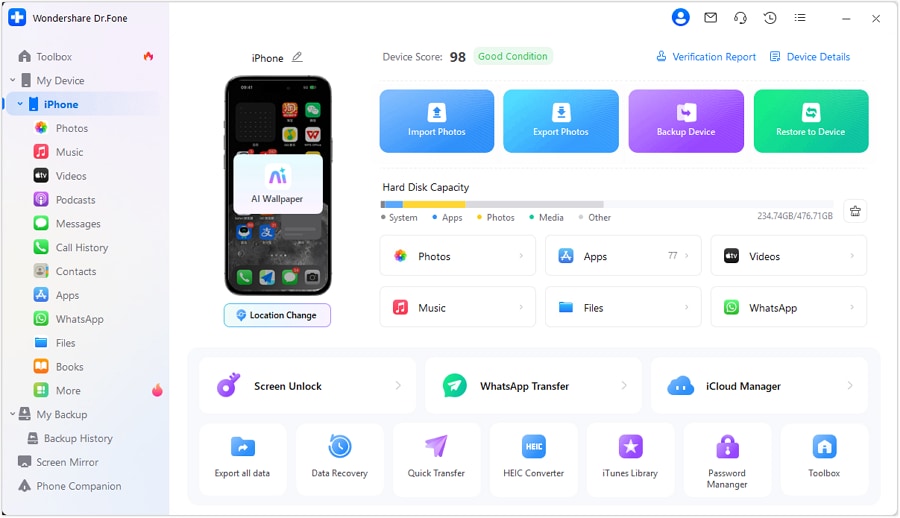
Step 1 Connect your phone and open the manager
Connect your iPhone to your computer and launch the device manager so you can review and handle data from one place before cleanup.
-
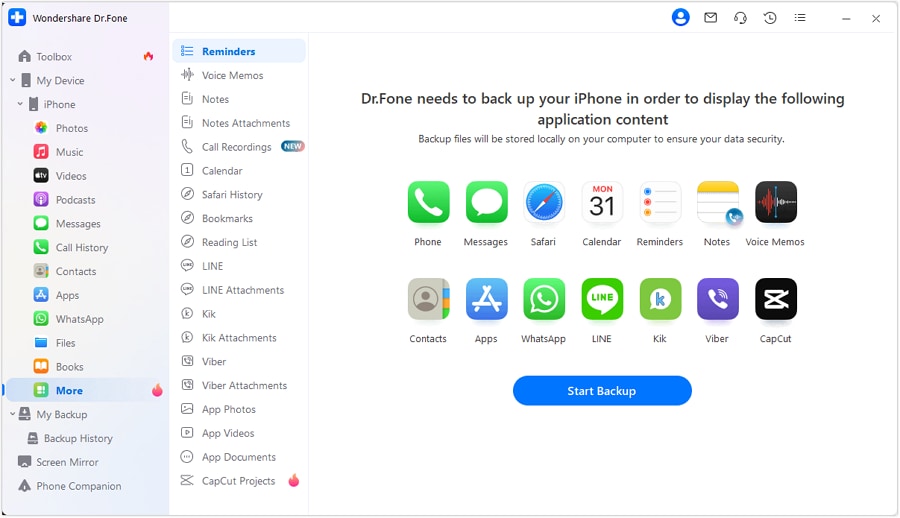
Step 2 Review categories before moving or deleting anything
Check what’s taking space (photos/videos, downloads, and other large items) and decide what to offload first so you can free space without relying on cloud availability.
-
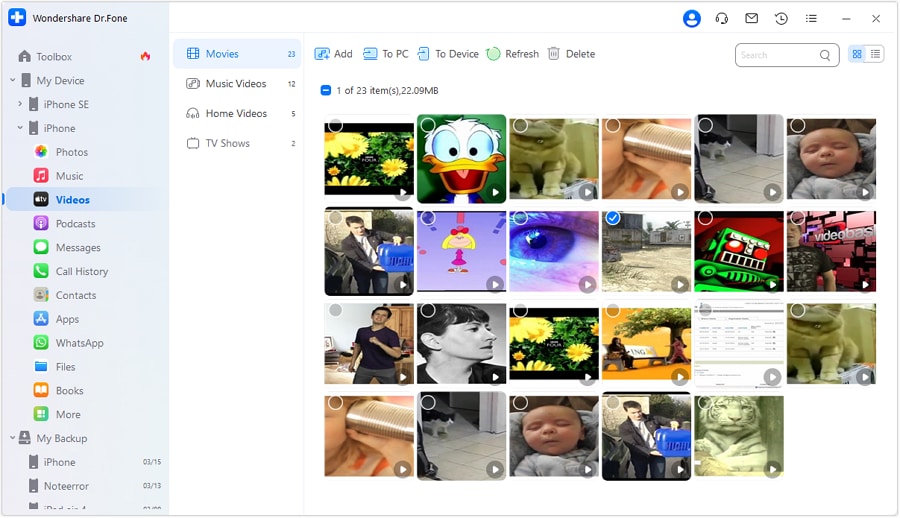
Step 3 Offload the biggest safe category first (often videos)
Export large videos (and other large files you choose) to your computer, then confirm they open correctly. This is safer than deleting first when you have limited time or Wi‑Fi.

-
Step 4 Verify, then do irreversible deletion last
Only after you confirm backups/transfers and offline essentials should you permanently remove items (including emptying “Recently Deleted/Trash” or any secure erase actions).
Recommended tool for safe pre-trip cleanup
AI can help you design the sequence and verification gates, but it can’t execute backups/transfers or confirm what’s actually readable. A tool that lets you preview, export, transfer, and back up your data helps you follow the plan safely under time pressure.
 Easily manage data through preview, delete, export, etc.
- Transfer all data between devices.
- Robust backup solutions for reliable data protection.
- Mirror screens to PC for meetings, teaching, and control.
As you execute, keep the “verification-first” principle: confirm backups are complete and readable, test offline essentials with airplane mode, and only then perform irreversible deletion.




Conclusion
Use AI to design a cautious, verifiable sequence with clear stop points before anything irreversible, then use a real tool like Dr.Fone to perform the backup/transfer and only proceed to permanent deletion after your checks pass.
FAQ
-
What should I avoid deleting right before a long trip?
Anything tied to access and offline reliability: authenticator apps/data, banking/security apps, offline maps, travel documents, and messaging app data you can’t easily restore.
-
How do I verify photos/videos are truly backed up before deleting?
Check a sample set (including the newest items) in your backup destination and confirm they open correctly; don’t rely on “sync enabled” alone.
-
When is it safe to empty “Recently Deleted” or Trash?
Only after you’ve confirmed the backup is complete, readable, and includes the newest critical files—and you’ve confirmed you won’t need those items offline during travel.
-
Should I clean app caches before travel?
Yes for low-risk apps (streaming/social) if you’ve verified it won’t remove offline downloads you need; avoid clearing data for apps that store travel documents or messages unless you’ve backed them up.
-
How much free space should I aim for?
Enough for camera/video plus updates and temporary files; many travelers aim for 10–20GB depending on trip length and how much they shoot.
-
What are AI’s limits in this workflow?
AI can’t see your storage breakdown, can’t confirm what’s backed up, and can’t execute or undo deletion—so verification steps must be performed on real devices/tools.
 Add Wondershare Dr.Fone as a preferred source on Google





