 Effortlessly manage data through preview, delete, export, etc.

 100% Security Verified | No Subscription Required | No Malware

 :
: 
 ChatGPT
 Perplexity
 Gemini
 Claude
 Grok
Grok

I thought we had a “backup,” but after switching phones and cleaning up storage, we realized the dispute thread was missing—and we had no way to prove what was said.
Reddit user, r/whatsapp
Missing one step in a WhatsApp chat retention plan can mean losing message history, breaking audit trails, or keeping data longer than you’re allowed to. AI can help you design a clear, verifiable sequence—but it can’t access your device, confirm what’s stored, or run backups/exports, so execution must be done with real tools after the plan is verified.

In this article
- How to plan without missing critical steps
- What you’re trying to prevent
- Why the sequence matters
- Point-of-no-return moments
- Quick planning checklist
- What the AI needs to know
- Using AI prompts to build a safer workflow
- AI plan vs. real device constraints
- When to stop planning and start execution
Part 1. How to Plan Chat Retention for Customer WhatsApp Threads Without Missing Critical Steps
You handle customer support in WhatsApp and need a repeatable way to retain threads for business needs (handoffs, disputes, compliance) without keeping sensitive chats forever. You may have multiple phones, multiple agents, and a mix of personal and business conversations in the same app.
The uncertainty usually isn’t “what is retention?”—it’s the sequence: what to capture, where it should live, who can access it, and how to prove it later. It’s also unclear how to deal with media files, deleted messages, and device changes.
There’s also a point-of-no-return moment: once you delete chats, reinstall WhatsApp, or overwrite local app data without a verified backup, recovery may be impossible. Planning must finish before any cleanup or migration actions happen.
1. Decide scope and constraints first.
Define what to retain (text/media/docs), how long, where it lives (local-only vs allowed storage), and who can access it before you touch the app or device.
2. Add verification gates before irreversible actions.
Identify deletion/reinstall/device-switch moments and require evidence that a retained copy is complete and readable before proceeding.
3. Separate planning from execution.
AI can design the workflow and checks, but real tools and on-device verification are required to create, validate, and store the retained copy.
Part 2. What the AI Needs to Know
Share the details below so the AI can build a workflow that matches your constraints and risk level.
- WhatsApp type: standard WhatsApp or WhatsApp Business
- Devices involved: iPhone/Android models, and whether chats move between them
- Agent setup: single owner phone, shared device, or multiple agents using multiple phones
- Storage policy: how long you want to retain (e.g., 30/90/365 days) and why
- Compliance needs: legal hold, audit trail, regulated industry, customer consent requirements
- Data scope: text only vs media, voice notes, documents, stickers, contact cards
- Access model: who can view retained chats, and how access is logged
- Risk tolerance: “must not lose anything” vs “okay to lose media but keep text”
- Current state: are there existing backups/archives, and are they verified
- Constraints: limited storage, no cloud allowed, only local storage allowed, encryption requirements
- Trigger events: employee offboarding, device loss, customer complaint, chargeback/dispute
Part 3. Using AI Prompts to Build a Safer Workflow
Use the prompts below to force a clear sequence, define verification gates, and surface the irreversible steps before you reach them.
3-1. Level 1: Basic Prompt
Help me design a chat retention plan for customer WhatsApp threads. I need a step-by-step workflow that prevents accidental loss and includes verification checkpoints. Do not include tool instructions—focus on decisions, sequence, and risks.
3-2. Level 2: Advanced Prompt
Create a structured workflow for retaining customer WhatsApp threads with **Preparation / Execution / Verification** sections.
- Mark each step as **critical** or **optional**.
- Identify irreversible moments (e.g., deleting chats, reinstalling the app, switching devices) and add “STOP—verify first” gates before them.
- Include roles/responsibilities (agent, manager, IT) and a minimal data-retention schedule.
3-3. Level 3: Evidence Prompt
Build a chat retention plan for customer WhatsApp threads using this context:
- Devices: (2 Android phones used by 3 agents), WhatsApp type: (WhatsApp Business), retention target: (180 days), constraints: (no cloud backups allowed), risk: (must preserve evidence for disputes).
I need:
- A checklist of what to capture (text/media/docs) and what metadata to record (case ID, agent, dates).
- Checks **before** execution (storage space, existing backups, encryption decision), **during** (confirm capture completeness), and **after** (spot-check restored readability, access control).
- A “do not proceed” list that includes any action that could permanently erase chats without a verified copy.
3-4. Prompt Refinement (Follow-up Prompts)
Convert this plan into a **one-page SOP** with sections: Scope, Definitions, Preconditions, Steps, Verification, Exceptions, and Escalation rules.
Add a **verification gate** before every destructive action and define the exact evidence required to pass (e.g., “open archive and confirm 3 random threads include media”).
Produce a **RACI table** (Responsible/Accountable/Consulted/Informed) for agents, team lead, and IT, including offboarding and device-loss scenarios.
Rewrite the workflow for my constraint: **retention must be searchable by case ID**, and access must be limited to (2 managers). Include how to label/organize archives consistently.
Add an **exception pathway** for “legal hold” where deletion is suspended and retention extends beyond the normal schedule.
Part 4. AI Plan vs. Real Device Constraints
| Planning item | What AI can do | What AI cannot do | What to verify on the device |
|---|---|---|---|
| Retention policy & scope | Draft rules, timelines, roles | Enforce them in WhatsApp | Confirm who has device/app access |
| Risk gates & sequencing | Identify irreversible steps | Prevent accidental taps | Confirm backups/archives actually exist |
| Evidence & audit checklist | Define what to capture/prove | Generate real logs from your phone | Spot-check sample threads and media |
| Execution readiness | Create preflight checklist | Run backups/exports/migrations | Confirm storage space and readable outputs |
AI improves planning, but cannot execute. Your device state, storage, permissions, and WhatsApp behavior determine what actually happens—so you must verify readiness before any action that changes or deletes data.
Part 5. When to Stop Planning and Start Execution
- You can state the retention scope in one sentence (what, how long, and why) and it matches your compliance needs.
- You have defined irreversible moments and added a verification gate before each one.
- You know the acceptance criteria for success (what “complete retention” means, including media and readability).
- You have a rollback or pause rule (what you do if verification fails mid-process).
Once those are true, planning should pause so you don’t drift into risky actions without a controlled run.
Recommended: Execute the Workflow Safely with a Real Tool
Execution matters because retention plans fail most often at the handoff between “we decided” and “we did”—especially right before deletions, migrations, or device resets. To implement your verified plan, you can use Dr.Fone - WhatsApp Transfer to perform the device-side capture/backup actions, then validate outputs against your acceptance criteria before enforcing any retention cleanup.
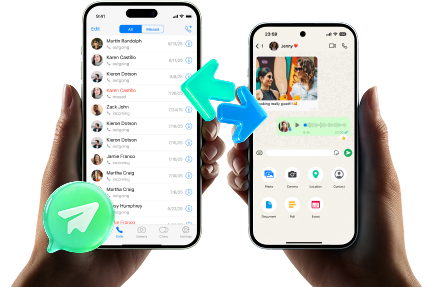
 Transfer WhatsApp across Android & iOS.
- Backup & restore WhatsApp to PC securely.
- Preview & export chats selectively.
- Works with all iPhone & Android models.
-
Step 1 Launch the tool and keep the plan in front of you
Start the workflow only after your planning gates are defined (scope, retention schedule, roles, and “STOP—verify first” moments).

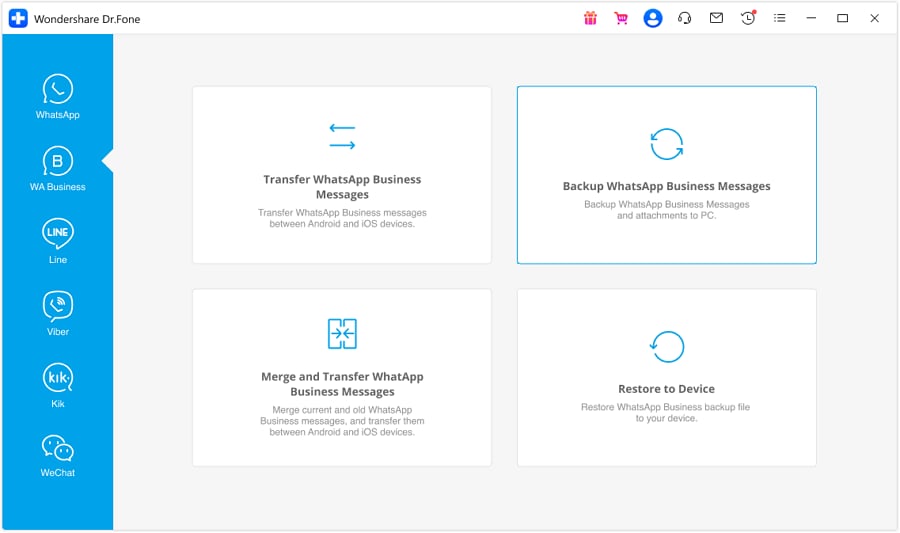
-
Step 2 Capture a retained copy (archive/backup) according to policy
Perform the planned capture/backup action for WhatsApp data and generate the retained copy according to your policy. AI cannot confirm the archive is complete or readable—verification is required before any deletions or app/device changes.
-
Step 3 Validate completeness against your checks
Use your verification checklist to spot-check representative threads (recent, old, media-heavy, dispute-related) and confirm required metadata labeling. AI can suggest what to check, but it cannot open your device data or certify evidence quality.

-
Step 4 Only after verification, enforce retention (cleanup/migration decisions)
This is the high-risk point: if you enforce deletion or reset before verification is complete, recovery may be impossible. Proceed only after your acceptance criteria pass.




Conclusion
Use AI to design a careful, verifiable chat retention plan for customer WhatsApp threads—then use a real execution tool like Dr.Fone to perform the device actions safely once verification gates and acceptance criteria are clear.
FAQ
-
What’s the biggest risk in a WhatsApp chat retention plan?
Doing any irreversible action (deletion, reinstall, device switch, storage cleanup) before you have a verified retained copy that meets your acceptance criteria. -
How do I know my retained copy is “good enough”?
Define acceptance criteria upfront (e.g., sample threads open correctly, media files present when required, dates visible, case ID labeling consistent) and pass a spot-check before proceeding. -
Should I retain everything (including media)?
Only if your policy requires it. Media increases size and risk; decide scope intentionally and document exclusions so you don’t assume you retained something you didn’t. -
When should I run the retention workflow—daily, weekly, monthly?
Base it on support volume, dispute window, and compliance needs. The key is consistency and having a repeatable verification step each run. -
Can AI tell me what’s on my phone or whether my backup is complete?
No. AI can design the checklist and sequence, but it can’t inspect your device, your WhatsApp database, or the retained files.
 Add Wondershare Dr.Fone as a preferred source on Google





