 Effortlessly manage data through preview, delete, export, etc.

 100% Security Verified | No Subscription Required | No Malware

 :
: 
 ChatGPT
 Perplexity
 Gemini
 Claude
 Grok
Grok

I wanted to delete a bunch of stuff before moving to my new phone, but I’m scared I’ll remove something and only realize it after I’ve wiped the old device.
Reddit user, r/iphone
You’re trying to reduce clutter before a phone-to-phone transfer, but missing one step can mean losing something important or moving the wrong data to your new device.
AI helps by turning a vague goal (“clean up before I transfer”) into a structured workflow: what to review first, what to verify, and what to avoid doing too early.
AI can’t see your device storage, confirm what’s actually backed up, or perform deletions/transfers safely—so once the plan is verified, execution needs real tools.
In this article
- Part 1. How to plan a safer keep/delete/archive workflow
- Why order matters more than what you delete
- The point-of-no-return moments to avoid
- What “stop and verify” gates should look like
- How to keep cleanup minimal before transfer
- Part 2. What the AI needs to know
- Part 3. Using AI prompts to build a safer workflow
- Part 4. AI plan vs. real device constraints
- Part 5. When to stop planning and start execution
Part 1. How to plan a safer keep/delete/archive workflow
A common situation: you’re upgrading phones, storage is tight, and you want to delete junk—but you also have photos, chats, and documents you can’t afford to lose. You ask AI what to do, and it gives a list… but you still don’t know the safest order.
1-1. Why order matters more than what you delete
The uncertainty usually isn’t what to clean, it’s when: should you delete before confirming backups? should you archive to cloud first? which apps store data locally vs in the cloud?
1-2. The point-of-no-return moments to avoid
The point-of-no-return moment is when you start bulk deleting or “emptying recently deleted” (or wiping an old phone) before you’ve validated backups and confirmed the new phone can open the data.
Part 2. What the AI needs to know
Share your situation so the AI can map the safest sequence and checks.
- Your devices and platforms (e.g., iPhone → Android, Android → iPhone, iPhone → iPhone)
- Storage pressure (how full each device is, roughly)
- Data categories involved (photos/videos, messages, WhatsApp/LINE, contacts, notes, files, app data)
- Your backup targets (iCloud/Google Drive/OneDrive/Computer/external drive) and what you already use
- Your time constraints (same-day transfer vs can wait overnight for uploads)
- Your risk tolerance (prefer extra backups vs minimal steps)
- Any “must not lose” items (e.g., 2FA authenticator, work chats, child photos)
- Whether you still need the old phone working afterward (trade-in, return, resale)
- Connectivity constraints (slow Wi‑Fi, limited data plan, no computer available)
Part 3. Using AI prompts to build a safer workflow
Use the prompts below to make AI produce a sequence with verification gates before any irreversible step.
3-1. Level 1: Basic Prompt
I’m transferring to a new phone and want to decide what to keep, delete, or archive before the transfer.
Create a safe checklist in the correct order, with “stop and verify” points before any deletion.
Keep it planning-only—no device actions.
3-2. Level 2: Advanced Prompt
Build a structured workflow to decide what to keep, delete, or archive before transferring to a new phone.
Split it into Preparation, Execution (planned only), and Verification.
Label items as critical vs optional.
Include clear “do not proceed until verified” gates before any irreversible step (like emptying trash, deleting cloud originals, or factory reset).
3-3. Level 3: Evidence Prompt
My situation: (Android → iPhone), old phone storage (122/128 GB), new phone storage (256 GB), timeline (today), Wi‑Fi speed (moderate), backup methods available (Google Photos + laptop), must-keep items (WhatsApp chats, photos 2018–2026, contacts, authenticator), ok-to-remove (duplicate screenshots, large videos, downloaded podcasts).
Create a decision workflow that:
- Defines keep / archive / delete criteria per data type (photos, videos, chats, files, apps)
- Includes checks before, during, and after transfer
- Specifies evidence to collect (e.g., “verify X by seeing Y”)
- Calls out high-risk moments (e.g., “empty recently deleted”, “remove device backup”, “factory reset old phone”) and blocks them until verification is complete
3-4. Prompt Refinement
Return the workflow as a table with columns: Data type, Keep criteria, Archive criteria, Delete criteria, Where it lives (local/cloud), Verification check, Point-of-no-return risk.
Add a “minimum viable safe transfer” path and a “deep cleanup” path, and state exactly what extra verification the deep cleanup requires.
Create a pre-transfer inventory checklist that I can complete in 15 minutes, including what screenshots or counts I should record (e.g., photo count, contact count).
List the top 10 failure modes for my scenario and add a prevention step + a detection step for each.
Force a “two-pass” plan: first confirm backups and transfer readiness; second do cleanup only after post-transfer validation.
Part 4. AI plan vs. real device constraints
AI improves planning, but cannot execute actions, confirm what’s truly backed up, or prevent an irreversible delete once it happens.
| Planning with AI | What’s constrained on real devices |
|---|---|
| Can define safe sequencing and decision criteria | Storage reporting can be misleading (cache/system) and varies by OS |
| Can propose verification gates and evidence to collect | Some app data can’t be exported cleanly without the app’s own method |
| Can outline risk moments and stop-points | Deletions can sync to cloud and remove items everywhere |
| Can produce checklists and fallback paths | Transfer speed, battery, cables, and permissions can derail execution |
Part 5. When to stop planning and start execution
- You have a written sequence with explicit “do not proceed” gates before deletion, trash-emptying, or device wipe.
- You’ve defined what “success” looks like (counts, spot-checks, app logins, chat history visibility) and how you’ll prove it.
- You’ve picked a single cleanup scope for before transfer (minimal) and deferred deeper cleanup until after validation.
- You have at least one fallback (secondary backup location or a decision to keep the old phone intact until verification passes).
At this point, the remaining risk comes less from planning and more from execution consistency and verification discipline.
Ai guide to decide what to keep delete or archive before transfer: Execute the Workflow Safely with Dr.Fone
Execution now matters because the safest plan still fails if transfers are interrupted, if the wrong data set is selected, or if verification is skipped before irreversible cleanup. To carry out the transfer you’ve planned, you can use Dr.Fone - Phone Transfer to move the “keep” scope first—then do deletion only after you validate results.
 Move data between iOS to Android and vice versa.
- Transfer contacts, SMS, photos, videos, music, and more types.
- Available with all phones with Android and iOS versions.
- Simple, click-through process.

-
Step 1 Run the transfer using the verified scope
Use Dr.Fone to execute the transfer based on your finalized keep/archive decisions (transfer what you decided to keep, and avoid deleting anything yet).

Limitation: Dr.Fone executes the transfer, but it cannot decide what you personally should delete or confirm your “must-keep” list is complete without your checks.
-
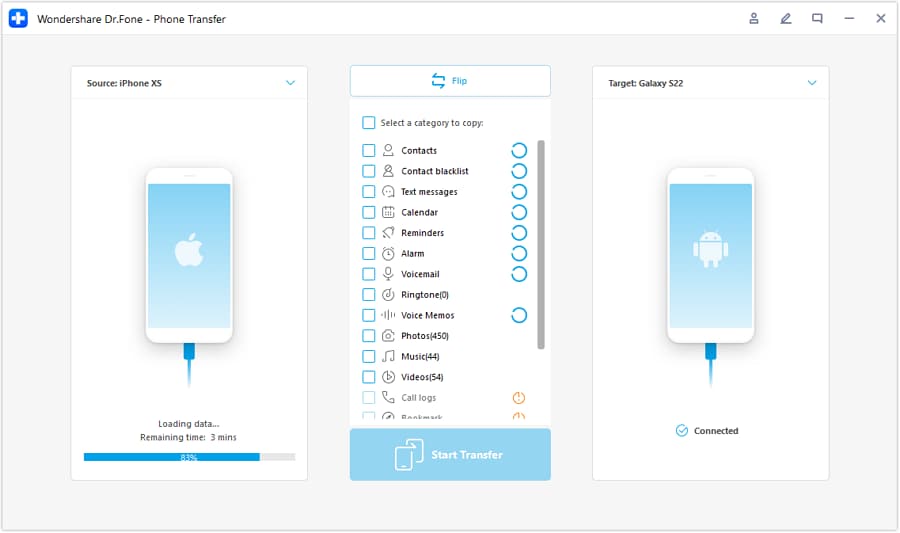
Step 2 Set the transfer direction correctly
Choose the correct source and destination devices (for example, iOS → Android or Android → iOS) so you don’t move the wrong data set.
-
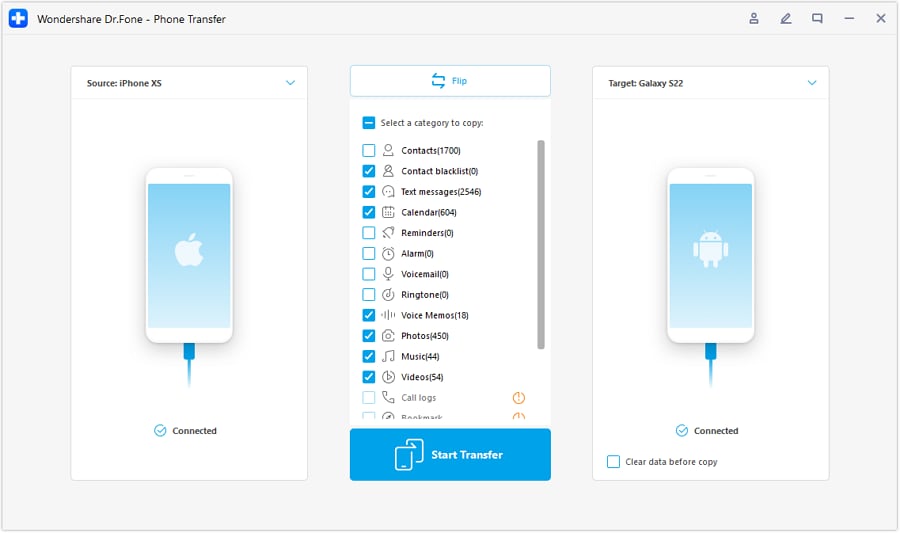
Step 3 Select only the data types you decided to keep
Select the categories that match your plan (what you decided to keep now), and leave deeper cleanup for after post-transfer validation.
-
Step 4 Verify outcomes against your evidence checklist before any high-risk cleanup
After transfer, verify using your pre-defined proofs (counts, spot-checks, ability to open files, chat history presence, key app access). Only then perform cleanup actions you marked as irreversible (e.g., emptying trash/recently deleted, removing originals, wiping the old phone).
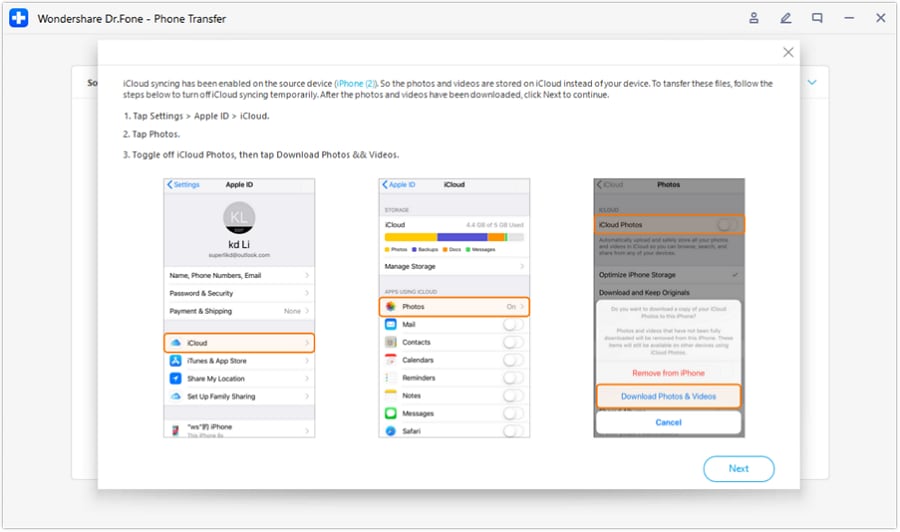
Limitation: Once you cross this point-of-no-return, recovery may be impossible—do not proceed if any verification item is incomplete or uncertain.




Conclusion
Use AI to design the sequence, decision rules, and verification gates for what to keep, delete, or archive before a transfer; then use a real tool like Dr.Fone to execute the transfer once the plan is locked and the point-of-no-return steps are clearly blocked until verification is complete.
FAQ
-
Should I delete files before transferring to make it faster?
Usually no—do a minimal pre-transfer cleanup only (obvious junk) and defer bulk deletion until after you confirm the new phone has what you need. -
What’s the most dangerous mistake in this process?
Deleting or “emptying recently deleted/trash” (or wiping the old phone) before you confirm backups and verify the transferred data on the new phone. -
How do I verify without checking every single photo or message?
Use evidence-based checks: counts (photos/contacts), date-range spot checks, keyword search in chats, and opening a sample of critical files from different folders. -
What if cloud sync means deleting on one device deletes everywhere?
Assume it can. Your plan should include a sync-awareness step: confirm where the data lives (local vs cloud) and how deletions propagate before doing any cleanup. -
When is it safe to factory reset or trade in the old phone?
Only after your post-transfer verification checklist is complete, your critical apps are working (including 2FA/authenticator), and you have at least one confirmed backup path.
 Add Wondershare Dr.Fone as a preferred source on Google





