 Effortlessly manage data through preview, delete, export, etc.

 100% Security Verified | No Subscription Required | No Malware

 :
: 
 ChatGPT
 Perplexity
 Gemini
 Claude
 Grok
Grok

I factory reset my phone and then realized my authenticator/2FA was tied to it. Now I can’t sign back into important accounts.
Forum user
A phone privacy cleanup checklist before factory reset sounds simple, but missing one step can lock you out, break 2FA access, or leave private data synced somewhere you forgot.
AI helps you turn a messy situation into a clear sequence: what to verify first, what to deauthorize, what to back up, and what to double-check before you hit any destructive options.
AI can’t see your actual device state, accounts, or backups in real time—so once the plan is solid, you still need real tools and device settings to execute safely.

In this article
- How to plan without missing critical steps
- What you’re trying to protect
- Why order and proof matter
- The point of no return
- FRP/Activation Lock risk
- What the AI needs to know
- AI prompts to build a safer workflow
- AI plan vs. real device constraints
- When to stop planning and start execution
Part 1. How to Plan Phone Privacy Cleanup Checklist Before Factory Reset Without Missing Critical Steps
1-1. What you’re trying to protect
You’re about to sell, trade in, recycle, or hand down a phone. You want your private data gone, but you also don’t want to lose access to photos, messages, or app logins you’ll need on your next device.
1-2. Why order and proof matter
Most uncertainty isn’t about what to do—it’s about order and proof: Did you really back everything up? Are you still signed into the right accounts? Will Factory Reset Protection (FRP) or Activation Lock trigger for the next owner?
1-3. The point of no return
The point of no return is starting the reset/erase (or confirming a “Delete all data” / “Erase iPhone” screen) before you’ve verified backups and removed account locks—because after that, recovery and re-access can be impossible or costly.
1-4. FRP/Activation Lock risk
If account locks (like FRP/Activation Lock) aren’t handled in the right sequence, the next owner may be blocked—and you may be forced to recover credentials under time pressure (or lose trade-in value).
Part 2. What the AI Needs to Know
Share your device and goal details so the AI can build a checklist that matches your risk level.
- Phone OS + model (e.g., iPhone 13 iOS 17 / Galaxy S22 Android 14)
- Why you’re resetting (sale, trade-in, warranty return, troubleshooting, recycling)
- What must be preserved (photos, WhatsApp/Signal chats, authenticator codes, notes, files)
- Backup destinations you can use (iCloud/Google, local computer, external drive)
- Account ecosystem (Apple ID/Google account, work MDM, family/shared devices)
- Security setup (screen lock type, SIM PIN, eSIM, SD card, device encryption status)
- 2FA setup (authenticator app, SMS number, backup codes, hardware keys)
- Time constraints (same-day trade-in vs. flexible)
Part 3. Using AI Prompts to Build a Safer Phone Privacy Cleanup Checklist Before Factory Reset Workflow
Use the prompts below to force a clean sequence with verification gates before any irreversible action.
3-1. Level 1: Basic Prompt
Create a phone privacy cleanup checklist before factory reset for my device and situation.
Keep it in the safest order with “verify before proceed” checkpoints.
Include a short list of the most common mistakes people make.
3-2. Level 2: Advanced Prompt
Build a structured workflow for “phone privacy cleanup checklist before factory reset” with these sections: Preparation, Execution, Verification.
Mark each step as Critical or Optional, and add a “Stop—do not continue unless…” condition before any irreversible steps (account removal, erase/reset).
3-3. Level 3: Evidence Prompt
I’m resetting a (Galaxy S22, Android 14) for (trade-in tomorrow).
I must keep (Google Photos, WhatsApp chats, authenticator codes) and I use (Google account + 2FA via authenticator).
Create a checklist with checks before, during, and after cleanup.
Include specific proof I can collect (screenshots of backup status, account sign-out confirmations, list of apps to deauthorize).
Also include a “Point of no return” line that I should not cross until every critical verification is complete.
3-4. Prompt Refinement
Rewrite the checklist as a decision tree with “If yes/if no” branches for backups, 2FA, and account locks (FRP/Activation Lock).
Produce a one-page version limited to 12 steps max, but keep all critical verification gates intact.
Add a pre-flight checklist of exactly 7 items that must be true before I tap “Erase/Reset.”
List the top 5 failure modes for my scenario and add a prevention check next to each (what I should verify, where to look, what counts as proof).
Convert the plan into a timeline (T-24h, T-2h, T-10m) with what to do and what to confirm at each point.
Part 4. AI Plan vs. Real Device Constraints
| AI planning output | Real-world constraint on your phone |
|---|---|
| Orders tasks to reduce lockouts and data loss | The device may require current passwords/2FA at the moment you sign out |
| Defines what “backup verified” should look like | Cloud backups can be incomplete, delayed, or tied to the wrong account |
| Flags irreversible steps and adds “stop” gates | Reset/erase screens don’t confirm what you forgot to export or deauthorize |
| Produces checklists for apps/accounts to deauthorize | Each app/service has different sign-out paths and device-limit rules |
AI improves planning and verification logic, but it cannot perform sign-outs, exports, backups, or resets on your actual device—execution still depends on device settings and dedicated tools.
Part 5. When to Stop Planning Phone Privacy Cleanup Checklist Before Factory Reset and Start Execution
- You can name exactly where each critical data category will live after reset (cloud vs. local) and how you’ll verify it.
- You have access to required credentials (Apple ID/Google password, 2FA method, backup codes) right now.
- Your checklist has at least one hard stop before erase/reset, with clear pass/fail criteria.
- You’ve identified your single biggest risk (e.g., authenticator loss, chat history loss, FRP/Activation Lock) and added a prevention step.
If all four are true, you’re at the point where further planning is less valuable than careful, verified execution.
Phone privacy cleanup checklist before factory reset: Execute the Workflow Safely with Dr.Fone
Execution now matters because your safety comes from proof (backups verified, accounts removed, locks disabled) before you reach the irreversible erase/reset moment. If you need to wipe private data more thoroughly as part of cleanup, Dr.Fone - Data Eraser can help you remove sensitive data in a more deliberate, verified way.
 Erase all data on iOS & Android
- Military-grade wiping to fully protect your privacy.
- Generate verified erasure reports better for device resale.
- Selectively erase private data and remove junk & large files.

-
Step 1 Open Dr.Fone and choose Data Eraser
Start from the main screen and select the erasing option you intend to use, so you can review what will be removed before committing to anything irreversible.

-
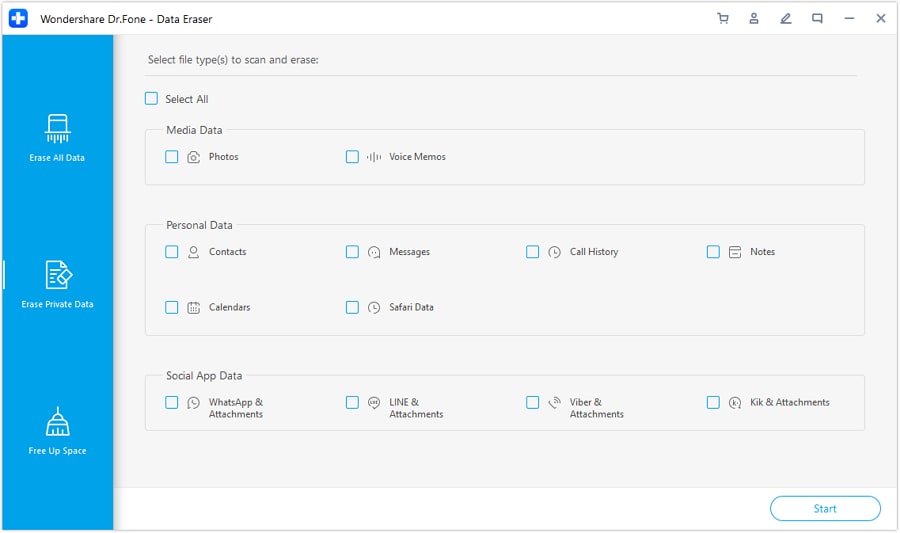
Step 2 Review the file/data categories available to erase
Before you proceed, confirm the categories match your checklist (what must be removed vs. what must be preserved elsewhere).
-
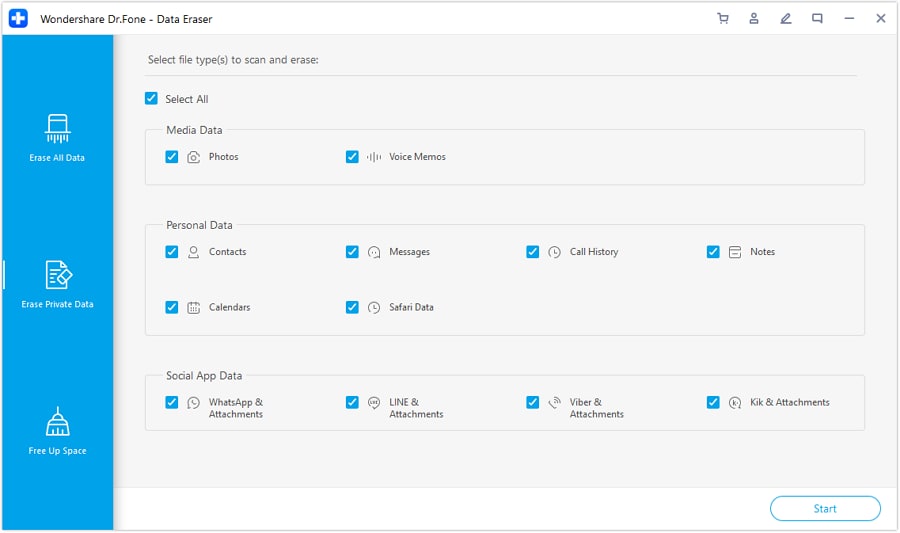
Step 3 Select the private data types you want to remove
Choose the data types based on your plan, especially the items most likely to expose privacy if left behind.
-
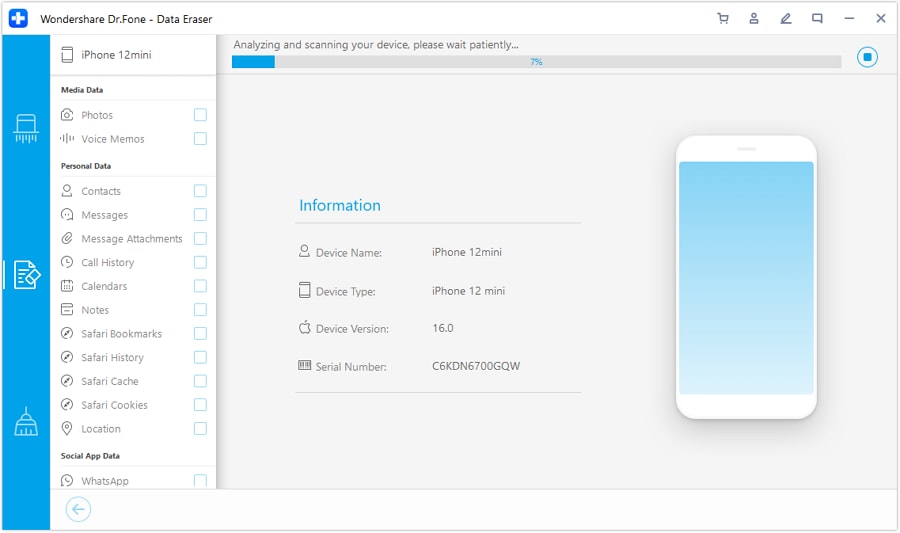
Step 4 Analyze what will be erased and confirm only after verification
Use the analysis/review stage as a final “stop gate” to ensure your backups, exports, and account access are verified before you complete any wipe action.
Remove access paths and device locks in the right order. Use your checklist to sign out/deauthorize critical accounts and services (and disable device-finding/lock features where applicable), capturing proof of completion before moving on.
Factory reset only after passing every verification gate. Proceed with the reset/erase only when your checklist says “pass,” because this is the irreversible point-of-no-return for local data.




Conclusion
Use AI to design a checklist with strict sequencing and verification gates, then use real tools—like Dr.Fone where applicable—plus your device settings to execute safely before you cross the irreversible reset point.
FAQ
-
What’s the biggest risk before a factory reset?
Resetting before verifying backups and 2FA access—especially losing authenticator codes, chat history exports, or triggering FRP/Activation Lock.
-
How do I “verify” a backup instead of trusting the status screen?
Confirm you can open the backup destination and see representative items (recent photos/files), and for critical apps, confirm their in-app backup/export status and account.
-
When should I capture screenshots or notes as proof?
Before you sign out or erase: backup status pages, account sign-out confirmations, device lock/Find My status, and any deauthorization lists.
-
Can AI tell me whether my phone is actually ready to reset?
No. AI can only define what to check and what “ready” means; you must confirm readiness using your phone settings, app status pages, and your backup destination.
-
If I’m trading in today, what’s the minimum I should not skip?
Verified backup + 2FA continuity + disabling account locks that would block the next user + only then performing the reset.
 Add Wondershare Dr.Fone as a preferred source on Google





