 Effortlessly manage data through preview, delete, export, etc.

 100% Security Verified | No Subscription Required | No Malware

 :
: 
 ChatGPT
 Perplexity
 Gemini
 Claude
 Grok
Grok

I’m about to wipe my old phone for resale, but I’m worried I’ll miss one sign-out and end up with Activation Lock/FRP issues—or lose access to 2FA after the reset.
Forum user
Erasing an old phone is simple, but missing one sign-out step can leave accounts linked, locks enabled, or data still accessible elsewhere.
AI is useful for turning a messy “what do I do first?” situation into a clear sequence with checks: what to back up, what to sign out of, what to disable, and what to verify before you wipe.
AI can’t see your phone’s real settings state or confirm that a sign-out actually completed, so execution still needs real device actions and reliable tools.

In this article
- How to plan the best sign-out order without missing critical steps
- Why the order matters
- Your “point of no return”
- Common hidden lock risks
- What “verification gates” mean
- What the AI needs to know
- Using AI prompts to build a safer workflow
- When to stop planning and start execution
- AI plan vs. real device constraints
Part 1. How to Plan the Best Sign Out Order Before Erasing an Old Phone Without Missing Critical Steps
You’re selling, trading in, or giving away an old phone, and you want to erase it without getting stuck later (activation lock, missing 2FA access, lost photos, or the buyer unable to set it up).
The uncertainty usually isn’t “how to factory reset,” but “what must happen before reset, in what order, and how do I prove it’s done.” Some apps silently stay logged in across devices, and some protections only show up after the wipe.
Your point of no return is the factory reset/erase step: once you erase before verifying backups and sign-outs, recovery can be impossible (especially if you also lose access to the phone number/Authenticator used for 2FA).

Part 2. What the AI Needs to Know
Answer these so the plan can match your device and risk level:
- Phone type and OS version (iPhone iOS ___ / Android brand + Android ___)
- Your goal (sell / trade-in / give away / recycle)
- Whether you already moved to a new phone (yes/no) and if it’s set up
- Account types used on the old phone (Apple ID, Google, Samsung, Microsoft, WhatsApp, Signal, banking apps, work/MDM)
- 2FA method tied to the old phone (SMS to that SIM, Authenticator app, security keys)
- What data must be preserved (photos, chats, notes, authenticator codes, files)
- Any device management status (work profile, MDM, company portal)
- Whether you know all passwords and have recovery options ready (email/backup codes)
Part 3. Using AI Prompts to Build a Safer Best Sign Out Order Workflow
Use the prompts below to make AI produce a sequenced checklist with verification gates before you touch the erase button.
3-1. Level 1: Basic Prompt
I’m about to erase my old phone and want the best sign-out order so I don’t get locked out or leave accounts linked.
Create a short, device-specific sequence (iPhone vs Android) with the top verification checks before factory reset.
3-2. Level 2: Advanced Prompt
Build a structured workflow for the best sign out order before erasing my old phone.
Split it into Preparation, Execution (sign-outs and disables), and Verification, and label each step as Critical or Optional.
Include an explicit “STOP—do not erase yet” gate with the conditions that must be true before wiping.
3-3. Level 3: Evidence Prompt
Context: I’m (selling/trading in) a (iPhone 13 on iOS 17 / Samsung S22 on Android 14). I already have a new phone (yes/no). My key accounts are (Apple ID/Google/Samsung), messaging is (WhatsApp/Signal), and 2FA is (Authenticator app / SMS to old SIM).
Create the best sign out order before erasing, with checks before/during/after.
For each critical step, tell me how to verify it worked (e.g., “confirm device removed from account page,” “confirm Find My/FRP is off,” “confirm chats restored on new phone”).
Also list common failure modes and what to do if I hit them (e.g., forgot password, activation lock warning, authenticator not migrated).
3-4. Prompt Refinement
Output the workflow as a table with columns: Step, Why it matters, How to verify, If verification fails, Critical/Optional.
Assume I might lose access to the old SIM immediately after wiping—update the order to protect 2FA and account recovery first.
Add a “handoff checklist” for the buyer/trade-in: what screens should they be able to reach after erase to prove locks are removed.
Create two variants: one for selling privately (highest risk) and one for trade-in (time pressure), highlighting differences in verification depth.
Ask me exactly 7 clarifying questions first, then produce the final plan only after I answer.
Part 4. When to Stop Planning Best Sign Out Order Before Erasing an Old Phone and Start Execution
- You have a written sequence with a clear “STOP before erase” verification gate.
- You’ve confirmed access to passwords, recovery email, and backup codes (or you generated them).
- Your backups are verified from the destination (new phone/cloud/web), not just “backup started.”
- You know exactly how you will confirm locks are removed (account device list, Find My/FRP/MDM status).
If any of these are uncertain, keep planning—because the wipe step is where mistakes become permanent.
Part 5. AI Plan vs. Real Device Constraints
| Planning item | AI can help with | Real-world constraint | What to do about it |
|---|---|---|---|
| Account sign-out order | Sequence steps + highlight dependencies | Some sign-outs require the device, password, and internet | Ensure Wi‑Fi/cellular works and credentials are ready |
| Backup confidence | Define what to back up and how to check completeness | AI can’t see if photos/chats actually uploaded | Verify in destination apps/cloud from another device |
| Lock removal (Find My/FRP/MDM) | Identify which locks matter and where to check | Locks can persist server-side after you erase | Confirm device removal in account portals before wiping |
| Final wipe decision | Create a “go/no-go” gate | Wipe is irreversible once performed | Do not erase until every critical check is green |
AI improves planning, but cannot execute sign-outs, remove locks, confirm server-side status, or perform the erase—those require real device actions and reliable tools.
Best sign out order before erasing an old phone: Execute the Workflow Safely with Dr.Fone
Execution now matters because the real risk is not the plan—it’s incomplete sign-outs, unverified backups, and wiping before locks are removed. If you need a dedicated execution layer for device-side cleanup, you can use Dr.Fone - Data Eraser.
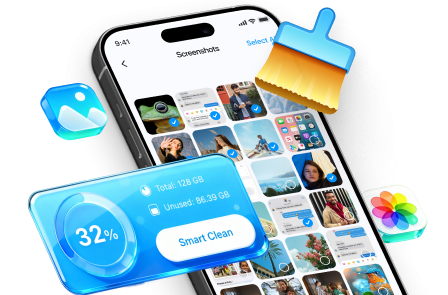
 Erase all data on iOS & Android
- Military-grade wiping to fully protect your privacy.
- Generate verified erasure reports better for device resale.
- Selectively erase private data and remove junk & large files.
5-1. Prep and protect access
Action: Finalize backups, migrate authenticator/2FA, and confirm you can log into your accounts from another device before removing anything from the old phone.
Limitation: AI cannot confirm your backups or 2FA migration succeeded; you must verify directly in each service.
5-2. Disconnect accounts and device locks
Action: Sign out in the planned order (cloud account first or last depending on platform), remove the device from account portals, and confirm protections like Find My/FRP/MDM are fully disabled/removed.
Limitation: AI can’t see server-side device status; you must confirm in the relevant account “Devices” pages and security settings.
5-3. Erase and validate the post-wipe state
Action: Use Dr.Fone as the execution layer to complete the device-side cleanup/erase you’ve verified is safe to perform, then confirm the phone boots to the initial setup screen without asking for the previous owner’s credentials.
Limitation: Once the wipe is done, recovering missed data or fixing a lock you didn’t remove can be difficult or impossible without the original credentials.
-
Step 1 Launch Dr.Fone and open the erasing features
Start the tool on your computer and navigate from the home interface to the data-erasing workflow for your device.

-
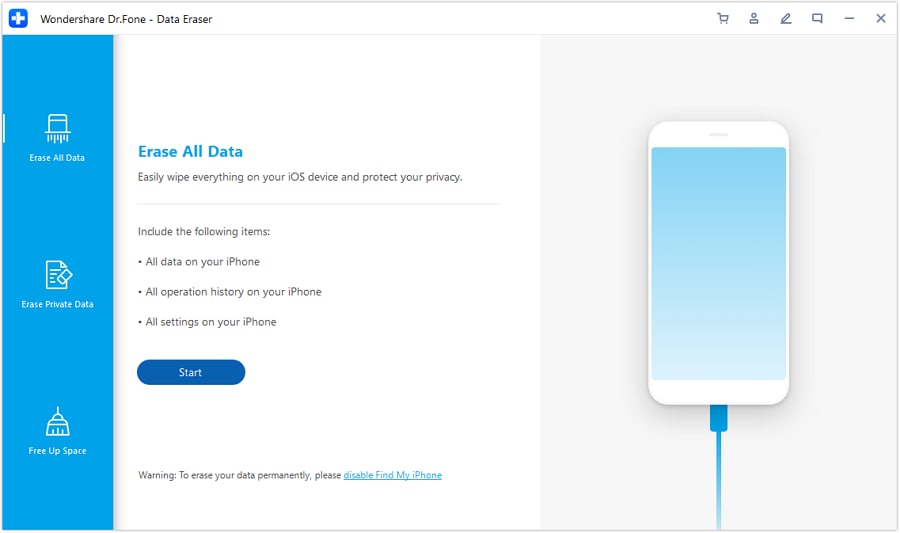
Step 2 Choose full erase for the device
Select the option to erase all data so the phone-side content is cleared after you’ve completed your sign-outs and lock removals.
-
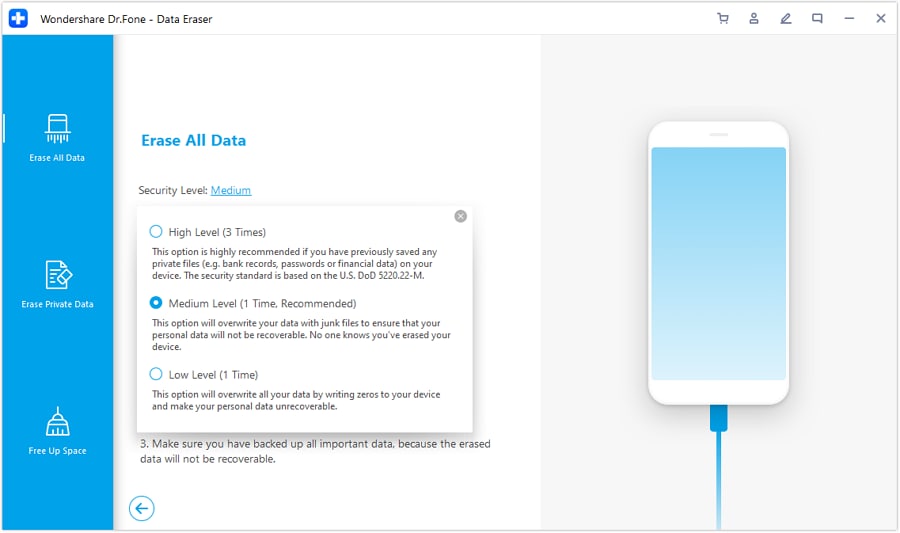
Step 3 Define the security level
Pick an erasure/security level that matches your handoff risk (for example, private sale vs. trade-in), then proceed.
-
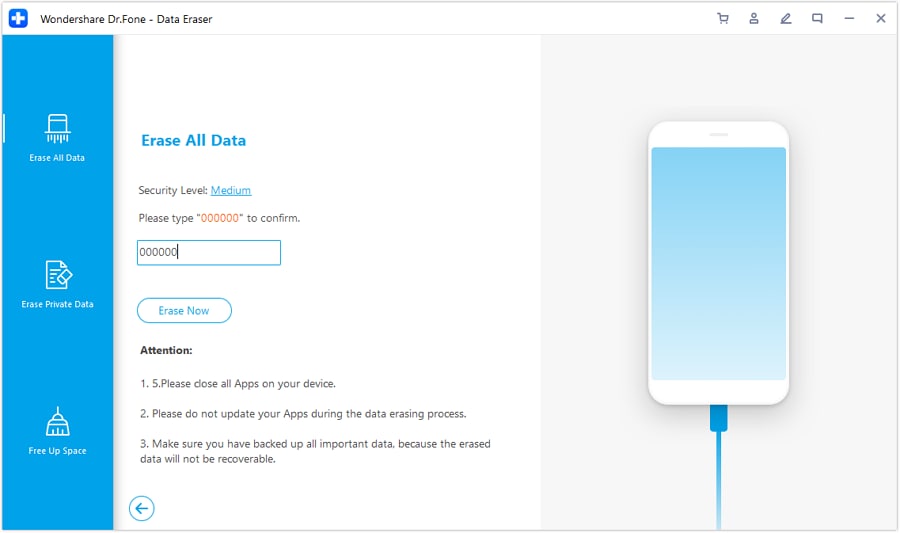
Step 4 Confirm and complete the erase
Enter the required confirmation code and finish the wipe process, then verify the phone reaches the initial setup screen without asking for the previous owner’s credentials.




Conclusion
Use AI to build the safest sign-out order, identify irreversible moments, and set verification gates; then rely on real device actions and tools like Dr.Fone to carry out the verified workflow and complete the erase safely.
FAQ
-
What’s the biggest mistake people make before erasing an old phone?
Erasing before verifying backups and before confirming account locks (Find My/FRP/MDM) are removed from both the phone and the account portal. -
Should I sign out of everything before I factory reset?
Usually yes for high-risk handoffs (selling/giving away), but the exact order depends on platform and whether disabling device tracking/activation lock requires being signed in. Your plan should include platform-specific verification. -
How do I verify I won’t trigger activation lock after wiping?
Check the device is removed from your Apple ID/Google account device list, confirm Find My (iPhone) is off, and ensure no work/MDM profile remains. After wipe, the setup should not demand the previous owner’s credentials. -
When should I move authenticator apps and 2FA off the old phone?
Before any sign-outs and definitely before wiping—especially if your recovery depends on that phone’s SIM/SMS or authenticator codes. -
Can AI tell me whether my phone is actually safe to erase right now?
No. AI can only provide a checklist and decision gate; you must confirm status in real settings screens and account portals.
 Add Wondershare Dr.Fone as a preferred source on Google





