 Recover photos, messages, WhatsApp, and more — no backup
needed.


 100% Security Verified | No Subscription Required | No Malware


 :

 ChatGPT
 Perplexity
 Gemini
 Claude
 Grok
You arranged a plant swap through Snapchat, but now you cannot find the message identifying the variety or the photo of the cutting. Two contacts use the same first name, and the name you remember may no longer be the one you see. Before you recover deleted Snapchat messages on Redmi K70E, make sure you are looking for the right exchange rather than treating an unfamiliar label as proof of deletion.
If the information really is missing, Dr.Fone - Data Recovery (Android) gives supported Redmi K70E users a no-backup scan with conversation and media previews. You can compare the actual content, select the plant note or photo that belongs to the exchange, and save useful results to a PC instead of collecting unrelated messages under a similar name.
In this article
Before you start
Keep the exact Redmi K70E support conditions
The supplied Redmi K70E record lists Kernel 6.1.138. No Android-version restriction is listed for this model, according to the confirmed interpretation of the original table. This does not remove the Kernel condition, establish arbitrary firmware compatibility or extend support to other Redmi models. Compare your device information with the entry and ask Dr.Fone support about a mismatch without changing the phone's software.
Preserve Snapchat and prepare a Windows PC
Advanced Recovery is Windows-only. Use a USB data cable and a private PC folder for selected output. Leave the app and its local storage in place: do not clear storage, reinstall, log out, reset or downgrade the phone while searching for deleted data. Follow the product's access instructions, not a generic Root or bootloader tutorial. Root details and a lossless outcome are not established by the support list.
Write down identity clues you already know
Note the remembered Display Name, a known old or current username, the approximate swap date and one distinctive content detail. Keep uncertain identities marked as uncertain. The scan saves found records to PC; it does not rename contacts, rebuild a friendship, restore an entire account history or place the results back into Snapchat.
Rule out a name mismatch before deleted-message recovery
Useful when the contact name looks different, a remembered username no longer finds the person, or several people share the same displayed name.
Step 1 Separate the Display Name from the username
Snapchat says the Display Name appears in Chat and on profiles and does not have to be unique. A username is the account's unique identifier, but it can also be changed. Do not assume a Display Name change means a new person, or that a remembered old username must still work.
Step 2 Look for the known current identity without changing relationships
Snapchat supports finding people by their Display Name or latest username. If you already know those details, use them to locate an accessible conversation and inspect its contents. Earlier friends may continue to see an older Display Name, and a saved phone contact name may also affect what is shown. There is no need to change your own name, add someone again or unblock someone as a recovery prerequisite.
Step 3 Confirm the exchange by content rather than name alone
Look for the plant variety, the distinctive pot or another detail you genuinely remember. When two accessible contacts share a name, compare the actual note and photo instead of assigning the first result to the swap. If the exchange is present, you have located retained information; if the messages are absent, continue to the device scan.
- An unavailable Chat is not necessarily a simple name mismatch. Blocking can make Chat invisible, and saved messages with former friends may no longer remain stored.
- Changing a name or account relationship does not recreate deleted history. These checks are about identifying existing information.
Check retained account records without relying on one familiar label
My Data may help you inspect retained saved-chat content and account information when the familiar contact label is not enough.
Step 1 Request categories and a suitable date range
Sign in to your own account at accounts.snapchat.com, open My Data and select the needed data, including Saved Chat History when available. Choose dates covering the exchange or switch the date filter off. Confirm the notification email, then click Submit.
Step 2 Read the actual exported records
When the export is ready, choose See exports > Download and extract the ZIP. Inspect the content and any identity details actually included; do not assume every download supplies a complete name-change log or that all records use the label you remember. A Snap History activity entry is not the plant note or the full photo. My Data supplies only information Snapchat still retains.
- A known previous username can be a review clue if it appears in a record, not a guaranteed search key or permanent identifier.
- If the photo was saved in your Memories instead, that is a different source with a separate Export your Memories > Request Only Memories option.
How to judge whether a result belongs to your exchange
| Clue | Useful check | Avoid this assumption |
|---|---|---|
| A familiar first name | Compare actual conversation content | Everyone using that Display Name is the same account |
| A known latest username | Use it to identify the relevant accessible account | The username can never change |
| An unfamiliar name on a found conversation | Read the visible details before discarding it | An unfamiliar label proves the desired Chat was deleted |
| A photo of a similar plant | Match the visible variety or distinctive details with written context | Any similar photo proves the exact swap agreement |
| A retained activity record | Use it as a limited clue | An activity entry contains the missing message or attachment |
Common problems and fixes
Searching one remembered name returns nothing
If you know a current Display Name or latest username, use that for an accessible-account check. In recovery results, use search or filters only where available and review relevant conversations manually when needed. The guide does not establish that Dr.Fone maps old names to new names automatically.
Two found conversations appear to have the same name
Inspect each one's actual available content and any identifiers shown. Look for the distinctive swap detail instead of merging messages by name. Save uncertain results separately while you verify them; the scan is not an identity-certification service.
The matching photo is found, but the variety name is not
Review the available messages around that exchange as well as conversation media and any found Snapchat Attachments. Preserve the useful image, but do not infer an exact variety or missing wording from a visually similar plant. Confirm the information with a trusted source if you need to use it.
How to use Dr.Fone - Data Recovery (Android)
Dr.Fone - Data Recovery (Android) helps you move beyond a missing familiar name and inspect the Snapchat content actually available from your supported Redmi K70E. Its Windows-only Advanced Recovery mode scans the connected phone, presents found conversations and media, and saves your chosen records to a PC. Previewing before selection makes it easier to keep a relevant plant note and image without treating every similarly named conversation as a match.
- No prior Snapchat chat backup is needed for this supported device-scan route.
- Conversation previews let you assess the actual wording rather than relying only on a contact label.
- Available media and selective PC saving help you keep useful visual and written references together.
 Scan Android phones and tablets directly.
- Preview and recover only what you want.
- Supports WhatsApp, photos, videos, contacts, and more.
- Works with 6000+ Android devices.

Follow the official Advanced Recovery workflow
Step 1 Open Advanced Recovery for the connected Redmi K70E
Launch Dr.Fone on Windows and open Toolbox > Data Recovery. Choose Android > Recover Android Data, select Advanced Recovery and click Start Scan. Connect the supported Redmi K70E by USB when prompted and follow the displayed instructions until the product detects it.

Step 2 Choose Snapchat and start the app-data scan
Select Snapchat from the available data categories, then click Start Scan. Choose the app containing the missing exchange rather than using a general photo result as a substitute for Chat text.

Step 3 Allow scanning to finish with a stable connection
Keep the Redmi K70E connected throughout scanning. If you need to stop, click Cancel before removing the cable. If the phone is temporarily unresponsive after scanning or recovery, use the restart instructions displayed by the product.

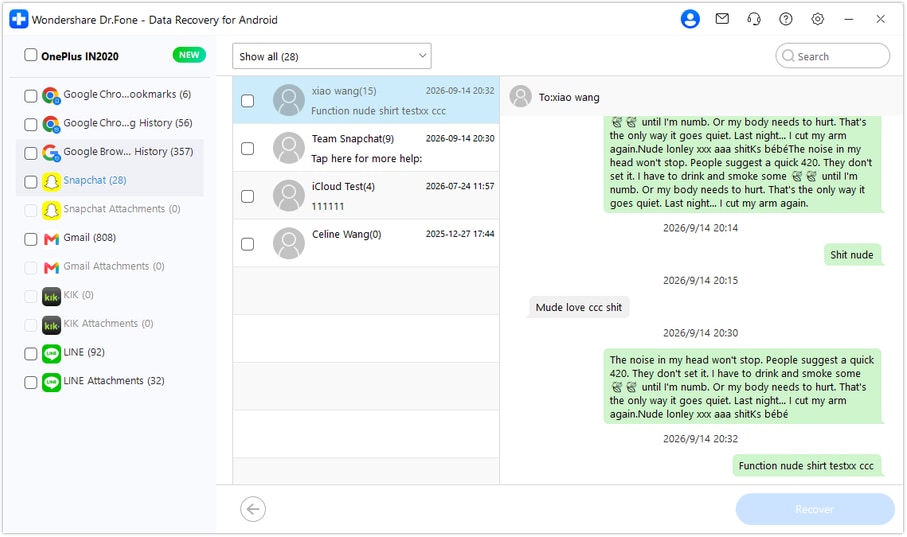
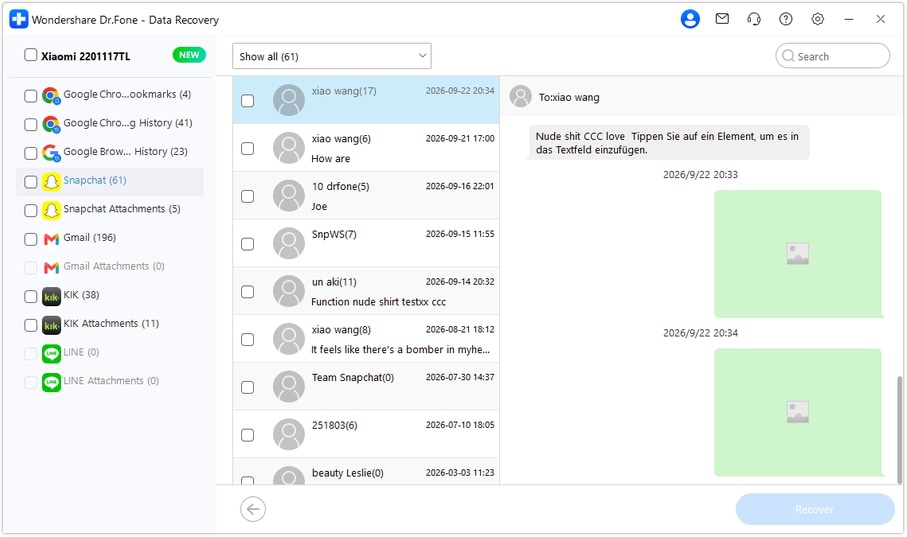
Step 4 Identify the relevant conversation and review found media
Choose Snapchat in the sidebar and open conversations containing the relevant available content. Use search and filters where offered, but verify the actual words and images rather than a name alone. Review media within the conversation and check Snapchat Attachments separately when the scan finds attachments. Select only results you want to keep.
Step 5 Save selected messages and attachments to PC
Click Recover, choose a computer folder and complete the on-screen save prompts. Open the saved output and check the selected content. Keep uncertain conversation matches separate; recovery creates PC copies, not a restored Snapchat chat list.




Conclusion
The right recovery result is the exchange you can recognize by its content, not simply the first familiar name. Dr.Fone - Data Recovery (Android) gives supported Redmi K70E users a focused Snapchat scan, useful conversation and media previews, and selective saving to PC. Download Dr.Fone for Windows, connect your phone and start finding the messages and attachments that belong to your missing exchange.
FAQ
1. Can I recover deleted Snapchat messages on Redmi K70E without a backup?
Dr.Fone - Data Recovery (Android) provides a supported phone-scan route without an earlier chat backup. Use Advanced Recovery on Windows to inspect available Snapchat records and save selected content to PC. The supplied Redmi K70E entry retains Kernel 6.1.138 and lists no Android-version restriction for this model.2. Does a friend's different Display Name mean the old Chat was deleted?
No. A Display Name differs from a username, does not have to be unique and can be changed. Existing friends may see an earlier name, while a saved phone contact may affect the displayed name. Check the actual accessible conversation before concluding that its messages were deleted.3. Can I always find the person with their old Snapchat username?
Do not rely on that. Snapchat permits username changes and documents finding people by their Display Name or latest username. A known old username is only a clue when examining records that actually show it; this guide does not promise a full username-history lookup.4. Will re-adding or unblocking the person recover the messages?
Those account changes are not deleted-history reconstruction and are not required here. Blocking can hide Chat, and saved one-to-one messages with former friends may no longer remain stored. Inspect retained information and available local scan results without assuming a relationship change will restore it.5. Does no listed Android-version restriction mean every configuration and item will recover?
No. The statement applies to the named Redmi K70E support entry and keeps its Kernel condition. It does not establish arbitrary firmware compatibility or guarantee any particular message, expired Snap or permanently deleted Memory. Only available found items can be selected, and the output is saved to PC.
 Add Wondershare Dr.Fone as a preferred source on Google





