 Recover photos, messages, WhatsApp, and more — no backup
needed.


 100% Security Verified | No Subscription Required | No Malware


 :

 ChatGPT
 Perplexity
 Gemini
 Claude
 Grok
You commented on a shared Google Photos album that a landscape crop would suit a print, then discussed the final framing privately on Snapchat. Now that reply is missing from your iQOO Neo10 Pro Plus. Your own proposal still looks familiar, but it does not tell you whether the other person asked to keep the full height or agreed to the crop.
Dr.Fone - Data Recovery (Android) helps you look for that actual response without an earlier chat backup. On a supported phone, preview found conversation text and available photo, video or attachment results, then save the useful selection to a Windows PC. First, use the optional retained-comment check to identify exactly what you proposed, without treating an activity update or a like as the missing decision.
In this article
Before you start
Keep the exact Pro Plus model condition
The approved iQOO Neo10 Pro Plus entry lists Kernel 6.6.89. No Android-version restriction is listed for this named model. Do not silently drop Plus or extend this condition to a different Neo device. Retain the current model, Android, build and displayed Kernel information for the exact support comparison; settings labels vary. No upgrade, downgrade or firmware change is required by this article.
Preserve the original local Snapchat state
Keep the existing installation, login and local storage intact. Do not clear cache or app data, reinstall, log out, reset or unlock the bootloader to seek deleted messages. Follow the product's on-screen access instructions instead of a generic Root tutorial. Prepare a Windows PC, reliable USB data cable and writable output folder; Advanced Recovery is Windows-only and saves selected results to PC.
Use retained Photos content only when it already exists
This optional check needs an existing authorized Google Photos account and your actual earlier comment, not a backup prerequisite for the scan. Do not rejoin an album, widen sharing or post a new comment to recreate a historical source. Selected phone results do not update a Photos album or write Chat back into Snapchat. Recoverability depends on found data, not a promise of every expired Snap or permanently deleted Memory.
Check your own Photos comment activity, not just the latest update
Use this optional source when you previously wrote relevant feedback in Google Photos. It can recover your retained proposal as information, not the later private response.
Step 1 Use Updates as a pointer to existing sharing activity
In the Google Photos Android app, tap Updates at the top and scroll through the chronological updates. Unread entries are bold. Comments, likes and new photos can all generate album updates, so identify the type of event rather than reading a familiar album update as a full discussion.
Step 2 Read the comments and likes you actually made
With your own Google Photos account, open the official comment activity log at photos.google.com/activities/photos_comments. Google links this log for seeing comments and likes you have made. Inspect the actual available comment text and distinguish it from a like; this is your own activity source, not a complete list of another person's remarks or deleted Snapchat replies.
Step 3 Keep the proposal separate from the final framing decision
Check whether your actual comment proposed a crop, merely asked a question or described an earlier version. Compare only the real image and wording you can still access. You do not need to turn on commenting, unmute an album or change sharing to read available material. Continue to the Snapchat scan if the final response or the referenced image is still missing.
- Muting an album can prevent its content from appearing in Updates. Missing updates are therefore not a complete audit of comments or proof that a conversation was deleted.
- Turning commenting off leaves existing likes and comments unless deleted; leaving an album removes your photos and comments, while stopping sharing removes others' contributed comments and photos. Do not perform those actions as recovery steps.
- A Photos comment, activity entry or shared image is a separate retained source. It is not automatically a local Snapchat attachment or a backup of private Chat.
A proposal, a reaction and a final instruction are not interchangeable
| What remains | Useful information | Missing information it cannot replace |
|---|---|---|
| A Photos Updates entry | That a particular type of sharing activity is listed | The full comment thread or a private Snapchat response |
| Your actual retained Photos comment | The proposal or question you wrote | The other person's later acceptance, correction or qualification |
| A like or a familiar album image | A reaction or the visible image content | An explicit instruction to crop or retain the full height |
| Found Snapchat text and media | The actual response and available reference content | A missing condition or automatic pairing to every album version |
Common problems and fixes
You remember an album comment but cannot find an update
Updates can be affected by album muting. Inspect your existing comment activity directly instead of changing mute or sharing settings to try to regenerate history. If the comment itself is unavailable, skip this optional source; an update is not guaranteed to preserve its full text.
The activity log shows your comment but no reply
The linked log is for comments and likes you made, not a promise of another person's complete conversation. Save or note the actual proposal privately if useful, then inspect the available Snapchat discussion for the later response. Do not infer consent from a like or the absence of an objection in this log.
The scanned image has a different crop from the album reference
Compare the actual visible framing and available message context without merging the images. A cropped file does not reveal the missing edge pixels, and proximity in the result list does not prove which version a short reply references. Keep useful files separately identified.
How to use Dr.Fone - Data Recovery (Android)
Dr.Fone - Data Recovery (Android) gives you a focused way to search for the response beyond your own retained proposal. On a supported iQOO Neo10 Pro Plus, its Windows-only Advanced Recovery scans local Snapchat app data without a previous chat backup, lets you review discovered conversations and media, and saves selected useful records to PC. Look for the actual framing instruction and found reference image rather than deciding from a reaction icon.
- An app-data scan looks for discoverable private Snapchat wording that an external activity log cannot supply.
- Available conversation and media previews help compare a found instruction with the actual image version.
- Selective PC recovery preserves useful text and found files without changing comments, sharing or the original Snapchat thread.
 Scan Android phones and tablets directly.
- Preview and recover only what you want.
- Supports WhatsApp, photos, videos, contacts, and more.
- Works with 6000+ Android devices.

Follow the official Advanced Recovery workflow
Step 1 Connect iQOO Neo10 Pro Plus through Advanced Recovery
On Windows, launch Dr.Fone and open Toolbox > Data Recovery. Select Android > Recover Android Data, choose Advanced Recovery and click Start Scan. Connect the supported iQOO Neo10 Pro Plus by USB when prompted and follow the device-detection instructions.

Step 2 Select Snapchat for the app-data scan
Choose Snapchat from the available categories and click Start Scan. WhatsApp and WhatsApp Business each require separate scanning from the other categories; the guide does not impose that restriction between non-WhatsApp categories.

Step 3 Leave the phone connected while scanning
Maintain the USB connection throughout the scan. If you need to stop, click Cancel before disconnecting. Follow the product's displayed restart instruction if the phone is temporarily unresponsive after scanning or recovery.

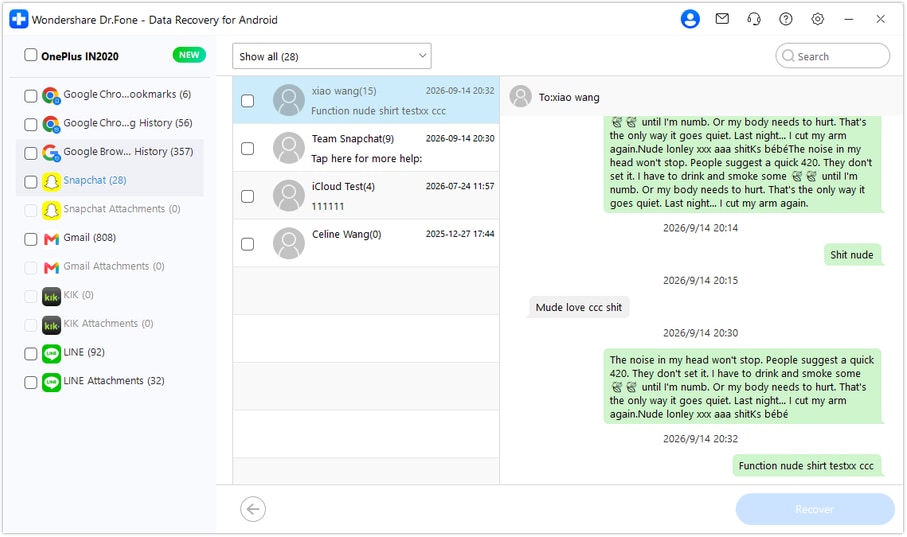
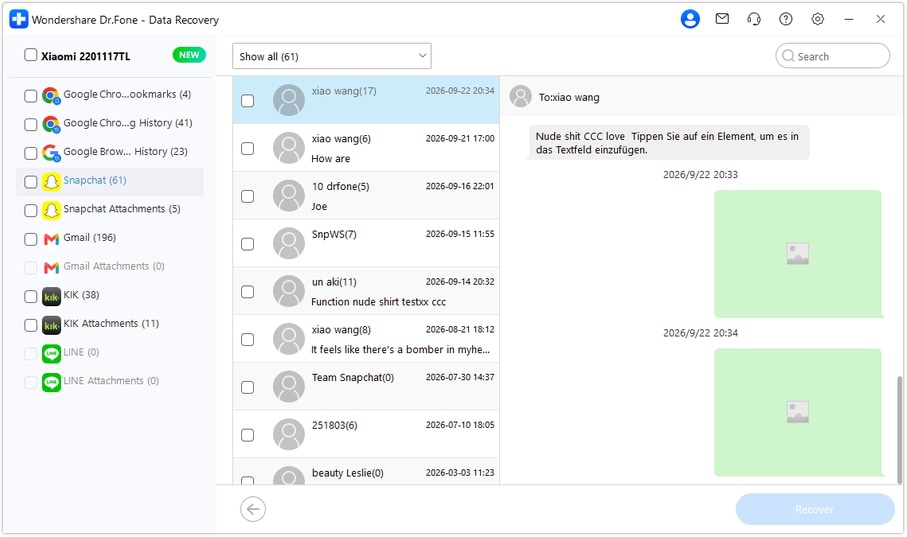
Step 4 Preview the found response and image framing
Choose Snapchat in the sidebar and select the relevant available conversation. Use search or filters where offered and read the actual response and surrounding text. Inspect media entries within the conversation and check Snapchat Attachments separately when the scan finds attachments. Select useful actual messages and files without turning a remembered proposal into the missing response.
Step 5 Recover the selected text and files to PC
Click Recover, choose a computer folder through the save prompts and complete the operation. Open the saved selection to inspect the available response and media. These are PC copies, not restored Snapchat messages, regenerated album comments or edits to the image.




Conclusion
For missing framing feedback on a supported iQOO Neo10 Pro Plus, Dr.Fone - Data Recovery (Android) combines focused Snapchat scanning, useful message-and-media previews and selective PC saving. Download Dr.Fone for Windows and start looking for the actual response and reference files that help you choose the right print.
FAQ
1. Can I recover deleted Snapchat messages on iQOO Neo10 Pro Plus without a backup?
Dr.Fone - Data Recovery (Android) offers a device-scan route for supported Neo10 Pro Plus data without an earlier chat backup. The approved condition is Kernel 6.6.89 with no Android-version restriction for this named model. Use Windows Advanced Recovery to scan Snapchat, inspect actual found results and save your selection to PC.2. Does the Google Photos activity log contain all replies to my comment?
Google links the comment activity log for comments and likes you have made. Do not treat it as another person's complete reply history or a private Chat archive. Updates can indicate comments, likes and other events, but actual available wording is needed to interpret a proposal or response.3. Can My Data supply the missing Snapchat correction?
It can supply only content Snapchat still retains. In your own account at accounts.snapchat.com, open My Data, select relevant categories, choose a date range or switch that limit off, confirm your notification email and click Submit. When ready, follow the email or return to My Data, select See exports > Download, then open the ZIP with compatible software and read the actual content. Saved Chat History differs from Snap History metadata and separate Memories; matching activity does not recreate a correction.4. Will Dr.Fone reconstruct an uncropped original or lost Memories?
The documented workflow previews and saves actual discovered content; it does not generate missing pixels, repair a file or recreate a lost original. Snapchat Support cannot recover lost or deleted Memories. Found messages and available media can still be saved separately to PC rather than restored into the app.
 Add Wondershare Dr.Fone as a preferred source on Google





