 Recover photos, messages, WhatsApp, and more — no backup
needed.


 100% Security Verified | No Subscription Required | No Malware


 :

 ChatGPT
 Perplexity
 Gemini
 Claude
 Grok
The weekly language exchange is still on your calendar, but the Snapchat message about this week's exception has vanished. Did your partner move just one session, or cancel it? A familiar repeating title can send you to the normal arrangement when the missing message was precisely about doing something different.
Dr.Fone - Data Recovery (Android) helps you recover deleted Snapchat messages on OnePlus Ace 6T by looking for the actual arrangement, reading available context and previewing any found timetable photo or video. Save selected useful results to a PC rather than trying to infer the exception from a calendar slot. First, check the exact existing event so a date or time-zone display difference does not become a false diagnosis.
In this article
Before you start
Use the named Ace 6T support condition
The approved OnePlus Ace 6T entry lists Kernel 6.12.38. No Android-version restriction is listed for this named model. Retain the Kernel condition and exact model; do not extend it to OnePlus 15T, other Ace models or arbitrary firmware. The record establishes the supplied support scope, not the presence of a specific missing exchange.
Prepare Windows without changing the source phone
Advanced Recovery is Windows-only and saves selected discoverable results to a PC rather than restoring them to Snapchat or Calendar. Prepare a Windows computer, a reliable USB data cable and an output folder. Keep the original Snapchat installation and local data; do not log out, reinstall, clear storage, reset, flash or unlock the bootloader as a recovery method. Follow the product's on-screen access instructions.
Inspect only an event you can already access
The Calendar check is optional and uses an existing authorized event, whether you entered it yourself or received it normally. It does not require enabling activity tracking, joining another calendar or editing an event. A calendar entry is a separate scheduling record, not a backup of private Snapchat messages or their attachments.
Find the exact Calendar session, not just the repeating title
Use this when an existing Google Calendar event survives and you need to separate its recorded schedule from a missing one-off Snapchat arrangement.
Step 1 Search the existing calendar on a computer
Open Google Calendar in your authorized account on a computer, select Search at the top right and enter the session name or another known term. Click an actual event result to see its details. Suggestions can include results from Gmail or Drive, so select the event itself rather than treating every familiar suggestion as a calendar record.
Step 2 Restrict the search to the relevant date and calendar
Use the Down arrow to the right of the search box. Choose the appropriate calendar and date range, and use What, Who or Where only when those details are known; then click Search. Google limits search results to 200 events and recommends a specific time period for missing past events. Read the actual occurrence date rather than assuming a same-named result is this week's session.
Step 3 Separate displayed time from the missing exception
Check the event details that are actually present. Calendar normally displays events in the viewer's local time zone, so a different clock time is not by itself evidence that your partner changed the arrangement. Repeating events can also be updated for selected events in a series. Do not edit the series to test a theory: the recorded slot cannot supply an uncopied cancellation or one-off agreement.
- This is existing-event discovery, not calendar deletion recovery or a Snapchat restore. A manually entered event may contain only what its creator entered.
- If the date is right but the private exception is absent, use the phone scan for actual wording. A blank calendar result does not determine what remains in the phone's Snapchat data.
Resolve a session change with the right evidence
| Available result | What it tells you | Useful next step |
|---|---|---|
| A same-named event from another week | A different occurrence of a familiar series | Narrow the date range before comparing any arrangements. |
| The relevant event at a different displayed clock time | The event's currently displayed schedule, potentially in your local time zone | Do not call it a reschedule without the actual arrangement or another authoritative source. |
| A found Snapchat cancellation or proposed move | The exact condition and reply that are available | Read whether the move was proposed, accepted or limited to one date, then save useful found context. |
| A timetable image without a matching reply | Only the sessions and labels visible in that file | Keep a usable reference, but confirm the personal exception separately. |
Common problems and fixes
Calendar search shows recent sessions but not the older one
Use the computer search's date-range and calendar filters, as Google recommends for missing past results. A 200-result search limit is not a Snapchat retention period. Do not delete events, enable activity tracking or change the series merely to make a past occurrence appear.
A found message mentions a new time but no acceptance
Read the available replies and the date being discussed. A proposal alone does not establish that the other person accepted it. Save the useful text without adding a missing confirmation; if the decision is still unresolved, contact your partner for the current plan.
The timetable photo is available but the private exception is not
Preview the actual image and retain it if useful, then inspect conversation text separately. Neither the file's presence nor the routine Calendar event supplies an absent one-off instruction. Snapchat Attachments is relevant only when the scan actually finds attachments.
How to use Dr.Fone - Data Recovery (Android)
Dr.Fone - Data Recovery (Android) gives you a focused way to look for the actual Snapchat arrangement behind an ambiguous calendar slot. On a supported OnePlus Ace 6T, its Windows-only Advanced Recovery mode lets you read found conversations, preview available photos and videos, and save selected useful records to a PC. You can preserve the words that distinguish a proposal from an accepted one-off change, along with any real timetable reference found.
- Read actual conversation results for the date, proposed change and available response instead of inferring an agreement from a recurring event.
- Inspect found media and conditional Snapchat Attachments to identify a usable timetable rather than relying on a filename.
- Select the useful discovered records and keep a separate PC reference without modifying Calendar or the Snapchat chat list.
 Scan Android phones and tablets directly.
- Preview and recover only what you want.
- Supports WhatsApp, photos, videos, contacts, and more.
- Works with 6000+ Android devices.

Follow the official Advanced Recovery workflow
Step 1 Choose Advanced Recovery for the Ace 6T
Launch Wondershare Dr.Fone on Windows and open Toolbox > Data Recovery. Select Android > Recover Android Data, choose Advanced Recovery and click Start Scan. Connect the supported OnePlus Ace 6T with a USB cable when prompted and follow the displayed instructions until the device is detected.

Step 2 Select Snapchat data to examine
Choose Snapchat from the available categories and click Start Scan. The guide requires WhatsApp and WhatsApp Business to be scanned separately from the other categories; they are not needed to look for this Snapchat arrangement.

Step 3 Wait with the device securely connected
Keep the phone connected during the selected app-data scan. If you need to stop, click Cancel before removing the USB cable. Follow the product's on-screen restart instruction if the phone becomes temporarily unresponsive after scanning or recovery.

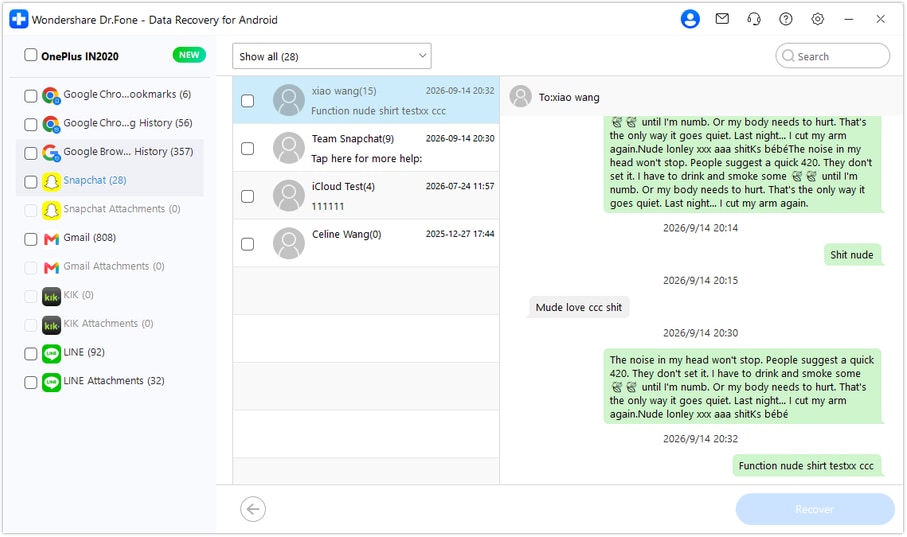
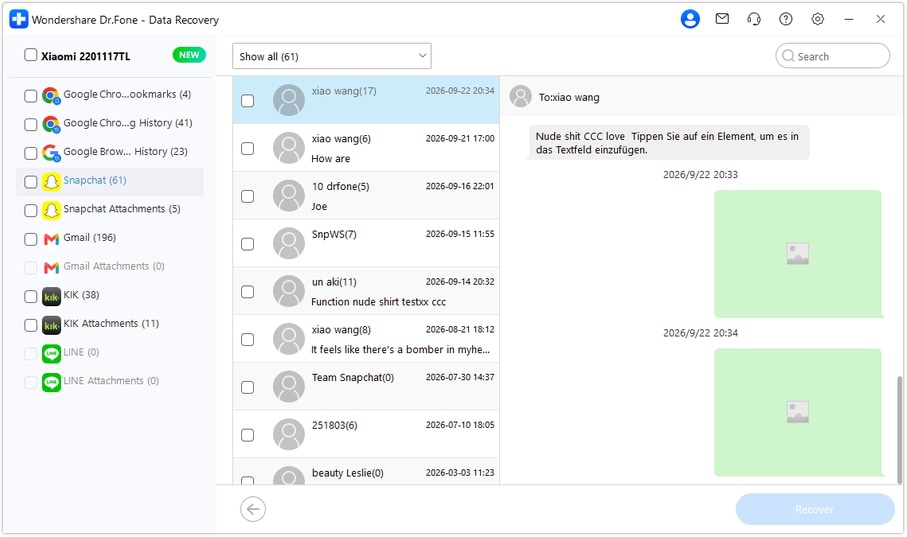
Step 4 Review the one-off arrangement and any timetable media
Choose Snapchat in the results sidebar, open the relevant conversation and read the available date, change and replies. Use search or filters where available. Review media entries within the conversation and check Snapchat Attachments separately when the scan finds attachments; preview actual photos or videos for the correct reference. Select useful found text and files without assuming the product automatically matches a timetable to a reply.
Step 5 Recover the selected arrangement to the PC
Click Recover and follow the prompts to choose a folder on your computer. Save the selected discoverable results and open the output to check the available wording and usable timetable files. The PC copy does not update the recurring event or put the messages back into Snapchat.




Conclusion
Dr.Fone - Data Recovery (Android) helps supported OnePlus Ace 6T users read found Snapchat arrangements, inspect relevant timetable media and preserve selected useful records on a PC. Download the Windows version, connect your compatible Ace 6T and start Advanced Recovery to look for the conversation details that make the session plan clearer.
FAQ
1. Can I recover deleted Snapchat messages on OnePlus Ace 6T without a backup?
Dr.Fone - Data Recovery (Android) offers a supported-phone local scan without requiring a previous chat backup. The approved Ace 6T entry lists Kernel 6.12.38 with no Android-version restriction for this named model. Scan Snapchat in Windows Advanced Recovery, inspect the available text and media, and save selected discoverable results to a PC.2. Does a recurring Calendar event prove the missing Snapchat arrangement?
No. An event records its own available schedule and details. A matching title may refer to another date, the displayed time can reflect the viewer's local time zone, and series changes can apply to selected events. Read the actual private instruction or confirm the current arrangement rather than treating the calendar as a transcript.3. How do I request a retained Snapchat account export?
Sign in to your own account at accounts.snapchat.com, open My Data, select the relevant available categories, choose a date range or switch the range off, confirm your notification email and submit. When the export is ready, follow the email or return to My Data, choose See exports > Download, and open the ZIP with compatible software. Saved Chat History may supply retained wording where included; Snap History activity and Memories are different records, not a guarantee of the missing decision.4. Will the scan restore every expired Snap or deleted Memory?
No. Recovery is limited to data actually found by the scan, and the output is a selected PC copy rather than an in-app restore. Snapchat Support cannot recover lost or deleted Memories. The workflow does not promise all viewed, expired, unsent or server-deleted content.
 Add Wondershare Dr.Fone as a preferred source on Google





