 Recover photos, messages, WhatsApp, and more — no backup
needed.


 100% Security Verified | No Subscription Required | No Malware


 :

 ChatGPT
 Perplexity
 Gemini
 Claude
 Grok
The workshop brief still opens, but its clean-looking page no longer shows the sentence about materials being included. Now the LINE conversation explaining that change has disappeared from your Motorola Razr Fold too. Did someone merely propose removing the sentence, or did the coordinator actually confirm a different arrangement? Reading the present page alone cannot answer both questions.
Dr.Fone - Data Recovery (Android) gives you a no-backup route to look for the actual local exchange. Preview conversations the scan finds, inspect available photos, videos and files under LINE Attachments, and save useful selected records to your PC. An optional check of revisions already retained in Word can identify the disputed wording without accepting changes or rewriting the brief.
In this article
Before you start
Keep the exact Motorola Razr Fold condition
The approved Motorola Razr Fold record, named Moto Razr Fold in the support table, lists Kernel 6.12.38; no Android-version restriction is listed for this named model. This is not the Razr 60 Ultra entry. Retain the exact model and Kernel conditions and follow the product's actual detection guidance rather than extending the record to every Motorola or firmware.
Preserve the LINE installation that held the exchange
Keep the original installation, login and local storage intact. Do not clear LINE data or cache, reinstall, log out, reset, flash firmware or try a guessed Root or bootloader procedure for recovery. Prepare a Windows PC, USB data cable and private output folder. Advanced Recovery is Windows-only and saves selected found data to PC, not back into LINE or a cloud document.
Treat the surviving brief as an optional independent source
Use only an existing document you may already access in desktop Word for Windows with the documented review controls. A PDF or clean screenshot need not contain the native file's revisions. No Word file or earlier LINE backup is required for the local scan. Standard Backup saves text only for same-OS restoration from a suitable earlier copy; a post-deletion Standard copy or Premium Backup does not roll back manually deleted chats.
Optional: expose retained Word revisions without accepting the deletion
Use this when the actual Word brief already contains tracked changes and a clean display may be hiding the sentence. It reads stored revision markup in one document, not a comparison generated from two files or recovery of deleted LINE history.
Step 1 Change the review display, not the tracking state
Open the authorized Word document and use the Review tab's markup display list to choose All Markup. Microsoft distinguishes No Markup, which shows the document with changes incorporated, from All Markup, which displays tracked revisions. Do not switch Track Changes on to investigate an earlier deletion: enabling tracking now does not create revisions for past untracked work.
Step 2 Check both edit-type and reviewer display scope
On Review > Show Markup, ensure Insertions and Deletions is selected when looking for removed wording. Inspect Specific People and use All Reviewers if you need all available reviewers' changes displayed. These are display choices, not Accept or Reject commands. A view limited to one reviewer or formatting changes can give an incomplete impression even after you select All Markup.
Step 3 Read the actual deletion and visible revision list
Read the retained clause and surrounding text. Review > Reviewing Pane offers Vertical or Horizontal lists; Microsoft describes its summary as the number of visible tracked changes and comments. Keep that visible count within the display scope you checked, rather than treating it as proof of every edit ever made. Use the document to read the context without typing in the pane or resolving a revision.
Step 4 Keep revision status separate from the LINE arrangement
Leave Accept, Reject and deletion controls unused. A tracked deletion means that revision remains available for review; a clean view is not proof the coordinator agreed to remove included materials. If the sentence was removed without tracking, or the relevant revision is no longer retained, stop this check. Continue to the LINE scan for the actual question, qualification and response.
- Original is another Word display choice, not a guaranteed historical snapshot of every earlier version. Hiding markup does not remove unresolved revisions, and switching tracking off does not remove revisions already stored.
- This check needs one actual retained file with revisions. It does not retrieve accepted or rejected changes, reconstruct a missing attachment or establish that a document reviewer's name is the LINE speaker.
What each source can tell you about the missing inclusion clause
| Source or observation | What you can establish | Useful next action |
|---|---|---|
| A clean page in Word's No Markup view | How that file displays with tracked changes incorporated. | Inspect existing markup before calling the sentence absent from the file. |
| A deletion appears after checking edit types and All Reviewers | The wording remains as a visible tracked revision in this document. | Read it without accepting or rejecting; look separately for the actual LINE response. |
| The Reviewing Pane shows a revision count | The number of visible tracked changes and comments under the display scope. | Do not turn that count into a complete historical edit log or an approval tally. |
| The scan finds LINE wording or actual supporting media | Discoverable conversation text or files are available to inspect. | Save the useful condition and real photos, videos or documents to PC as separate sources. |
Common problems and fixes
All Markup still does not display the sentence
Check Insertions and Deletions and the reviewer filter before drawing a conclusion. If no relevant revision remains in that actual file, changing display options cannot recreate it. Do not type a remembered sentence into the brief and call it recovered wording; inspect the local LINE results independently.
The document contains a deletion but the arrangement is still unclear
Keep the retained revision as document content, not a confirmed change to the workshop offer. Read available LINE text for whether the coordinator described a suggestion, an agreed exception or a replacement brief. A reviewer label or clean page does not supply an absent response.
The scan finds a supply photograph but not the discussion
Switch from LINE Attachments to LINE and inspect available conversations, using search or filters where offered. Preserve a usable picture independently, but do not infer that pictured materials were included. A file mentioned in text and an actual found attachment are different results.
How to use Dr.Fone - Data Recovery (Android)
Dr.Fone - Data Recovery (Android) helps you look for the LINE explanation that a document's review display cannot provide. Its Windows-only Advanced Recovery workflow scans local app data on a supported Motorola Razr Fold without an earlier chat backup, lets you read found conversations and inspect LINE Attachments separately, and saves selected results to PC. You can preserve the actual inclusion wording, a useful demonstration clip and the reference files found without committing document revisions during recovery.
- Local LINE discovery looks beyond a clean document for the missing question, qualification and response.
- Separate conversation and attachment previews let you assess actual wording, supply photos, videos and files individually.
- Selective PC saving keeps the useful source records in a focused reference folder without changing the existing brief.
 Scan Android phones and tablets directly.
- Preview and recover only what you want.
- Supports WhatsApp, photos, videos, contacts, and more.
- Works with 6000+ Android devices.

Follow the official Advanced Recovery workflow
Step 1 Open Advanced Recovery and detect the Razr Fold
Launch Dr.Fone on Windows and open Toolbox > Data Recovery. Choose Android > Recover Android Data, select Advanced Recovery and click Start Scan. Connect the supported Motorola Razr Fold with a USB cable when prompted and follow the on-screen instructions until detection.

Step 2 Select LINE from the app-data categories
Choose LINE for the missing exchange and click Start Scan. The guide requires WhatsApp and WhatsApp Business each to be scanned separately from the other categories. That specific rule does not require every non-WhatsApp category to be isolated from one another.

Step 3 Keep the local scan connected
Maintain the USB connection while Advanced Recovery scans. If stopping is necessary, click Cancel before disconnecting. If the phone is temporarily unresponsive after scanning or recovery, restart it as instructed on the product screen.

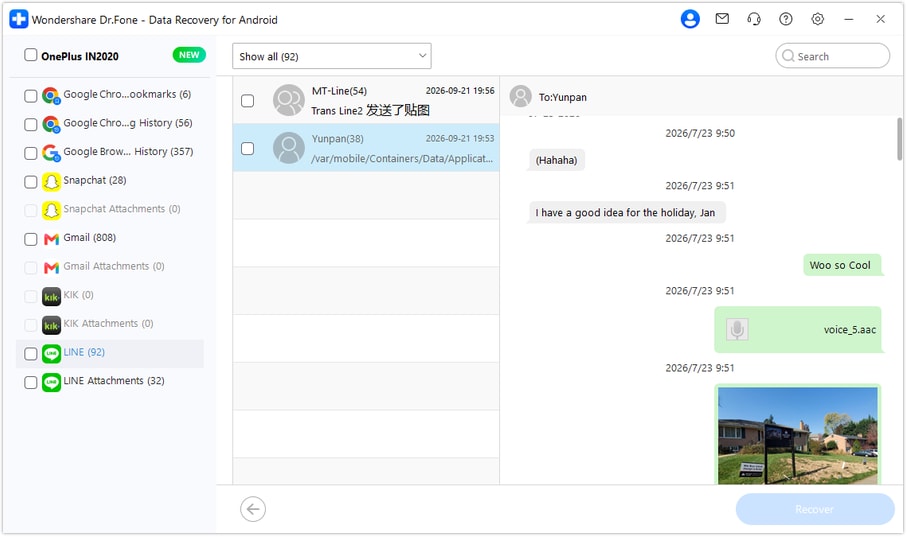
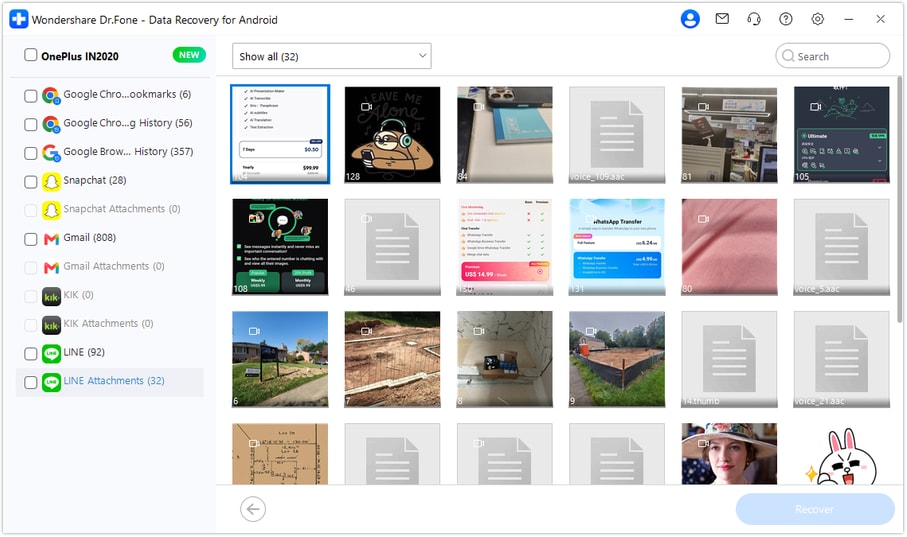
Step 4 Preview the LINE condition and supporting attachments
Choose LINE in the sidebar and read the available conversations for the complete materials condition and response. Use search or filters where available and select relevant records. Open LINE Attachments separately to inspect actual found photos, videos and files; a clean image of a brief is not its editable revision history.
Step 5 Recover the useful selection to your computer
Click Recover and follow the prompts to choose a PC folder and save selected data. Inspect the actual output, keeping retained Word material separate. This mode saves discoverable selected records to PC and does not insert them into LINE or recover a cloud document's review history.




Conclusion
For a supported Motorola Razr Fold, Dr.Fone - Data Recovery (Android) helps you review original LINE context, inspect useful found media and preserve selected source records on your PC. Download the Windows version, connect your compatible phone and start the guided scan for the wording and supporting files that make the arrangement clearer.
FAQ
1. Can I recover deleted LINE messages on Motorola Razr Fold without a backup?
Dr.Fone - Data Recovery (Android) offers a Windows local-scan route for supported Motorola Razr Fold configurations, followed by preview and selected saving to PC. No earlier LINE backup is required. The exact model entry lists Kernel 6.12.38 with no Android-version restriction for this named model.2. Does Word No Markup mean the tracked deletion was accepted?
No. Microsoft describes No Markup as hiding markup while displaying changes incorporated. Inspect All Markup and the relevant edit-type and reviewer display choices. A document view does not prove a separate LINE approval or retrieve an accepted revision that no longer remains.3. Why can the revision list appear incomplete?
Word can filter displayed changes by edit type and reviewer. The Reviewing Pane's summary counts visible tracked changes and comments, not every past document action. Check the existing display scope without accepting, rejecting or manufacturing revisions.4. Can I also recover deleted LINE photos, videos and files?
Review LINE Attachments separately for actual items found by the scan, then select useful media and documents for PC saving. Text and attachment availability can differ. The workflow does not promise every expired original, a complete conversation or an automatic editable-document reconstruction.
 Add Wondershare Dr.Fone as a preferred source on Google





