 Recover photos, messages, WhatsApp, and more — no backup
needed.


 100% Security Verified | No Subscription Required | No Malware


 :

 ChatGPT
 Perplexity
 Gemini
 Claude
 Grok
Two saved cafes can be easy to find, while the message explaining which one to meet at is gone. Perhaps the Snapchat plan named one as the starting point for a photo walk and the other only as a rain alternative. When that exchange disappears from your OPPO Find X9 Ultra, a map full of familiar saved markers is not enough to recover the arrangement.
Dr.Fone - Data Recovery (Android) helps you look for the actual Snapchat plan without needing an earlier chat backup. Its Windows-only Advanced Recovery mode lets you read the conversations it discovers, inspect available location-reference images and other media, and save selected results to a PC. Use the optional list check to recover an existing place reference, then focus the scan on the choice and condition that make it useful.
In this article
Before you start
Keep the exact Ultra support condition
OPPO Find X9 Ultra is listed with Kernel 6.12.58. The supplied Android field has no version restriction for this named model; do not inherit Find X9 Pro's Android 16/Kernel 6.12.23 combination or generalize the Ultra record to other OPPO devices. Retain the current model, Android, Kernel and build details for support without updating, downgrading or flashing the phone.
Preserve the phone and prepare Windows
Leave Snapchat installed, signed in as it already is, and with its local storage intact. Do not clear storage or cache, reinstall, factory-reset or unlock the bootloader as a recovery method. Use a Windows computer, a reliable USB data cable and a writable PC folder. Follow the product's displayed access instructions rather than an unverified Root tutorial.
Identify the missing part of the arrangement
Note the person or group, approximate date and whether you need a selected venue, a fallback condition or a reference picture. Saved place names, current map information and a historical agreement are separate. Selected scan results are saved to PC, not restored into Snapchat or Maps. Only found data can be recovered; full expired or unsent conversations, every viewed Snap and permanently deleted Memories are not guaranteed.
Find an existing Google Maps list even if its places are not on the main map
An optional check for places you already saved, or a list already shared with you that you can legitimately access. No list, backup, new sharing or location permission change is needed for the Snapchat scan.
Step 1 Open You in Google Maps
In the Google Maps Android app, tap You to find your existing lists. Open the relevant accessible list and inspect the places actually present. Work from your saved list rather than assuming that a search result for a similarly named business is the original reference.
Step 2 Distinguish a hidden list from a deleted place
Google Maps has Hide on your map and Show on your map controls under the list's More menu. A list hidden from the main map can still be found through You. You can inspect the existing list without toggling its visibility, adding places or changing who can view or edit it.
Step 3 Compare the candidate places with the missing Chat
Record which candidates are actually in the list. A saved place is a reference, not proof that everyone agreed to go there; a list can contain both the main venue and an alternative. Its current order also does not establish the order of the Snapchat plan. Continue to the app-data scan for the sentence connecting a place to the meeting or the rain condition.
- This is ordinary retained Google Maps list access, not location-history recovery, friend tracking or a Snapchat restoration method.
- Existing shared-list viewers can see contributor information for list changes, but that does not make the contributor the author of a separate Snapchat agreement. Do not expand sharing to perform this check.
Build a usable plan from the sources that actually remain
| What remains | What you can establish | What still needs source wording |
|---|---|---|
| An existing saved Maps list | Which candidate places are currently included, even if the list is hidden on the main map | Which candidate the group chose for this occasion |
| A found Snapchat message naming the primary venue | The stated meeting place and any details actually written with it | Whether a different venue becomes active under a missing condition |
| A found fallback message or reference image | The condition in the text, or the place details visible in the actual image | A venue choice cannot be inferred merely from a saved marker or recognizable frontage |
| An export containing only Snap History activity | That an activity record was retained | The meeting instruction, the weather condition or an image file |
Common problems and fixes
The saved places are absent from the main map
Inspect the existing list under You. Main-map hiding is different from list deletion and does not mean the underlying Snapchat plan was deleted at the same time. Keep list visibility and sharing unchanged while you review it.
The scan finds a cafe name but not whether it was the fallback
Read the available surrounding lines for the actual condition and the event being discussed. Save the named venue as a partial source if useful. Do not silently promote it to the main meeting point or assume that a weather forecast supplies the missing agreement.
A photo resembles the venue, but the written plan is different
Review the text and image independently. The photo may illustrate an alternative or an earlier outing. Check actual visible identifiers and available message context, then save useful results separately rather than automatically matching them by appearance or proximity in the result list.
How to use Dr.Fone - Data Recovery (Android)
Dr.Fone - Data Recovery (Android) gives supported Find X9 Ultra users a way to search for the private arrangement behind the saved place references. Its Windows-only Advanced Recovery workflow scans local Snapchat app data without a previous chat backup, previews the conversations and media it finds, and saves your chosen results to PC. You can concentrate on the actual venue selection and fallback wording instead of collecting unrelated map markers.
- A focused Snapchat scan looks for discoverable deleted communication rather than treating a saved-place list as a chat archive.
- Readable conversation previews and available media help separate the chosen venue from a pictured alternative.
- Selected PC output preserves the useful plan and found reference files without changing Snapchat or Maps.
 Scan Android phones and tablets directly.
- Preview and recover only what you want.
- Supports WhatsApp, photos, videos, contacts, and more.
- Works with 6000+ Android devices.

Follow the official Advanced Recovery workflow
Step 1 Launch Advanced Recovery for the connected Find X9 Ultra
On Windows, open Dr.Fone and choose Toolbox > Data Recovery. Select Android > Recover Android Data, choose Advanced Recovery and click Start Scan. Connect the supported OPPO Find X9 Ultra by USB when prompted and follow the device-detection instructions on screen.

Step 2 Choose Snapchat from the available categories
Select Snapchat as app data to scan and click Start Scan. WhatsApp and WhatsApp Business must each be scanned separately from the other categories. Do not interpret that WhatsApp rule as an unsupported restriction on combining non-WhatsApp categories.

Step 3 Let the scan run with a stable connection
Keep the phone connected throughout scanning. If you must interrupt the process, click Cancel before disconnecting the cable. Should the device be temporarily unresponsive after scanning or recovery, follow the product's displayed restart instruction.

Step 4 Read the available venue choice and inspect reference media
Select Snapchat in the sidebar and open the relevant conversation. Look for actual place names and the words that distinguish a main venue from a conditional alternative. Use available search or filters, review media entries within the conversation, and check Snapchat Attachments separately when the scan finds attachments. Select useful actual messages and files; only data found by scanning can be recovered.
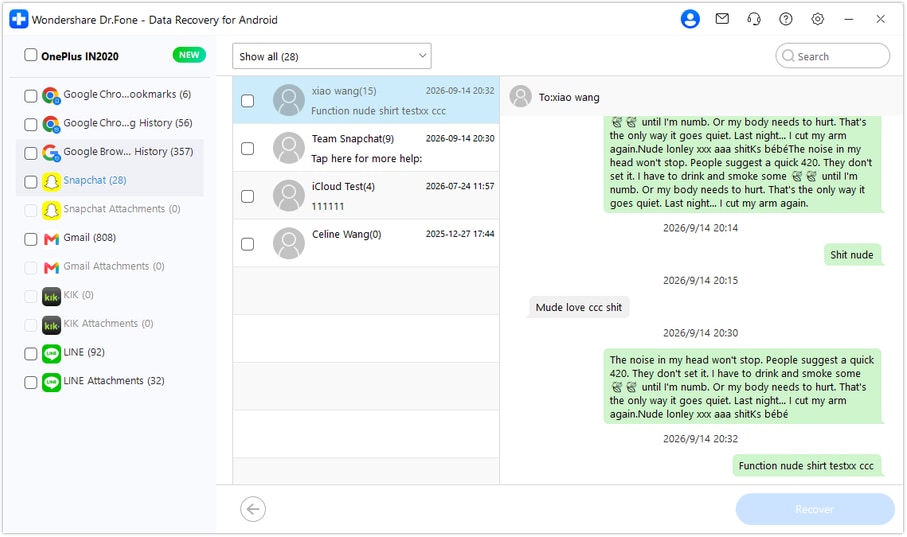
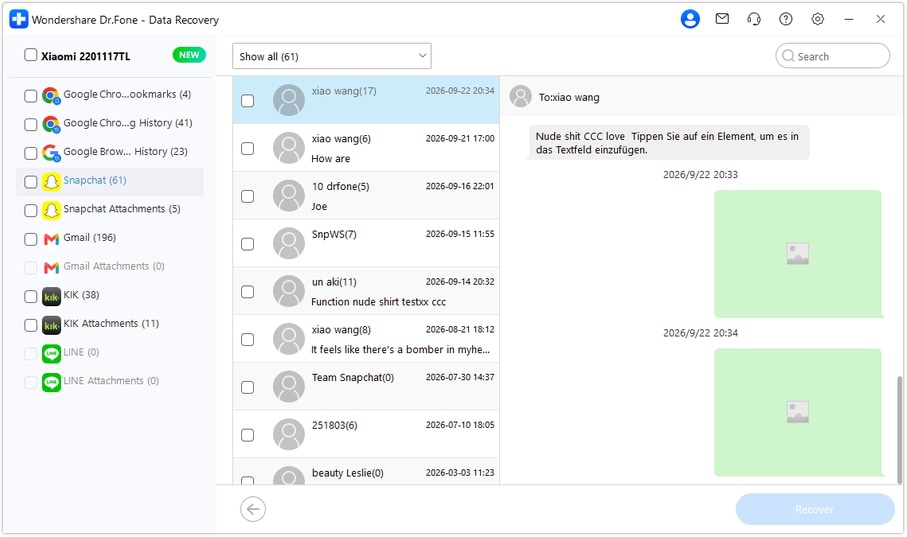
Step 5 Recover the useful arrangement to PC
Click Recover and follow the prompts to choose a folder on your computer. Finish saving and open the output to verify access to the selected plan and any available reference files. The output is stored on the PC; it is not inserted into Snapchat, synced to the cloud or used to update a Maps list.




Conclusion
For a lost venue decision on a supported OPPO Find X9 Ultra, Dr.Fone - Data Recovery (Android) helps you look for the actual Snapchat plan, preview available reference media and keep selected useful records on a PC. Download the Windows version, connect your compatible phone and begin the guided recovery process to preserve more than just the candidate place names.
FAQ
1. Can I recover deleted Snapchat messages on OPPO Find X9 Ultra without a backup?
Dr.Fone - Data Recovery (Android) offers a device-scan route for supported Find X9 Ultra data without an earlier chat backup. The model's listed Kernel is 6.12.58 and no Android-version restriction is listed for this named model. Run Advanced Recovery on Windows, review the found Snapchat data and save the selected records to PC.2. Does a saved Google Maps place prove where we agreed to meet?
No. A list may retain several possibilities, and hiding that list on the main map does not delete the list itself. Inspect the accessible list under You for candidate references, then look for the actual Snapchat words that choose a venue and state any fallback condition.3. How do I download the Snapchat account data that is still retained?
Sign into your own account at accounts.snapchat.com and open My Data. Select the categories you need, choose the date range or switch the limit off, confirm your notification email and click Submit. Once ready, use the email link or return to My Data, then See exports > Download. Open the downloaded ZIP with compatible software and inspect the actual retained contents. Saved Chat History can differ from Snap History activity and the separate Memories category; none guarantees the missing meeting sentence.4. Can a scan restore lost Memories or write the plan back to Snapchat?
This Advanced Recovery flow saves selected discoverable results to PC, not into Snapchat or a cloud account. Snapchat Support cannot recover lost or deleted Memories, and available local media is not a guarantee of every expired or viewed Snap. You can still preserve useful found text and files as separate references.
 Add Wondershare Dr.Fone as a preferred source on Google





