 Recover photos, messages, WhatsApp, and more — no backup
needed.


 100% Security Verified | No Subscription Required | No Malware


 :

 ChatGPT
 Perplexity
 Gemini
 Claude
 Grok
You need the message in which a client explained how you could share a photograph, but the Snapchat exchange is missing and the My Data email has not arrived. The photo alone does not tell you whether the client meant a private portfolio or a public post. To recover deleted Snapchat messages on Xiaomi 17 Pro Max without a backup, look for the actual wording rather than letting a missing notification end the search.
Dr.Fone - Data Recovery (Android) provides a separate phone-scan route: preview available Snapchat conversations and media, choose the relevant records and save them to your PC. You can also check an account export directly without waiting for an email link. This guide helps you retrieve the useful words and the matching image as distinct records, so you can see exactly what information is available.
In this article
Before you start
Check Xiaomi 17 Pro Max with Android 16
The confirmed support record names Xiaomi 17 Pro Max running Android 16 with Kernel 6.12.23. Match those conditions with the phone's model and software information. Do not substitute another Xiaomi model, assume every firmware is supported or apply the older Android 9-13 baseline as a ceiling for this listed configuration.
Preserve the device and choose a private output folder
Use a Windows PC and reliable USB data cable. Advanced Recovery is Windows-only and saves selected results to the PC, not directly into Snapchat or Memories. Keep Snapchat installed and avoid clearing app storage, resetting the phone or changing firmware. Follow the product's access prompts; clarify unfamiliar requirements with support rather than attempting an unverified Root or bootloader procedure.
Define the wording you need and use your own account
Note the contact, approximate exchange date and the image or subject discussed. Check your own account records and supported phone only. Saved Chat text, Snap History metadata, attachments and Memories are different sources. The scan only supplies found data; it does not promise a full conversation, every expired Snap or permanently deleted Memories.
Find a Snapchat My Data export without the notification email
You already submitted a data request, but the email is missing or the notification address was wrong.
Step 1 Open the account site directly
Sign in to your Snapchat account at accounts.snapchat.com and open My Data. Snapchat's help says a request can still be accessed there even if you entered the wrong email. Use the account site rather than waiting for access through the notification message.
Step 2 Download the export if it is ready
Look for the recent export, choose See exports and then Download when available. Extract the downloaded ZIP on your computer. A submitted request and a ready downloadable file are different states; no email does not by itself mean the request failed.
Step 3 Check the selected categories before judging the result
Read the retained Saved Chat History for the contact and the actual permission wording. If the earlier request was Memories-only, it was a separate export of retained Memories rather than a request for the chat record. A Snap History activity entry also does not contain the permission text.
- Snapchat aims to deliver My Data within seven days, but large downloads can take longer. This is not a guaranteed completion deadline.
- My Data only returns information Snapchat still retains; finding the download does not mean it includes every deleted message.
Request the right retained records if you have not done so
There is no relevant request yet, or the earlier export did not include the kind of retained information you need.
Step 1 Select chat-related data and dates
In My Data, select the categories you want to include, with Saved Chat History where offered. Choose the discussion date range, or turn the date limit off for all available dates. Confirm the email address to receive the notification and click Submit.
Step 2 Use the portal when the export becomes available
Return to My Data and use See exports followed by Download when ready. Extract the ZIP and inspect the actual retained wording. You can pursue the separate Dr.Fone phone scan below while an account request is processing; the scan does not depend on receiving the My Data email.
- Choosing a broader date range can include more retained records, but cannot recreate information that Snapchat no longer stores.
- A new request is not required merely because the notification went to the wrong email; check the existing request through your account first.
What each source can tell you about the missing permission message
| Source or status | Useful next check | Do not confuse it with |
|---|---|---|
| My Data request still processing | Check the account portal later for a ready download | An empty completed archive or a failed local phone scan |
| Retained Saved Chat History | Read the exact wording and available surrounding discussion | A complete record of every deleted message |
| Available phone-scan conversation text | Check who said what and which image or use the text refers to | Automatic proof of a broader permission than the words actually state |
| A found photo or Chat attachment | Identify the relevant image if it opens | The missing permission text or an instruction to publish it |
| Snap History activity | Treat it as activity information only | The actual wording granting or limiting use |
Common problems and fixes
The request is still processing after several days
Check My Data directly for the request status. Snapchat says processing time varies with download size and that large downloads can exceed its seven-day aim. Do not call a pending request an empty result. Keep the phone data intact and use the separate supported device-scan route if you want to search local records.
The export is ready but you cannot download or open it on the phone
Try downloading from a computer, as Snapchat recommends, and use software that can extract a ZIP. If download problems continue, try another browser. Inspect the extracted records rather than assuming a downloaded ZIP has already been opened and reviewed.
The photo is present but the wording about sharing it is not
Review the available conversation text and retained chat records separately from the image. Do not infer permission from a delivery event, an emoji or the mere presence of the file. If the scope remains unclear, obtain a fresh clarification before using the photograph in that context.
How to use Dr.Fone - Data Recovery (Android)
Dr.Fone - Data Recovery (Android) gives Xiaomi 17 Pro Max users a practical phone-data search while a Snapchat account export is pending or unhelpful. Its Windows-only Advanced Recovery workflow lets you inspect the conversations and media it finds, choose the relevant wording and image, and save selected results to a PC without an earlier backup. Previewing actual content helps you decide whether a result answers the missing-permission question instead of merely showing that an exchange happened.
- A local Snapchat scan provides a source separate from an account-export request or notification email.
- Conversation and media previews help identify the actual wording and distinguish it from the related photograph.
- Selective PC recovery keeps useful records in a folder you can review without restoring the live Chat.
 Scan Android phones and tablets directly.
- Preview and recover only what you want.
- Supports WhatsApp, photos, videos, contacts, and more.
- Works with 6000+ Android devices.

Follow the official Advanced Recovery workflow
Step 1 Open Advanced Recovery and connect Xiaomi 17 Pro Max
Launch Dr.Fone on Windows and open Toolbox > Data Recovery. Select Android > Recover Android Data, choose Advanced Recovery and click Start Scan. Connect the Xiaomi 17 Pro Max by USB when prompted and follow the on-screen instructions until the phone is detected.

Step 2 Select Snapchat as the recovery category
Choose Snapchat on the app-data screen and click Start Scan. If needed, scan WhatsApp or WhatsApp Business separately from the other categories as the official guide requires. This does not impose a separate scan on each of the non-WhatsApp categories.

Step 3 Keep the phone connected during scanning
Wait while Advanced Recovery scans the selected data. If you need to stop, click Cancel before unplugging the USB cable. Follow the product's restart instructions if the phone is temporarily unresponsive after scanning or recovery.

Step 4 Preview the message wording and matching media
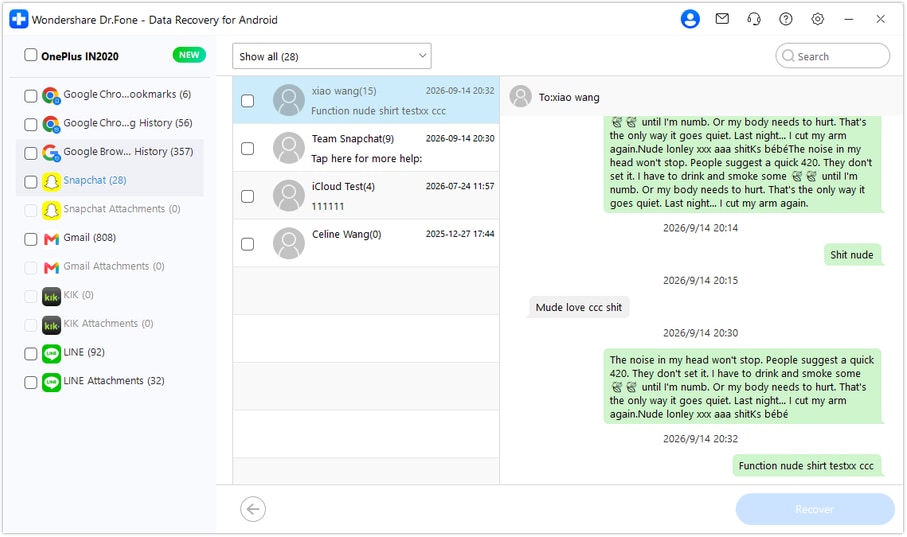
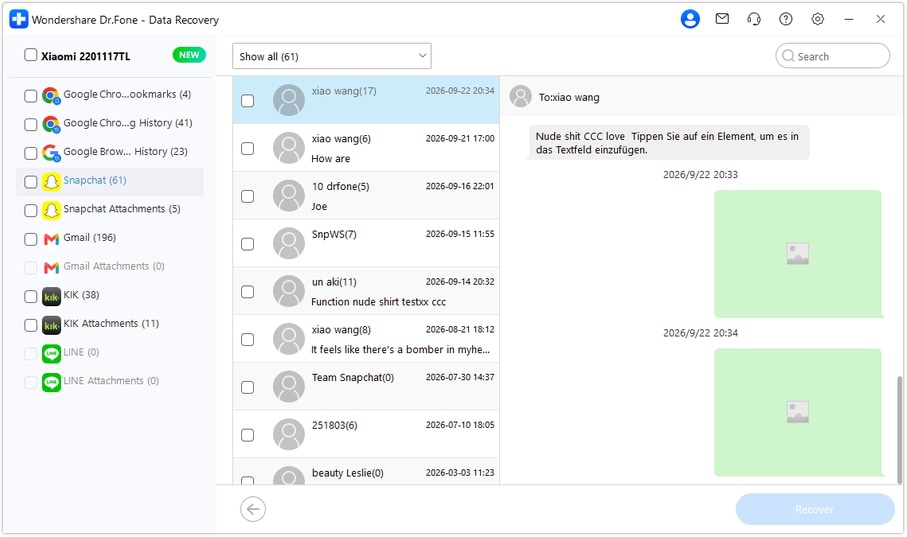
Choose Snapchat in the sidebar and open the relevant conversation if found. Use search or filters where available and read the actual words around the image discussion. Inspect media entries within the conversation and Snapchat Attachments separately when found, then select the useful results that are present.
Step 5 Recover your selections to a PC folder
Click Recover and follow the prompts to choose a computer folder and save the selected records. Open the saved output to check the text and image. The result is a PC copy, not a restored Snapchat conversation, a Memories import or a change to the pending account export.




Conclusion
A missing notification email does not have to stop your search for useful Snapchat records. Dr.Fone - Data Recovery (Android) helps you scan the supported Xiaomi 17 Pro Max, preview available message wording and related media, and keep selected results on your PC. Download Dr.Fone for Windows and start Advanced Recovery to look for the records that answer your question.
FAQ
1. Can I recover deleted Snapchat messages on Xiaomi 17 Pro Max without a backup?
Dr.Fone - Data Recovery (Android) offers a device-scan route without an existing backup for supported configurations. The confirmed Xiaomi 17 Pro Max entry is Android 16 with Kernel 6.12.23. Use Windows Advanced Recovery to scan Snapchat, preview found records and save selected results to a PC.2. What if I entered the wrong email for Snapchat My Data?
Snapchat says you can still access the request by signing in at accounts.snapchat.com and opening My Data. Check the existing request there and use See exports and Download when ready; you do not have to rely on the notification email to reach the export.3. Is a missing My Data email proof that my deleted messages cannot be recovered?
No. A notification problem does not establish what is in the account export or on the phone. Check the request through the account portal, inspect the completed retained-data download, and treat a Dr.Fone phone scan as a separate source with its own found results.4. Does a Memories-only download contain the saved permission message?
It is a separate export for retained Memories, not a substitute for Saved Chat History. Choose the appropriate categories in a general My Data request when looking for retained chat wording. Neither choice guarantees a full archive of deleted conversations.5. Can the scan recover deleted Snapchat attachments while My Data is pending?
The phone-scan workflow is independent of the My Data notification and processing status. Inspect the media entries and Snapchat Attachments actually found, then save useful selections to a PC. The presence of an image does not mean its accompanying message or every original file is available.
 Add Wondershare Dr.Fone as a preferred source on Google





