 Recover photos, messages, WhatsApp, and more — no backup
needed.


 100% Security Verified | No Subscription Required | No Malware


 :

 ChatGPT
 Perplexity
 Gemini
 Claude
 Grok
After leaving a Snapchat game group, you realize the house-scoring rule you wrote is missing. A photo of the final score sheet is not enough: you need the exception that explained how a tie or bonus was handled. Assuming another member saved your message may send you looking for a copy that no longer remains in the group.
Dr.Fone - Data Recovery (Android) offers supported Galaxy S23+ users a way to look for discoverable Snapchat conversations and media without an earlier backup. Preview the actual rule text and any available score-sheet image, then save selected records to a PC. To recover deleted Snapchat messages on Samsung Galaxy S23+, use that content-focused route, not repeated attempts to leave or rejoin a group.
In this article
Before you start
Confirm the Galaxy S23+ support entry
The confirmed Samsung Galaxy S23+ entry lists Kernel 5.15.153, and no Android-version restriction is listed for this model. Note the model and software information in Settings > About phone > Software information. Keep this exact condition rather than assuming every S23-family phone or Kernel is equivalent.
Keep the phone and remaining Snapchat data intact
Prepare a Windows PC, stable USB data cable and private save folder. Avoid clearing storage, reinstalling, resetting, flashing or using an unverified Root or bootloader procedure. Do not leave a group as a troubleshooting action. Follow the product's displayed device and access prompts.
Define your text and media targets separately
Record the group, approximate game date and the rule or exception you wrote. Identify whether the score sheet was a Chat attachment, Snap, Story or a separately saved image. Advanced Recovery is Windows-only and saves selected found results to PC, not back into Snapchat. It does not restore membership, bypass My Eyes Only or guarantee every expired Snap or permanently deleted Memory.
Distinguish leaving the group from clearing its feed entry
Use this check to understand a group-related loss before asking other members for a saved-in-Chat copy.
Step 1 Identify the action that already happened
Snapchat documents Leave Group separately from Clear from Chat Feed. If you only removed a feed entry, check any group conversation still legitimately accessible to you for retained content. If you left the group, do not assume that reopening or rejoining will rebuild the earlier exchange.
Step 2 Apply the leaving rule specifically to your own sent content
Snapchat says the Snaps and Chats you sent will be cleared from the Group Chat when you leave, even if someone saved them in the Chat. This is not a statement that every other member's messages are also deleted. Check whether the missing rule was your sent message or someone else's wording.
Step 3 Ask only for copies that genuinely exist
If a participant is willing to help, ask whether they retained a separate screenshot, original document or direct-message copy. A saved-in-group message is not automatically an independent file. Do not request access to their account or device, and do not assume an old score-sheet image contains the missing written exception.
- You do not need to regain group membership before inspecting your own supported phone data with the product workflow.
- A new invitation or a fresh explanation is a new event, not proof that the original deleted text was restored.
Check separate retained sources for the house rule
Look here when the same rule may have been discussed outside the group or stored as an actual file.
Step 1 Inspect an existing one-to-one copy
Check a relevant direct conversation you can access if you actually shared the rule there as well. Inspect a separately saved score sheet or your own retained Memories if applicable. Compare the game or session named in the visible content so a different table's house rules are not mistaken for this one.
Step 2 Request the records available through My Data
Sign in to your account at accounts.snapchat.com and open My Data. Select the offered data categories you need, such as Saved Chat History when available. Choose the appropriate date range or turn that limit off, confirm your notification email and click Submit. When ready, choose See exports and Download, extract the ZIP and review the included records.
- My Data only returns retained records. A group or Snap activity reference without the actual rule is not its recovered text.
- Saved Chat History, Snap History and Memories are different categories; requesting them does not reverse group departure or reconstruct every deleted exchange.
What each result tells you about the lost group rule
| Result | Useful evidence | What remains separate |
|---|---|---|
| A group invitation or membership change | Your access to the group now | Recovery of earlier messages. |
| Your original rule text found in a conversation | The actual exception or scoring wording shown | Any missing amendments or later agreement. |
| A separate score-sheet photo | The visible scores and annotations | A rule that was never written on the image. |
| Another member's new explanation | Their current understanding | The original message's exact wording. |
| Selected Dr.Fone output on PC | A separate saved copy of the found items | Reinserting records into the Snapchat group. |
Common problems and fixes
A member says they saved your rule but cannot see it after you left
Snapchat's leaving rule explains why saving your sent message inside the group may not preserve it there. Ask whether an independent copy really exists. Do not have the member repeat account changes or promise that their saved marker guarantees the text.
The recovered score sheet does not explain the final total
Read the actual message results for the scoring exception. Do not work backward from the total and present a guessed rule as recovered wording. Keep the image and any incomplete text as separate records until a genuine original or new clarification resolves the question.
The group is missing from the result list
Review the available Snapchat conversations and any relevant direct-message copy, using search or filters where offered. Inspect found media separately. A phone scan cannot require a particular group to appear or recreate group membership; preserve useful actual results and compare the retained export.
How to use Dr.Fone - Data Recovery (Android)
Dr.Fone - Data Recovery (Android) helps you search for the Snapchat content that mattered in a group exchange, not just its membership status. On a supported Galaxy S23+, Windows-only Advanced Recovery scans available app data without an earlier backup, lets you inspect found conversations and media, and saves your chosen results to a PC. You can preserve the actual scoring wording and a relevant image when discovered, without needing to rebuild the group to read that separate copy.
- Inspect available conversations for the original rule instead of relying on a remembered summary.
- Review found conversation media and check Snapchat Attachments separately when they are discovered.
- Save selected useful records to PC for reference without exporting every unrelated group discussion.
 Scan Android phones and tablets directly.
- Preview and recover only what you want.
- Supports WhatsApp, photos, videos, contacts, and more.
- Works with 6000+ Android devices.

Follow the official Advanced Recovery workflow
Step 1 Connect the Galaxy S23+ through Advanced Recovery
Launch Dr.Fone on Windows and open Toolbox > Data Recovery. Choose Android > Recover Android Data, select Advanced Recovery and click Start Scan. Connect your supported Galaxy S23+ by USB when prompted and follow the instructions until it is detected.

Step 2 Choose Snapchat app data
Select Snapchat from the available categories and click Start Scan. The guide requires WhatsApp and WhatsApp Business to be scanned separately from the other categories; leave those out of this Snapchat selection.

Step 3 Wait for the Snapchat scan
Keep the phone connected as scanning proceeds. Click Cancel before unplugging if you need to stop. If the device is temporarily unresponsive after scanning or recovery, restart it as instructed by the on-screen prompts.

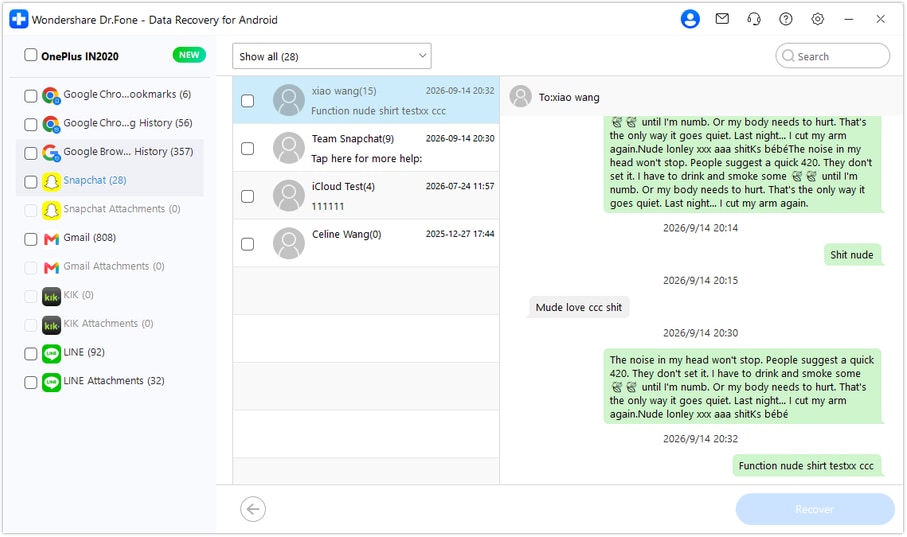
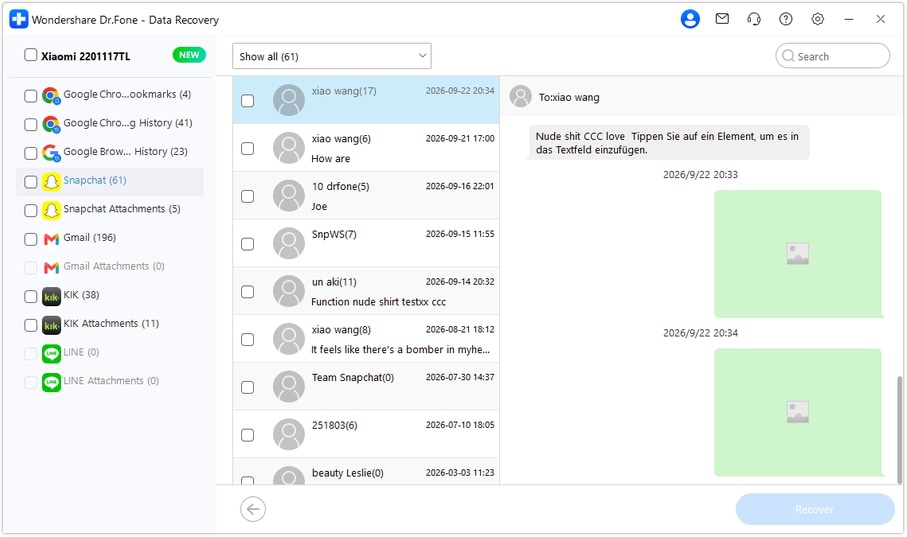
Step 4 Preview the found rule text and score-sheet media
Choose Snapchat in the sidebar and select an available conversation to inspect its messages. Use search or filters where offered and review media entries within conversations. Check Snapchat Attachments separately when found. Select the actual text and useful image results you want, rather than assuming a group reference contains the missing rule.
Step 5 Recover the selected Snapchat data to your PC
Click Recover and follow the prompts to select a computer folder and save your chosen items. Inspect the saved output for the wording and media selected. The results are PC copies, not a restored group thread or returned Snapchat membership.




Conclusion
For a group exchange whose wording is worth preserving, Dr.Fone - Data Recovery (Android) offers focused Snapchat scanning, useful conversation and media previews, and selective saving to your PC. Download the Windows version, connect your compatible Samsung Galaxy S23+ and start looking for the rule text and references you want to keep.
FAQ
1. Can I recover deleted Snapchat messages on Samsung Galaxy S23+ without a backup?
Dr.Fone - Data Recovery (Android) offers a Windows device-scan route for supported Galaxy S23+ configurations without an earlier backup. Select Snapchat in Advanced Recovery, inspect available conversations and media and save chosen found records to a PC. The confirmed model entry lists Kernel 5.15.153 and no Android-version restriction for this exact model.2. Does leaving a Snapchat group remove messages I sent even if they were saved?
Snapchat says leaving a Group Chat clears the Snaps and Chats you sent from that group even if someone saved them in the Chat. Do not extend that statement to every other participant's messages or assume a saved-in-Chat item is an independent screenshot or file.3. Will rejoining the group or running Dr.Fone put the old messages back?
Do not treat rejoining as a deleted-history restore. Dr.Fone's Advanced Recovery saves selected discoverable results to a PC; it does not reconstruct the Snapchat group, change membership or insert old messages into it.4. Can I recover deleted Snapchat attachments on Galaxy S23+ after leaving a group?
Review the available media within found conversations and Snapchat Attachments separately when discovered. Leaving the group does not guarantee a file remains locally or with another participant. An actual separate retained copy is worth checking, but a group activity record alone is not the attachment.
 Add Wondershare Dr.Fone as a preferred source on Google





