 Recover photos, messages, WhatsApp, and more — no backup
needed.


 100% Security Verified | No Subscription Required | No Malware


 :

 ChatGPT
 Perplexity
 Gemini
 Claude
 Grok
A custom crossword can look finished while still containing the wrong clue. If the LINE exchange changing the clue number, answer length or solution wording was deleted, an older PDF alone may not tell you what the setter intended. Recovering deleted LINE messages on Samsung Galaxy Z Fold 6 without a backup means looking for the revision conversation as well as the puzzle file.
Dr.Fone - Data Recovery (Android) helps you review discoverable local LINE messages and available attachments, then save the useful records to a PC. You can compare the actual correction with the puzzle rather than guess from a filename. If you also hid or blocked the setter's account, the following checks keep that separate from the recovery task and let you retain your chosen contact boundaries.
In this article
Before you start
Match the Fold 6 and Kernel entry
Samsung Galaxy Z Fold 6 is listed with Kernel 6.1.145; no Android-version restriction is listed for this model. Record the model, Android version and Kernel version in the phone's software information and check that condition. Do not substitute the Fold 7, Fold 5 or a different Kernel entry merely because the devices are related.
Keep the phone's current app data intact
Use a Windows PC, a reliable USB data cable and a private destination folder. Advanced Recovery is Windows-only and exports selected results to a PC rather than back into LINE. Keep the app installed and avoid clearing its storage, resetting the phone or experimenting with firmware, bootloader or Root changes. Follow the product's actual access prompts.
Identify the revision, not just the contact
Write down the puzzle title, an approximate date, the clue number and any remembered replacement phrase. A blocked-list entry identifies an account status, not whether the relevant message exists. LINE's Standard Backup requires a backup from before deletion and covers text; Premium Backup does not reverse manual chat deletion. This guide uses local scanning instead of either backup route.
Separate a missing friend from a missing LINE conversation
Use these retained-data checks when the setter disappeared from your friend list at about the same time as the puzzle discussion. There is no need to change a block simply to establish which account you are looking for.
Step 1 Inspect the account list without changing it
On your LINE main device, open Home > Settings > Friends > Blocked accounts and check whether the setter is listed. If you deliberately hid the account instead, inspect Friends > Hidden accounts. Do not tap Delete, Unblock or Unhide as a recovery experiment.
Step 2 Look for the retained chat independently
Open Chats and look for the setter or puzzle discussion. If you remember hiding the conversation itself, use Home > Settings > Chats > Hidden chats > Edit > Unhide chat. Hidden accounts and Hidden chats are different lists; an account disappearing from Friends is not a diagnosis of the message history.
Step 3 Check the complete clue correction
If the existing chat still contains the exchange, read the surrounding messages and preserve the useful wording. Match the clue number and answer length to the actual puzzle file. If only newer messages remain or the correction was truly deleted, continue to the Dr.Fone scan below.
- Blocking prevents receiving messages and calls from that account. Do not treat messages never received while blocked as deleted local history.
- An unblock changes contact behavior; it does not reconstruct a deleted conversation. Keep your preferred privacy settings while reviewing the data you already have.
Recover the right parts of a crossword revision
| What you find | How it can help | What still needs checking |
|---|---|---|
| The message replacing a clue | Preserves the intended wording and any exception | Whether the change applies to the same numbered clue in this puzzle version. |
| A puzzle PDF or grid image | Shows the layout and printed answer lengths | The visible contents, not a filename such as final or revised. |
| A solution file | Lets you compare the available answer with the correction | Whether it belongs to the same grid; its existence alone does not establish approval. |
| A reference photo or video | May explain a visual clue if a usable copy is available | That the media itself opens and contains the relevant detail. |
Common problems and fixes
The setter is in Blocked accounts, but the clue is absent
Use the block entry only to distinguish the contact from similarly named people. Inspect retained chat and the LINE scan results separately. An absent message could have been deleted or never received; do not infer which happened from the current block status alone.
The recovered clue number does not fit the available PDF
Check the puzzle title, grid size, nearby clue text and the printed answer length. Numbering can differ between files. Keep the correction and candidate files as separate references until their actual contents establish the match; Dr.Fone does not revise the grid or solve the puzzle.
The text preview is useful but the attachment is incomplete
Save the available message wording first, then inspect LINE Attachments for another usable copy of the relevant file. A file reference is still useful for identifying the missing version, but it does not recreate unavailable file contents or an expired original.
How to use Dr.Fone - Data Recovery (Android)
Dr.Fone - Data Recovery (Android) gives you a practical route to look for the deleted revision without relying on a LINE backup. On the supported Galaxy Z Fold 6, Windows-only Advanced Recovery lets you inspect discoverable LINE conversations, separately preview LINE Attachments and recover selected results to a PC. That combination helps you retain the exact clue change and compare it with the puzzle material actually found.
- App-focused scanning for discoverable LINE records rather than assuming a surviving contact entry contains the lost discussion.
- Separate text and attachment previews to compare a numbered correction with the actual grid or solution file.
- Selective PC output for the useful revision records while leaving your contact privacy choices separate from recovery.
 Scan Android phones and tablets directly.
- Preview and recover only what you want.
- Supports WhatsApp, photos, videos, contacts, and more.
- Works with 6000+ Android devices.

Follow the official Advanced Recovery workflow
Step 1 Start Advanced Recovery for the Fold 6
Launch Dr.Fone on Windows, go to Toolbox > Data Recovery and choose Android > Recover Android Data. Select Advanced Recovery and click Start Scan. When prompted, connect the supported Fold 6 by USB and follow the on-screen instructions until the phone is detected.

Step 2 Choose LINE on the data selection screen
Select LINE and click Start Scan to look for this app's data. Use the app-data category containing the missing clue discussion rather than substituting a general photo search.

Step 3 Wait with the USB connection intact
Keep the Fold 6 connected while Advanced Recovery scans. To stop the process, click Cancel before removing the cable. If the phone is temporarily unresponsive afterward, use the restart instructions displayed by the product.

Step 4 Preview clue messages and puzzle attachments
Choose LINE in the results sidebar and review available conversations for the puzzle title, clue number and replacement wording. Use the search box or filters where available. Open LINE Attachments separately and inspect available images, videos and files before selecting the records that help identify the correct revision.
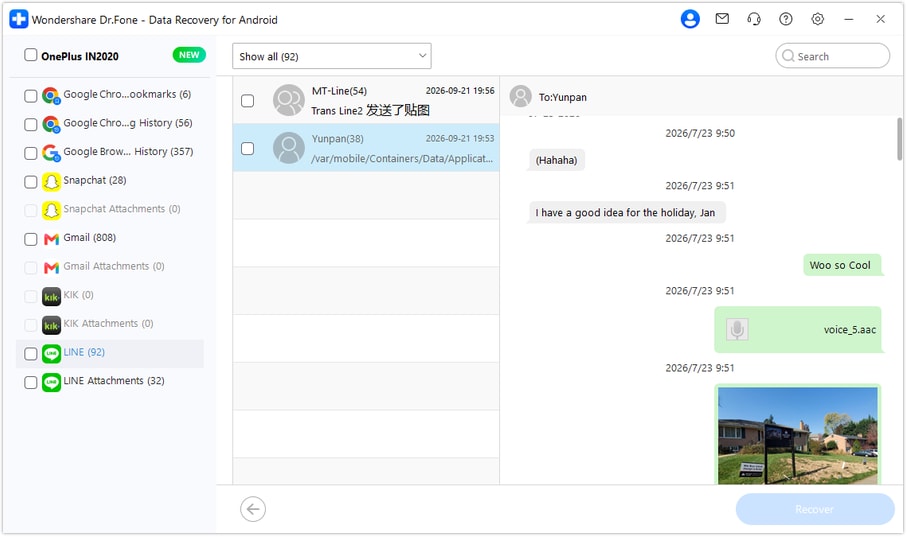
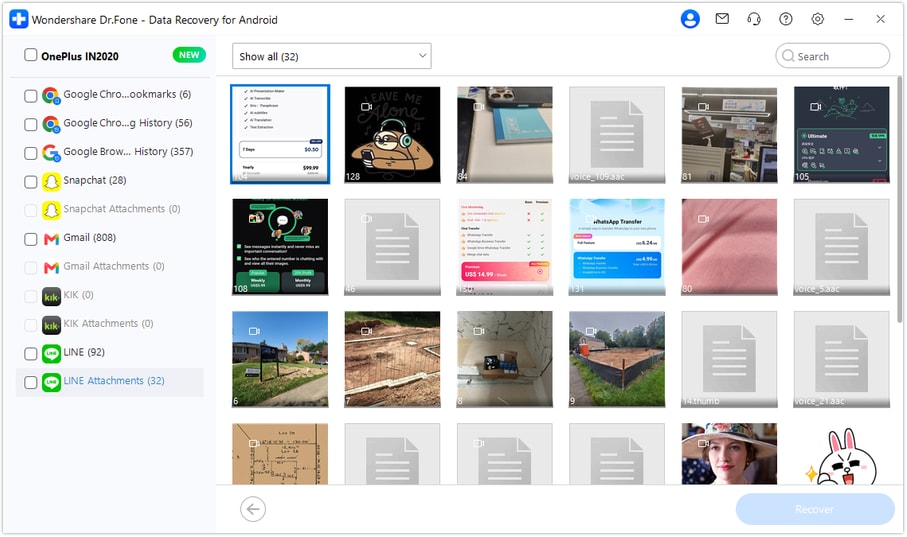
Step 5 Recover the selected references to a PC
Click Recover, select a computer folder and complete the saving prompts. Open the output to check the selected messages and usable attachments. The saved records are a PC copy, not a restored interactive LINE chat or an automatically corrected puzzle.




Conclusion
The most useful recovery may be one exact clue correction and the file it belongs to. Dr.Fone - Data Recovery (Android) helps you look for that LINE exchange, inspect available puzzle attachments and save selected references to your PC. Download Dr.Fone for Windows and start Advanced Recovery on your supported Samsung Galaxy Z Fold 6.
FAQ
1. Can I recover deleted LINE messages on Galaxy Z Fold 6 without a Google Drive backup?
Dr.Fone - Data Recovery (Android) offers a device-scan route for the supported Fold 6 configuration. It does not need an existing LINE Google Drive backup: choose Advanced Recovery on Windows, scan LINE, preview the discoverable results and save your selections to a PC.2. Must I unblock someone before attempting deleted-message recovery?
Unblocking is not a step in the official Dr.Fone recovery workflow. Inspect your retained chat and available scan results separately from Blocked accounts. Blocking affects receiving messages and calls; changing it is not an undelete command.3. Can a scan find a correction sent while the setter was blocked?
Do not assume it can. LINE says you do not receive messages from a blocked account, so a message that never reached the phone is not a deleted local record to recover. Current block status also does not establish when the block began.4. Can I save deleted LINE photos, videos and puzzle files too?
Inspect the separate LINE Attachments results and select usable items found there. Save available message text as well, since it can explain which file was intended. No complete original is guaranteed merely because its name or thumbnail is visible.5. What if the Fold 6 has a different Kernel version?
The supplied entry is Kernel 6.1.145, with no Android-version restriction listed for this model. Keep the exact model and software identifiers and ask Dr.Fone support about a mismatch. Do not change the phone's Kernel or firmware as a recovery shortcut.
 Add Wondershare Dr.Fone as a preferred source on Google





