 Recover photos, messages, WhatsApp, and more — no backup
needed.


 100% Security Verified | No Subscription Required | No Malware


 :

 ChatGPT
 Perplexity
 Gemini
 Claude
 Grok
A Snapchat message corrected the source of a quotation you planned to use, but now it is missing from your Honor 80 GT. Your research draft still shows a small reference number beside the quotation, yet the source note is not beside the text. Guessing from a familiar book title could leave you quoting the wrong edition or attributing a paraphrase as someone's exact words.
Dr.Fone - Data Recovery (Android) helps you recover deleted Snapchat messages on Honor 80 GT by looking for the actual correction and any available reference image without an earlier chat backup. Preview the conversations and media the scan finds, then preserve the useful selection on your PC. If your own Google document already contains a footnote, the optional check below can first recover that retained reference information without editing the draft.
In this article
Before you start
Keep the Honor 80 GT support row intact
The named Honor 80 GT entry, also labelled Honor 80 GT (AGT-AN00), lists Kernel 5.10.168 / 5.10.198 / 5.10.209 / 5.10.226 / 5.10.236. No Android-version restriction is listed for this named model. Keep all five alternatives as supplied rather than treating them as a continuous range, adding a firmware requirement or extending the entry to other Honor phones.
Protect the phone and prepare Windows
Advanced Recovery is Windows-only. Have a Windows PC, a reliable USB data cable and a private writable destination folder ready. Preserve the existing Snapchat installation, login and local storage; do not clear cache or data, reinstall, log out, reset, flash or unlock the bootloader as recovery steps. Follow the product's displayed access instructions instead of a guessed Root procedure.
Separate the missing correction from an existing reference
Note the contact, quotation and approximate exchange date. A footnote, a photographed book page, Saved Chat History, Snap History metadata and Memories are different records. Only actually discovered local results can be selected for PC saving, not imported back into Snapchat. The scan does not promise every viewed or expired Snap, a complete conversation or permanently deleted Memories. The optional document is not a backup prerequisite.
Optional: read an existing Google Docs footnote where it is actually displayed
Use this only for an existing Google document you already have permission to read and a reference note that was actually entered there. Skip it if no such document exists; the phone scan does not depend on a research draft.
Step 1 Read the reference marker in the actual document
On a computer, open the existing Google document and inspect the quotation and its reference marker. Keep the surrounding sentence in view so you know which passage the note concerns. A screenshot of the marker alone is not the note's text, and a similar quotation in another draft need not use the same reference.
Step 2 Look at the end when the document is pageless
Google states that footnotes in pageless documents appear together at the end of the document. If the draft uses that format, scroll to the end and read the actual relevant note rather than expecting it below the quotation on a separate page. Do not insert a new footnote, change the page setup or replace the reference while investigating.
Step 3 Distinguish a footnote from a hidden header or footer
Google separately says existing headers and footers are not visible in pageless format. Those are different elements from footnotes, so an absent running source line is not proof that the footnote was deleted or moved into it. If the information exists only in an unavailable element or another copy, leave the document unchanged and continue to the Snapchat scan.
Step 4 Keep the retained citation separate from the missing correction
Read the author, work, edition and page only where the actual note supplies them. The note may still describe your earlier assumption, while the Snapchat message corrected the attribution or explained that the words were a paraphrase. Preserve that distinction instead of silently treating the draft's present citation as the sender's final explanation.
- This check reads retained document content; it is not Docs history, deleted-footnote recovery, OCR or extraction of Google documents by Dr.Fone.
- A present citation can solve a reference question without preserving who supplied it, the full correction or permission to quote. No format switch or document edit is required for the local Snapchat scan.
Recover the source reference and the correction as separate information
| What you can inspect | Useful information | What still needs the actual exchange |
|---|---|---|
| A retained footnote at the end of a pageless draft | The citation text actually entered in that document | Whether the Snapchat correction replaced or qualified that citation |
| A reference marker beside the quotation | Which passage points to a note in this draft | The note's contents when they are not visible in the capture |
| A found Snapchat conversation | The correction, paraphrase distinction and available surrounding wording | Any missing earlier quotation or later clarification |
| A found page photo or other media | The readable reference content actually present in the file | Unshown page details, uncaptured replies or automatic edition identification |
Common problems and fixes
The reference number is visible, but no footnote is below the passage
If the existing Google document is pageless, inspect its end for the collected footnotes. Do not infer deletion from the lack of a page-bottom note or create a replacement citation. If the retained note is absent, use the actual Snapchat results for the missing correction rather than inventing the source.
The draft names a book, but a found message names a different edition
Keep both sources identifiable and read the message's exact correction. A draft can retain an earlier assumption, and an edition change can affect the relevant page. Preserve the actual found words and any usable page image without automatically rewriting the draft or filling in missing bibliographic details.
A page photo is found, but the quotation's explanation is not
Inspect the Snapchat conversation results as well as media entries and Snapchat Attachments when found. A readable page can be useful on its own, but it does not supply an absent explanation of quotation versus paraphrase. Save the useful file and keep the remaining text gap explicit.
How to use Dr.Fone - Data Recovery (Android)
Dr.Fone - Data Recovery (Android) gives supported Honor 80 GT users a focused route to the correction behind a surviving citation. Its Windows-only Advanced Recovery scans local Snapchat app data without a previous backup, lets you read found conversations and inspect available reference media, and saves your chosen useful records to PC. You can concentrate on the actual attribution wording and relevant page image instead of collecting unrelated phone files or changing your research draft.
- Look for the original available correction even when no separate document or chat backup exists.
- Preview found conversation wording and actual media to distinguish a source reference from the sender's explanation.
- Save selected useful records to PC for convenient reference while keeping your draft and recovered app records separate.
 Scan Android phones and tablets directly.
- Preview and recover only what you want.
- Supports WhatsApp, photos, videos, contacts, and more.
- Works with 6000+ Android devices.

Follow the official Advanced Recovery workflow
Step 1 Open Advanced Recovery and connect Honor 80 GT
Launch Dr.Fone on Windows and open Toolbox > Data Recovery. Select Android > Recover Android Data, choose Advanced Recovery and click Start Scan. Connect the supported Honor 80 GT by USB when prompted and follow the on-screen instructions until detection.

Step 2 Choose Snapchat app data
Select Snapchat from the available categories and click Start Scan. The guide requires WhatsApp and WhatsApp Business each to be scanned separately from the other categories; it does not impose that separation between every non-WhatsApp category. This task targets local Snapchat records, not the Google document.

Step 3 Let the selected app-data scan complete
Keep the phone connected while scanning progresses. If you need to stop, click Cancel before removing the USB cable. If the phone is temporarily unresponsive after scanning or recovery, follow the restart instruction displayed by the product.

Step 4 Read the correction and inspect actual reference media
Choose Snapchat in the sidebar and open the relevant available conversation. Use search or filters where offered, read the actual attribution correction and available context, and inspect media entries within the conversation. Check Snapchat Attachments separately when the scan finds attachments. Select useful actual text and files rather than treating a reference marker or thumbnail as the missing information.
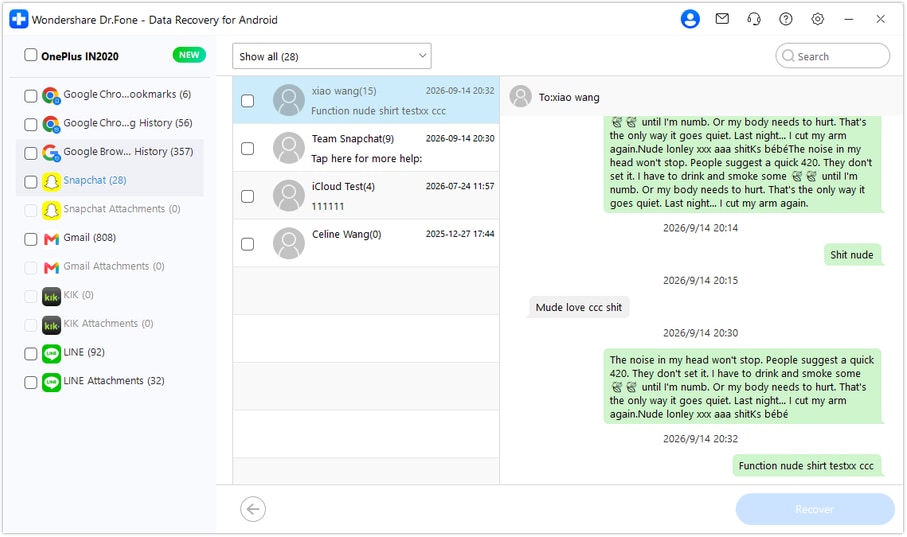
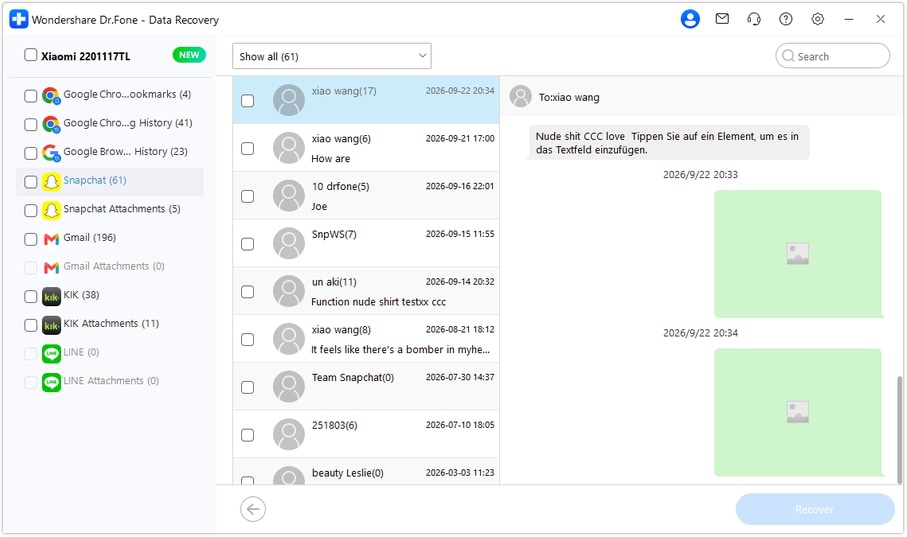
Step 5 Recover the selected reference records to PC
Click Recover, choose a computer folder through the save prompts and complete the operation. Open the saved selection to inspect the readable correction and usable media. The output is a PC copy, not a restored Snapchat thread or an updated citation in Google Docs.




Conclusion
Dr.Fone - Data Recovery (Android) helps supported Honor 80 GT users find available Snapchat corrections, preview useful reference media and preserve selected records on PC. Download the Windows version, connect your compatible phone and start the guided scan to look for the actual words and source details worth keeping.
FAQ
1. Can I recover deleted Snapchat messages on Honor 80 GT without a backup?
Dr.Fone - Data Recovery (Android) offers a Windows local-scan route for supported Honor 80 GT data without an earlier chat backup. Scan Snapchat, preview found conversations and media, and save selected results to PC. Retain the exact named-model Kernel alternatives listed in preparation; no Android-version restriction is listed for this model.2. Why is a Google Docs footnote not beside the quotation?
Google says footnotes in pageless documents appear together at the end of the document. Read the actual note there without changing the format or inserting a replacement. Headers and footers are separate elements that are not visible in pageless format.3. Does a retained citation prove what the Snapchat sender corrected?
No. It records the reference currently entered in that draft and may still contain an earlier assumption. The actual retained or scan-discovered message is needed for the correction and its qualification; a reference marker alone contains neither.4. Can Snapchat My Data include the missing source correction?
Only if Snapchat still retains the actual content. In your own account at accounts.snapchat.com, open My Data, select relevant available categories, choose a date range or switch that limit off, confirm your notification email and click Submit. When ready, follow the notification or return to My Data, choose See exports > Download, then open the ZIP with compatible software. Read actual Saved Chat History if included; Snap History metadata and separate Memories are not the missing correction or a guaranteed complete conversation.5. Can I recover deleted Snapchat photos and attachments on Honor 80 GT?
Review actual found media inside Snapchat conversations and check Snapchat Attachments separately when attachment results exist. Save useful selected items to PC. A message naming a photo is not its actual file, and neither this workflow nor a citation check promises every expired Snap or permanently deleted Memory; Snapchat Support cannot restore lost or deleted Memories.
 Add Wondershare Dr.Fone as a preferred source on Google





