 Recover photos, messages, WhatsApp, and more — no backup
needed.


 100% Security Verified | No Subscription Required | No Malware


 :

 ChatGPT
 Perplexity
 Gemini
 Claude
 Grok
The recipe photo is still familiar, but the ingredient change and the short technique video were in a LINE conversation you just deleted. When a cooking-group recipe arrives in several messages, losing the discussion can leave you with only half the instructions.
Dr.Fone - Data Recovery (Android) helps you look for both the missing wording and the available supporting files without relying on a chat backup. If you need to recover deleted LINE messages on Xiaomi 15, the useful goal is a readable set of instructions: inspect the conversation, compare any photos or video found, and save the parts you want to keep on your PC.
In this article
Before you start
Check the listed Xiaomi 15 Global configuration
The confirmed device record is Xiaomi 15 (Global), Android 15, kernel 6.6.77. Compare those conditions with your current phone information. The article title uses Xiaomi 15, but the supplied Global entry is not permission to assume another regional variant or the Xiaomi 15 Pro has identical support.
Prepare Windows without changing the phone's data
Advanced Recovery is Windows-only and saves selected results to a PC, not back inside LINE. Prepare a USB data cable and a computer destination folder. Leave LINE installed, avoid clearing its storage or cache, and postpone reset or firmware changes. Follow the product's access prompts instead of attempting an unverified Root or bootloader procedure.
Keep the no-backup and media boundaries clear
LINE's official restoration needs a successful earlier backup. Standard Backup covers text messages and must have been made before deletion; Premium Backup cannot roll back a manually deleted chat. Dr.Fone scans available local data instead. Keep Memo attachments also have a limited server-storage period, so neither an old message bubble nor a thumbnail guarantees that an original file is available.
Check a recipe copy you already sent to Keep Memo
You remember saving part of the recipe to your own Keep Memo chat before the cooking-group conversation disappeared.
Step 1 Open the existing Keep Memo conversation
Go to LINE's Chats tab and open Keep Memo. If you hid it, go to Home > Settings > Chats > Hidden chats, tap Edit next to Keep Memo and choose Unhide chat. Inspect what is actually there rather than assuming LINE copied the deleted group automatically.
Step 2 Separate a usable instruction from an unavailable file
Read the saved text and try opening any relevant recipe photo, video or document. Keep Memo is a personal chat, not permanent storage for every attachment. If a file no longer opens, a surviving message or thumbnail is not the same as a downloadable copy.
Step 3 Identify which part of the recipe is still missing
Compare the retained copy with what you remember needing: the ingredient list, the later adjustment or the demonstration. Keep any usable material, then use the LINE scan below to look for the missing discussion and attachments on the phone.
- This check needs no restorable chat backup, but only helps with content you actually retained in Keep Memo.
- Keep Memo has no Notes or Albums features. Do not look for a deleted-chat archive or assume a saved recipe contains later group replies.
Build a useful recipe reference from the results you find
| Recipe component | Useful place to inspect | What it can tell you |
|---|---|---|
| The original ingredient list | Retained Keep Memo text or available LINE conversation | Read the quantities actually shown; a finished-dish photo cannot supply missing measurements. |
| A later change to the instructions | Available LINE messages around the recipe | Check whether a reply changes an earlier instruction. Keep an unresolved gap visible instead of assuming the first version is final. |
| A technique demonstration | Video results in LINE Attachments | Open the saved clip to see which technique it shows; the clip may not contain the full written recipe. |
| A recipe card or shared document | Available photos and files in LINE Attachments | Check readability and compare the content with any recovered text before treating it as the matching recipe. |
Common problems and fixes
Keep Memo shows the recipe video but will not play it
LINE stores chat attachments temporarily and does not publish a universal retention duration. If the file is unavailable, inspect the scan's LINE Attachments results or ask the sender for a copy they still have. Do not repeatedly resend the old bubble expecting it to recreate the video.
You recover an ingredient list but not the follow-up adjustment
Review the available conversation beyond the initial recipe and use search where offered. Save the useful list, then ask the group to confirm the missing change. A partial conversation can supply a reference without establishing a complete, final set of instructions.
How to use Dr.Fone - Data Recovery (Android)
Dr.Fone - Data Recovery (Android) gives you a focused way to look for the pieces of a deleted LINE recipe conversation on a supported Xiaomi 15. The Windows-only Advanced Recovery workflow shows available LINE text separately from LINE Attachments, so you can examine ingredient messages alongside any recipe photos, demonstration videos and files found. You can then save selected results to a PC and review the useful material together without depending on a backup.
- Look for the missing wording: inspect the conversation results for instructions that were never copied to Keep Memo.
- Find supporting material: review the separate attachment results for readable recipe cards, clips and documents.
- Keep what is useful: select the available records you need and save a focused PC reference rather than every unrelated group message.
 Scan Android phones and tablets directly.
- Preview and recover only what you want.
- Supports WhatsApp, photos, videos, contacts, and more.
- Works with 6000+ Android devices.

Follow the official Advanced Recovery workflow
Step 1 Start Advanced Recovery and connect the Xiaomi 15
Launch Dr.Fone on Windows and navigate to Toolbox > Data Recovery. Select Android > Recover Android Data, choose Advanced Recovery and click Start Scan. When prompted, connect the Xiaomi 15 by USB and follow the instructions until it is detected.

Step 2 Select LINE for the recipe-history scan
Choose LINE from the app-data categories available for scanning, then click Start Scan. This task concerns LINE; WhatsApp and WhatsApp Business follow the guide's separate-selection requirements rather than being combined with the other categories.

Step 3 Keep the phone connected until scanning finishes
Allow Advanced Recovery to scan the selected LINE data without removing the cable. If you need to stop, click Cancel first. Follow the on-screen restart instruction if the phone becomes temporarily unresponsive after scanning or recovery.

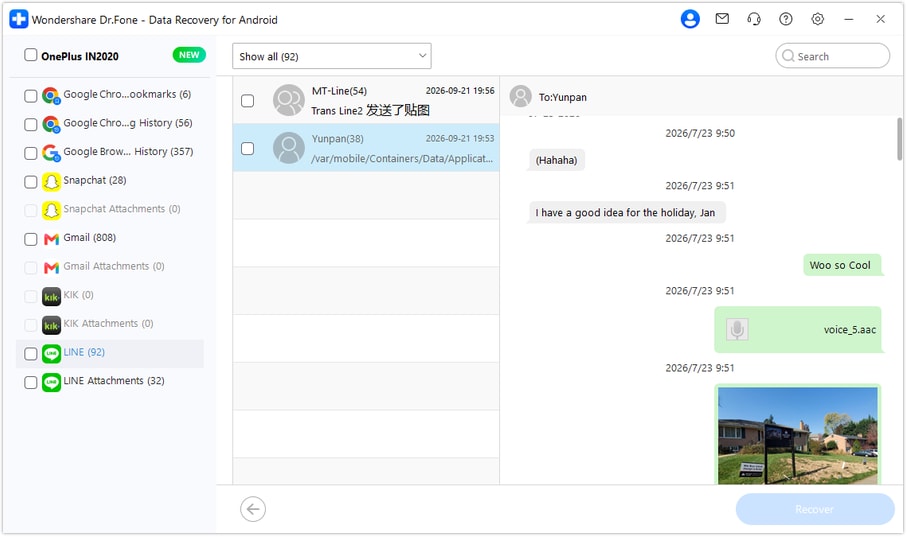
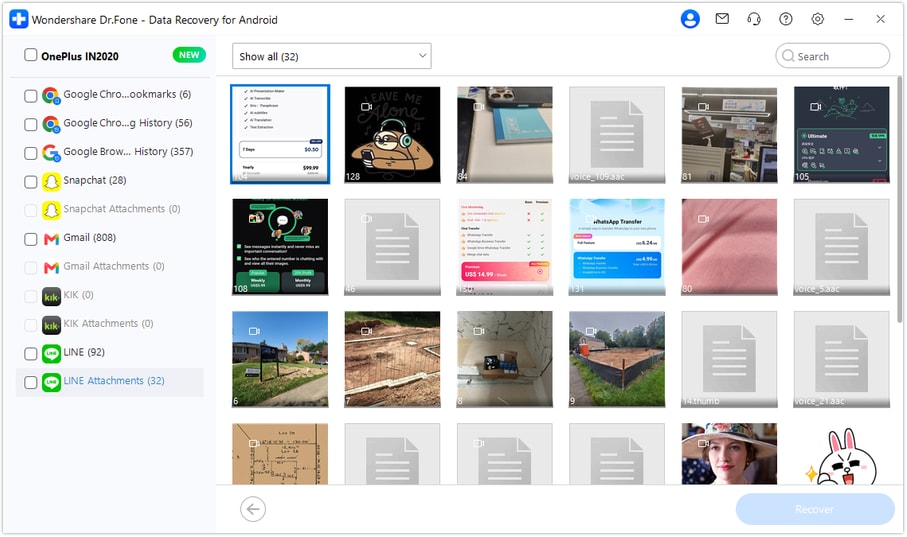
Step 4 Preview the recipe conversation and attachment results
Choose LINE in the results sidebar to read the available conversations, using search and filters where offered. Open LINE Attachments separately to browse the available recipe photos, videos and files. Select the instruction messages and supporting material you want to save.
Step 5 Recover the selected recipe material to a computer folder
Click Recover and follow the prompts to choose the output folder on your PC. Save the selected data and open the resulting material to check its readability and relevance. Advanced Recovery saves the PC copy rather than rebuilding the original LINE chat.




Conclusion
For a recipe scattered across messages, photos and a demonstration video, Dr.Fone - Data Recovery (Android) helps you look for the missing instructions, preview the supporting attachments and keep selected results on your PC. Download Dr.Fone for Windows and start a LINE scan on your supported Xiaomi 15 to bring the useful recipe material into one place for review.
FAQ
1. Can I recover LINE messages without a backup on Xiaomi 15?
Dr.Fone - Data Recovery (Android) offers a local app-data scan for the listed Xiaomi 15 Global configuration, Android 15 with kernel 6.6.77. Select LINE in Windows Advanced Recovery and save the available results you choose to a PC; an earlier chat backup is not required for this scan.2. Is Keep Memo a backup of my deleted group conversation?
No. Keep Memo is your own personal chat. It can contain items you previously sent there, but it does not automatically preserve every message or later recipe correction from another conversation.3. Can Keep Memo restore a recipe video after it becomes unavailable?
LINE says files shared in chats, including Keep Memo, are stored on its servers only temporarily. An expired file cannot be reopened simply because its message remains. Check an existing downloaded copy, an available scan result or a sender-held copy instead.4. Can I recover deleted LINE photos and attachments without all the recipe text?
The LINE Attachments view lets you select the files found by scanning independently of the conversation results. A readable recipe image may be useful by itself, but it does not supply missing changes that were only written in the chat.5. Does this Xiaomi 15 configuration cover other regional variants?
The supplied device evidence specifically names Xiaomi 15 (Global), Android 15 and kernel 6.6.77. Use that exact scope rather than inferring identical eligibility for another regional model or the Pro variant.
 Add Wondershare Dr.Fone as a preferred source on Google





